Office Ally is a low-cost billing platform that many small practices adopt quickly and understand slowly. In reality, it is three tools under one name. First, it is a claims clearinghouse, second, it is a practice management system called Practice Mate and third, it is a certified EHR called EHR 24/7. Therefore, picking the wrong tool, or using the right one poorly, can delay payments for months.
Moreover, free software does not remove the cost of rejected claims, skipped eligibility checks, and unworked denials. In addition, fees such as the non-participating payer charge surprise many practices after launch. This guide explains every part of Office Ally in plain language. Specifically, it covers how claims travel and what each product does.
It also explains which X12 transactions and denial codes matter, what the software costs, and where it falls short. As a result, you will know how to use Office Ally well, and when a billing partner protects your revenue better than software alone.

What Is an Office Ally & What Does It Do?
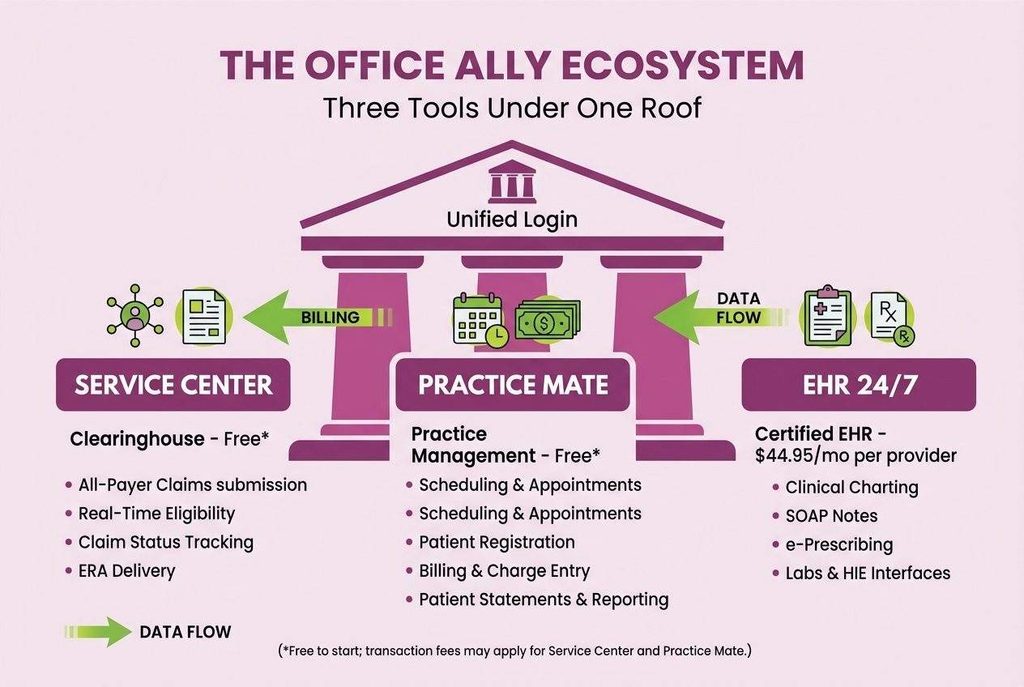
Office Ally is a healthcare software company that offers a claims clearinghouse, a practice management system, and an electronic health record. It was founded in 2000 and is based in Vancouver, Washington. Therefore, one login can cover scheduling, charting, claim submission, and payment posting for outpatient practices.
However, the brand name hides an important distinction. Service Center and Practice Mate have no subscription fee, while EHR 24/7 carries a monthly charge per provider. Consequently, practices often assume everything is free and then notice charges later. The table below separates each product clearly.
| Product | What It Does | Best Fit | Published Pricing |
|---|---|---|---|
| Service Center | All-payer clearinghouse portal for claims, eligibility, claim status, and ERAs | Practices with an existing biller | Free to start; transaction fees may apply |
| Practice Mate | Web-based practice management for scheduling, billing, claims, and reports | Solo and small practices | $0 subscription; add-ons and transaction fees may apply |
| EHR 24/7 | Certified web-based EHR for charting, SOAP notes, labs, and e-prescribing | Practices wanting charting and billing in one system | $44.95 per provider per month |
| EDI Clearinghouse | Enterprise clearinghouse through API, SFTP, or portal | High-volume organizations | Custom pricing |
Is Office Ally a Billing Company?
Office Ally is a software vendor, not a billing company. It gives your team the tools to submit and track claims. However, it does not code encounters, work denials, or appeal underpayments for you. Therefore, someone on your staff, or a billing partner, must still run the revenue cycle every day.
Who Uses Office Ally Most Often?
Office Ally mainly serves solo providers and small groups that want low software costs. Moreover, practices with an in-house biller often use the clearinghouse alone, alongside another system. Therefore, the platform fits teams that value affordability and simplicity more than deep customization or built-in billing outsourcing.
How Does the Office Ally Clearinghouse Work?
A clearinghouse is a secure intermediary between your practice and insurance payers. It checks claim data, converts it into the HIPAA standard format, and routes it to the correct payer. Therefore, you send one file instead of building a separate connection with every insurer. Moreover, the clearinghouse returns reports that show what happened next.
What Are the Steps in the Claim Journey?
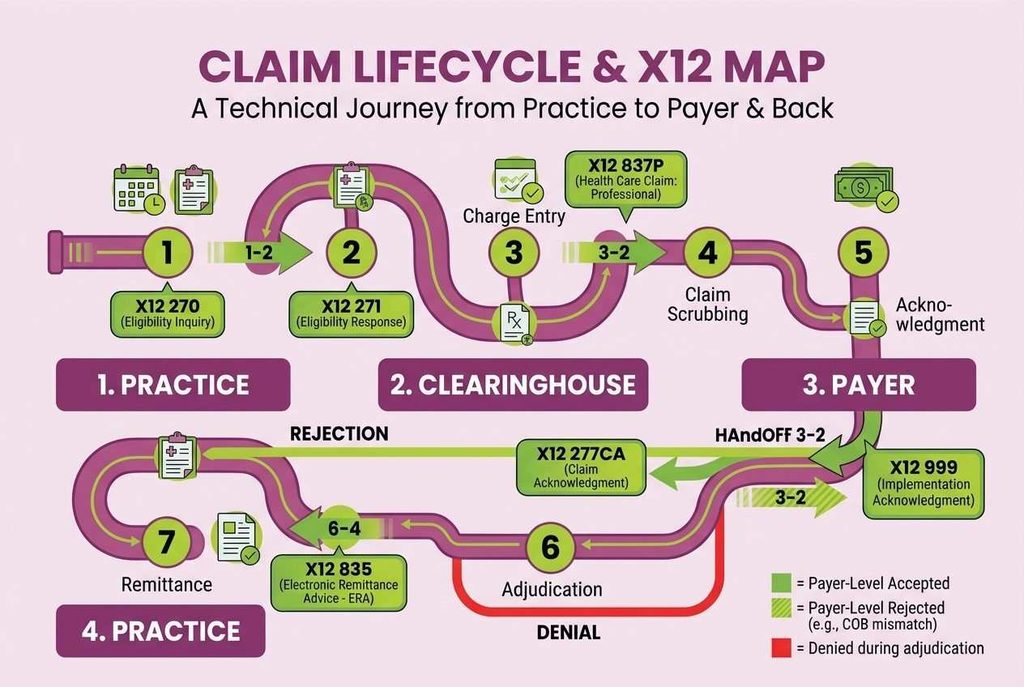
Every claim follows the same path, regardless of specialty. First, understanding each step helps you locate problems quickly. Then, you can assign each step to a clear owner. The sequence below shows how a claim moves from the visit to the payment.
- Eligibility check: Staff verify coverage before the visit.
- Charge entry: The biller enters CPT, ICD-10, modifier, and unit data.
- Claim scrubbing: Front-end edits flag missing or invalid fields.
- Submission: The claim travels to the payer in the 837 format.
- Acknowledgment: The clearinghouse and payer return acceptance or rejection reports.
- Adjudication: The payer pays, adjusts, or denies the claim.
- Remittance: The 835 ERA returns payment and adjustment details for posting.
What Is the Difference Between a Rejection and a Denial?
A rejection means the claim failed front-end edits and never entered adjudication. In contrast, a denial means the payer processed the claim and refused payment. Therefore, rejections are corrected and resubmitted, while denials usually require appeals or corrected claims. Moreover, tracking both separately reveals exactly where revenue leaks.
Which EDI Transactions Does Office Ally Support?
Office Ally supports the standard HIPAA X12 transactions that practices use every day, including claims, eligibility, claim status, and remittance files. Therefore, knowing the transaction numbers helps you read reports and speak clearly with payers. Moreover, each code in the table below maps to one step of the billing cycle.
| X12 Code | Transaction Name | Direction | Billing Purpose |
|---|---|---|---|
| 837P | Health Care Claim: Professional | Practice to payer | Submits physician and outpatient claims |
| 837I | Health Care Claim: Institutional | Facility to payer | Submits hospital and facility claims |
| 837D | Health Care Claim: Dental | Practice to payer | Submits dental claims |
| 270 | Eligibility Inquiry | Practice to payer | Asks whether coverage is active |
| 271 | Eligibility Response | Payer to practice | Returns benefits, copays, and deductibles |
| 276 | Claim Status Request | Practice to payer | Asks where a claim stands |
| 277 | Claim Status Response | Payer to practice | Returns the current claim status |
| 835 | Electronic Remittance Advice | Payer to practice | Explains payments and adjustments |
| 999 | Implementation Acknowledgment | Receiver to sender | Confirms a file passed format checks |
| 277CA | Claim Acknowledgment | Payer to sender | Confirms claim-level acceptance or rejection |
What Do Acknowledgment Reports Tell You?
Acknowledgment files confirm that each handoff succeeded. First, the clearinghouse confirms it received your file. Then, the payer confirms it accepted or rejected each claim. Therefore, reviewing these reports daily catches errors within hours instead of weeks. Moreover, unreviewed reports are the most common reason rejected claims sit unnoticed.
What Can You Do Inside the Office Ally Service Center?
Service Center is the web portal where practices manage clearinghouse work. It lets users verify eligibility, submit and correct claims, check claim status, and receive remittance advice. Therefore, a single screen replaces many separate payer websites. Moreover, it also accepts claim files created in other billing systems.
How Does Real-Time Eligibility Verification Work?
Eligibility verification sends a 270 request to the payer and returns a 271 response within seconds for supported payers. As a result, staff see active coverage, copays, and deductibles before the patient is seen. Moreover, catching inactive coverage early prevents a common denial reason. However, response detail varies by payer.
How Does Claim Status Tracking Work?
Service Center offers a real-time claim status tool that queries the payer directly. It returns a high-level result such as accepted, rejected, or pending. Furthermore, batch reports show submission and payment events for reconciliation. Therefore, billers can prioritize urgent follow-up instead of guessing which claims have stalled.
What Are ERAs and Why Do They Matter?
An electronic remittance advice, or ERA, is the 835 file that explains how a payer processed each claim. Consequently, it replaces paper explanation of benefits forms and enables faster payment posting. Moreover, it carries adjustment codes that show why a payer paid less than billed. However, some payers require enrollment before ERAs arrive.
What Is an Office Ally Practice Mate?
Practice Mate is Office Ally’s web-based practice management system. It handles patient demographics, scheduling, charge entry, claim creation, patient statements, and reporting. Therefore, it connects front-desk work directly to the clearinghouse. Moreover, it carries no subscription fee, although transaction fees and some add-ons may apply.
Each feature in Practice Mate supports a specific billing task. Consequently, understanding the link between features and results helps you configure the system correctly. Moreover, clean setup at the start prevents errors from reaching the payer. The table below shows how core features affect your claims.
| Practice Mate Feature | What It Does | Billing Impact |
|---|---|---|
| Patient registration | Stores demographics and insurance details | Fewer front-end data errors |
| Appointment scheduling | Manages provider calendars and visit types | Links every visit to a charge |
| Charge entry | Records CPT, ICD-10, modifiers, and units | Builds the claim for submission |
| Claim submission | Sends claims through the Office Ally clearinghouse | Shortens the path from visit to payer |
| Payment posting | Applies ERA payments and adjustments | Improves ledger accuracy |
| Patient statements | Bills the patient-responsibility balance | Speeds copay and deductible collection |
| Reports | Tracks claims, payments, and aging | Gives visibility into accounts receivable |
What Are the Limits of a Practice Mate?
Practice Mate focuses on core workflows rather than advanced analytics. However, some users report that downloading reports often requires manual sorting in Excel. Therefore, growing practices may need extra reporting support. Moreover, add-ons such as patient reminders and intake tools carry separate fees, which can raise the monthly total.
What Is Office Ally EHR 24/7?
EHR 24/7 is Office Ally’s certified, web-based electronic health record. It supports clinical charting, configurable SOAP notes, lab and health information exchange interfaces, and document management. Moreover, it integrates with Practice Mate, so a finished encounter flows into a billable charge. Therefore, clinical and billing data stay connected.
How Does the EHR Connect to Billing?
A provider documents the visit in EHR 24/7, and the encounter data passes into Practice Mate as a charge. Subsequently, the biller reviews it and submits the claim through the clearinghouse. As a result, double entry drops. However, accurate coding still depends on complete provider documentation.
Do Practices on Another EHR Need to Switch?
Practices that already chart in a different system do not need to change platforms. Instead, they can keep their current EHR and add specialized EMR billing services that handle coding, claim submission, and denial follow-up. Therefore, clinical workflows stay unchanged while collections improve.
How Much Does Office Ally Cost?
Office Ally uses a pay-as-you-grow model instead of one flat plan. Claims to participating payers cost nothing, according to published pricing. However, a non-participating payer fee applies in months when a claim goes to a payer that Office Ally marks as non-par. Therefore, your payer mix drives your real cost.
The table below lists the published figures as of late 2026. Moreover, vendors revise fees often, so confirm current rates before you commit. In addition, add-on charges such as reminders and messaging can change the monthly total. Therefore, review every line before you budget.
| Item | Published Price | Notes |
|---|---|---|
| Claims to participating payers | $0 | No per-provider fee |
| Non-participating payer fee | $44.95 per month | Per unique Tax ID and rendering NPI with at least one non-par claim that month |
| Practice Mate | $0 subscription | Transaction fees and add-ons may apply |
| EHR 24/7 | $44.95 per provider per month | E-prescribing included; EPCS token $100 per year |
| Reminder Mate | $29.95 per month | Covers the first 500 reminders; volume-based after that |
| Direct Messaging | $6.00 per user per month | Works with EHR 24/7 |
| EDI Clearinghouse | Custom pricing | Built for high-volume organizations |
How Does the Non-Par Fee Add Up?
The fee applies per Tax ID and rendering NPI pair, not per claim. For example, two providers under one Tax ID who each send one non-par claim in a month owe $89.90. In contrast, a month with only participating claims costs nothing. Therefore, checking payer status before submission saves real money.
How Do You Set Up an Office Ally Step by Step?
Setup is straightforward, but payer enrollment can add waiting time. Therefore, completing the steps in order prevents avoidable delays. Moreover, gathering your identifiers first makes registration faster. Finally, plan for a short testing period before you send a full claim batch.
- Create your account: Register with Office Ally and choose the products you need.
- Gather identifiers: Collect your Tax ID, group and rendering NPIs, taxonomy codes, and addresses.
- Load providers and payers: Add provider profiles and insurance plans inside Practice Mate.
- Complete payer enrollment: Submit enrollment for payers that require it for claims or ERAs.
- Test a small batch: Send a few claims and review the acknowledgment reports.
- Scale up: Move to full claim volume once rejections stay low.
Which Claim Rejections and Denial Codes Should You Know?
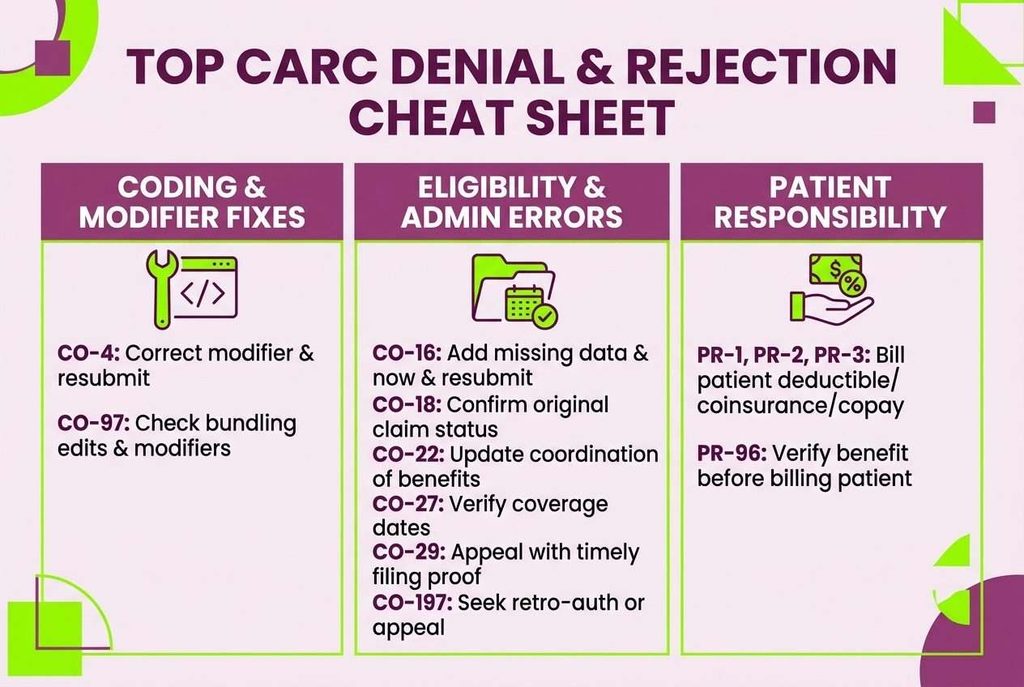
Most revenue loss starts with preventable errors. Consequently, learning the common adjustment codes helps your team respond quickly. Moreover, Claim Adjustment Reason Codes appear on every 835 remittances. Therefore, the table below pairs each frequent code with a practical first response.
| CARC | Meaning | Practical First Response |
|---|---|---|
| CO-4 | Procedure code conflicts with the modifier, or a required modifier is missing | Correct the modifier and resubmit |
| CO-16 | Claim lacks information or contains a billing error | Add the missing data and resubmit |
| CO-18 | Exact duplicate claim or service | Confirm the original claim status first |
| CO-22 | Care may be covered by another payer | Update coordination of benefits |
| CO-27 | Expenses incurred after coverage ended | Verify eligibility dates and bill the correct payer |
| CO-29 | Timely filing limit has expired | Appeal with proof of timely filing |
| CO-50 | Service not deemed medically necessary | Review documentation and appeal with records |
| CO-97 | Service is included in payment for another procedure | Check bundling edits and modifiers |
| CO-197 | Precertification or authorization absent | Seek retro-authorization or appeal |
| PR-1, PR-2, PR-3 | Deductible, coinsurance, or copay owed by the patient | Bill the patient responsibility |
| PR-96 | Non-covered charge | Verify the benefit before billing the patient |
How Can Practices Prevent the Most Common Rejections?
Prevention costs less than rework. First, verify eligibility before every visit. Second, confirm payer-specific modifier and diagnosis rules before charge entry. Third, review the acknowledgement report each morning. As a result, most front-end rejections get fixed the same day. Moreover, tracking rejection reasons by payer reveals patterns worth fixing at the source.
What Are the Pros and Cons of Office Ally?
Office Ally delivers strong value for the right practice. However, it also has clear boundaries. Therefore, weighing both sides before you commit protects your cash flow. Moreover, an honest review of your own volume, staffing, and payer mix shows which side matters more. The two sections below summarize what practices report most often.
What Does Office Ally Do Well?
Office Ally’s biggest strength is affordability. Practices can submit claims to participating payers without per-claim fees. Furthermore, one vendor covers clearinghouse, scheduling, and charting, which simplifies training. Moreover, reviewers frequently praise ease of use and responsive phone support. Therefore, the platform suits small teams with straightforward billing needs.
Where Does Office Ally Fall Short?
However, software cannot replace billing expertise. Office Ally does not code claims, work denials, or appeal underpayments for you. In addition, non-par fees, payer enrollment steps, and limited reporting can frustrate growing practices. Therefore, many practices eventually add specialist support to protect collections and reduce staff workload.
When Should a Practice Outsource Office Ally Billing?
Practices should consider outsourcing when denials, aging A/R, or staff turnover begin to outpace the in-house team. Moreover, Office Ally is software, so someone still has to run it well. Therefore, many practices keep the platform and add Office Ally billing services for coding, claim follow-up, and denial appeals.
The comparison below shows how responsibilities shift. Consequently, you can see which tasks your team keeps and which tasks a partner absorbs. Moreover, this view helps you decide whether partial support or full outsourcing fits your practice. Therefore, review each row against your current workload.
| Billing Task | Office Ally Software Alone | With a Billing Partner |
|---|---|---|
| Claim submission | Your staff enters and sends claims | The partner manages submission end to end |
| Eligibility checks | Staff run each check manually | The partner verifies coverage before visits |
| Rejection fixes | Staff monitor and correct reports | The partner corrects errors the same day |
| Denial appeals | Staff research and write appeals | The partner manages appeals and follow-up |
| Payment posting | Staff post each ERA | The partner posts and reconciles payments |
| Reporting | Standard platform reports | Custom A/R and denial reporting |
How Does an Outsourced Biller Work Inside an Office Ally?
Transcure’s AAPC-certified billers work inside your existing Office Ally setup, so no platform change is needed. Moreover, they target a 98% first-pass clean claim rate by scrubbing claims before submission. Consequently, practices spend less time on rework and more time with patients.
Frequently Asked Questions
Is Office Ally a Clearinghouse, a Practice Management System, or an EHR?
Office Ally is all three, delivered as separate products. Service Center is the clearinghouse, Practice Mate is the practice management system, and EHR 24/7 is the electronic health record. Therefore, practices can adopt one product or combine all three. However, each product has its own pricing and setup steps.
Does Transcure Provide Billing Services for Practices Using Office Ally?
Yes, Transcure’s AAPC-certified billers work inside your existing Office Ally setup, so you do not need to change platforms. Moreover, they handle coding, claim submission, denial follow-up, and payment posting. Therefore, your practice keeps affordable software while gaining a dedicated revenue cycle team.
What Is the Office Ally Non-Par Fee?
The non-par fee is a monthly charge of $44.95. It applies to each unique Tax ID and rendering NPI combination that sends at least one claim to a non-participating payer. Furthermore, Office Ally marks participation status in its payer list. Therefore, checking that list before submission helps you predict the monthly bill.
How Quickly Can Transcure Start Billing for My Practice?
Onboarding takes under 14 days, and Transcure signs a business associate agreement with every client before work begins. Moreover, payer payments deposit directly into your own bank accounts, never into Transcure’s. Consequently, you keep full control of your cash while our team manages claims, denials, and reporting.
Is Office Ally HIPAA Compliant?
Office Ally describes its platform as HIPAA compliant and supports the HIPAA standard transactions. However, compliance remains a shared duty. Practices must still use unique logins, limit access by role, and train staff on privacy rules. Therefore, platform security helps, but daily user habits protect patient data.
Do I Need Payer Enrollment to Use Office Ally?
Some payers require enrollment before they accept electronic claims or send ERAs. Therefore, practices should check each payer’s requirements during setup. Moreover, enrollment can take days or weeks, depending on the payer. As a result, starting enrollment early prevents delays in your first claim batch.