Tebra and ModMed compared on which specialties each serves, how each prices, who performs the billing work, and how far each platform’s AI reaches into claims.
Tebra and ModMed both sell a cloud EMR with practice management and billing tools. Also, Tebra still carries its legacy name, Kareo, inside many practices. ModMed is the short name for Modernizing Medicine.
The two platforms rarely compete for the same practice. ModMed builds specialty-specific software for 11 medical specialties. Tebra builds for independent practices led by primary care, pediatrics, behavioral health, and nurse practitioners.
This comparison starts with specialty fit, then covers pricing, billing work, AI, and device access. Every figure comes from each vendor’s own website, documentation, or press releases.

What Are Tebra and ModMed?
Tebra and ModMed are cloud-based EMR and practice management vendors with different specialty strategies. Tebra serves independent practices broadly, while ModMed designs each product around a named specialty.
What Is Tebra (Formerly Kareo)?
Tebra is an EMR and practice management platform built for independent practices. Kareo and PatientPop merged in November 2021 to form Tebra. Kareo brought the EHR and billing software, and PatientPop brought patient engagement tools.
Tebra sells software only. Tebra states on its billing companies page that it exited medical billing services and does not compete with its partners. Payer enrollment, the web and desktop split, and published rates are covered in the walkthrough on setting up Tebra EMR for billing.
What Is ModMed?
ModMed is a specialty-specific EHR and practice management company founded in 2010. Technology entrepreneur Dan Cane and dermatologist Dr. Michael Sherling started the company, which is headquartered in Boca Raton, Florida. ModMed reports more than 2,500 employees.
ModMed’s flagship EHR is EMA, short for Electronic Medical Assistant. Gastroenterology practices use a separate EHR called gGastro. ModMed sells practice management, analytics, payment processing, and patient engagement alongside them. Setup, specialty coding rules, and common billing problems sit in the ModMed EMR billing workflow and challenges breakdown.
How Do Tebra and ModMed Compare at a Glance?
The table below sets the two platforms side by side on the attributes that change a billing decision. Each row comes from the vendor’s own published material.
| Attribute | Tebra | ModMed |
|---|---|---|
| Specialty Focus | Primary care, pediatrics, mental health, nurse practitioners, therapists | 11 named specialties, from dermatology to urology |
| Pricing Visibility | Published per-provider rates | Package contents published; prices by quote only |
| Physician Rate | $599 per month (Practice Essentials) | Not published |
| Therapist Rate | $225 per month | Not published |
| Vendor Billing Service | None; software only | ModMed RCM Services, sold as an add-on |
| AI Documentation | AI Note Assist | ModMed Scribe |
| Claim AI | AI Claim Review with denial probability | Claim Denial Assessment |
| Agentic RCM | Not part of Tebra’s AI Smart Staff set | Live inside RCM Services; self-managed access from Q4 2026 |
| Device Model | Web platform plus Windows desktop app for billing | Native iPad app plus desktop browser |
| Developer Access | SOAP APIs | Certified FHIR API and App Marketplace |
The first row decides most comparisons. A practice outside ModMed’s 11 specialties has little reason to weigh the remaining rows.
Which Specialties Does Each Platform Serve?
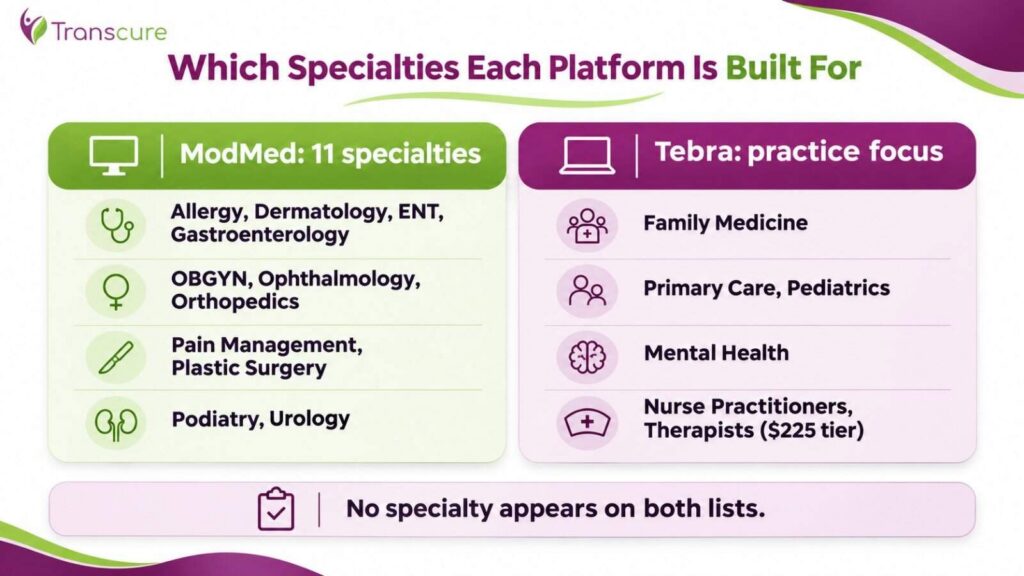
ModMed serves 11 named specialties, and Tebra’s specialty focus does not overlap with any of them. That gap makes specialty the first question in this comparison, not the last.
Which Specialties Is ModMed Built For?
ModMed lists 11 specialties: allergy, dermatology, ENT, gastroenterology, OBGYN, ophthalmology, orthopedics, pain management, plastic surgery, podiatry, and urology. ModMed serves startup clinics through enterprise-sized practices within those fields.
Each specialty gets its own documentation templates, terminology, and exam workflows. ModMed states that it hired doctors and taught them to code, so practicing specialists shape the software. ModMed reports a #1 ranking from Black Book across all 11 specialty EHR categories.
The billing payoff comes from documentation. EMA suggests codes as the provider documents the exam. When ModMed Practice Management is in use, the system generates a clinical bill once the visit note is finalized.
Which Practices Is Tebra Built For?
Tebra publishes dedicated specialty pages for family medicine, primary care, pediatrics, mental health, and nurse practitioners. None of those appear on ModMed’s specialty list.
Tebra’s pricing confirms the focus. Practice Essentials costs $599 per physician, $399 per non-physician provider, and $225 per therapist. ModMed publishes no rates at all, for therapists or anyone else. Psychologists, counselors, social workers, and physical, occupational, and speech therapists all fall under it.
What Happens When a Practice Falls Between the Two?
A practice outside both specialty lists should judge each platform on billing structure instead. Internal medicine and multi-specialty groups often sit in that gap. So do primary care practices that employ one or two specialists.
For those practices, the deciding questions shift to who performs the billing work and how predictable the cost is. Specialty templates matter less when most visits are general office care. Both platforms sit alongside other options in the wider market for specialty and general EMR software.
How Do Tebra and ModMed Price Their Platforms?
Tebra publishes its prices, while ModMed publishes what its packages contain but not what they cost. That difference shapes how a practice budgets before signing.
What Does Tebra Charge?
Tebra publishes flat monthly rates by provider type on its pricing overview. Practice Essentials covers billing, clinical EHR, and telehealth. Low-volume pricing starts at $349 per physician and $199 per non-physician provider.
Low-volume pricing applies to practices submitting 100 claims or fewer per month. Practices above 100 claims for three consecutive months move to standard rates. Unlimited non-clinical staff seats come included at every tier.
What Does ModMed Publish About Its Pricing?
ModMed prices by quote and publishes package contents on its specialty pages. The ENT package page shows which components are included and which carry extra charges.
Four items appear as add-ons on that page:
- ModMed BOOST revenue cycle management services, marked as carrying additional charges
- Implementation and training
- Business consulting services
- ModMed Pay, with account setup, terminal, and processing fees excluded
The same page states that ModMed Practice Management includes a clearinghouse interface. Practices should request an itemized quote that prices each add-on separately. Third-party estimates of ModMed pricing circulate widely, but none trace to ModMed.
Who Does the Billing Work on Each Platform?
ModMed sells billing labor as an optional service, and Tebra sells none. The split decides how much staff time or outside help each practice needs.
What Do ModMed RCM Services Cover?
ModMed RCM Services pair billing specialists and certified medical coders with ModMed’s practice management software. ModMed states the team can submit claims, work denials, and take patient billing calls on the practice’s behalf.
ModMed’s BOOST service page adds detail on scope. The team reviews eligibility before patients arrive and handles claim resubmissions. A client management team meets with the practice monthly to review financial reports and trends. ModMed reported that BOOST collected about $1.8 billion in claims over 12 months, in October 2024.
The service carries a cost on top of the software. ModMed’s ENT package page lists BOOST as an add-on with additional charges.
What Billing Work Stays With a Tebra Practice?
Every billing task stays with the practice on Tebra. Tebra exited medical billing services, so claims, posting, denials, and appeals run through practice staff or an outside billing company. Also, Tebra reports more than 1,600 billing companies on the platform.
Tebra supplies tools rather than labor. Check Codes validates a charge before it saves, and SALT copies codes from a previous charge. Claims route through TriZetto, with enrollment completed payer by payer. The full set appears in the Tebra EMR feature set.
How Do Tebra and ModMed Compare on AI?
Both vendors apply AI to documentation and to claims before submission. ModMed goes further with agentic revenue cycle tools, though access depends on how the practice bills.
How Do AI Note Assist and ModMed Scribe Compare?
Both tools turn patient conversations into draft documentation for provider review. Neither replaces provider sign-off. Unreviewed AI text attached to a billed code creates audit exposure on either platform.
ModMed Scribe works inside EMA and suggests clinical actions from the visit conversation. Also, ModMed reports more than 2.5 million patient visits captured by the tool. ModMed also cites an A+ performance rating for Scribe from KLAS.
Tebra rolled AI Note Assist out to Clinical subscribers in phases through May 2026. Tebra prices the tool per note or by subscription. The broader toolset is mapped among the ModMed platform features.
How Does Each Platform Apply AI to Claims?
Tebra AI Claim Review returns a numeric denial probability for each encounter before submission. The tool names the likely causes and shows similar denied claims. Tebra states the suggestions do not guarantee approval.
ModMed applies Claim Denial Assessment to flag claims likely to be denied before payers receive them. ModMed reports the model flagged 1,341,930 of 2,204,272 denials, or 60.88%, across enabled customers. That figure comes from ModMed’s own data.
When Does ModMed’s Agentic RCM Reach Self-Managed Practices?
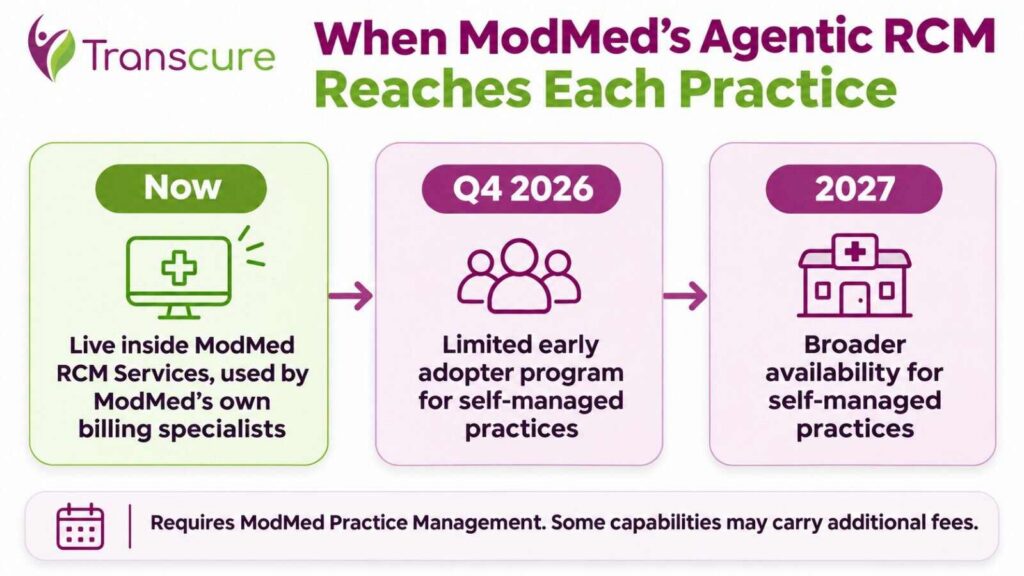
ModMed’s RCM AI Platform is live today only inside ModMed RCM Services. ModMed’s billing specialists use it to process claims for managed-service customers.
The platform deploys AI agents that build appeal packages, apply claim edits, validate claims, and execute resubmissions. ModMed expects a limited early adopter program for self-managed practices in the fourth quarter of 2026. Broader availability begins in 2027.
Two conditions apply. ModMed Practice Management is required to buy the platform. ModMed also notes that some capabilities may carry additional fees.
How Do Device Access and Integrations Compare?
ModMed is built around the iPad, while Tebra’s billing work depends on a Windows desktop application. The difference matters most to clinicians who document at the point of care.
Which Devices Does Each Platform Run On?
ModMed designed EMA as a native iPad application for documentation in the exam room. EMA also runs in desktop web browsers, and PocketEMA extends access to iPhone and Android phones. Patients can complete intake on an iPad through the ModMed Kiosk app.
Tebra’s web platform runs in any modern browser. Clearinghouse reports, proof of timely filing, and AI Claim Review sit in the Tebra Desktop Application, which is a Windows program. Mac-based billing staff on Tebra need a Windows workstation for those tasks.
How Do Developers Connect to Each Platform?
ModMed offers a Certified FHIR API and an App Marketplace for third-party connections. ModMed also holds ONC certifications for EMA, gGastro, and its ASC product.
Tebra publishes SOAP APIs and a partner marketplace. Practices building custom reporting or connecting outside tools should scope either route with the vendor before committing.
Which Platform Fits Your Practice?
Fit depends on specialty first, then billing ownership and budget visibility. The table below ties each verdict to a published fact.
| Practice type | Better fit | Basis |
|---|---|---|
| Dermatology, ophthalmology, or plastic surgery | ModMed | Named ModMed specialties with dedicated templates |
| Orthopedics, pain management, or podiatry | ModMed | Named ModMed specialties |
| Gastroenterology | ModMed | Dedicated gGastro EHR |
| Behavioral health or therapy | Tebra | Therapist rate at $225 |
| Primary care or pediatrics | Tebra | Dedicated Tebra specialty pages |
| Nurse practitioner-led practice | Tebra | Non-physician rate at $399 |
| Practice wanting a published monthly cost | Tebra | Flat published rates |
| Specialty practice wanting vendor-run billing | ModMed | RCM Services add-on |
| iPad-first clinicians | ModMed | Native iPad application |
Specialty practices on ModMed’s list should start there. Everyone else will usually find Tebra’s published pricing and broader primary care focus the better match.
Where Does Each Platform Create Billing Friction?
Both platforms create friction that surfaces in collections rather than in the demo. Each item below comes from vendor documentation or vendor package pages.
What Billing Friction Do Tebra Practices Face?
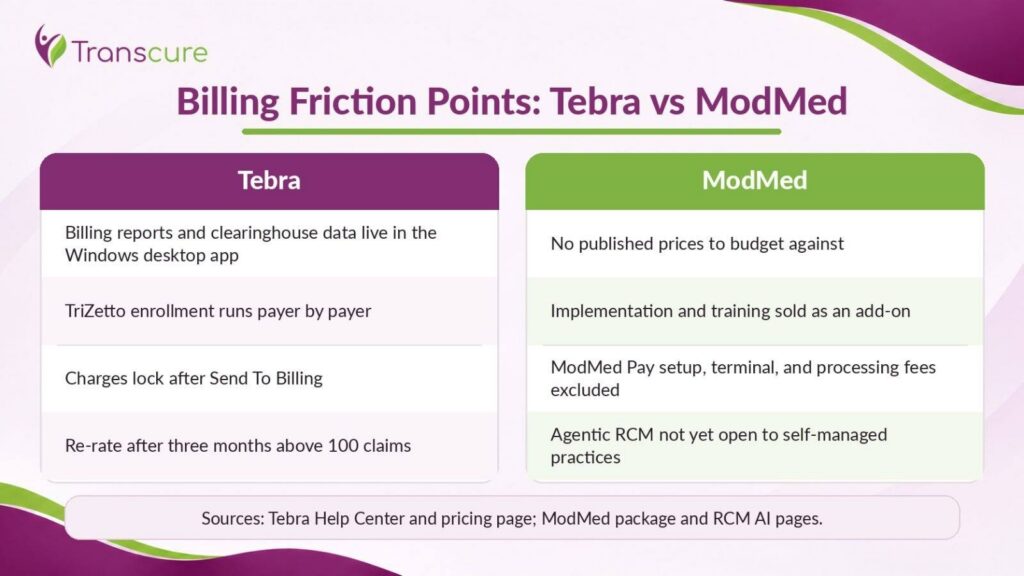
Tebra friction traces to documented platform behavior. Five issues stand out:
- Desktop-only billing functions keep browser-based staff out of reports and clearinghouse data
- TriZetto enrollment runs payer by payer, so charges age while approvals clear
- Charges lock on Send To Billing, pushing corrections into rework
- Low-volume pricing re-rates after three months above 100 claims
- Data export at exit covers patient and claim records only
What Billing Friction Do ModMed Practices Face?
ModMed friction centers on cost visibility and staged access. No published prices exist to budget against, so every quote needs line-item checking. Implementation and training appear as an add-on on ModMed’s ENT package page.
ModMed Pay setup, terminals, and processing fees sit outside the package price. Self-managed practices wait until Q4 2026 early access, or 2027, for agentic RCM tools that managed-service customers already use. Those tools also require ModMed Practice Management.
Which Should Your Practice Choose?
The right platform follows specialty first and billing ownership second. Feature counts rarely decide this pairing.
ModMed suits practices where these conditions hold:
- The practice works in one of ModMed’s 11 specialties
- Clinicians document on iPads in the exam room
- Leadership wants the EMR vendor to offer billing as an option
Tebra suits practices where these conditions hold:
- The practice delivers primary care, pediatrics, behavioral health, or therapy
- Leadership wants a published, predictable software cost
- Billing runs in-house or through an independent billing company
Practices committed to ModMed can still keep billing independent of the vendor. Independent ModMed billing support works inside the existing ModMed account.
How Does Transcure Support Billing on Tebra and ModMed?
Transcure runs billing inside whichever platform a practice already uses. No migration, no new software, and no change to clinical workflows. Thousands of specialty practices trust Transcure across 43+ EHR integrations.
Problem: Eligibility gaps create front-end denials. Eligibility agent ELIXA verifies coverage, copays, and deductibles before each visit. Payer enrollment completes before go-live on Tebra. Outcome: a 98% first-pass clean claim rate and a denial rate under 1%.
Problem: Suggested codes go unreviewed. Coding agent CODIN checks codes against payer rules and the practice’s real payer mix. AAPC-certified coders review flagged charges before submission. Outcome: fewer rework cycles on locked or rejected claims.
Problem: Denials sit unworked past appeal windows. Denial agent DEXA works CARC and RARC codes such as CO-4, CO-16, CO-50, and PR-96. Appeals file at every level. Outcome: 80% recovery on denied claims.
More than 1,100 AAPC-certified billers support the work, under a BAA executed per 45 CFR 164.502(e). Transcure holds ISO 27001 certification, and onboarding completes in under 14 days. Scope and onboarding detail for Tebra practices sit with outsourced Tebra billing services.
Frequently Asked Questions
Is ModMed Better Than Tebra for Dermatology?
ModMed is the stronger fit for most dermatology practices. Dermatology is one of ModMed’s 11 named specialties, with dedicated templates and suggested coding. Tebra publishes no dermatology-specific specialty page.
Is Tebra the Same as Kareo?
Tebra and Kareo describe the same platform. Kareo merged with PatientPop in November 2021 to form Tebra. Kareo survives as a legacy product name that many practices still use daily.
Does ModMed Offer Medical Billing Services?
ModMed offers billing services through ModMed RCM Services, also called BOOST. Billing specialists and certified medical coders submit claims, work denials, and handle patient billing calls. ModMed lists the service as an add-on with additional charges.
Does Tebra Offer Medical Billing Services?
Tebra does not offer medical billing services. Tebra exited billing services and sells software only. Practices on Tebra bill in-house or work with one of more than 1,600 billing companies on the platform.
Does ModMed Publish Its Pricing?
ModMed publishes package contents but not prices. Its specialty package pages list included components and mark add-ons such as RCM services, implementation, and ModMed Pay. Practices request a quote for actual costs.
Does ModMed Run on an iPad?
ModMed runs natively on the iPad. ModMed designed EMA as a native iPad application for exam-room documentation. EMA also runs in desktop browsers, and PocketEMA covers iPhone and Android phones.