ModMed vs Epic comes down to practice size, specialty focus, and billing support needs. Small and midsize specialty practices suit ModMed because EMA follows each specialty’s clinical workflow. Health systems run Epic while practices reach it through Garden Plot and Community Connect.
According to ModMed’s June 2026 press release, Scribe 2.0 has passed 1,000,000 patient visits. Epic earned 82.3 out of 100 in KLAS’s 2025 ambulatory report on independent practices. Billing support differs since ModMed offers BOOST while Epic runs revenue cycle through Resolute.

This guide covers features, pricing, implementation, billing, and specialty fit using verified vendor sources. A final verdict then matches each EHR to your practice size and clinical specialty. Transcure billers work inside both ModMed and Epic for practices that need billing help.
What Is the Quick Answer on ModMed vs Epic?
Choose ModMed for a specialty practice wanting EHR workflows built around its clinical focus. Pick Epic for large groups or health systems needing one record across many sites. Pricing, rollout time, and billing support separate the two platforms, as the table shows.
| Factor | ModMed | Epic |
|---|---|---|
| Best fit | Small and midsize specialty practices | Large groups and health systems, plus independent practices through Garden Plot or Community Connect |
| Specialties | 11 specialties, from dermatology to urology | Broad multi-specialty coverage across ambulatory and inpatient care |
| Deployment | Cloud-based, with iPad and web access | Epic hosted through Garden Plot, or run on-premises or in Azure by the organization |
| Pricing model | Custom quote, with BOOST and ModMed Pay as add-ons | Custom quote, with industry estimates from about $100,000 for small clinic setup |
| Implementation time | About 3 months per G2 reviewers | About 9 months per G2 reviewers |
| AI | ModMed Scribe 2.0 inside EMA | Art for clinicians, Emmie for patients, and Penny for billing |
| Billing | ModMed PM with BOOST RCM Services | Resolute Professional Billing |
| G2 rating | 4.5 out of 5 | 4.2 out of 5 |
What Is ModMed and Who Uses It?
Formerly Modernizing Medicine, ModMed builds cloud EHR software for medical practices across 11 specialties. EMA stands for Electronic Medical Assistant and is the company’s own specialty EHR system. Capterra says nearly 50,000 providers use it for charting, scheduling, billing, and patient communication.
Providers document visits in EMA while front desk teams use ModMed Kiosk for intake. Billers use ModMed PM dashboards and reports to track open claims, denials, and balances. Black Book ranked all 11 ModMed specialty EHRs first in its 2026 user survey.
What Does ModMed Include Beyond EMA?
Practice management runs through ModMed PM, which covers scheduling, billing, document management, and reporting. Eligibility checks, claim scrubbing, and ModMed Pay payments also sit inside the same system. The Quoting Tool on ModMed’s practice management page gives patients clear upfront cost quotes.
Certified coders and billing specialists work inside ModMed PM through RCM Services, or BOOST. Ambient documentation comes from Scribe 2.0, which turns exam room dialogue into suggested notes. Patients reach providers through the APPatient app, which handles messaging, refills, scheduling, and telehealth.
Gastroenterology practices use gGastro for the EHR and gPM for billing, scheduling, and operations. Revenue cycle support for those practices comes from gBOOST, which covers gastroenterology billing services. Also, the ModMed EMR guide explains how that billing workflow runs from EMA to payment.
Which Specialties Does ModMed Serve?
Specialty coverage spans many medical fields, and ModMed’s official overview lists each of them. Procedural fields include dermatology, ophthalmology, orthopedics, ENT, plastic surgery, podiatry, urology, and pain management. Allergy, gastroenterology, and OBGYN complete the list, and each has a dedicated EHR solution.
Dermatology earned a 13th consecutive top Black Book ranking, according to ModMed’s 2026 release. ENT reached 12 consecutive top rankings, while gastroenterology reached 16 in the same release. Buyers outside these 11 specialties should confirm availability with ModMed before shortlisting the platform.
What Is Epic and How Do Practices Use It?
Ambulatory practices use Epic through EpicCare Ambulatory, the outpatient clinic side of the platform. Founded in 1979, Epic Systems built its name in hospitals before reaching independent clinics. Independent clinics reach it through Garden Plot or Community Connect instead of buying outright.
Modules such as Kaleidoscope for ophthalmology and Bones for orthopedics serve specialty clinics directly. Full module lists sit in our Epic EHR features guide for readers wanting detail. Clinics should confirm module availability and licensing terms with Epic before planning any rollout.
What Do EpicCare Ambulatory and Resolute Cover?
EpicCare Ambulatory covers visit documentation, orders, prescriptions, and results inside one shared patient record. Prelude registers patients and collects insurance details while Cadence books and manages each appointment. Charges build from the finished note, so documented codes become the codes on claims.
Resolute splits into Professional Billing for physician claims and Hospital Billing for facility claims. Work queues route eligibility, coding, claim, and denial tasks to billers, coders, and specialists. Payment posting uses 835 ERA files, while professional claims leave Resolute as 837P files.
How Can an Independent Practice Access Epic?
Community Connect lets a host health system extend its Epic instance to nearby groups. Almost 40,000 providers reached Epic through Connect when Epic launched Garden Plot in 2022. Connect creates a shared patient record with local hospitals, so Epic recommends it first.
Garden Plot is Epic’s hosted software-as-a-service model for independent medical groups. Groups choose it when Connect is not an option, according to Epic’s launch announcement. KLAS’s 2025 report also found some Connect practices faced customization challenges and rollout delays.
| Factor | Community Connect | Garden Plot |
|---|---|---|
| Host | A local health system | Epic directly |
| Best fit | Groups tied to a hospital partner | Independent groups with over 40 providers and no host |
| Support | Host organization | Epic |
| Entry cost estimate | Set by the host, estimated at $500 to $1,000 per provider monthly | No public price, estimated at $2,000 to $10,000 monthly |
| Trade off | Tied to the host’s build | Independence with a trimmed feature set |
How Do ModMed and Epic Compare Feature by Feature?
Charting, scheduling, billing, and engagement exist in both platforms, yet each arranges them differently. Depth within each specialty drives ModMed product design, while enterprise scale drives Epic design. G2 reviewers rate ease of use at 8.8 for ModMed and 8.1 for Epic.
How Do Their Clinical Documentation and Templates Differ?
Adaptive learning in EMA remembers provider preferences and suggests diagnosis, procedure, and modifier codes. Templates in EMA come from specialty physicians, so notes follow how each specialty practices. Coders review those suggestions before billing because evaluation and management levels remain fully adjustable.
SmartPhrases, SmartText, and SmartSets let Epic providers reuse note text and pull common orders. Visit notes follow a set order from chief complaint through the final treatment plan. Each module is licensed separately, so two Epic sites can run different documentation tools.
How Do ModMed Scribe 2.0 and Epic Art Handle AI Documentation?
Built natively in EMA, Scribe 2.0 suggests clinical orders and billing codes for review. Training data spans 750 million clinical encounters, according to ModMed’s April 2026 AWS release. Usage grew from 240,000 patient visits in March 2026 to 1,000,000 visits by June.
Art is Epic’s AI assistant for clinicians, and its AI Charting feature drafts notes. Chart with Art uses Microsoft Dragon ambient technology and suggests orders from the conversation. Adoption reached 85% of Epic customers across Art, Emmie, and Penny, per Fierce Healthcare.
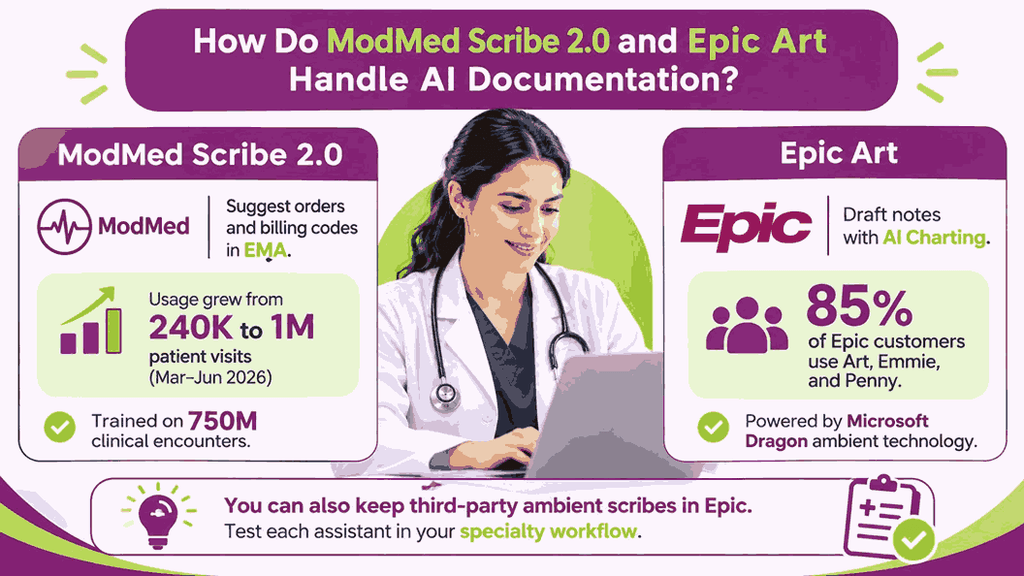
Customers can also keep third-party ambient scribes in Epic, as they do today. Scribe 2.0 availability varies by specialty, so confirm your EMA specialty before planning rollout. Teams weighing both options should test each assistant inside their own specialty workflow first.
How Do APPatient and MyChart Serve Patients?
APPatient puts refills, mobile check-in, insurance verification, and waivers on iPhone and Android. Telehealth launch, copay payments, and balances also work there, though some need extra modules. Self-scheduling sits in the Premium+ tier while ModMed Kiosk handles waiting room intake.
MyChart lets patients view results, message care teams, schedule visits, and pay bills online. Single sign-on through MyChart Central links accounts from Epic organizations under one ID. Services vary by organization, so each organization configures which MyChart features patients can see.
Emmie adds an AI assistant inside MyChart that explains results and helps schedule visits. Cross-practice record access favors MyChart, while APPatient centers on each individual specialty practice. Shared patients with local hospitals make that cross-organization reach matter greatly for clinics.
How Do Their Reporting and Analytics Tools Differ?
Data Explorer ships with EMA and lets staff explore raw data on their own. Premium Analytics adds prepared dashboards, though ModMed AI Analytics will replace it, per ModMed. Dashboards stay specialty-specific because they build on structured data captured in EMA workflows.
Cogito is Epic’s reporting umbrella and runs from live reports to large data warehouses. SlicerDicer lets users explore data through point-and-click screens without writing any code. Clarity and Caboodle store history for analysts, while Reporting Workbench serves daily operational reports.
Denial trends and A/R aging appear in the standard reporting of both platforms today. Benchmarks against specialty peers arrive through ModMed analytics tools, which suit focused specialty clinics. Population-level exploration through SlicerDicer suits large Epic organizations managing many sites and patients.
How Do They Handle Interoperability?
Care Everywhere launched in 2008 and exchanges records between Epic sites and other systems. FHIR APIs run across Epic systems, and developer documentation is published openly at open.epic.com. Carequality participation covers 100% of the Epic community, according to Epic’s own 2024 statement.
Developers reach EMA, ModMed PM, and gGastro data through ModMed’s Certified FHIR R4 API. Operations are limited to read, search, and bulk export, according to ModMed’s API documentation. Portal credentials let patients retrieve their own data under 21st Century Cures Act requirements.
HL7 interfaces let EMA send charges and billing data to another practice management system. Network reach favors Epic because Care Everywhere and Carequality connect many hospitals and clinics. Referral-heavy clinics should test exchange with local hospital partners before choosing either platform.
Feature areas from this section all appear side by side in the table below.
| Feature area | ModMed | Epic |
|---|---|---|
| Specialty depth | 11 specialty EHRs built by specialty physicians | Specialty modules such as Kaleidoscope and Bones |
| Documentation | EMA templates with adaptive learning | EpicCare Ambulatory with SmartPhrases, SmartText, and SmartSets |
| AI documentation | ModMed Scribe 2.0 inside EMA | Art with AI Charting |
| Patient tools | Patient Portal and APPatient for iPhone and Android | MyChart and MyChart Central |
| Reporting | Data Explorer and Premium Analytics, moving to ModMed AI Analytics | Cogito, Reporting Workbench, Clarity, Caboodle, and SlicerDicer |
| Interoperability | Certified FHIR R4 API with read, search, and bulk export | Care Everywhere, FHIR APIs, and Carequality |
| G2 Ease of Use Rating | 8.8 | 8.1 |
How Much Do ModMed and Epic Cost?
Neither vendor publishes a price list, so each figure here reflects third-party estimates. Subscriptions per provider drive ModMed pricing, while Epic EMR cost follows the buying route.
| Pricing Factor | ModMed | Epic |
|---|---|---|
| Pricing Basis | Per provider monthly subscription | Set by buying route and contract |
| Published Price List | None | None |
| Reported Entry Cost | About $500 per provider monthly (third-party estimate) | $500 to $1,000 per provider monthly through Community Connect (estimate) |
| Group Route | Volume-based custom quote | Garden Plot, estimated at $2,000 to $10,000 monthly |
| Common Extras | BOOST, ModMed Pay fees, faxing, and integrations | Interfaces, extra users, maintenance, and go-live support |
How Does ModMed Price Its Software and Add-ons?
Quotes arrive per provider each month and vary by specialty, modules, and practice size. SelectHub lists a starting price of $500 per provider monthly for the ModMed platform. One Capterra reviewer reports $800 or more per user monthly, so confirm every quote.
BOOST RCM Services carry extra charges, and ModMed’s ENT pricing page marks them optional. Terminals, ModMed Pay setup, and processing fees also sit outside the base software package. Reviewers also cite faxing and integration charges, plus multiyear contracts that limit future flexibility.
Request an itemized quote covering modules, ModMed Pay fees, and RCM Services before signing. Compare quotes by total cost to collect rather than by the monthly fee alone. Ask how provider counts, and modules can change during the contract before you agree.
What Does Epic Cost for a Small or Mid-size Practice?
The buying route determines Epic EHR pricing because Epic publishes no price list for practices. Host hospitals set Community Connect fees, and practices must request quotes from each host. Third-party estimates report roughly $500 to $1,000 per provider monthly through Community Connect.
Unpublished Garden Plot pricing is estimated between $2,000 and $10,000 per month for groups. Its 2022 launch announcement set a 40-provider minimum for independent Garden Plot groups. Direct licenses suit health systems, and Epic published no standalone route for small practices.
Topflight estimates $100,000 to $300,000 to set up a small clinic on Epic directly. Per-physician licenses add an estimated $5,000 to $7,000 once, plus maintenance near 20%. Whole clinic pricing runs an estimated $4,000 to $12,000 monthly by the same source.
Which Hidden Costs Should Practices Check?
Hidden ModMed costs include ModMed Pay terminals, processing fees, and faxing or integration charges. ClarityRCM estimates first-year ModMed implementation fees at roughly $6,000 to $15,000 per provider.
Contracts may also start billing before full implementation finishes, according to several user reviews. Staff hours spent in Epic classes and at go-live rarely appear on quotes. Interfaces to labs, imaging, billing, and portals are scoped and priced on their own.
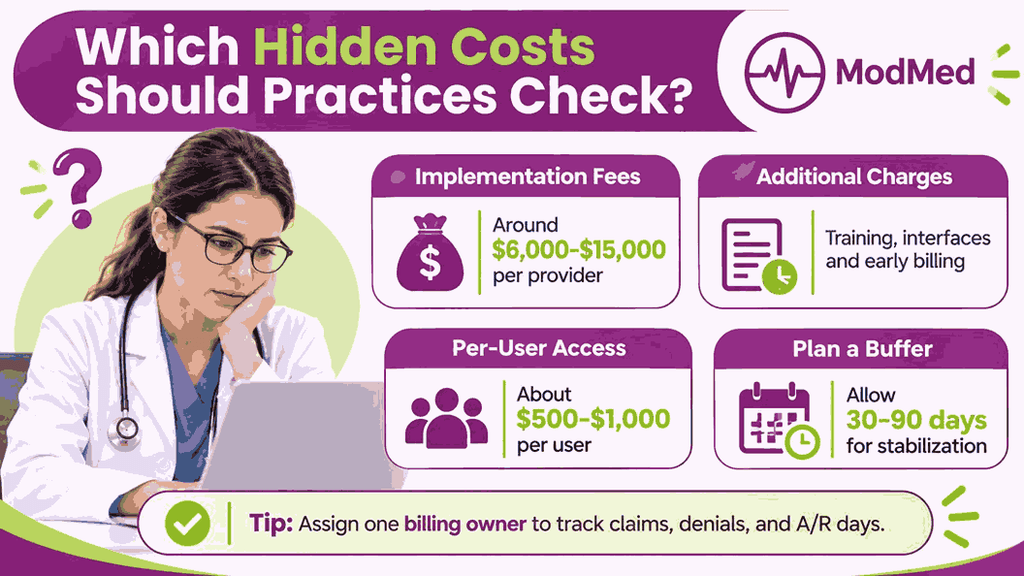
Read-only access for extra users costs an estimated $500 to $1,000 per user. Plan for a stabilization period of 30 to 90 days, according to HFMA guidance. Assign one billing owner to track claims, denials, and A/R days through that window.
How Long Does Implementation Take for Each EHR?
Implementation takes about 3 months for ModMed and 9 months for Epic, per G2. Those figures rest on only 5 or 6 reviewer responses, so treat them cautiously. Timelines for small Epic practices run 6 to 12 months, while ModMed publishes none.
| Implementation Factor | ModMed | Epic |
|---|---|---|
| Reported Timeline | About 3 months per G2 reviewers | About 9 months per G2 reviewers |
| Published Guidance | No fixed timeline from ModMed | 6 to 12 months for small practices |
| Delay Driver | Payer enrollment and data migration | Data migration, adding 25% to 40% |
| Go Live Help | VAST workshops and post-go-live follow-up | Super users and at-the-elbow support |
What Training Does Each Vendor Provide?
Educators lead ModMed EMA onboarding through three progressive phases named Adoption, Stabilization, and Optimization. Knowledge checks confirm staff readiness before go-live, while VAST offers virtual adoption workshops.
Video tutorials, quick reference guides, and manuals live in ModMed Communities for ongoing learning. Classes follow user roles, so each person trains only on their own specific duties. Super users complete extra training and then support colleagues during go-live and afterward.
Application analysts earn Epic certification through classes, projects, and exams, which adds staffing time. Vendor follow-up after go-live fine-tunes ModMed workflows with your staff, in-person or remotely.
How Does Billing Work in ModMed vs Epic?
Claims in ModMed vs Epic both start in the clinical note but then diverge. Scrub rules and a clearinghouse interface review ModMed PM claims before payers receive them. Rule libraries in Charge Router and Resolute work queues steer Epic claims toward payment.
| Billing Step | ModMed PM | Epic Resolute |
|---|---|---|
| Charge Creation | Clinical bill builds after the EMA note is finalized | Charges flow from the finished note through Charge Router |
| Claim Scrubbing | Custom scrub rules plus a clearinghouse interface | Charge Router rule library with NCCI and LCD edits |
| Denial Handling | Denial Assessment flags risky claims before submission | Work queues sorted by CARC, RARC, payer, and dollar value |
| Payment Posting | ERA posting to patient ledgers | Auto posting from 835 ERA files with variance queues |
| AI Billing Help | ModMed RCM AI Platform, announced August 2026 | Penny for coding suggestions and appeal letters |
| Staffing Need | Billers, with optional RCM Services | Resolute certified analysts plus billers |
How Does ModMed PM Handle Claims and Denials?
Clinical bills are built in ModMed PM once providers finalize the visit note in EMA. Custom scrub rules filter claims by CPT code, modifier, provider, and location before submission. After scrubbing, the clearinghouse applies payer-specific edits and handles electronic submission and remittances.
Risky claims get flagged by Denial Assessment against specialty rules before payers see them. People still correct errors and sort denials by CARC and RARC codes after posting. Drill-down dashboards break denials out by payer, code, and provider to reveal patterns.
Announced in August 2026, the ModMed RCM AI Platform targets denials and collection costs. Purchase requires ModMed PM, and parts of the platform already run inside RCM Services. Availability dates should come from ModMed, since only parts of the platform are live.
How Does Epic Resolute Handle Claims and Denials?
NCCI edits, LCD coverage, modifier logic, and bundling rules all run inside Charge Router. Failing claims drop into Epic work queues, where billers correct them before clearinghouse submission. Waystar, Change Healthcare, Trizetto, and Availity are common Epic clearinghouse partners for 837P files.
Remittance denials route to Resolute work queues by reason code, payer, and dollar threshold. High-dollar commercial denials outrank small Medicare adjustments, and AR specialists handle the escalations. Reporting Workbench, Clarity, and SlicerDicer show denial trends to Resolute billing teams and managers.
Prior authorization runs through Epic’s Referrals and Authorizations modules, though some steps stay manual. Analysts maintain these rule libraries, so staffing gaps quickly turn into costly denial problems.
Where Do Coding and Denial Problems Appear in Each?
Under coding appears often in ModMed reviews, where staff manually edit suggested visit codes. Audits by certified coders should compare suggested codes with each note before claim submission. Slow support and limited report customization also hinder denial follow-through, some reviewers say.
Open Epic encounters past 48 hours create charge lag, which raises days in A/R. Stale rule libraries let clean-looking claims reach payers and return denied within weeks. Missed prior authorizations surface as denials months later, when retro approval windows have closed.
Documentation gaps drive ModMed denials, while stale rules and queue backlogs drive Epic denials. Either way, outside EMR billers working inside the platform can close those gaps without migration. Review denial reasons by payer and code before blaming either platform for revenue losses.
Which Specialties Fit ModMed and Which Fit Epic?
Focused specialty clinics suit ModMed when workflows, coding, and billing follow one specialty closely. Hospital-affiliated groups suit Epic when one shared record must span many care locations. Seven specialties appear below with platform fit, billing watch points, and our specialty guides.
| Specialty | ModMed fit | Epic fit | Billing watch point |
|---|---|---|---|
| Dermatology | Specialty EHR with adaptive templates and suggested coding | EpicCare Ambulatory inside a health system record | Modifier 25 on same-day procedures |
| Ophthalmology | Specialty EHR built around eye care workflows | Kaleidoscope module for ophthalmology | Eye visit codes versus E/M code choice |
| Orthopedics | Specialty EHR with orthopedic dashboards in Premium Analytics | Bones module for orthopedics | Global periods and modifiers 57, 58, 78, and 79 |
| Gastroenterology | gGastro EHR with gPM billing and gBOOST support | EpicCare Ambulatory for hospital-based groups | Screening versus diagnostic colonoscopy, with modifier PT for Medicare |
| Pain Management | Specialty EHR with pain management benchmarks | EpicCare Ambulatory with Referrals and Authorizations support | Prior authorization and LCD coverage for injections |
| Plastic Surgery | Specialty EHR with Quoting Tool and inventory tracking | EpicCare Ambulatory for hospital-affiliated groups | Self-pay and insurance quotes |
| ENT | ENT-specific EHR with mobile EHR and MIPS quality module | EpicCare Ambulatory inside a health system record | BOOST listed as optional in the ModMed ENT package |
What Do Users Say About ModMed and Epic?
On October 31, 2026, G2 listed ModMed at 4.5 stars from 461 reviews overall. That same G2 page also showed Epic at 4.2 stars from 941 reviews overall. Meanwhile, Capterra’s November 3, 2026 comparison shows ModMed at 4.5 and Epic at 4.4.
Which EHR Fits Your Practice Size and Setup?
Four checks decide the fit, namely practice size, specialty focus, hospital ties, and budget. Score each check against the vendor evidence above before requesting any quotes or demos. Then weigh billing support, since either platform needs skilled people for claim follow-up.
| Check | ModMed fits when | Epic fits when |
|---|---|---|
| Practice size | Small groups, which are 86% of ModMed’s Capterra reviewers (November 3, 2026) | Large groups and systems, where 54% of Epic’s Capterra reviewers are enterprise (October 9, 2026) |
| Specialty focus | One of ModMed’s specialties needs built-in workflows | A multi-specialty group needs one shared record |
| Hospital ties | The practice is independent with no hospital partner | The practice is hospital affiliated or fits Community Connect |
| Implementation | About 3 months per G2 reviewers | About 9 months per G2 reviewers |
| Budget and contract | Per-provider quotes, with multi-year terms to review | Route-based quotes, with interfaces and training to plan |
| Billing support | ModMed PM with optional RCM Services | Resolute with certified analysts and billers |
When Does ModMed Fit a Practice?
Physicians in ModMed’s 11 specialties gain adaptive templates, coding suggestions, and tablet-based charting. Rollout in about 3 months, per G2 reviewers, suits groups needing quick staff adoption. Ease of use scores 4.6 on Capterra for ModMed as of November 3, 2026.
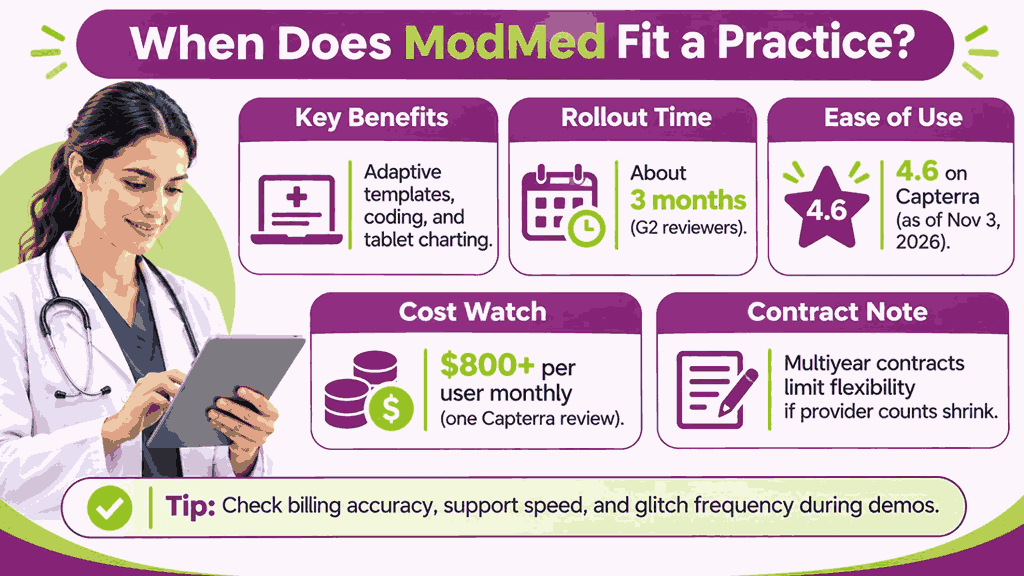
Budget needs care, since one Capterra reviewer reported $800 and up per user monthly. Multiyear contracts limit flexibility when provider counts shrink, according to that same Capterra review. Probe billing accuracy, support speed, and glitch frequency during demos and customer reference calls.
When Does Epic Fit a Practice?
Affiliated clinics gain one shared patient record through Community Connect or a direct license. Large groups with over 40 providers can also ask Epic about hosted Garden Plot. Enterprise organizations make up 54% of Epic’s Capterra reviewers as of October 9, 2026.
Organizations that can staff Resolute analysts, trainers, and super users handle Epic’s heavy demands. Deployment takes about 9 months, per G2 reviewers, so budget plenty of time for training. Consider ModMed instead when one specialty, no hospital partner, and limited IT staff apply.
How Can Transcure Support Billing on ModMed or Epic?
Dedicated billers from Transcure work daily inside both ModMed PM and Epic Resolute logins. Clients keep their EHR and data, so no migration or workflow change is required. Also, AAPC-certified billers deliver ModMed billing services by reviewing agent output and working flagged claims.
What Does Transcure Handle Inside ModMed?
ELIXA verifies eligibility, PRIA tracks authorizations, and CODIN validates codes before claims reach clearinghouses. Alongside human billers, 7 dedicated AI agents support ModMed PM workflows daily at Transcure. Configuration work rebuilds default scrub rules around each specialty’s modifiers, global periods, and authorizations.
DEXA traces each denial by CARC and RARC code, and billers appeal inside ModMed. Callers work aging claims every day and focus on balances with repeated payer delays. Account managers review denials, days in A/R, and net collections against specialty benchmarks monthly.
Coverage includes dermatology, ophthalmology, orthopedics, ENT, pain management, plastic surgery, podiatry, GI, and urology. Every engagement includes a signed BAA, and billers use your existing ModMed PM login. Fees run 5% of collections with no onboarding charges, and certified coding is included.
What Does Transcure Handle Inside Epic?
Our Epic billing services team handles daily queue work inside Resolute Professional Billing, entirely within your existing Epic environment. Daily queue work inside Resolute Professional Billing stays entirely within your existing Epic environment.
Front-end tasks cover eligibility checks, prior authorization support, and charge review before submission. Submission, status checks, and denial follow-up keep professional claims moving steadily toward payment. Posting and reconciliation match 835 payer payments with the correct accounts and contractual adjustments.
Receivables follow-up targets aging balances, high-value claims, and unresolved payer issues daily. Statements, balances, and self-pay questions receive billing support, alongside detailed revenue cycle reporting.
Reported outcomes include up to 98% first-pass clean claims and 99.99% claim accuracy. Collections improve up to 20%, and receivables are recovered in about 24 days, per Transcure. In-house billers cost $40,000 or more each, while Transcure charges 5% of collections.