Healthcare providers use digital systems to manage patient records, clinical documentation, prescriptions, and billing within a centralized platform. The main types of EMR software include cloud-based EMR, on-premise EMR, and specialty-specific EMR systems. Each type differs in deployment model, infrastructure requirements, and clinical customization.
EMR software works by collecting patient data at the point of care, storing it in structured digital records, and enabling providers to access, update, and share information securely within the organization. It integrates scheduling, clinical documentation, e-prescribing, and billing workflows into a single platform.
EMR software cost depends on the deployment model, number of users, features, and vendor pricing structure. Pricing typically includes subscription fees, licensing, implementation, training, and maintenance expenses.
The benefits of EMR software include improved documentation accuracy, streamlined clinical workflows, better regulatory compliance, enhanced data security, and faster access to patient information. It also supports billing accuracy and reporting efficiency.
What is EMR Software?
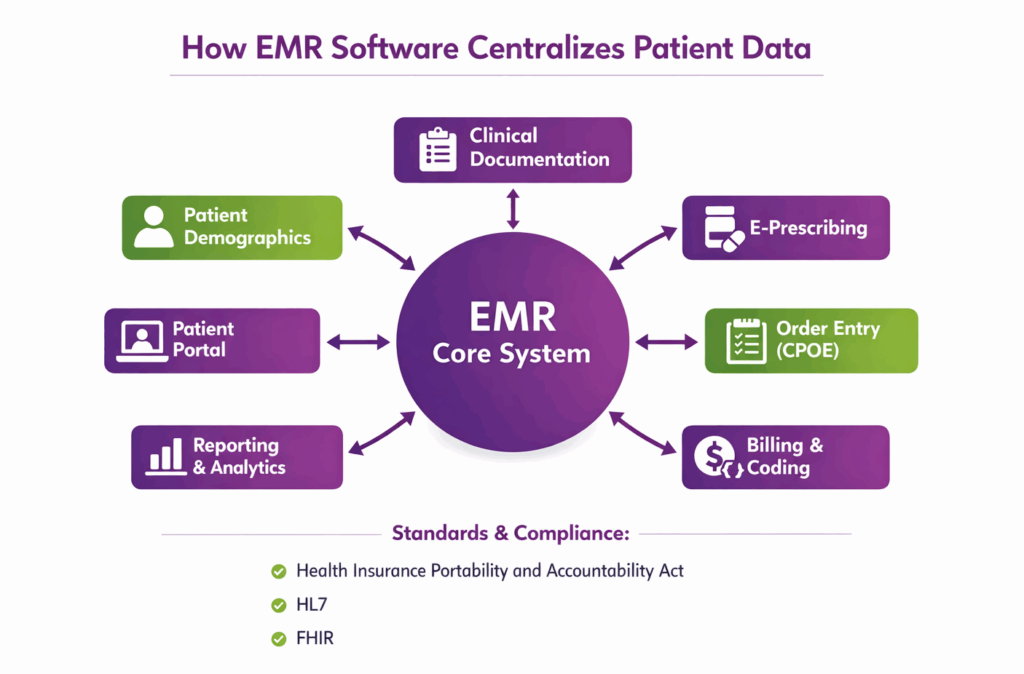
EMR software is a digital system used by healthcare providers to create, store, and manage electronic medical records within a single practice or healthcare facility. It replaces paper charts by organizing patient data such as medical history, diagnoses, medications, allergies, lab results, and treatment plans in a structured format.
Medical EMR software is designed specifically for clinical environments and supports documentation, e-prescribing, order entry, and billing workflows. EMR software development focuses on building secure, compliant systems that meet healthcare regulations such as HIPAA and support interoperability standards like HL7 and FHIR.
What are the Types of EMR Software?
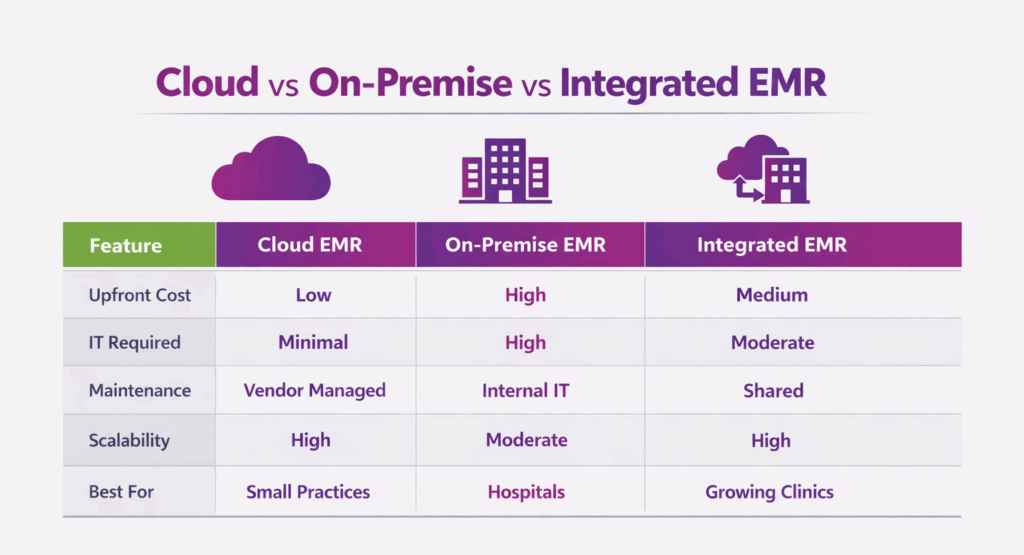
EMR software comes in multiple types based on deployment, specialty focus, and integration level. Each type is designed to meet different clinical, administrative, and technical needs.
Cloud-Based EMR
Cloud-Based EMR is a system hosted on secure remote servers rather than local hardware. Authorized users can log in from any location, providing flexibility and remote access. It typically operates on a subscription basis, with regular updates and maintenance handled by the provider.
On-Premise EMR
On-Premise EMR is installed and run on a facility’s own servers within the healthcare organization. It requires internal hardware, network support, and IT staff to manage maintenance, updates, and security.
Specialty-Specific EMR
Specialty-Specific EMR is customized for a particular medical specialty, such as cardiology or dermatology. It uses pre-built templates, forms, and workflow processes to streamline documentation and billing for that specialty.
General Practice EMR
General Practice EMR is designed for practices that manage a broad range of patient needs. It supports diverse clinical documentation, charge entry, and billing processes across multiple services.
Open-Source EMR
Open-Source EMR allows access to its underlying code without licensing fees. Internal IT staff can modify features, templates, and workflows to align with the organization’s requirements.
Integrated EMR (With Practice Management)
Integrated EMR combines clinical documentation with administrative and financial functions. This integration streamlines workflow across scheduling, billing, and patient care processes.
Hospital-Based EMR Systems
Hospital-Based EMR Systems are built for large facilities with high patient volumes and multiple specialties. They manage coordination across departments and support complex hospital workflows efficiently.
How Does EMR Software Work?
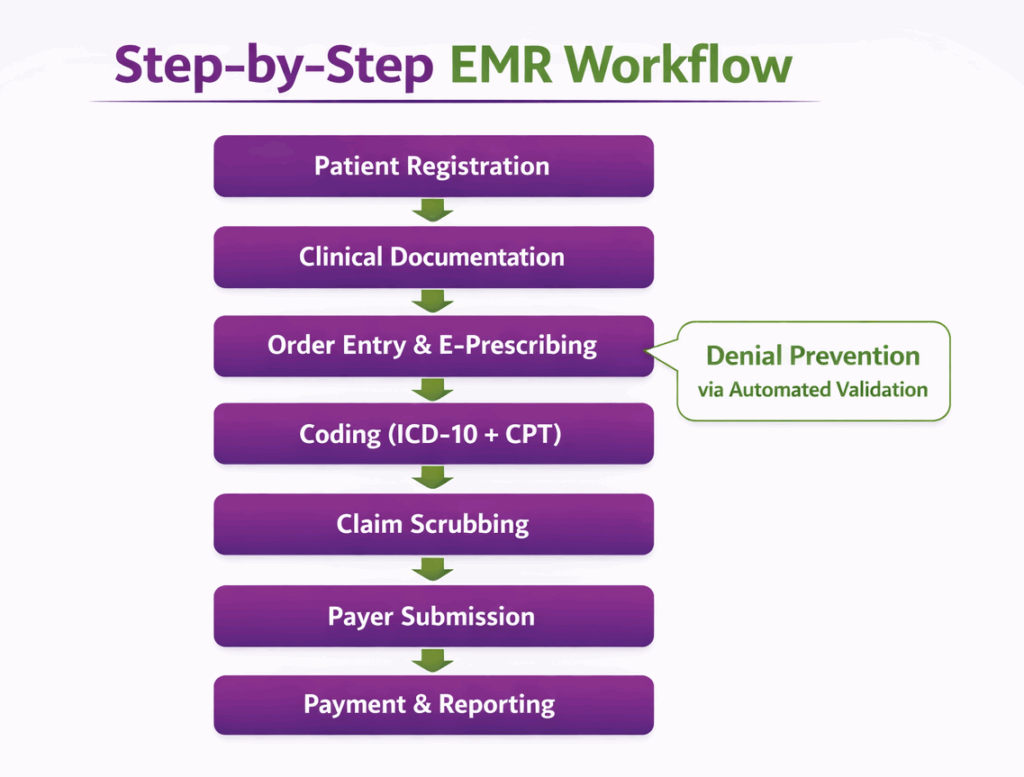
EMR software works by capturing, organizing, and managing patient data digitally across all stages of care. It integrates registration, clinical documentation, order management, billing, and reporting into a single, secure system to streamline workflows and improve care accuracy.
Patient Registration
Patient registration involves collecting and recording demographics, insurance details, and contact information at the first visit. The system stores this data and synchronizes it with hospital systems to ensure continuity of care and maintain accurate records for future visits.
Demographics Capture
Demographics capture ensures accurate entry of patient personal information and insurance details into the EMR. Records are regularly reviewed and updated to maintain accuracy and meet regulatory compliance requirements.
Clinical Documentation
Clinical documentation records patient encounters, diagnoses, procedures, and treatment plans in the EMR. Template-based structured entries improve consistency and reporting, while free-text notes allow flexibility but require additional review for billing and analytics.
Order Management
Order management allows providers to enter and track diagnostic tests, imaging studies, and medication orders within the EMR. Orders are monitored electronically, and results are received, reviewed, and linked directly to the patient record.
Clinical Decision Support
Clinical decision support generates alerts, reminders, and guideline-based recommendations during care. These tools assist providers in selecting appropriate diagnoses, tests, and treatment plans to improve patient outcomes.
Billing and Charge Capture
Billing and charge capture automatically generate codes, invoices, and claim files from documented services. Clinical documentation feeds directly into the revenue cycle, ensuring accurate and timely charge capture.
Reporting and Analytics
Reporting and analytics compile EMR data to produce performance, patient care, and revenue reports. Key performance indicators such as claim acceptance rate, revenue trends, and patient volume are tracked and analyzed for informed decision-making.
Data Storage and Security
EMR software stores patient data securely to prevent unauthorized access or loss. Security measures include data encryption, role-based access, regular backups, and compliance with healthcare regulations like HIPAA.
How Much Does EMR Software Cost?
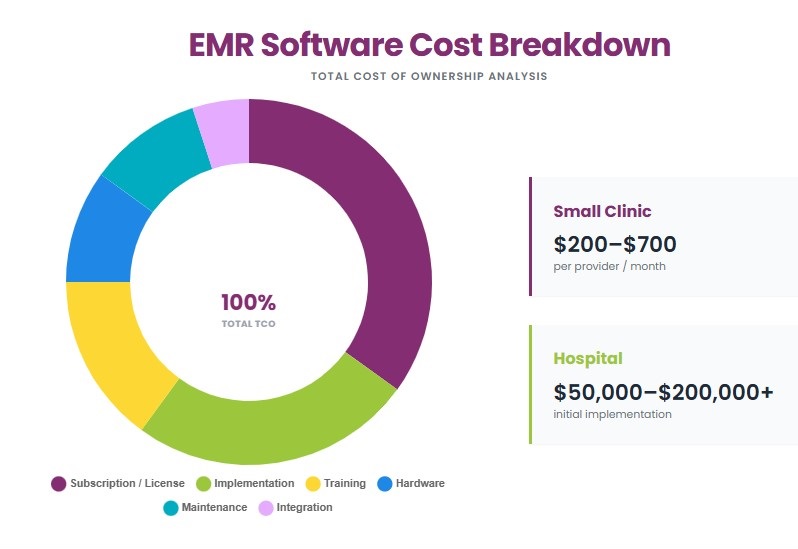
EMR software costs vary by deployment type, practice size, and feature set. Small clinics may spend a few thousand dollars per year, while large hospitals can incur six-figure expenses. Total costs include subscription or license fees, implementation, training, hardware, and ongoing maintenance.
Software Subscription Fees
Software subscription fees are recurring payments for accessing the EMR system. Cloud-based EMR systems typically cost $200 to $700 per provider per month, while specialty systems may range from $400 to $1,000 per provider per month. Perpetual license models for on-premise EMR can cost $10,000 to $50,000 upfront per provider, with additional annual maintenance fees.
Implementation and Setup
Implementation and setup include installation, customization, and data migration. Costs generally range from $5,000 to $30,000 for small practices and $50,000 to $200,000 for hospitals. Vendor consulting, workflow customization, and technical support may add 10 to 20% of the implementation cost.
Training and Support
Training and support cover staff onboarding and ongoing technical assistance. Typical costs range from $1,000 to $5,000 for small clinics and $10,000 to $50,000 for larger organizations annually, depending on the number of users and training intensity.
Hardware Costs (If On-Premise)
On-premise EMR requires servers, workstations, network infrastructure, and backup systems. Hardware costs range from $5,000 to $20,000 for small offices and $50,000 to $150,000 for hospitals, including additional devices for scanning, mobile access, and secure documentation.
Maintenance and Upgrade Fees
Maintenance and upgrade fees cover software updates, security patches, and ongoing system management. Cloud-based EMR typically includes this in the subscription, while on-premise systems require 15 to 20% of the license cost annually. Organizations should budget for major version upgrades, which can cost $10,000 to $50,000 depending on system size and complexity.
What are the Benefits of EMR Software?
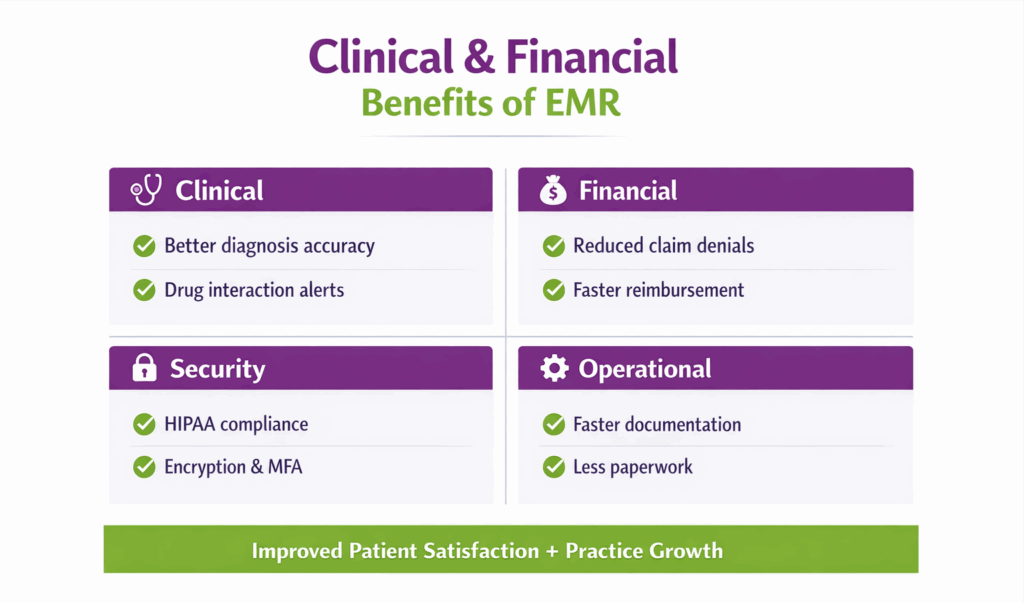
EMR software provides clinical, operational, financial, and security advantages within healthcare organizations. These benefits directly impact patient care quality, documentation standards, workflow efficiency, and revenue performance.
Improves Patient Care
Patient care refers to the delivery of healthcare services to diagnose, treat, and manage patient conditions effectively. It includes accurate evaluation, treatment planning, and follow-up.
Centralized digital records allow providers to retrieve a complete patient history instantly during care delivery. Real-time access to diagnoses, medications, allergies, and lab results supports informed clinical decisions and reduces treatment or documentation errors.
Enhances Documentation Accuracy
Documentation accuracy refers to the completeness, correctness, and consistency of clinical records. Accurate documentation ensures reliable patient data and compliant billing.
Structured templates and built-in validation checks reduce missing or incorrect entries. Predefined formats and standardized workflows maintain consistency across providers and departments.
Increases Efficiency and Productivity
Efficiency and productivity refer to completing clinical and administrative tasks with minimal time and resource waste. Higher productivity improves patient throughput and staff performance.
EMR systems automate routine processes such as data entry prompts, coding suggestions, appointment scheduling, and claim generation. Digital workflows reduce manual paperwork and administrative burden.
Strengthens Revenue Cycle Management
Revenue Cycle Management (RCM) is the process of managing billing, coding, claims submission, and payment collection. It ensures healthcare organizations receive accurate reimbursement for services.
Proper documentation review and code validation improve charge capture accuracy. Built-in compliance checks reduce claim rejections and payer denials.
Improves Data Security
Data security refers to protecting patient information from unauthorized access, alteration, or loss. It ensures the confidentiality, integrity, and availability of medical records.
Patient data is stored according to Health Insurance Portability and Accountability Act (HIPAA) requirements. Role-based access controls, user authentication, and data encryption protect sensitive information.
Streamlines E-Prescribing and Order Management
E-Prescribing and Order Management refer to the electronic creation, transmission, and tracking of medication and diagnostic orders. These functions replace handwritten prescriptions and manual order systems.
Electronic prescribing sends prescriptions directly to pharmacies, reducing processing time. System alerts such as allergy checks, dosage validation, and drug interaction warnings minimize prescribing errors.
Supports Advanced Reporting and Analytics
Reporting and analytics involve generating and analyzing structured data to measure clinical, operational, and financial performance. These insights support informed decision-making.
System-generated dashboards track metrics such as patient volume, reimbursement rates, and quality indicators. Aggregated patient data helps identify trends, high-risk groups, and preventive care opportunities.
Boosts Patient Engagement
Patient engagement refers to the active involvement of patients in managing their healthcare. It improves adherence, satisfaction, and health outcomes.
Patients can securely access medical records, lab results, and visit summaries through online portals. They can also book, reschedule, or cancel appointments digitally.
Optimizes Overall Practice Performance
Practice performance refers to the overall efficiency, financial health, and clinical quality of a healthcare organization. Strong performance reflects balanced clinical and administrative operations.
EMR systems enhance operational efficiency, improve revenue capture, and support better patient outcomes. Clinical, administrative, and financial functions operate within a unified workflow.
What are the Side Effects of EMR Software?
The Drawbacks of EMR Software are:
- Workflow Disruptions: Initial implementation and system transitions can interrupt established clinical workflows and temporarily reduce productivity.
- Increased Documentation Time: Providers may spend additional time entering structured data, which can extend patient encounter documentation.
- User Resistance and Frustration: Staff may resist adopting new systems due to learning curves, interface complexity, or changes in routine processes.
- Data Entry Errors: Incorrect or incomplete data input can lead to inaccurate patient records and billing discrepancies.
- Alert Fatigue: Excessive system alerts and reminders may cause providers to ignore important clinical warnings.
- System Downtime: Technical failures, maintenance issues, or network outages can limit access to patient records.
- Patient Privacy and Security Risks: Cybersecurity threats or improper access controls can expose sensitive patient information.
- Financial and Operational Costs: Implementation, training, maintenance, and hardware investments can create a significant financial burden.
- Impact on Patient Interaction: Increased screen time during consultations may reduce face-to-face communication between providers and patients.
- Interoperability Challenges: Limited compatibility between different healthcare systems can restrict seamless data exchange.
How to Find the Right EMR Software?
To find the right EMR software, follow these practical evaluation steps:
- Assess Your Practice Needs: Identify clinical workflows, specialty requirements, patient volume, and user count. Document required modules such as e-prescribing, lab interfaces, RCM, and alignment with your existing medical billing software to ensure smooth financial operations and clean claim processing.
- Evaluate Usability: Test the user interface for clinicians and administrative staff for speed and clarity. Prefer systems with intuitive templates and minimal clicks.
- Check Compliance and Security: Verify HIPAA compliance, data encryption, audit logging, and breach notification processes. Confirm the vendor provides a Business Associate Agreement and security certifications.
- Integration Capabilities: Confirm compatibility with labs, imaging, practice management, billing systems, and HIEs. Look for HL7/FHIR support and available APIs.
- Consider Deployment Options: Decide between cloud, on-premise, or hybrid based on IT resources, control, and budget. Factor in scalability and maintenance responsibilities.
- Evaluate Vendor Support: Assess implementation services, training programs, SLAs, and local support availability. Request documented response times and escalation procedures.
- Assess Costs: Calculate total cost of ownership: subscription or license, implementation, data migration, training, hardware, and annual maintenance. Compare short-term vs long-term pricing.
- Request Demos and Trials: Arrange hands-on demos and pilot trials using real workflows and sample data. Include end-users in evaluations to validate usability and fit.
- Check Reviews and References: Review independent user feedback and request references from similar practices. Contact references to verify implementation experience, support responsiveness, and ROI.
What Are the Best EMR Software?
The best EMR software are the widely used, well-supported vendors that serve ambulatory and hospital markets.
- Epic
- NueMed
- Meditech
- eClinicalWorks
- athenahealth
- Allscripts
- NextGen Healthcare
- AdvancedMD
- DrChrono
- Practice Fusion
What Are the Best EMR Software for Ophthalmology?
The best EMR software for ophthalmology are specialist products built for imaging and ophthalmic workflows.
- EyeMD EMR
- ModMed
- Medflow
- Nextech
- RevolutionEHR
- Eyefinity
- Topcon Harmony
- Klinik Eye EMR
- Practo Ray
- Integrity EMR for Eyes
What Are the Best EMR Software for Hospital?
The best EMR software for hospitals are large-scale systems that support complex, multi-department workflows.
- Epic
- Oracle Cerner
- Meditech
- Allscripts
- eClinicalWorks
- NextGen Healthcare
- CPSI
- OpenMRS
- MedHost
- FreeMed
What Are the Best EMR Software for Physical Therapy?
The best EMR software for physical therapy are therapy-focused practice management and charting systems.
- WebPT
- Jane App
- Noterro
- Clinicient
- TheraOffice
- SimplePractice
- Practice Perfect
- TheraNest
- Prompt EMR
- HENO
What Are the Best EMR Software for Clinics?
The best EMR software for clinics are flexible ambulatory system suitable for multi-specialty and small practices.
- athenahealth
- eClinicalWorks
- AdvancedMD
- DrChrono
- Practice Fusion
- Tebra (Kareo)
- CureMD
- CareCloud
- NextGen Healthcare
- PracticeBetter
What Are the Best EMR Software for Behavioral Health?
The best EMR software for behavioral health is purpose-built or strongly configured for mental-health workflows.
- SimplePractice
- TheraNest
- ICANotes
- TherapyNotes
- Valant
- Netsmart
- Patagonia Health
- Vozo EHR
- CounSol.com
- Credible
What Are the Best EMR Software for Medical Billing?
The best EMR software for medical billing (RCM-focused) are platforms that specialize in claims, denials, and collections.
- R1 RCM
- athenahealth
- Kareo / Tebra
- AdvancedMD
- CareCloud
- PracticeSuite
- CPSI
- Liberty Liens
- Navicure
- PrognoCIS
What Are the Best EMR Software for Dental?
The best EMR software for dental are dental practice management and imaging-aware systems.
- Dentrix
- Eaglesoft
- Open Dental
- Curve Dental
- Adit Dental Software
- CareStack
- DentiMax
- EagleSoft (Carestream)
- Denticon
- MaxiDent
Is EMR Software Suitable for Small Practices?
Yes, EMR software is suitable for small practices because it improves documentation accuracy, streamlines billing, reduces paperwork, and supports regulatory compliance without requiring large administrative teams. Cloud-based EMR systems are especially appropriate for small clinics since they offer lower upfront costs, minimal IT infrastructure requirements, and scalable subscription pricing based on the number of providers.
How Secure Is EMR Software?
EMR software is secured through data encryption and controlled user access to prevent unauthorized use. Patient information is protected using encryption protocols for data at rest and in transit, while role-based access controls restrict system access based on user responsibilities.
EMR systems adhere to legal standards such as the Health Insurance Portability and Accountability Act (HIPAA) to protect patient information and maintain regulatory compliance. Vendors implement administrative, physical, and technical safeguards to ensure confidentiality, integrity, and availability of health records.
Potential security risks include cyberattacks, phishing attempts, ransomware, insider misuse, weak passwords, and system downtime that may affect data availability. Improper configurations or outdated software can also compromise data integrity.
To mitigate these risks, EMR vendors apply regular security updates and patches, enforce multi-factor authentication and secure login procedures, and maintain detailed activity logs for auditing. Routine data backups, intrusion detection systems, and continuous monitoring further reduce the risk of data loss or breaches.
How Long Does It Take to Setup EMR Software?
EMR software setup typically takes 4 to 12 weeks for small practices and 3 to 12 months for hospitals or large healthcare organizations. The timeline depends on practice size, data migration complexity, customization requirements, staff training needs, and integration with external systems.
The implementation process includes several stages. Planning and vendor selection define project scope and workflow requirements. System configuration and customization tailor templates, user roles, and billing rules. Data migration transfers patient records from legacy systems or paper charts. Integration setup connects labs, imaging centers, pharmacies, and billing platforms. Training and testing prepare staff and validate workflows before launch. Go-live and post-implementation support monitor performance and resolve issues.
Organizational and technical variables significantly affect deployment time. Large patient databases, multi-location practices, complex specialty workflows, limited IT infrastructure, and resistance to change can extend timelines. Clear project management, dedicated implementation teams, and structured staff training improve readiness and accelerate go-live.
Can EMR Software Integrate with Existing Systems?
Yes, EMR software can integrate with existing systems such as laboratory systems, imaging platforms, pharmacy networks, billing software, and health information exchanges. Integration is typically achieved through standards like HL7 and FHIR APIs, allowing secure data exchange and reducing duplicate data entry across clinical and administrative platforms.
Is EMR Software HIPAA Compliant?
Yes, EMR software is designed to be HIPAA compliant when properly configured and used according to regulatory requirements. Vendors implement safeguards such as data encryption, role-based access control, audit logs, and secure data storage, while healthcare organizations must ensure proper user access management and compliance policies to maintain adherence to HIPAA standards.
How Does EMR Reduce Claim Denials?
EMR reduces claim denials by improving documentation quality, validating coding accuracy, and automating compliance checks before claim submission.
- Improving Documentation Accuracy: Structured templates and required data fields ensure complete and accurate clinical documentation, reducing missing or inconsistent information that leads to denials.
- Ensuring Proper ICD-10 and CPT Code Selection: Built-in coding tools and prompts assist providers in selecting appropriate ICD-10 diagnosis codes and CPT procedure codes based on documented services.
- Validating Claims Before Submission: Automated claim scrubbing checks identify coding errors, modifier issues, and incomplete data before electronic submission to payers.
- Enhancing Medical Necessity Compliance: The system cross-checks diagnoses with procedures to confirm medical necessity requirements are met according to payer guidelines.
- Improving Eligibility and Authorization Tracking: Integrated eligibility verification and prior authorization tracking reduce denials related to inactive coverage or missing approvals.
- Reducing Human Errors in Charge Entry: Automated charge capture directly from clinical documentation minimizes manual entry mistakes and omitted services.
- Maintaining Compliance and Audit Trails: Audit logs and documentation history support compliance reviews and provide clear evidence during payer audits or appeals.