
Tebra EMR groups its features into four product areas rather than a single feature list. Billing teams touch two of those four daily. The other two shape how much rework reaches the billing queue.
Feature availability is not the same as feature access. Some Tebra capabilities are included in every bundle. Others carry separate line items, and a third group requires payer or vendor enrollment before the feature works at all.
This page breaks down the named features inside each Tebra product area. It covers the AI Smart Staff tools released for 2026, what Tebra charges extra for, and how Tebra treats medical billing companies.

What Are Tebra EMR Features, and How Is the Platform Organized?
Tebra EMR features are organized into four product areas sharing one patient record and one subscription. Also, Tebra sells those areas as bundles rather than as individually licensed modules.
Tebra builds for independent outpatient practices, which sets the depth of every feature below. Tebra competes with AdvancedMD, athenahealth, and eClinicalWorks in the EMR software platforms category. Feature breadth is comparable. Feature depth favors the enterprise platforms.
Which Product Areas Does Tebra Group Features Into?
Tebra publishes four feature areas plus a separate platform for billing companies. The table below maps each area to its billing relevance.
| Product Area | Named Features | Billing Relevance |
|---|---|---|
| EHR | AI-powered charting, AI Note Assist, electronic prescriptions, electronic labs, telehealth, patient intake | Feeds charge capture from finalized notes |
| Billing and Payments | AI Billing Assistant, insurance eligibility, electronic claim submission, automated patient statements, RPA, reporting | Carries the revenue cycle |
| Patient Experience | AI Voice Assistant, online scheduling, appointment reminders, two-way text, patient portal, AI Review Replies, AI Review Insights | Reduces front-end data errors |
| Practice Marketing | Custom websites, SEO, SEM, reputation management, social media, web profiles | No direct billing function |
Practice Marketing is the PatientPop inheritance. No competing practice management platform ships an equivalent natively, and billing teams can ignore that area entirely.
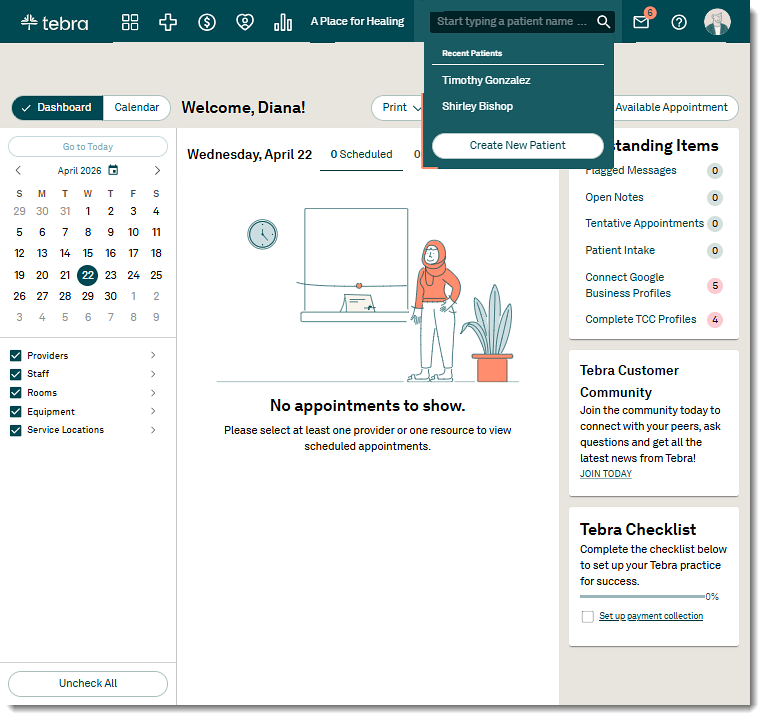
The in-app navigation divides the platform further than the marketing site does. Tebra’s top toolbar carries five standing module icons: Platform, Clinical, Billing, Patient Experience, and Analytics. A sixth, Tebra Payments, appears only on accounts using it. Module access is provider-based, so an icon can appear active while the features stay limited to the subscribing provider.
Are Kareo Features the Same as Tebra Features?
Yes, with one caveat. Kareo features and Tebra features describe the same platform. Kareo is a legacy product name, not a separate system. The caveat concerns account age. Accounts carrying legacy Kareo history sometimes lack functions newer accounts have. Feature parity is worth confirming rather than assuming.
Which Certifications Does Tebra Hold?
Tebra publishes four compliance certifications covering data handling and payment processing.
- HIPAA compliance across the EHR, billing software, and AI features
- SOC 2 for security controls
- HITRUST for healthcare information protection
- PCI for payment card handling
PCI certification matters for practices collecting card-on-file payments. HITRUST carries weight during health system and payer due diligence.
Which Tebra EMR Features Drive the Billing and Claims Workflow?
Four Tebra features carry the revenue cycle from eligibility check through collection. Configuration decides what each produces, and default settings rarely match a real payer mix.
Tebra positions its billing tools for both in-house billing teams and external billing companies. The feature set is identical across both models.
What Does Insurance Eligibility Verification Check?
Tebra eligibility verification runs on the ANSI X12 standard against more than 2,700 payers. Tebra sends a 270 inquiry and receives a 271 response before the patient arrives.
The response returns four data points staff act on at check-in:
- Active coverage status for the date of service
- Copay amount owed at the visit
- Deductible remaining for the plan year
- Coinsurance percentage after deductible
Where those data points appear depends on the interface. The web platform returns a status icon only: verified in green, not determined in yellow, or not eligible in red. The full eligibility report saves to the Desktop Application under the patient’s case, on the Eligibility tab of the insurance policy.
Tebra recommends running eligibility one to three days before the appointment. Tebra also names four causes of failed checks: incomplete or denied EDI payer enrollment, incorrect group or individual NPI setup, incorrect electronic payer connection setup, and incorrect member information.
How Does Charge Capture Move a Visit Into a Claim?
Charge capture builds the claim inside the web platform and then hands it to the Desktop Application. Charges auto-populate when created from a clinical note or an appointment card.
The charge entry screen carries four billing-specific features:
- SALT, which copies the referring provider, diagnosis codes, and procedure codes from a previous charge
- Check Codes, a validation pass returning errors before the charge is saved
- Up to 12 diagnosis codes per charge, with drag-and-drop ranking
- Code favorites, visit reasons, and procedure macros for repeated service lines
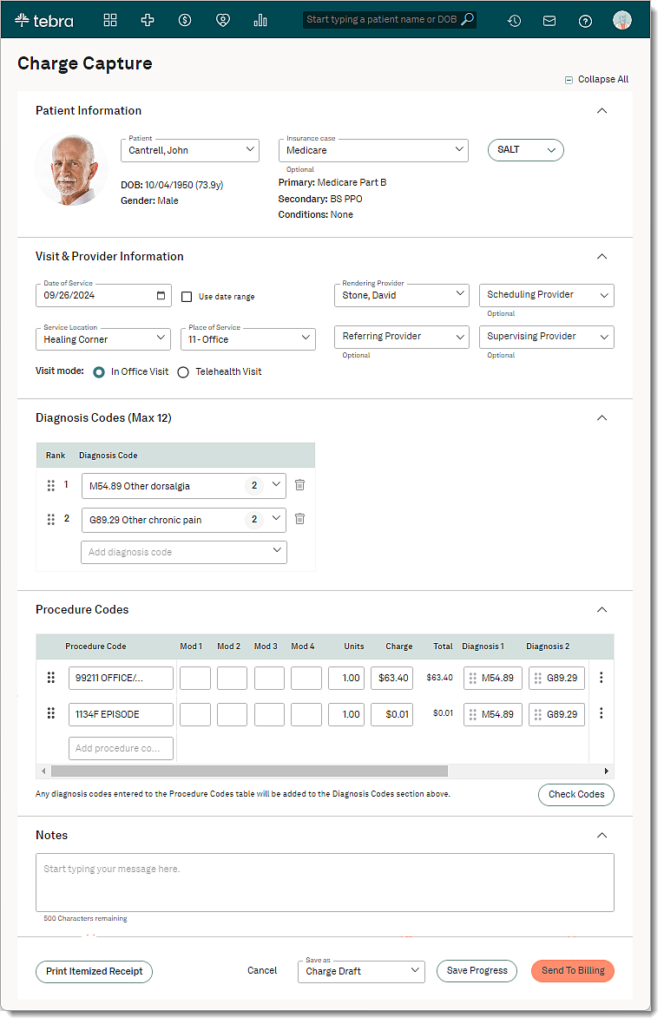
Charges move through four statuses: Charge Draft, Pending Charge Approval, Pending Charge Rework, and Send To Billing. Tebra documents that a charge sent to billing can no longer be edited. Corrections after that point require rework in the Desktop Application rather than an edit in the browser.
How Does Electronic Claim Submission Work?
Tebra submits claims in batches through TriZetto, with paper claim printing available as a fallback. Practices enroll, submit, track, and reconcile from one platform.
Claim processing status updates and clearinghouse reports return to the practice after submission. Those reports live in the Tebra Desktop Application rather than the web interface, which shapes who on the team can work rejections. Full detail on that split sits in the Tebra EMR setup and billing workflow breakdown.
Which Tasks Does Robotic Process Automation Handle?
Tebra sells robotic process automation as rules-based automation for repetitive billing tasks. RPA is distinct from AI tools and produces deterministic output.
RPA covers ERA posting, data transfers, and accounts receivable updates. Tebra publishes a billing company case study reporting a 33% reduction in manual input and 95% accuracy after RPA deployment. Practices with low claim volume rarely justify the configuration effort.
How Do Automated Patient Statements and Payments Work?
Tebra sends patient statements by mail or electronically, with payment links embedded. Statement automation runs on rules rather than on manual batch preparation.
Payment collection features include:
- Online payment through the patient portal
- Card-on-file storage for recurring balances
- In-person payment capture at the front desk
- Text and email statement delivery alongside mailed statements
Patient responsibility has grown as a share of practice revenue. Statement automation matters more for practices carrying high-deductible plan populations.
What Clinical and Patient Experience Features Does Tebra EMR Include?
Clinical documentation quality sets coding quality, because charges generate from finalized notes. Template configuration decides what reaches the claim.
Tebra ships specialty templates rather than a single generic note format. Template depth varies by specialty, and thin templates produce coding gaps that surface as denials.
What Does AI-Powered Charting Cover?
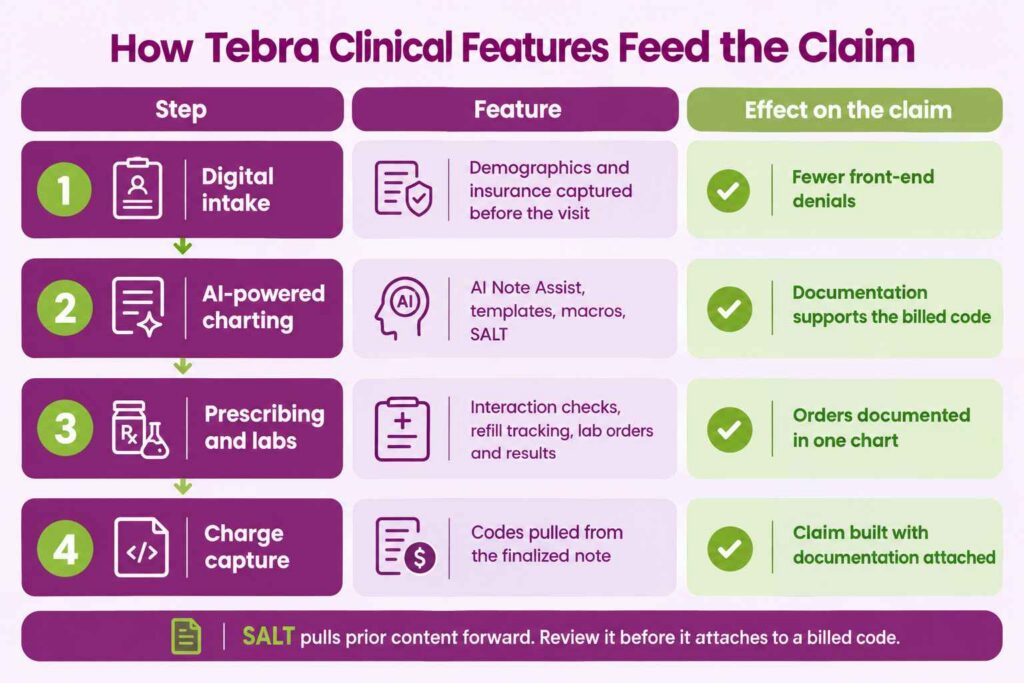
Tebra charting combines four documentation accelerators in one workflow. Providers finish notes faster without changing the underlying chart structure.
- AI Note Assist for converting patient conversations into organized notes
- Reusable templates configured per specialty
- Macros for repeated phrases and assessments
- SALT for pulling content forward from a previous visit
SALT carries audit exposure when used without review. Pulled-forward content attached to a billed code must reflect the current encounter. The same SALT function appears in charge capture, where it copies diagnosis and procedure codes rather than narrative text.
Which Prescribing and Lab Features Are Built In?
Tebra includes electronic prescribing with interaction checking and electronic lab ordering. Both run inside the chart rather than through an external portal.
Prescribing covers direct pharmacy transmission, drug interaction checks, and refill tracking. Lab features cover test ordering and result viewing in one place. Practices in high-volume prescribing specialties should confirm EPCS configuration during onboarding.
What Do the Patient Portal and Digital Intake Handle?
The Tebra patient portal gives patients 24/7 access to visit summaries, test results, and secure messaging. Digital intake moves form completion ahead of the appointment.
Front-end accuracy is the billing argument for both features. Demographic and insurance errors captured at intake never reach the claim. Pediatric practices see the largest effect, because guarantor and coverage data changes frequently, which is why pediatrics medical billing teams push intake completion before the visit.
Does Tebra Include Telehealth?
Yes, in the Practice Essentials bundle. Tebra telehealth runs HIPAA-compliant video visits integrated with the schedule and the note. No separate platform login is required, and documentation flows into the same chart. Practices buying single solutions rather than a bundle should confirm telehealth inclusion against their quote.
What AI Features Does Tebra EMR Offer in 2026?
Tebra groups its artificial intelligence under AI Smart Staff, a set of five tools. Two carry direct billing impact. Three affect the front office and patient acquisition.
The naming is deliberate. Tebra positions each tool as a staff function rather than as a feature, which reflects the labor constraint independent practices operate under.
What Does AI Note Assist Produce?
AI Note Assist converts patient conversations into organized clinical notes. Tebra rolled the tool out to Clinical subscribers in phases through May 2026.
Pricing runs either per note or by subscription, depending on configuration. Provider review before chart entry remains required. Unreviewed output attached to billed codes creates documentation audit exposure that no AI tool absorbs.
How Does the AI Billing Assistant Rank Denial Risk?
The AI Billing Assistant identifies claims at higher risk of denial before submission. Tebra describes the output as a prioritization tool rather than a pass-fail gate.
The in-product name differs from the marketing name. Tebra documents the feature as AI Claim Review, and it sits in the Desktop Application inside the encounter window rather than in the web platform.
Output is more specific than a flag. AI Claim Review returns a numeric denial probability on the encounter, names the reasons behind it, and surfaces a count of similar denied claims for comparison. Reasons cover issues a rules engine misses, including bundling conflicts across an E/M code, an add-on code, and an injection on the same date of service, or a missing prior authorization on a J-code.
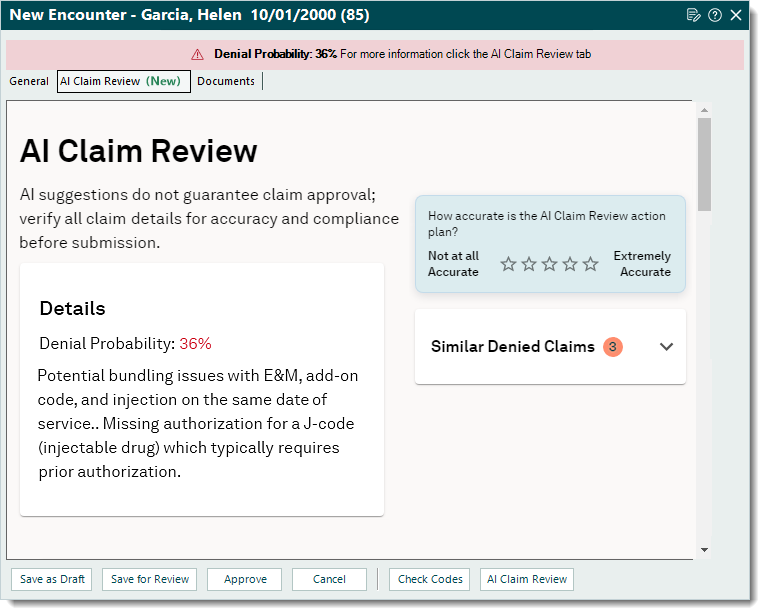
Tebra attaches its own limitation to the feature. The product states that AI suggestions do not guarantee claim approval and that every claim detail needs verification before submission.
The practical change is triage. Billing staff review high-probability claims first instead of checking every claim equally. The tool sits alongside the existing rules engine rather than replacing it, so scrubbing rules still carry the first-pass outcome.
What Do the AI Voice Assistant and Review Tools Handle?
Three AI Smart Staff tools operate outside the claim entirely. Each reduces front-office workload rather than billing workload.
| Tool | Function |
|---|---|
| AI Voice Assistant | Answers patient calls, books appointments, handles refill requests, and common questions |
| AI Review Replies | Generates HIPAA-compliant responses to patient reviews |
| AI Review Insights | Tracks sentiment and themes across reviews in one dashboard |
| AI Message Tagging | Categorizes inbound messages in the Desktop Application |
The AI Voice Assistant has an indirect billing effect. Calls answered correctly produce fewer scheduling and demographic errors at the front desk.
Do Tebra AI Features Select Codes or Adjudicate Claims?
No, Tebra AI features draft documentation and rank denial risk. No Tebra AI component selects CPT or ICD-10 codes independently, prices a claim, or makes an adjudication decision. Claim logic remains rules-based, which produces repeatable output that survives a payer audit. Billing teams evaluating Tebra should read the AI marketing against that boundary.
What Reporting and Analytics Features Come With Tebra EMR?
Tebra reporting splits across an older Desktop Application report suite and a newer A/R Dashboard. Which one a practice uses decides how much analysis is possible and who can run it.
Which Reports Are Available and Where Do They Live?
Standard Tebra reports cover key indicators, accounts receivable aging, productivity, payments, and encounters. Tebra documents this older suite under the Desktop Application only.
Custom report building sits further behind that. Tebra runs it through a Microsoft Excel add-in, which stacks a second Windows dependency on top of the Desktop Application itself. Practice managers working from a browser cannot build their own reports.
What Does the Tebra A/R Dashboard Show?
The A/R Dashboard is Tebra’s newer analytics layer, available in both the Desktop Application and the web platform. Tebra states the dashboard reaches all customers by the end of September 2026.
Five summary metrics anchor the view:
- Outstanding A/R, split by insurance and by patient
- Gross collection rate, calculated as total payments divided by total charges billed
- Total adjustments, averaged across the past three months
- Average days in accounts receivable
- Credit balances from overpayments, split by insurance and patient
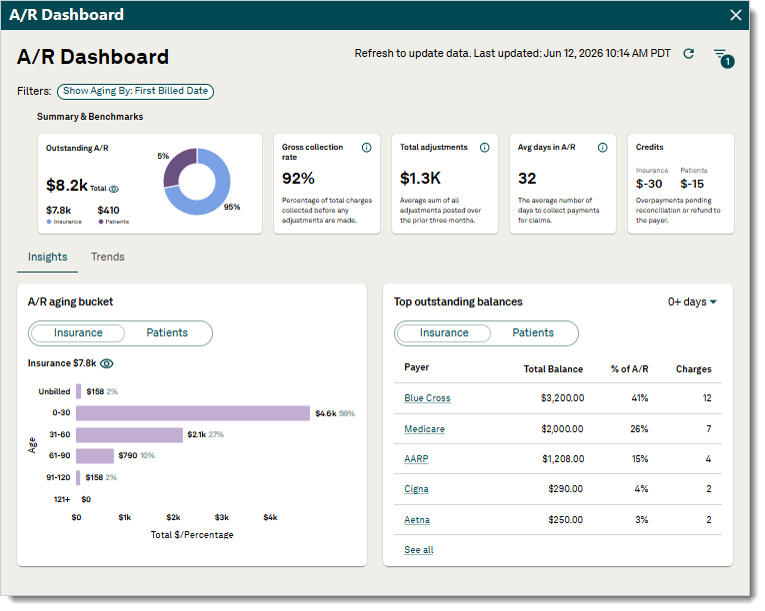
Filters run by payer scenario, rendering provider, scheduling provider, and service location. Aging displays by first billed date, date of service, or last billed date. Access is limited to system administrators.
Four named reports sit alongside the dashboard: Active Denials, Insurance Collections, Unapproved Encounters, and Missed Charges. Practices still running only the older report suite are working without this layer.
Can Practices Export Raw Tebra Data?
Yes, through Cloud Analytics. Tebra provides a HIPAA-compliant data cloud that exports raw data into custom datasets. Tebra also publishes APIs that connect to third-party applications for practices building external reporting. Both routes require analyst skills that most in-house billing teams do not hold, which is why the capability goes unused at smaller practices.
Which Tebra EMR Features Are Add-Ons Rather Than Standard?
Tebra bundles more capability than platforms selling a la carte. Two bundles cover most practices, and unbundling happens at the single-solution tier rather than feature by feature.
The table below shows inclusion status by purchase route. Confirm current line items against your own quote, since packaging changes by contract.
| Purchase Route | What It Includes |
|---|---|
| Practice Essentials | Billing, clinical EHR, telehealth |
| Practice Automation | Everything in Essentials plus patient engagement and experience tools |
| Billing Starter | Billing module only |
| EHR Starter | Clinical module only, requires Billing Starter |
| Patient Experience and Marketing | Engagement and marketing tools only |
Unlimited non-clinical staff seats are included at every tier. Front desk staff, medical assistants, billers, and administrators access the platform without raising the bill.
What Does Each Bundle Include?
Practice Essentials covers the clinical and billing workflow. Practice Automation adds the PatientPop inheritance, meaning scheduling, intake, reminders, messaging, and reputation tools.
One dependency catches practices buying piecemeal. EHR Starter requires Billing Starter, so no practice buys Tebra Clinical alone at starter pricing. Full per-provider figures sit on the setup and pricing breakdown rather than this page.
Which Features Require Separate Enrollment Rather Than Payment?
Three Tebra features need enrollment before they function, regardless of what a practice pays. Payment alone does not switch them on.
- Electronic claims, eligibility, and ERA each require TriZetto enrollment, completed payer by payer
- Claim attachments require a separate Jopari registration covering 275 transactions
- Electronic prescribing of controlled substances requires EPCS identity verification per prescriber
Practices budget for these features and then wait weeks for them to work. Enrollment timing is controlled by payers and third parties, not by Tebra.
What Tebra Integrations and APIs Are Available?
Tebra connects to outside systems through three routes: the Partner Marketplace, direct clinical integrations, and published APIs. Each serves a different connection type.
What Does the Partner Marketplace List?
The Tebra Partner Marketplace lists vetted third-party applications practices connect without a custom build. Tebra also supports direct integrations with labs, imaging centers, and billing tools.
Web profile distribution runs separately. Tebra pushes practice information to Google, Tebra Care Connect, and more than 80 directories, which is a marketing function rather than a clinical interface.
What Can Developers Access Through Tebra APIs?
Tebra publishes SOAP APIs rather than REST, documented under the Desktop Application section of its help center. The protocol choice matters for integration cost in 2026, because most modern tooling assumes REST.
Practices connecting external analytics, custom dashboards, or reporting warehouses use this route. Tebra publishes an API integration user guide and partner integration guides. Scoping still takes vendor conversation, because developer documentation depth trails the enterprise platforms.
Which Tebra EMR Features Support Medical Billing Companies?
Tebra builds a distinct feature set for billing companies rather than adapting the practice product. Tebra publishes a separate platform, a partner program, and its own scale figures for this segment.
Three numbers describe that base: more than 1,600 medical billing companies on the platform, over $20 billion in claims processed each year, and more than 50,000 providers served by a billing company running Tebra.
Features built for the billing company model:
- Cloud Analytics for exporting raw client data into custom datasets across a portfolio
- Robotic process automation for ERA posting and A/R updates at portfolio scale
- Billing partner program enrollment, automatic on joining, carrying custom pricing and partner-specific support
- Portfolio reporting for denial rates, rework volume, and A/R trends across clients
Does Tebra Compete With Billing Companies?
No, Tebra exited medical billing services to concentrate on software. Tebra states on its billing companies page that it does not compete with its partners.
That exit separates Tebra from most practice management vendors. AdvancedMD, athenahealth, and eClinicalWorks each sell revenue cycle services alongside the software, which puts the vendor in competition with any independent biller a practice hires. A practice on Tebra choosing medical billing services for any EMR platform faces no such conflict.
How Do Tebra EMR Features Compare to AdvancedMD, athenahealth, and eClinicalWorks?
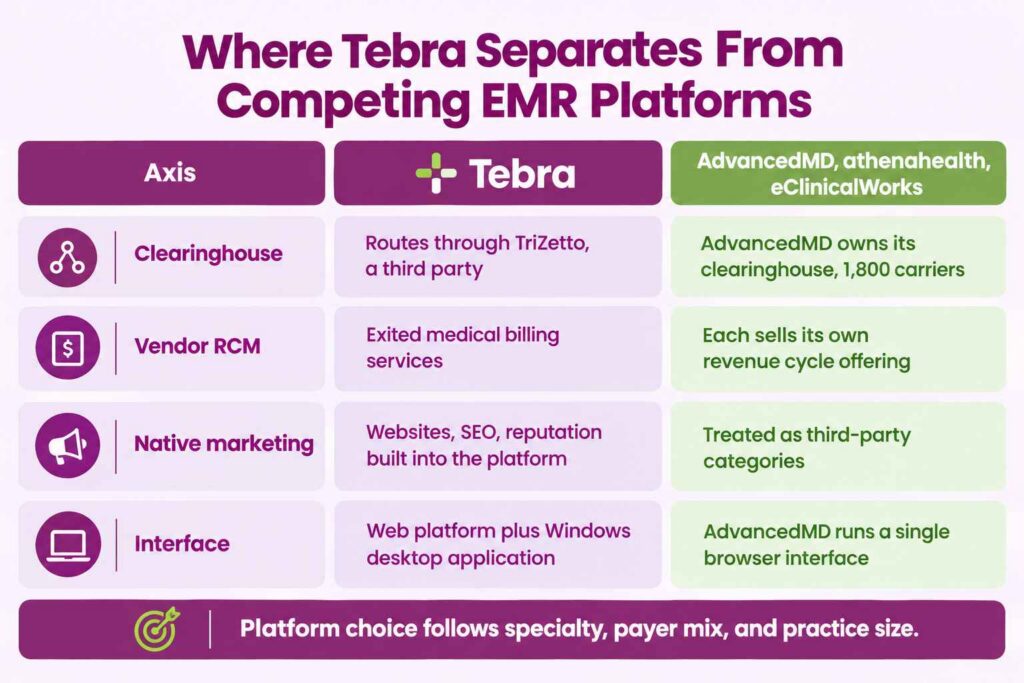
Tebra separates from the field on native marketing tools and vendor neutrality, not on billing feature depth. Feature parity is close across the independent practice segment.
Four axes distinguish Tebra features from competing platforms:
- Clearinghouse ownership. Tebra routes through TriZetto. AdvancedMD owns a proprietary clearinghouse acquired from NueMD in 2018, connected to 1,800 carriers.
- Vendor RCM competition. Tebra exited billing services. The comparison platforms all sell their own revenue cycle offering.
- Native marketing. Tebra ships websites, SEO, and reputation management inside the platform. Competitors treat these as third-party categories.
- Interface consolidation. Tebra splits billing across a web platform and a Windows desktop application. AdvancedMD runs one browser interface.
Platform selection follows specialty, payer mix, and practice size rather than feature counts.
Which Feature Gaps Show Up Most in Tebra Reviews?
Four gaps appear repeatedly in Tebra user discussion. None is a dealbreaker. All affect daily billing work.
- Desktop dependency puts clearinghouse reports, proof of timely filing, and reporting outside the browser
- Mac incompatibility follows from that, because the Desktop Application is a Windows program
- Locked records prevent edits once a charge is sent to billing, pushing coordination of benefits corrections into rework
- Reporting granularity requires workarounds for payer-level and provider-level analysis
Tebra documentation confirms the first three directly, including the edit lock on charges sent to billing. Only the reporting granularity complaint rests on user reports rather than published documentation.
How Does Transcure Configure Tebra EMR Features for Better Collections?
Feature availability rarely explains collections performance on Tebra. Configuration does. Most in-house teams run default settings against a payer mix those settings never anticipated.
Transcure operates inside the Tebra instance a practice already runs. Three problems drive most Tebra revenue loss, and each maps to a specific workstream:
Problem: Features are paid for but not enrolled. Transcure completes TriZetto enrollment across claims, eligibility, and ERA for the full payer list, plus Jopari registration where attachments apply. Outcome: onboarding under 14 days with claims submitting from the first billable encounter.
Problem: Eligibility runs without acting on the response. ELIXA verifies coverage, copays, and deductibles before every appointment, and CODIN tunes coding against the actual payer mix. Outcome: a 98% first-pass clean claim rate and a denial rate under 1%.
Problem: Desktop-only reporting goes unread. DEXA works CARC and RARC denials, including CO-4, CO-16, CO-50, and PR-96, with reporting built around practice KPIs rather than default templates. Outcome: 80% recovery on denied claims.
Transcure staffs 1,100+ AAPC-certified billers across 40+ specialties, operating under a BAA executed per 45 CFR 164.502(e). Pricing runs at 5% of monthly collections. Scope detail sits with billing services for Tebra and Kareo practices.
Tebra EMR ships a broad feature set for a platform aimed at independent practices, and the billing tools hold up against larger competitors. What separates outcomes is enrollment completed on time, scrubbing rules matched to a real payer mix, and reporting someone actually reads. Practices that treat those three as configuration work rather than as onboarding paperwork collect more from the same feature set.