
Tebra EMR is a cloud-based electronic medical record and practice management platform built for independent practices. Tebra was formed in November 2021 when Kareo merged with PatientPop. Kareo remains the legacy product name that many billing teams still use daily.
Billing teams work across two interfaces in Tebra EMR. Charge capture, claim scrubbing, and payment posting run through a combination of the Tebra Web Platform and the Tebra Desktop Application. Claims route to payers through TriZetto, the clearinghouse Tebra connects to.
This guide covers Tebra EMR setup for billing, the end-to-end billing workflow, published Tebra pricing, the problems practices report most, and what changed in 2026.

What Is Tebra EMR, and How Does It Relate to Kareo?
Tebra EMR is a cloud-based EHR and practice management platform for independent medical practices. Tebra Technologies, Inc. operates the platform from Corona Del Mar, California. Dan Rodrigues, who founded Kareo, serves as chief executive officer.
Kareo and PatientPop closed their merger on November 2, 2021. The combined company took the name Tebra, derived from the word vertebrae. PatientPop retired its own website on April 2, 2024, completing the consolidation.
Three facts define the Tebra EMR entity for billing purposes:
- Tebra is ONC-certified and HIPAA-compliant, per Tebra’s published compliance statements
- Kareo contributed the EHR, scheduling, insurance billing, and patient payment technology
- PatientPop contributed practice websites, online booking, digital registration, and reputation tools
Tebra competes against eClinicalWorks, AdvancedMD, and athenahealth in the cloud-based EMR software market. Tebra targets the smaller end of that market, where a solo provider or a five-clinician group runs clinical and financial work from one login.
Which Modules Make Up the Tebra Platform?
Tebra sells three core modules and two platform bundles. Billing teams work almost entirely inside Tebra Billing, the module that carries claims, eligibility, remittance, and denials.
The table below maps the module structure Tebra publishes on its pricing pages:
| Module | What the module covers | Billing relevance |
|---|---|---|
| Tebra Clinical | Charting, e-prescribing with EPCS and PDMP, electronic labs, telehealth | Feeds charge capture from finalized notes |
| Tebra Billing | Claim creation, submission, eligibility, denials, payment posting, reporting | Carries the full revenue cycle |
| Tebra Engage | Online scheduling, digital intake, reminders, messaging, patient portal | Reduces front-end data errors before billing |
Practice Essentials bundles Tebra Clinical, Tebra Billing, and telehealth. Practice Automation adds the patient experience tools. Module-level feature depth sits outside the scope of this guide.
Is Kareo Still a Separate Product from Tebra?
No, Kareo operates as a legacy name inside Tebra, not as a separate product. Tebra states directly on its pricing overview that practices researching Kareo pricing are evaluating the broader Tebra platform. Login URLs still carry the Kareo domain, and the mobile app lists Kareo in its title. The underlying platform is one system.
Which Practice Types and Specialties Run on Tebra EMR?
Tebra EMR serves independent outpatient practices rather than hospitals or health systems. Tebra maintains dedicated specialty pages for five concentrations: family medicine, primary care, pediatrics, mental health, and nurse practitioners.
Behavioral health carries unusual weight in the Tebra base. Tebra publishes a separate therapist pricing tier for psychologists, counselors, licensed clinical social workers, and physical, occupational, and speech therapists. No other provider category receives its own tier.
Tebra also splits its buyers into two operating models:
- Independent practices billing in-house with their own staff
- Medical billing companies managing multiple client practices from one dashboard
How Do You Set Up Tebra EMR for Billing?
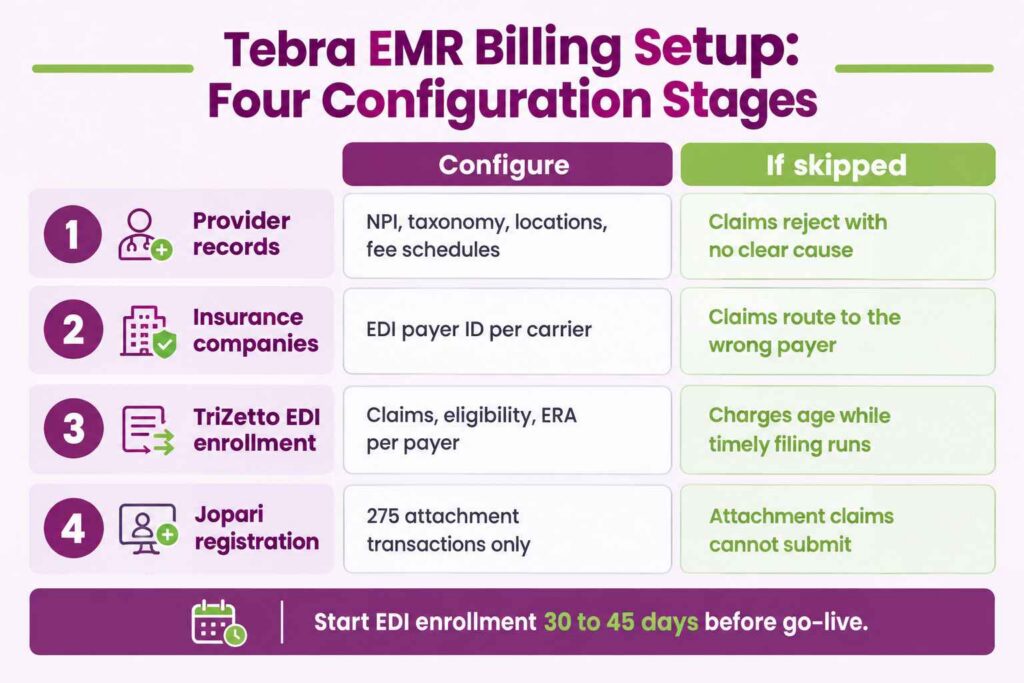
Tebra EMR setup for billing runs through four configuration stages. Each stage determines whether claims clear on first submission or reject weeks later without an obvious cause.
Tebra assigns an implementation team and maps automation to existing workflows during onboarding. The configuration work below produces the billing outcomes, and skipped steps surface as denials rather than as setup errors.
Which Provider and Practice Records Must Be Configured First?
Provider and practice records come first because every downstream claim carries them. Configuration covers NPI numbers, taxonomy codes, service locations, and billing entities for each rendering provider.
Practices configure these records before any payer work begins:
- Provider NPI and taxonomy codes for each rendering and billing provider
- Service location addresses matching what payers hold on file
- Fee schedules by payer and by procedure code
- Referring provider relationships for services requiring a referral source
How Are Insurance Companies and Payer Connections Added?
Insurance companies are added inside Practice Settings on the Tebra Web Platform or through the Desktop Application. Tebra’s setup documentation describes both paths.
Each insurance company carries an EDI payer ID that establishes the electronic connection to TriZetto. Tebra’s own guidance states that when an exact payer name and payer ID combination is unavailable, practices select a payer sharing the same payer ID. Payer type filters cover UB-04, workers’ compensation, and auto insurance.
How Does TriZetto EDI Enrollment Work in Tebra EMR?
TriZetto is the clearinghouse Tebra routes claims through, and enrollment runs on a self-service model. Tebra publishes a dedicated TriZetto Enrollment Portal Guide describing the workflow.
The portal gives practices direct access to enroll for three transaction types:
- Claims. Electronic claim submission to the payer
- Eligibility. Real-time coverage verification
- Electronic remittance advice. Automated payment posting
Enrollment happens payer by payer, not once per practice. A practice accepting 20 payers completes enrollment 20 times across three transaction types. Each enrollment carries its own approval timeline controlled by the payer, not by Tebra.
Does Tebra EMR Support Electronic Claim Attachments?
Yes, through a separate connection. Tebra’s Electronic Claim Attachments Payer List states that although payers are configured with TriZetto as the clearinghouse, claims with attachments submit through Tebra’s connection with Jopari. Practices complete a separate EDI Registration Form naming Jopari as the software vendor. The Jopari enrollment covers 275 transactions only, which is the attachment transaction set.
Which Setup Mistakes Cause Denials Later?
Five setup mistakes produce the majority of preventable denials on Tebra EMR:
- Starting EDI enrollment after go-live rather than 30 to 45 days before
- Enrolling for claims but skipping the ERA transaction, forcing manual payment posting
- Selecting a payer ID that routes to the wrong payer entity
- Leaving fee schedules at default values instead of loading contracted rates
- Skipping the Jopari registration at practices that bill attachment-dependent services
How Does the Billing Workflow Run Inside Tebra EMR?
The Tebra EMR billing workflow runs from eligibility verification through denial resolution across two interfaces. Understanding which interface owns which task is the single most practical thing a billing team learns about Tebra.
Where Does the Web Platform End and the Desktop Application Begin?
Tebra operates a Web Platform and a Desktop Application, referred to as Tebra PM. Tebra’s help documentation organizes billing articles under both, and several billing functions appear only under the Desktop Application.
This table maps functions to interface based on where Tebra documents each one:
| Function | Documented location |
|---|---|
| Add insurance company | Web Platform and Desktop Application |
| Clearinghouse reports | Desktop Application |
| Proof of timely filing | Desktop Application |
| Claim rejection codes and validation errors | Desktop Application |
| Patient statements and payment posting | Desktop Application |
| Reports and analytics | Desktop Application |
A billing team running Tebra cannot complete the full revenue cycle from a browser. Workflow planning accounts for the Desktop Application from day one rather than treating it as a legacy option.
How Does Charge Capture Move from Encounter to Claim?
Charge capture begins in the clinical note. Providers attach ICD-10 and CPT codes during documentation, and the charge moves into the billing queue on note completion.
Front-end accuracy determines how much rework the billing team absorbs. Digital intake and online scheduling reduce demographic errors before a claim exists. Practices running Tebra Clinical without Tebra Engage carry more manual demographic entry.
How Does Tebra EMR Scrub and Submit Claims?
Tebra runs a rules engine that applies payer-specific edits before claims reach the clearinghouse. Tebra describes the engine as auto-scrubbing claims, applying payer rules, and catching errors before EDI submission.
Eligibility verification runs on the ANSI X12 standard. Tebra sends a 270 inquiry to more than 2,700 payers and receives a 271 response confirming active coverage, copay, deductible, and coinsurance.
Claims submit in batches. Rejections return through TriZetto and surface in the Desktop Application under claim rejection codes and validation errors.
How Are ERAs Posted and Payments Reconciled?
Electronic remittance advice posts automatically against submitted claims once ERA enrollment completes for that payer. Practices without completed ERA enrollment post payments manually from paper EOBs.
Tebra also sells robotic process automation for high-volume posting. The RPA product parses 835 files, auto-posts remittances, and applies unapplied payments using business rules.
How Are Denials Worked and Appealed in Tebra EMR?
Denials surface through claim status tracking and the A/R Dashboard. Tebra describes the dashboard as surfacing denial patterns and A/R trends, and queuing denials for appeal or automatic resubmission.
Denial categories drive different workflows:
- Eligibility and coverage denials trace back to the 270/271 check or to a lapsed plan
- Documentation requests require records pulled from Tebra Clinical before appeal
- Duplicate and coordination of benefits denials require the patient case and payer sequence corrected
Can Tebra Billing Run on a Mac?
No, not for the Desktop Application functions. The Tebra Desktop Application is a Windows program, and Mac users report this limitation directly in the Tebra mobile app reviews. Mac-based practices either run a Windows virtual machine or route desktop-only billing tasks to a Windows workstation. Web Platform functions work on any modern browser.
How Much Does Tebra EMR Cost?
Tebra EMR costs between $49 and $799 per provider per month, per Tebra’s published pricing overview. Tebra is unusual among practice management vendors in publishing per-tier dollar figures rather than quoting privately.
Three variables set the final number: provider count, provider type, and platform configuration. Tebra sorts providers into physicians, non-physician providers, and therapists.
What Do the Tebra Platform Bundles Cost per Provider?
Tebra publishes bundle pricing across five practice-type and volume combinations. The rates below come directly from Tebra’s pricing overview page.
| Practice type | Volume tier | Practice Essentials | Practice Automation |
|---|---|---|---|
| Physician | Standard | $599 | $799 |
| Physician | Low volume | from $349 | from $399 |
| Non-physician | Standard | $399 | $449 |
| Non-physician | Low volume | from $199 | from $249 |
| Therapist | Standard | $225 | $299 |
All figures are per provider, per month. The therapist tier costs 62% less than the standard physician Practice Essentials rate, which explains the density of behavioral health practices on the platform.
What Do Tebra Single Solutions Cost?
Single solutions let practices buy one module instead of a bundle. Tebra publishes three single-solution entry points:
- Patient Experience and Marketing: from $49 non-physician, from $99 physician
- EHR Starter: from $99 non-physician, from $199 physician
- Billing Starter: from $99 non-physician, from $199 physician
One dependency matters for practices buying piecemeal. Tebra states that the EHR Starter plan requires purchase of the Billing Starter plan. A practice cannot buy Tebra Clinical alone at starter pricing.
What Happens When a Practice Passes 100 Claims per Month?
Pricing re-rates to the standard tier. Tebra applies starter and low-volume pricing only to practices submitting 100 claims or fewer per month. Practices exceeding that threshold for three consecutive months transition to standard rates.
The financial impact is material for a growing practice. A physician on low-volume Practice Essentials moves from approximately $349 to $599 per provider per month. That is a 72% increase triggered by growth rather than by any change in configuration. Tebra’s pricing against AdvancedMD turns on that threshold, since AdvancedMD’s per-provider plans carry no claim limit.
Is Tebra EMR Priced as a Percentage of Collections?
No. Tebra charges a per-provider subscription, not a percentage of collections. Tebra states that monthly cost stays fixed and does not increase as practice revenue grows. Percentage-of-collections pricing comes from an independent billing company, not from Tebra.
Which Billing Problems Do Tebra EMR Practices Run Into Most?
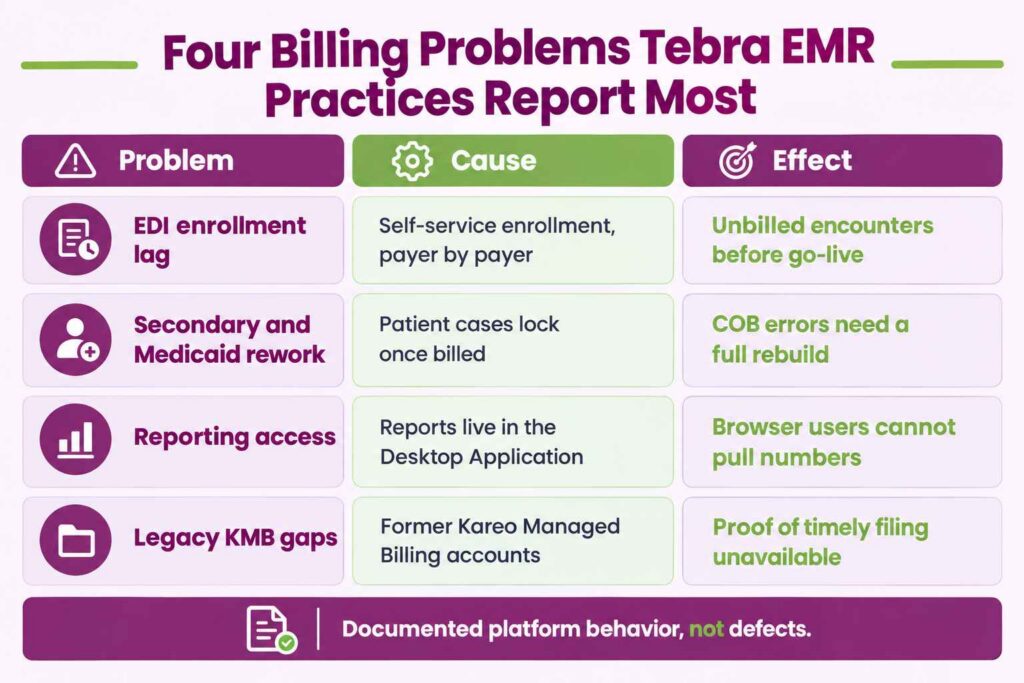
Four billing problems appear consistently across Tebra EMR practices. Each traces to a documented platform behavior rather than to a defect.
Why Do EDI Enrollments Delay First Claim Submission?
Self-service enrollment moves at payer speed, not at practice speed. Each payer approves claims, eligibility, and ERA transactions on its own timeline through the TriZetto Enrollment Portal.
Practices that treat enrollment as a go-live task rather than a pre-go-live task accumulate unbilled encounters. Charges sit in the queue while enrollment clears, and timely filing windows continue running.
Why Do Secondary and Medicaid Claims Create Rework?
Coordination of benefits errors require the patient case to be corrected, and Tebra limits case edits after billing. Billing teams report that patient cases cannot be changed once a claim has been billed against them.
Behavioral health practices feel this most because Medicaid frequently sits as a secondary payer. Correct payer sequencing at charge entry prevents the rework, which is why psychiatric medical billing teams set the payer order before the first claim goes out.
Which Reporting Gaps Affect Multi-Provider Practices?
Reporting lives in the Desktop Application, which constrains who can access it. Tebra documents key indicator reports, accounts receivable reports, productivity reports, and custom reports under the Desktop Application rather than the Web Platform.
Practice managers working from a browser cannot pull these reports. Multi-location groups either standardize on Windows workstations or centralize reporting with one person.
Do Legacy Kareo Managed Billing Accounts Lose Features?
Yes, for at least one documented function. Tebra states in its proof of timely filing documentation that the feature is unavailable for accounts formerly managed by Kareo Managed Billing. Practices carrying legacy KMB history verify feature availability rather than assuming parity with newer accounts.
What Changed in Tebra EMR Billing for 2026?
Tebra released AI Smart Staff, a connected set of artificial intelligence tools built into the platform. Two of the five tools carry direct billing impact.
The complete AI Smart Staff set covers five functions:
| Tool | Function | Billing impact |
|---|---|---|
| AI Billing Assistant | Pre-submission claim review | Direct |
| AI Note Assist | Clinical documentation drafting | Indirect through charge capture |
| AI Voice Assistant | Patient calls | Indirect through front-end accuracy |
| AI Review Replies | Review responses | None |
| AI Review Insights | Patient sentiment trends | None |
AI Billing Assistant reviews claims before submission, which places it alongside the existing rules engine rather than replacing it. Tebra deployed AI Note Assist to Clinical subscribers in phases through May 2026, priced either per note or by subscription.
How Does Transcure Support Billing on Tebra EMR?
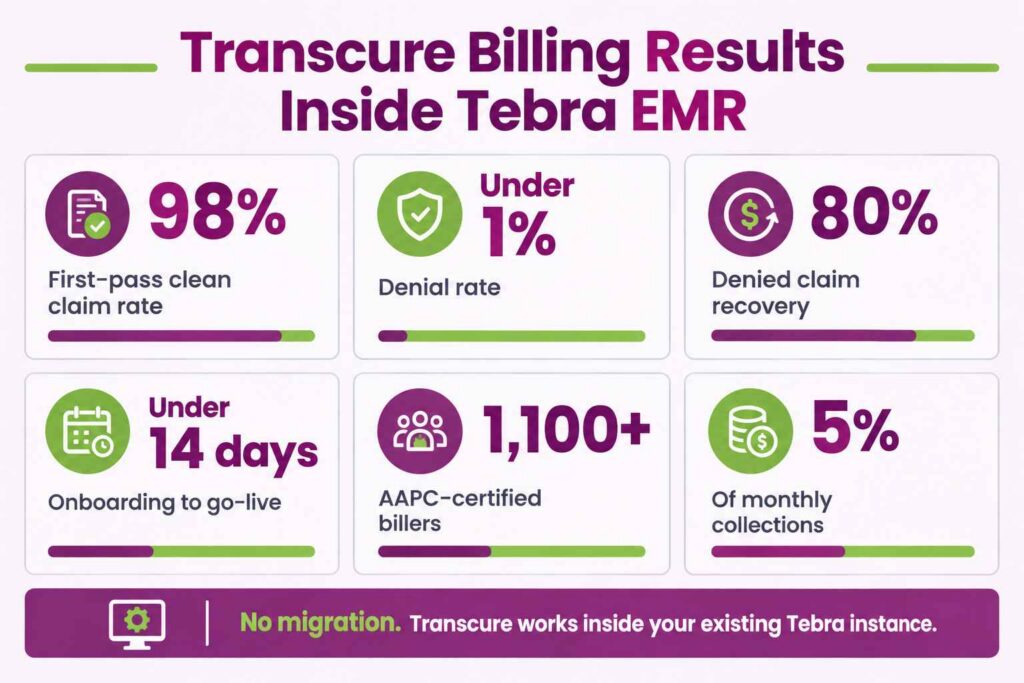
Transcure runs billing operations inside the Tebra EMR instance a practice already uses. No migration, no platform change, no retraining of clinical staff.
Three problems drive most Tebra EMR revenue loss, and each maps to a specific Transcure process:
Problem: EDI enrollments stall and charges age. Transcure completes TriZetto enrollment for claims, eligibility, and ERA across the full payer list before go-live. Onboarding runs under 14 days. Outcome: claims submit from the first billable encounter.
Problem: Eligibility errors generate front-end denials. ELIXA verifies coverage, copays, and deductibles before every appointment through EDI and payer connections. Outcome: a 98% first-pass clean claim rate and a denial rate under 1%.
Problem: Denials sit unworked past appeal windows. DEXA analyzes every CARC and RARC code, including CO-4, CO-16, CO-50, and PR-96, and files appeals at all levels. Outcome: 80% recovery on denied claims.
Transcure staffs 1,100+ AAPC-certified billers across 40+ specialties, operating under a BAA executed per 45 CFR 164.502(e). Pricing runs at 5% of monthly collections with no setup fees and no per-claim charges. Full scope and onboarding timelines sit with Tebra and Kareo billing support.
Does Tebra Offer Its Own Medical Billing Service?
No, Tebra exited medical billing services to concentrate on software. Tebra states on its billing companies page that it does not compete with its partners.
That exit makes Tebra unusual among practice management vendors. Most major platforms sell revenue cycle services alongside the software, which puts the vendor in competition with any independent biller a practice hires. Tebra instead enrolls every billing company on the platform into its billing partner program automatically.
Tebra publishes three figures on the scale of that partner base: more than 1,600 medical billing companies on the platform, over $20 billion in claims processed each year, and more than 50,000 providers served by a billing company running Tebra. Practices choosing billing services built for any EMR therefore face no vendor conflict on Tebra.
Tebra EMR gives independent practices a complete revenue cycle toolset, from ANSI X12 eligibility checks through TriZetto claim submission and ERA posting. Configuration quality decides what that toolset produces. Practices that complete payer enrollment early, plan around the Desktop Application, and track the 100-claim pricing threshold collect more than practices that discover those constraints after go-live.