Every EHR vendor promises fewer clicks, faster billing, and happier providers. NextGen Healthcare and eClinicalWorks both make that promise, and both have the market share to back it up. What separates them is not the pitch. It is how each system handles templates, coding, billing, and support once a practice is actually running on it.
This comparison sets the marketing aside and looks at the mechanics: pricing structures, coding automation, RCM workflows, and implementation timelines, using real numbers instead of vendor claims.
Here is a quick snapshot before going into further details:
| Comparison Category | NextGen Healthcare (Office / Enterprise) | eClinicalWorks (V12 / Cloud) |
|---|---|---|
| Best Suited For | Multi-specialty practices, behavioral health, ophthalmology, mid-to-large clinics | Primary care, FQHCs, community clinics, small-to-mid-sized independent practices |
| Deployment Model | Cloud SaaS (NextGen Office) and Hybrid/On-Premise or Managed Cloud (Enterprise) | 100 percent cloud-based, browser or desktop client, plus mobile apps |
| Pricing Model | Office: roughly $300 to $500/provider/month. Enterprise: custom tiered quotes plus implementation fees | EHR + PM: about $449/provider/month. EHR + RCM Service: about 2.9 percent of collections plus setup fees |
| Clinical Documentation | Highly customizable specialty templates, integrated NextGen Ambient Assist | Flexible note structures, integrated Sunoh.ai ambient listening and voice recognition |
| Patient Engagement | NextGen Patient Experience: digital intake, self-scheduling, integrated telehealth | healow ecosystem: healow app, healow Pay, healow Sign, self-check-in kiosks |
| Interoperability | Mirth Connect integration engine plus a robust API marketplace | PRISMA health search engine (Carequality/CommonWell) plus open APIs |
| Billing and RCM | Advanced claim scrubbing, custom financial analytics, strong coding rules engine | Comprehensive native billing tools, integrated digital payment processing, automated batch claims |
| Customer Support Rating | Moderately higher scores, dedicated account management for Enterprise | Variable satisfaction, ticketing can slow down during complex escalations |

Specialty Clinical Templates and Documentation
Both platforms chart patient encounters well, but they get there through different philosophies about customization.
NextGen built its reputation on specialty depth. Orthopedics, ophthalmology, behavioral health, cardiology, and several surgical specialties all get out-of-the-box templates that reflect how those providers actually document. What makes this useful in practice is the “talk, type, or touch” workflow.
A cardiologist dictating findings, a behavioral health provider typing detailed notes, and a surgeon tapping through structured fields can all work inside the same system without fighting a template built for someone else’s specialty.
eClinicalWorks takes a more standardized approach through Smart Forms. These work well for high-volume, predictable visits, which is exactly what a busy primary care or urgent care schedule looks like.
The tradeoff shows up when a practice wants to customize those forms heavily. eCW Users consistently describe a steeper learning curve compared to NextGen’s macro-level editing.
| Feature | NextGen Healthcare | eClinicalWorks |
|---|---|---|
| Specialty Focus | Out-of-the-box depth for Orthopedics, Ophthalmology, Behavioral Health, Cardiology, and select surgical specialties | Strongest in Primary Care, Urgent Care, Community Health Centers, and OB/GYN |
| Template Customization | Highly modular, macro-level editing, flexible “talk, type, or touch” workflows | Smart Forms and structured templates, steeper learning curve to customize |
| AI Documentation | NextGen Ambient Assist listens to encounters and drafts SOAP notes for review | Sunoh.ai transcribes conversations directly into structured clinical notes |
| Document Management | Standard OCR for document routing and basic fax management | Image AI automatically scans and matches incoming faxes to the correct patient record |
That last row is easy to overlook, but it matters more than it sounds. A practice that handles a high volume of incoming referral faxes will notice the difference between manual routing and Image AI doing the matching automatically.
Coding Tools and Charge Capture
Coding accuracy is where revenue either gets protected or quietly leaks out through denials. Both vendors have built coding logic directly into the clinical workflow, though they approach it from different angles.
| Feature | NextGen Healthcare | eClinicalWorks |
|---|---|---|
| Coding Automation | Specialty-specific rules engine, claims scrubbed against NCCI edits before submission | Supports CPT, ICD-10, HCPCS, and NDC coding with auto-suggestions and real-time error detection |
| Charge Entry | Straightforward, accessible, fast interface for billing staff | Tightly coupled to the clinical note, though navigation can feel click-heavy on complex visits |
| E/M Coding Assist | Calculates E/M levels based on medical decision-making or time documented | Built-in E/M coder helps capture correct service levels for compliant reimbursement |
There is a real-world example worth mentioning here. When gastroenterology CPT codes were updated for 2026, the change introduced 288 new codes, 84 deletions, and 46 revisions. That is not a small update.
NextGen’s rules engine let administrators map and scrub those bulk changes at the template level, which meant less manual cleanup for the coding team.
eClinicalWorks handled the same transition through its E/M coder, auto-suggesting the updated ICD-10 and CPT codes right during the encounter so providers were less likely to submit claims using outdated codes.
Revenue Cycle Management and Billing Workflows
This is usually where the decision gets made, because billing performance affects cash flow more directly than almost anything else in the system.
eClinicalWorks RCM Workflow
eClinicalWorks leans into native billing depth. Claim generation includes batch processing, automated submission, and clearinghouse integration built into the core platform rather than bolted on. The Healow Pay tool lets patients pay through text, email, or the portal, which shortens Days in Accounts Receivable in a way that manual statement mailing never could.
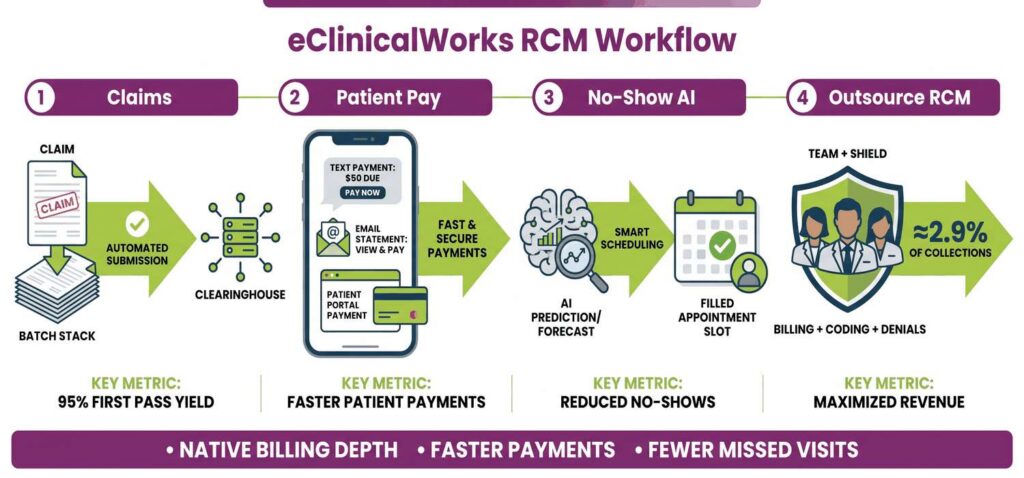
Healow No-Show AI predicts missed appointments in advance, giving staff a window to fill the slot before that revenue disappears entirely. For practices that want billing handled entirely by someone else, eCW also offers an end-to-end RCM service covering billing, coding, and denial follow-ups for roughly 2.9 percent of collections.
Many practices comparing that percentage against the cost of hiring and training an internal billing team end up deciding to outsource eCW Billing rather than build the department themselves.
NextGen RCM Workflow
NextGen approaches revenue cycle management through rigor rather than automation for its own sake. Claim scrubbing catches bundling errors, missing modifiers, and eligibility mismatches before a claim ever leaves the system, which is exactly the kind of thing that prevents a denial three weeks later.
A Tasking engine routes rejected claims and denials directly to the right billing staff member based on payer or denial reason. So, claims do not sit in a generic queue waiting for someone to notice them. NextGen Enterprise also offers highly customizable financial dashboards and forecasting tools built for multi-site practices tracking several revenue streams at once.
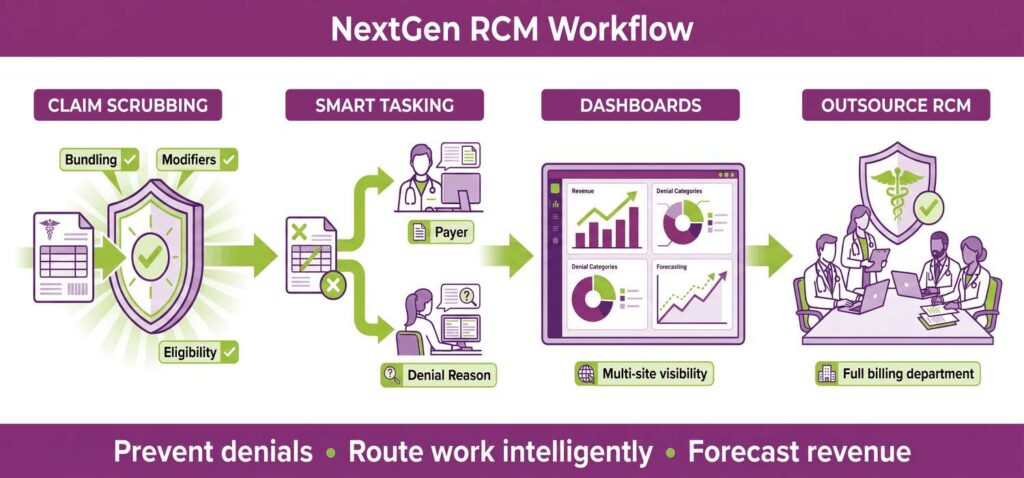
Practices that want the analytics without hiring a dedicated financial analyst often choose to outsource NextGen Billing through NextGen Financial Suite, which handles the entire billing department under contract.
Put simply, eClinicalWorks tends to fit practices that want aggressive automation and patient-facing payment tools built in. NextGen tends to fit specialty practices that need granular financial visibility, even if that means a more involved setup process.
Pricing and Implementation Transparency
| Pricing Component | NextGen (Office and Enterprise) | eClinicalWorks (Cloud) |
|---|---|---|
| EHR Only | Office: about $300/provider/month. Enterprise: about $300 to $545+/provider/month, custom quote | $449/provider/month, flat rate |
| EHR + Practice Management | Included in standard subscription | $599/provider/month |
| RCM Services (Outsourced Billing) | Custom percentage of collections based on volume | 2.9 percent of practice collections |
| Implementation and Startup Fees | Office: low startup fees. Enterprise: high upfront costs, often tens of thousands for custom builds and training | Advertised as no startup costs, though complex migrations or add-ons may incur fees |
| Hidden or Variable Costs | API connections via Mirth Connect and custom analytics reporting can raise long-term costs | Certain third-party integrations or advanced automation modules may require additional licensing |
The pattern here is consistent across every row. eClinicalWorks wants you to know the price upfront and keeps that promise for the core product.
NextGen’s pricing scales with complexity, which is fair given how differently a solo practitioner and a twelve-location surgical group would use the same software. But it does mean budgeting requires an actual conversation with sales rather than a published rate card.
Interoperability and Data Exchange
Both platforms are certified for data exchange, but they built their flagship engines around different priorities.
NextGen owns Mirth Connect, which is about as close to an industry standard as integration engines get. That ownership matters because it lets NextGen build complex, custom APIs connecting to local hospitals, third-party applications, and state registries that do not always follow standard formats.
A practice with an unusual integration need, say a connection to a regional health information exchange running an older data structure, tends to find Mirth Connect more adaptable to that kind of edge case.
eClinicalWorks runs on PRISMA, a proprietary health search engine tied into the Carequality and CommonWell networks, exchanging more than 50 million records monthly. PRISMA is particularly good at pulling a patient’s history from outside hospital systems and organizing it into a chronological timeline right inside the chart.
For a primary care provider seeing a new patient who has records scattered across three different health systems, that timeline saves real time during the visit itself.
Patient Engagement Portals
Patient retention now depends heavily on mobile convenience, and both vendors have invested seriously here.
NextGen Patient Experience, or NextGen Px, is a closed-loop system built around digital document uploads, secure messaging, patient surveys, and pre-visit clinical intake. Users tend to describe the communication flow as smooth, which sounds like a small thing until you consider how many patient portals feel disjointed.
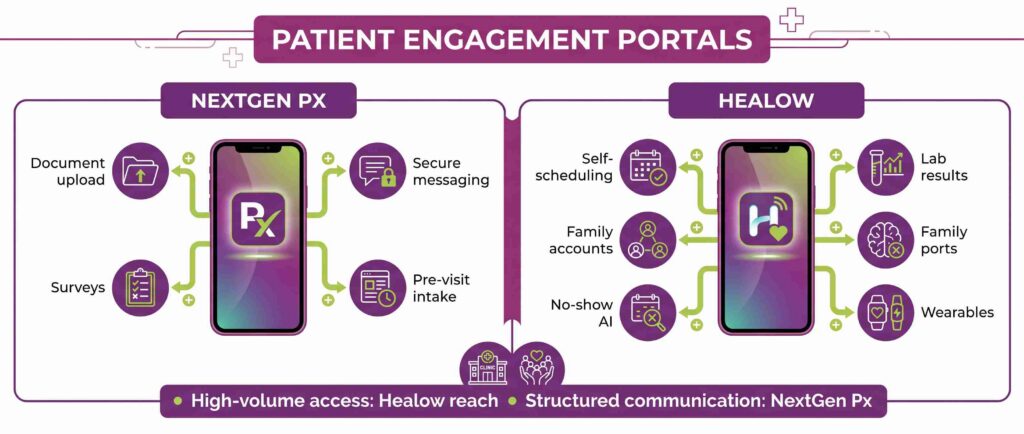
The eCW Healow ecosystem is one of the most widely downloaded patient apps in the industry, and it is not close. It covers self-scheduling, lab result access, and family account management, and it layers in AI-powered no-show predictions plus wearable device integration for lifestyle tracking.
A community health center or urgent care that depends on high patient volume and walk-in convenience will likely get more mileage out of Healow’s broader consumer reach than out of NextGen Px.
Reporting, Analytics, and Industry Ratings
| Category | NextGen Healthcare | eClinicalWorks |
|---|---|---|
| Analytics Engine | Strong financial and operational dashboards for large, multi-site practices | eBO (Business Optimizer): color-coded tiles and canned reports, widely considered superior for data visualization |
| User Sentiment | Analyst Score: 83/100. User Recommendation: 77 percent. Praised for custom templates, noted as complex to learn. | Analyst Score: 81/100. User Recommendation: 69 percent. Praised for all-in-one features, critiqued for UI and support speed |
| Recent Awards | Best in KLAS 2024 for Behavioral Health | #1 EHR and PM by Black Book 2024, seventh consecutive year, plus KLAS 2024 “Most Improved” |
Neither score is dramatically higher than the other, which tells you something on its own. These are two mature platforms with loyal user bases and legitimate weaknesses. The difference is in what each weakness costs a given practice, not in overall quality.
Implementation Complexity, Timelines, and Onboarding
| Feature | eClinicalWorks | NextGen Enterprise | NextGen Office |
|---|---|---|---|
| Ease of Setup | Moderate. Works out-of-the-box for primary care, but the sheer number of menus and templates can overwhelm new users | Hard. Requires significant time, budget, and a dedicated internal IT project manager | Easy. Lighter, web-based system built for quick deployment without IT staff |
| Customization Burden | Workflows must map to eCW’s existing structure. Setting up macros and favorites takes upfront time | Highly modular. Templates, coding rules, and macros must be built before the system is fully usable | Minimal customization needed. Standard templates work with basic tweaking |
| Network and Hardware | Cloud-based SaaS. Requires strong internet and a modern browser or desktop client. No on-premises servers | Often requires on-premises servers or managed cloud hosting, heavily dependent on network architecture | Cloud-based SaaS. Runs easily on basic laptops and tablets |
| Timeline | 60 to 90 days | 4 to 8 months | 30 to 60 days |
eClinicalWorks moves fast on the technical side because everything is cloud-hosted, but staff frequently run into the deep menu hierarchy once they start actually using it day to day. Training usually involves a designated eCW project manager working remotely with the team, though some users describe that training as rushed given how much there is to learn.
NextGen Enterprise is the outlier here, and it is worth being honest about that. Four to eight months is a real commitment. It involves dedicated workflow analysis, custom template building, and extensive Mirth Connect configuration, usually across multiple phases of on-site or intensive virtual training.
This is not a bad system. It is a system built for practices that have the internal resources to support a longer rollout in exchange for a highly tailored result.
NextGen Office, on the other hand, is genuinely quick. Most small practices go live within a month or two with minimal disruption.
Data Migration and Support
Moving patient demographics, charts, and billing history out of a legacy system is usually the part nobody plans enough time for, and it often becomes the actual bottleneck in a switch.
eClinicalWorks uses a standardized data import tool. Demographic data and basic clinical information such as allergies, medications, and problem lists move over cleanly. Unstructured notes and custom templates from an older system are a different story, and mapping those can get messy.
Support during this phase is generally adequate, though ticketing has been reported to slow down during critical data-mapping problems, which is not the moment you want a slow response.
NextGen performs noticeably better here, particularly on the Enterprise side. Because NextGen owns Mirth Connect, its migration teams, or third-party consultants working within that ecosystem, can build custom scripts to extract, clean, and map complex historical data from legacy systems rather than relying on a one-size-fits-all import tool.
Small and Independent Practices: NextGen Office vs. eClinicalWorks
NextGen Enterprise is built for large, multi-specialty groups, but NextGen Office is a completely different product aimed at practices with one to ten providers. Compared against eClinicalWorks, which scales from small clinics up to enterprise networks, the experience for a small practice differs quite a bit.
| Feature/Metric | NextGen Office | eClinicalWorks (eCW) |
|---|---|---|
| Target Audience | Solo practitioners and small independent clinics with no dedicated IT staff | Small to mid-sized clinics, urgent cares, and community health centers |
| Starting Price | About $549 to $660 per provider/month | Flat rate of $449/provider/month (EHR) or $599/provider/month (EHR + PM) |
| Ease of Use | Lighter, web-based, minimal setup, praised for intuitive billing and scheduling | Comprehensive but heavier, often described as click-heavy, steeper learning curve |
| User Satisfaction | Averages around 4.0/5 on major review platforms | Averages around 3.3/5, with users critiquing training and support |
| Customer Support | Higher ratings for prompt ticket resolution | Often cited as a weakness, slower response times on critical tickets |
| Deployment Speed | Fast, out-of-the-box ready with pre-loaded specialty templates | Moderate, longer setup due to the number of customizable settings |
If you run a small, independent clinic and want an affordable, easy-to-learn system with strong customer support, NextGen Office is the stronger choice based on this data. eClinicalWorks makes more sense if you anticipate rapid growth and want an all-in-one platform with aggressive patient engagement tools like Healow already built in from day one.
AI Medical Scribes: NextGen Ambient Assist vs. Sunoh.ai
Ambient AI scribes are probably the fastest-moving part of this comparison, since both vendors are actively investing in tools that listen to the patient-provider conversation and generate structured notes automatically.
| Feature | NextGen Ambient Assist | Sunoh.ai (eClinicalWorks) |
|---|---|---|
| Pricing Model | Custom quote, usually bundled into the NextGen contract | Transparent flat $99/month add-on |
| Workflow Integration | Native to the NextGen Mobile app, providers can review and sign notes from a phone before the patient leaves the room | Integrated across iOS, Android, and web, maps transcripts directly to specific fields in the eCW chart |
| Advanced Clinical Suggestions | Suggests ICD-10 codes, medications, and lab or imaging orders based on visit context | Focuses on structuring the draft clinical summary and slotting data into Smart Forms accurately |
| Pre-Visit Cognitive Load | Generates rapid patient summaries by reading existing chart history before the visit | Relies more on PRISMA’s chart timeline for pre-visit review, while Sunoh handles the live encounter |
| Reported Time Savings | Providers save an average of 2.5 hours per day, weekend charting nearly eliminated | Similar time savings reported, after-hours documentation largely eliminated |
Sunoh.ai wins on price clarity, plain and simple. NextGen Ambient Assist costs more to figure out upfront, but it does more than transcribe. Suggesting codes and orders based on live conversation context is a meaningfully different capability than structuring a transcript, even if both tools save a comparable amount of time by the end of the day.
The Final Verdict
Choose eClinicalWorks if your practice operates in primary care, urgent care, or a community health center and you want predictable subscription pricing, strong billing automation out of the box, and the most widely adopted patient app in the industry.
Choose NextGen if your practice is multi-specialty, behavioral health, or surgical, and you need deep clinical template customization, serious Mirth Connect integration capability, and financial analytics built for complex, multi-site operations, assuming your budget and timeline can absorb a longer implementation.
For practices still weighing whether billing should stay in-house, it is worth running the actual numbers before deciding. Hiring, training, and retaining an internal billing team is not cheap, and denial rates tend to creep up when staff is stretched thin across coding, follow-up, and patient calls all at once.
Practices that Outsource NextGen Billing typically do so to access advanced claim scrubbing and financial reporting without carrying that overhead internally. Practices that outsource eCW Billing are usually drawn to the transparent 2.9 percent structure and Healow Pay’s ability to collect from patients faster than a mailed statement ever could.
Neither platform is universally better. NextGen rewards practices willing to invest time and budget into a tailored system. eClinicalWorks rewards practices that want to move fast and lean on a large, well-supported patient ecosystem.
The right answer depends on your specialty mix, your staff’s comfort with a learning curve, and how much control you want over financial reporting versus how much you are willing to hand off to automation.