ModMed billing starts in EMA, the Electronic Medical Assistant, and finishes inside ModMed PM. ModMed PM creates a clinical bill once the provider finalizes the visit note in EMA. Claims pass through practice-specific scrub rules in ModMed PM before submission to the clearinghouse.
The clearinghouse then applies its payer-specific edits and supports electronic claim submission and remittance processing. In August 2026, ModMed announced its agentic RCM AI Platform to help practices reduce denials. Denial Assessment flags risky claims, and ModMed Scribe 2.0 has processed one million patient visits.

MGMA polling shows 48% of group leaders name denials and appeals their biggest revenue leak. This ModMed billing guide covers setup, workflow, specialty rules, pricing, challenges, and outsourcing options. Dermatology, ophthalmology, orthopedics, GI, and pain management teams will find billing rules for their specialty.
What Is ModMed, and Why Do Specialty Practices Rely on It?
ModMed is a cloud-based specialty EHR and practice management platform, formerly known as Modernizing Medicine. Specialty practices rely on it because templates, coding, and billing follow each specialty’s clinical workflow. Because EMA feeds ModMed PM directly, ModMed billing results depend on EMA setup and configuration.
A Specialty-Built Platform
EMA, the Electronic Medical Assistant, is ModMed’s specialty-specific EHR with workflows tailored to each specialty. ModMed PM integrates fully with EMA and handles scheduling, billing, document management, and reporting.
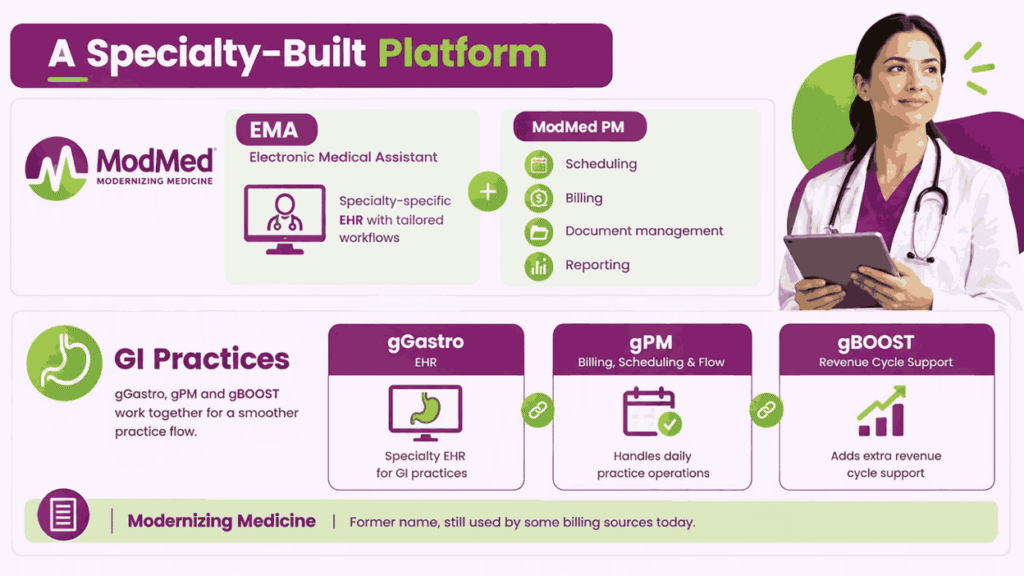
GI practices use gGastro as the EHR and gPM for billing, scheduling, and office flow. gPM integrates fully with gGastro, while gBOOST provides additional revenue cycle support for those practices. Modernizing Medicine is the former name, and some billing sources still use it today.
What Makes ModMed Distinctive
Five capabilities set ModMed apart from general-purpose EHRs when billing accuracy matters to your practice:
- Specialty Templates: EMA templates are built by specialty physicians, so documentation matches how each specialty works.
- Suggested Coding: EMA generates ICD-10 codes, billing codes, orders, and encounter forms while providers document the exam.
- ModMed Scribe: ModMed Scribe 2.0 works natively inside EMA and turns exam-room dialogue into suggested billing codes.
- Denial Assessment: Denial Assessment checks claims against specialty-specific rules and flags errors before payers receive them.
- ModMed Pay: ModMed Pay syncs payments to ModMed PM with text-to-pay, autopay, and payment plans.
What Changed in ModMed During 2026
ModMed is expanding its AI-Powered Practice with tools for clinical documentation, billing, and front-office operations. Scribe 2.0 launched in November 2025 and surpassed one million patient visits by June 2026. In August 2026, ModMed announced its agentic RCM AI Platform for specialty revenue cycle management.
AI RCM Agents generate appeal packages, suggest claim edits, validate claims, and execute resubmissions. Buying the platform requires ModMed PM, and parts already run inside ModMed RCM Services. A Billing Assistant on the roadmap guides staff through denied claims and suggested resolution actions.
Enhanced Faxing, Denial Assessment, and Support Assistant arrived in 2025, and 2026 builds on them. ModMed will showcase the platform at MOMENTUM in Orlando from October 16 to 18, 2026. These tools help most when practices configure them correctly, as the setup section explains later.
Who Is ModMed Designed For, and Which Specialties Does It Serve?
ModMed serves specialty practices that need documentation, scheduling, and billing built around clinical workflows. Knowing where your practice fits helps you configure ModMed billing correctly from the first day.
Practice Types Supported
ModMed tailors its EHR and practice management software to small practices and midsize groups. Midsize groups get multi-location scheduling and AI-powered claim denial assessment as patient volumes grow.
Orthopedic Partners is rolling out ModMed’s AI-Powered Practice across more than 55 locations enterprise-wide. Practice size shapes billing needs, from one shared biller to dedicated teams per location.
Specialty Coverage
ModMed serves 11 specialties, such as:
- Allergy
- Dermatology
- ENT
- Gastroenterology
- OBGYN
- Ophthalmology
- Orthopedics
- Pain Management
- Plastic Surgery
- Podiatry
- Urology
Dermatology billing hinges on modifier 25, while ophthalmology relies on 920xx eye visit codes. Orthopedics brings global periods, and pain management depends on prior authorization for many procedures. GI practices must separate screening from diagnostic colonoscopies, and a later section covers each rule.
Who Operates ModMed Day to Day
Providers document in EMA, and ModMed generates suggested billing codes as the exam is entered. Front desk teams use ModMed Kiosk and Mobile Check-In for paperless intake and payment collection.
Billing staff use ModMed PM tasks, dashboards, and reports to manage claims, denials, and balances. Short-staffed practices can add ModMed RCM Services, with billing specialists and a dedicated client manager.
How Do You Set Up ModMed for a Medical Practice?
Setup shapes your ModMed billing results, because early configuration choices flow into every later claim. This section covers the implementation path, four configuration stages, and mistakes that quietly cost revenue.
What the Implementation Process Looks Like
ModMed structures EMA onboarding into three progressive phases: Adoption, Stabilization, and Optimization, with educator-led training. Educators run knowledge checks during training to confirm your team is ready before go-live. VAST, or Virtual Adoption Support and Training, offers virtual workshops to help practices go live.
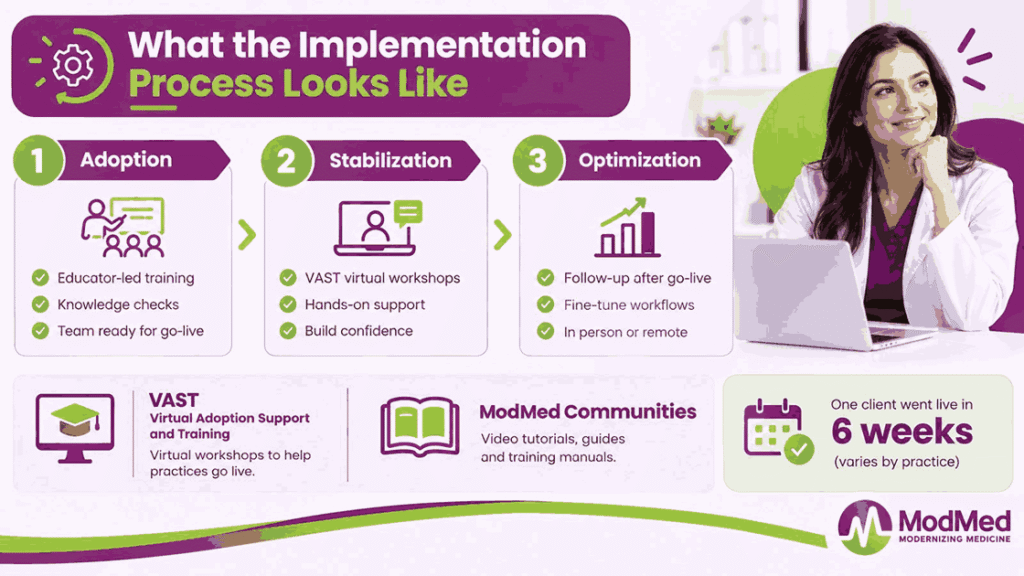
ModMed Communities, formerly ModMed Central, hosts EMA video tutorials, quick reference guides, and training manuals. One ModMed client reports going live after only 6 weeks of training, though timelines vary. ModMed follows up after go-live to fine-tune workflows with your staff, in person or remotely.
Four Configuration Stages for Billing-Ready Setup
Billing-ready setup follows four stages, and skipping any one of them creates rework after go-live.
Stage 1: Provider and NPI Profile
Load each provider’s NPI, taxonomy code, and license, plus the group NPI and Tax ID. A mismatch between these identifiers and payer records triggers rejections before claims reach adjudication.
Stage 2: Payer Enrollment and Eligibility
Enroll providers with every payer, then load verified payer IDs and legacy payers into PM. Turn on eligibility verification so coverage problems surface before the visit, not after the claim. Credentialing often takes 90 to 120 days after submission, so start enrollment well before go-live.
Stage 3: EMA Templates and Coding Setup
ModMed lets you configure protocols, consent forms, review of systems, and inventory before going live. Review EMA’s suggested codes with your coder, so templates support accurate E/M levels and modifiers.
Stage 4: Clearinghouse and Scrub Rules
ModMed PM includes a clearinghouse interface, and customizable scrub rules check claims before submission. Replace default scrub rules with payer-specific edits by CPT code, modifier, provider, and location. Enroll for ERA with each payer, then test remittance posting before live claims begin flowing.
Common Setup Mistakes That Hurt Billing Later
Five setup mistakes commonly hurt billing, and each one is cheaper to fix before go-live.
- Default Scrub Rules Left Unchanged: Generic edits miss payer-specific requirements, so rejections pile up at the clearinghouse after go-live.
- Unverified Payer IDs and Enrollment Gaps: Wrong payer IDs or missing enrollments reject claims before payers can even review them.
- ERA Enrollment Skipped or Untested: Without tested ERA enrollment, staff post payments by hand and reconciliation errors build quietly.
- Coding Templates Configured without a Coder: Templates built without coder input can lead to under-coding and missing modifiers on claims.
- Billing Staff Trained Late: Training billers after go-live delays denial work while A/R aging climbs past thirty days.
What Are the Core ModMed Features That Matter for Billing?
Seven ModMed features shape billing outcomes more than any others inside EMA and ModMed PM. Knowing what each one does helps you configure it correctly and spot where billing leaks.
- Suggested Coding in EMA: EMA generates ICD-10 codes, billing codes, and encounter forms from data providers enter during exams.
- Custom Scrub Rules: ModMed’s customizable scrub rules let billers catch payer-specific errors before claims leave your practice.
- Built-in Clearinghouse: ModMed PM includes a built-in clearinghouse that reviews each claim before it reaches the payer.
- Denial Assessment: Denial Assessment checks claims against specialty-specific rules and flags likely errors before payers receive them.
- ERA Posting: ERA posting applies remittance advice to patient ledgers so payments reconcile without manual entry.
- ModMed Pay: ModMed Pay syncs payments to ModMed PM with text to pay, autopay, and payment plans.
- Quoting Tool: The Quoting Tool provides patient cost quotes that clarify potential costs before treatment begins.
Included vs. Paid Add-ons
Not all ModMed features come bundled, so confirm inclusions in writing before you sign. ModMed’s ENT pricing page marks BOOST RCM as an add-on carrying additional charges for practices. ModMed Pay setup, terminals, and payment processing fees are also not included in that package.
How Does the Billing Workflow Run Inside ModMed?
ModMed billing runs as one connected flow from exam room to final patient balance. Understanding each handoff shows you where claims stall, rejections start, and revenue quietly leaks.
How Charges Move From EMA to PM
Providers document the exam in EMA, which generates suggested billing codes as they enter findings. ModMed PM then creates a clinical bill, or electronic superbill, once the note is finalized.
Charges flow into PM without manual re-entry, so coding accuracy depends on EMA documentation. Practices using other PM systems can connect EMA through HL7 interfaces for billing and charges.
The Full Billing Workflow in Six Stages
Follow each stage from patient registration to final billing to understand how ModMed moves claims toward payment:
Stage 1: Registration and Eligibility
Staff captures demographics and insurance through ModMed Kiosk, Mobile Check-In, or the front desk. ModMed’s eligibility system scans major payers before the appointment so coverage problems surface early.
Stage 2: Charge Capture and Coding
EMA suggests ICD-10 and billing codes, and coders review E/M levels and modifiers first. Documentation gaps caught here prevent under-coding and costly denials later in the claim lifecycle.
Stage 3: Scrubbing and Submission
Scrub rules and the built-in clearinghouse review each claim before it reaches the payer. Denial Assessment adds a final check against specialty-specific rules before claims go to payers.
Stage 4: ERA Posting
Payers send electronic remittance advice (ERA) files through the clearinghouse according to their processing and delivery schedules. Posting applies payments, adjustments, and contractual write-offs to the appropriate patient and account records.
Stage 5: Denial Management
Billers sort denials by CARC and RARC codes, then correct, appeal, or resubmit each claim. ModMed’s drill-down dashboards break denials down by payer, code, and provider to reveal patterns.
Stage 6: A/R Follow-Up and Patient Billing
Billers work aging claims daily, prioritizing the oldest balances and payers with repeated delays. Patients receive eStatements and can pay online, by text, or through autopay with ModMed Pay.
ModMed Billing Pricing: What It Actually Costs
ModMed does not publish a standard price list, so practices request a custom quote. Software quotes vary by specialty and modules, and ModMed RCM Services carry additional charges. Hidden costs include ModMed Pay setup, payment terminals, processing fees, and additional service charges. Compare quotes by cost to collect, not only the monthly fee or percentage rate.
How Does Specialty Billing Work Inside ModMed?
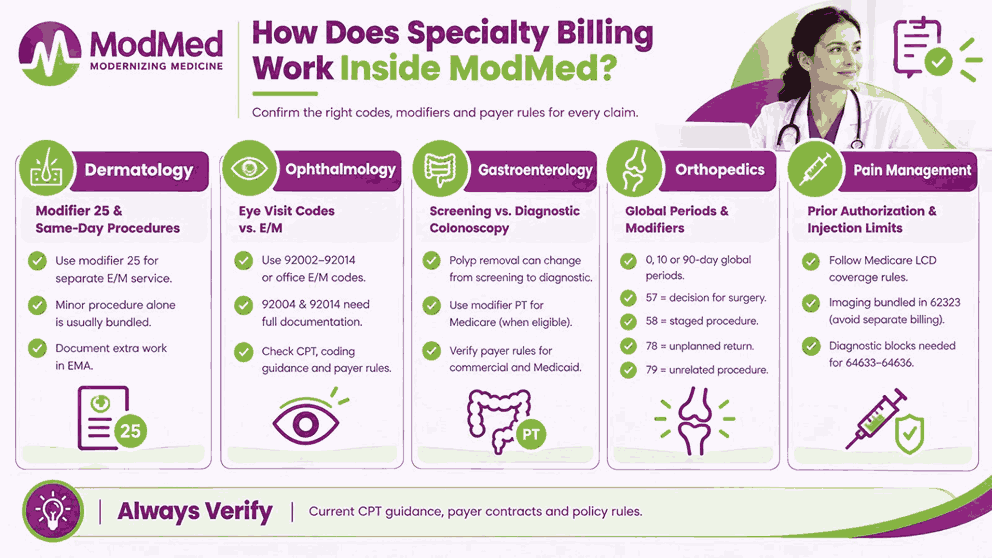
ModMed builds EMA around specialty workflows, but payer rules still decide whether each claim pays. Verify every code and modifier below against current CPT guidance and your payer contracts.
Dermatology: Modifier 25 and Same-Day Procedures
Modifier 25 identifies a significant, separately identifiable E/M service provided on the same day as a procedure. An E/M service performed only to decide on a minor procedure is generally included in the procedure payment. Document the additional evaluation and management work clearly in EMA, ensuring the record supports a separately reportable service beyond the usual procedure-related work.
Ophthalmology: Eye Visit Codes vs. E/M
Ophthalmology practices may report general ophthalmological service codes 92002–92014 or appropriate office E/M codes, depending on the services provided. Comprehensive examination codes 92004 and 92014 require documentation that supports the comprehensive service and its associated diagnostic or treatment plan. Check the current CPT descriptors, applicable coding guidance, and payer policies before selecting the code.
Gastroenterology: Screening vs. Diagnostic Colonoscopy
A screening colonoscopy may become diagnostic or therapeutic when a provider finds and removes polyps during the procedure. For eligible Medicare claims, modifier PT identifies a screening colonoscopy converted to a diagnostic or therapeutic service.
Commercial and Medicaid plans may have different modifier requirements, so verify the applicable payer policy before submission. Medicare beneficiaries generally owe 15% coinsurance for the provider’s services when a polyp or other tissue is removed, although the exact amount depends on the setting and applicable coverage rules.
Orthopedics: Global Periods and Modifiers
Surgical codes carry 0-day, 10-day, or 90-day global periods that bundle routine postoperative care. Modifier 57 marks the decision for surgery, and modifier 58 marks a planned staged procedure. Modifier 78 covers unplanned related returns to the OR, and modifier 79 covers unrelated procedures.
Pain Management: Prior Authorization and Injection Limits
Many epidural steroid injection claims must meet Medicare LCD coverage rules, including documented medical necessity. Imaging guidance is bundled into codes like 62323, so billing fluoroscopy separately triggers denials.
Radiofrequency ablation codes 64633 through 64636 generally require documented diagnostic blocks before the procedure. Check prior authorization requirements and payer frequency limits before scheduling any injection or ablation.
In ModMed, build these rules into scrub rules so errors are caught before submission.
What Are the Real Challenges Practices Face With ModMed Billing?
ModMed earns strong marks for specialty charting, but billing is where many reviewers report friction. These five challenges come from user reviews, so weigh them against your practice size.
Support Responsiveness
Reviewers frequently describe slow support responses when technical or billing issues need escalation to ModMed. Opinions are mixed, though, and some customers praise their customer success manager and support teams. Document every billing ticket, and escalate recurring issues before they quietly age your A/R.
Onboarding and Learning Curve
Several reviewers call the learning curve manageable, while others report onboarding challenges for new staff. ModMed offers educator-led training, VAST workshops, and ModMed Communities to support your team’s go-live readiness. Train billers on scrub rules, ERA posting, and denial queues before go-live, not after.
Pricing Transparency and Contract Surprises
Reviewers cite high per-user costs, unexpected fees, and billing that began before full implementation. Some also mention multi-year contracts and add-on charges for services like faxing and integrations. Request an itemized written quote covering modules, ModMed Pay fees, and RCM Services before signing.
Under-Coding and Manual Code Edits
Several Capterra reviewers say they must manually edit codes because ModMed under-codes visits. Under-coded E/M levels and missing modifiers quietly reduce payer reimbursement on every affected claim. ModMed’s suggested codes are a starting point, so certified coders should review them before submission.
Denial Follow-Through and Reporting Limits
Denial Assessment flags risky claims, but staff still must correct, appeal, and track every denial. Some reviewers say reporting needs to be more customizable and less error-prone, which limits analysis. ModMed’s drill-down dashboards show denials by payer, code, and provider, but staff must act.
Should You Use ModMed’s Own RCM Service, Outsource, or Bill In-House?
The right choice depends on coding needs, team capacity, reporting expectations, and cost to collect. ModMed RCM Services pairs billing specialists and certified coders with a dedicated client manager. Here is how the three options compare on the factors that most affect collections.
| Factor | ModMed RCM Services (BOOST) | Transcure | In-House Billing |
|---|---|---|---|
| Team Assignment | Dedicated billers inside your PM, plus a monthly client manager call | Named, dedicated billers and coders per practice from day one | Your own staff; coverage depends on one or two people |
| Coding Coverage | Certified coders included | 1100+ AAPC and AHIMA-certified coders, plus CODIN | Needs a certified coder or outsourced coding |
| Pricing | No public rate; quote required | 5% of collections, no onboarding fees, coding included | Salaries, benefits, training, and software costs |
| AI Agents | AI denial assessment, plus RCM AI Platform inside RCM Services | 7 dedicated AI agents | Depends on the tools you buy |
| Reporting Depth | Dashboards for aged A/R, net collection ratio, and DSO | Monthly KPI reviews against specialty medians, no upcharge | Depends on staff time and ModMed report setup |
Choose ModMed RCM Services if you want one vendor for software, billing, and support. Otherwise, choose an independent partner like Transcure if you want dedicated coders, transparent pricing, and added specialty depth. Practices that want hands-on ModMed support can also explore our EMR billing services for claims, denials, and A/R.
How Does Transcure Help Practices Get Better Billing Results on ModMed?
ModMed supplies strong billing tools, but results depend on how skilled people use them. Transcure closes that gap with certified billers, specialty configuration, and AI agents inside ModMed PM.
Where the Gap Between the Software and the Results Lives
Revenue-cycle problems remain a concern for medical practices. In a January 2026 MGMA Stat poll, 48% of respondents identified denials and appeals as their biggest revenue-cycle leak. Change Healthcare’s 2020 Denials Index reported that 86% of analyzed hospital claim denials were potentially avoidable.
Industry estimates of denial rework costs vary, so practices should use their own staffing costs and claim data to calculate the financial impact. Change Healthcare also estimated that reworking a denied claim costs providers roughly $118 per claim.
Change Healthcare data shows about 12% of claims were denied upon initial submission in 2022. Specialty practices on ModMed are not exempt, so prevention beats chasing denials after submission.
What Transcure Does Differently Inside ModMed
Five capabilities separate Transcure’s ModMed billing from generic outsourcing, and each targets a specific leak.
- Specialty-specific Configuration: Transcure rebuilds scrub rules and coding logic around each specialty’s modifiers, global periods, and authorizations.
- Denial Prevention: ELIXA verifies eligibility, PRIA tracks authorizations, and CODIN validates codes before claims reach the clearinghouse.
- Structured Denial Management: DEXA traces each denial by CARC and RARC code, and billers appeal it inside ModMed.
- A/R Recovery: Dedicated callers work aging claims daily, prioritizing the oldest balances and payers with repeated delays.
- Reporting: Account managers review denials, days in A/R, and net collections against specialty benchmarks monthly.
Apart from the above, the following table also helps you see the real results after choosing Transcure ModMed billing services:
| Without Transcure | With Transcure |
|---|---|
| Default scrub rules and repeat rejections | Payer-specific scrub rules and cleaner first-pass claims |
| Manual code edits and under-coded visits | Certified coder review before submission |
| Denials worked when time allows | Every denial traced by CARC and appealed |
| Aging A/R with no clear owner | Daily A/R follow-up by named callers |
| Occasional ad hoc reports | Monthly KPI reviews with specialty benchmarks |
Which Practices Transcure Works With on ModMed
Transcure works with specialty practices on ModMed EMA and PM, from solo providers to groups. Teams include dermatology, ophthalmology, orthopedics, ENT, pain management, plastic surgery, podiatry, OBGYN, GI, and urology.
Practices with small billing teams, rising denials, or under-coding concerns benefit most from outsourced support. Transcure signs a BAA and works inside your ModMed login, so your workflow stays intact.
Frequently Asked Questions About ModMed Billing
Does ModMed offer Billing Services?
Yes, ModMed RCM Services, also called BOOST, uses billing specialists working inside ModMed PM. ModMed PM scrubs claims, while RCM Services adds certified coders and a client manager.
What is ModMed BOOST?
ModMed BOOST is an in-house billing service combining practice management software with billing specialists. ModMed markets it as ModMed RCM Services, and the older gBOOST name covers gastroenterology.
How Much does ModMed Billing Cost?
ModMed does not publish a price list, so practices must request a custom quote. Request itemized quotes covering modules, RCM Services, ModMed Pay fees, and setup before signing.
Can you Outsource Billing without Leaving ModMed?
Yes, outsourced billers can work inside your ModMed PM login without changing your EHR. Your practice keeps EMA documentation, while the partner handles claims, denials, A/R, and reporting.
Why Does ModMed Under-code Visits?
Some reviewers report manually editing ModMed’s suggested codes because they believe visits are under-coded. Documentation depth drives suggested levels, so certified coders should audit codes against each note.
What is Denial Assessment?
Denial Assessment is a ModMed PM feature evaluating claims against specialty-specific rules before submission. It flags likely denials, but staff must still correct errors and work remaining denials.
How Long Does Implementation Take?
ModMed publishes no fixed timeline, but one client reported going live after six weeks. Third-party estimates run nine to seventeen weeks, so plan around payer enrollment and migration.
Can you Migrate Data off ModMed?
Yes. ModMed publishes EHI Export documentation for EMA, including data dictionaries for single-patient and bulk-population exports. Before migrating, confirm which clinical and billing data can be exported, the available file formats, the scope of the export, and any applicable fees or access restrictions with ModMed.
Is ModMed HIPAA Compliant?
ModMed says its cloud platform’s end-to-end encryption helps support your practice’s HIPAA compliance efforts. Compliance still depends on your safeguards, so sign a BAA and verify ONC certification.