Most practices don’t lose revenue because of poor care; they lose it because unpaid claims sit untouched for months. NextGen gives billing teams the tools to stop that slide, but the software only works when the process is clear.
This blog post explains how collections and A/R management work inside NextGen, from aging reports to patient statements. You will also see benchmarks, denial codes, and a clear workflow your team can follow each week.

What Collections and A/R Management Mean in NextGen
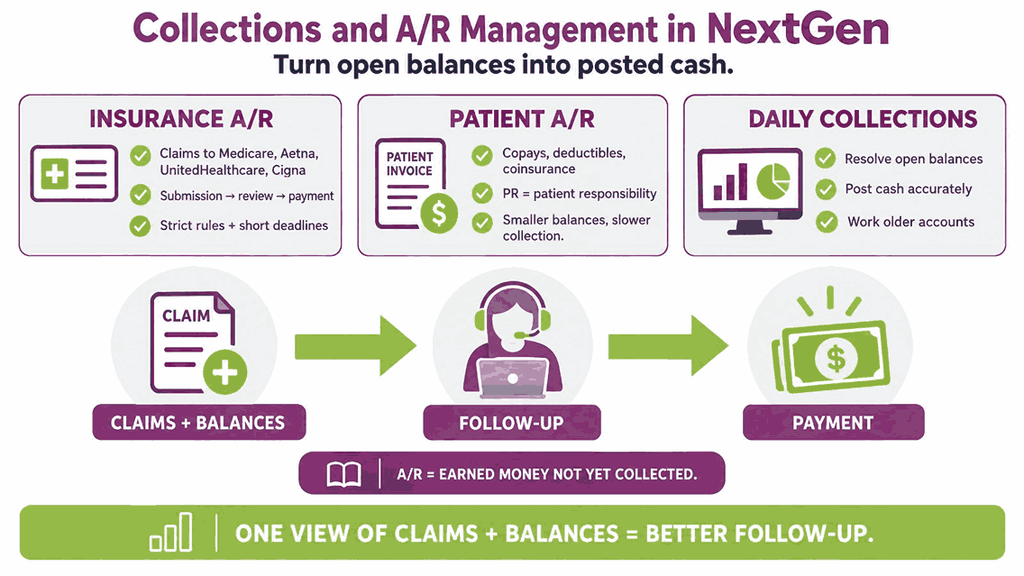
Accounts receivable, or A/R, is the money a practice has earned but not yet collected. Every unpaid claim and every open patient balance sits in A/R until someone resolves it. Collections is the daily work of turning those open balances into posted cash payments.
NextGen handles both sides inside its practice management system, so billers see claims and balances in one place. Many practices pair the software with nextgen medical billing services for older, harder accounts.
Insurance A/R
Insurance A/R covers claims sent to payers such as Medicare, Aetna, UnitedHealthcare, and Cigna. These claims move through submission, acceptance, payer review, and payment, and each stage can stall. Most of your overdue dollars usually sit here because payer rules are strict and deadlines are short.
Patient A/R
Patient A/R is the portion the patient owes after insurance pays, including copays, deductibles, and coinsurance. On remittance advice, these amounts appear under group code PR, which stands for patient responsibility. Patient balances are smaller, but they are slower to collect and cost more per dollar.
Why A/R Management Matters for Your Practice
Cash flow depends on how fast claims turn into payments, not on how many claims you send. A practice that bills well but collects slowly will still struggle to cover payroll.
Older claims are also harder to win because payers enforce strict timely filing and appeal limits. For example, Medicare allows one calendar year from the date of service to file a claim. Many commercial payers set windows between 90 and 180 days, and CARC 29 flags a missed deadline.
Use these common industry benchmarks to judge whether your A/R is healthy or slipping.
| Metric | Healthy Target | Warning Sign |
|---|---|---|
| Days in A/R | 30 to 40 days | Above 50 days |
| A/R over 90 days | Under 15 percent | Above 25 percent |
| Net collection rate | 95 percent or higher | Below 90 percent |
| First pass acceptance rate | 95 percent or higher | Below 90 percent |
| Denial rate | Under 5 percent | Above 10 percent |
Good RCM Services track these numbers every week, because a small slip becomes a large backlog quickly.
How NextGen Tracks Accounts Receivable
NextGen offers several connected tools for A/R, and each one answers a different question. Exact screen names vary by version and setup, so confirm them with your NextGen administrator.
Aging Reports
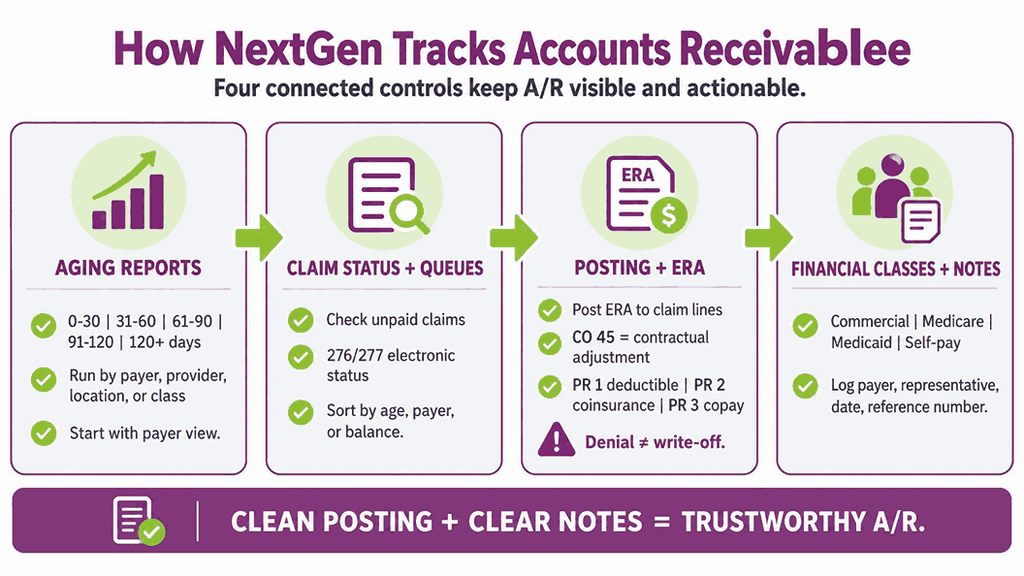
Aging reports group open balances by how long they have been unpaid. The standard buckets are 0 to 30, 31 to 60, 61 to 90, 91 to 120, and over 120 days. You can run them by payer, provider, location, or financial class to find where money is stuck.
Start with the payer view, because one slow payer often explains most of a bad report.
Claim Status and Work Queues
Claims that sit without a payer response need active follow-up after a set number of days. Many teams use claim status checks at 30 days after submission for commercial payers.
Electronic status checks through your clearinghouse, using the 276 and 277 transactions, save hours of phone time. Work queues then sort accounts by age, payer, or balance so staff always know what to touch next.
Work queues are only as accurate as the data that feeds them. Practices using EMR billing services can pull diagnosis codes, procedure codes, and modifiers from the clinical note directly into the claim. That link reduces CO 16 and CO 4 denials at the source. Fewer flawed claims reach the queue, so staff spend their time on true payer delays.
Payment Posting and Remittance Advice
Accurate payment posting is the base of clean A/R, because errors create false balances. NextGen can post electronic remittance advice, or ERA, directly to the claim line. Each adjustment carries a group code and a reason code that explain what happened.
Contractual write-offs use CO 45, which is the difference between your charge and the allowed amount. Patient balances move to PR codes, where PR 1 is deductible, PR 2 is coinsurance, and PR 3 is copay.
Posting a denial as a contractual write-off is a costly mistake that hides recoverable revenue.
Financial Classes and Account Notes
Financial classes group patients by payer type, such as commercial, Medicare, Medicaid, and self-pay. They help decide which statement cycle and follow-up steps apply to each account.
Account notes should record every call, including the payer, representative name, date, and reference number. Good notes stop two staff members from working the same claim twice and wasting a day.
A Weekly A/R Workflow in NextGen
This routine fits most specialties, though you should adjust timing to match your payer mix.
- Run the aging report. Pull the aging report by payer and flag every account older than 60 days.
- Clear rejections first. Fix claims rejected at the clearinghouse before anything else, because payers never saw them.
- Check status on unpaid claims. Request electronic status on claims past 30 days and record the answer in the account notes.
- Work denials by dollar value. Start with the highest balances and the denial reasons your team can fix quickly.
- Appeal with proof. Send appeals with the medical record, correct codes, and payer policy attached, before the deadline.
- Bill the patient. Move true patient responsibility to the patient only after insurance has finished processing the claim.
- Review and report. End the week by comparing days in A/R and A/R over 90 days against last week.
Teams short on time often hand steps two through five to outside medical billing services.
Why Claims Stall in A/R
Most stalled claims trace back to a short list of causes, and the codes tell you where to look.
| Code | Meaning | Typical Fix |
|---|---|---|
| CO 4 | Procedure code does not match the modifier | Correct the modifier and resubmit |
| CO 16 | Claim lacks information or has errors | Add the missing data and resubmit |
| CO 18 | Duplicate claim or service | Confirm original claim status first |
| CO 27 | Coverage ended before the service date | Verify eligibility and bill the correct payer |
| CO 29 | Timely filing limit expired | Appeal with proof of timely submission |
| CO 50 | Service not medically necessary | Appeal with notes and payer policy |
| CO 97 | Service bundled into another payment | Review modifier use, such as 25 or 59 |
| CO 197 | Prior authorization missing | Request a retro authorization if allowed |
Modifier errors deserve special attention, since modifiers 25 and 59 draw frequent payer review. Many of these denials start at the front desk, not in the billing office.
Working Denials Inside NextGen
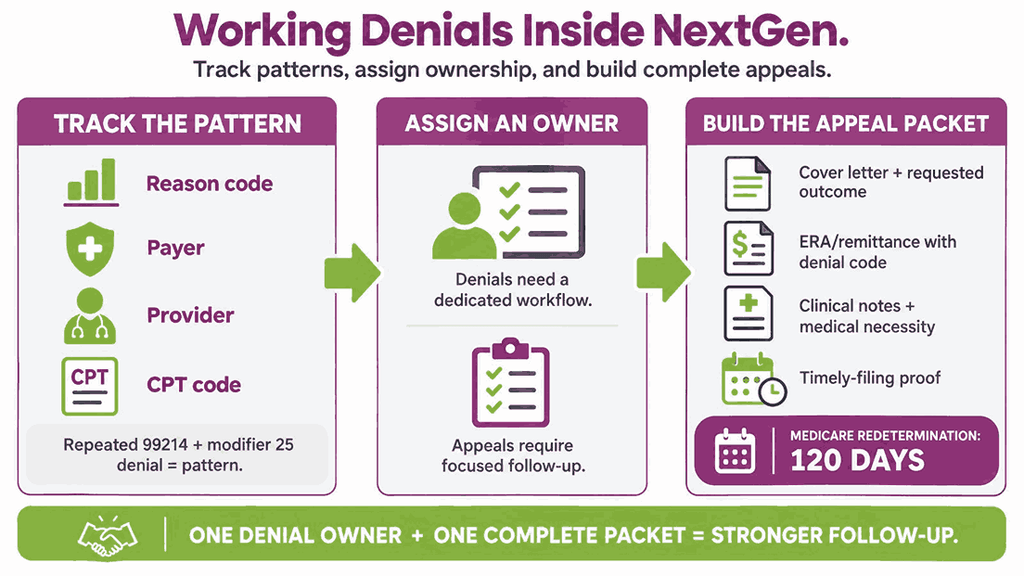
Denials produce much of the old A/R, so they need their own workflow and owner.
Track Denials by Pattern
Track denials by reason code, payer, provider, and CPT code to see patterns. If one payer denies CPT 99214 with modifier 25 repeatedly, the problem is a policy, not a single claim. Dedicated denial management support helps because appeals take time that front-line staff rarely have.
Build a Strong Appeal Packet
Appeal deadlines vary, but Medicare redetermination requests are due within 120 days of receiving the initial determination. A strong packet usually includes these items:
- A short cover letter that states the denial reason and the outcome you want
- A copy of the remittance advice that shows the denial code and payment date
- Clinical notes that support medical necessity for each billed service and diagnosis code
- Proof of timely filing, such as a clearinghouse acceptance report or payer portal screenshot
Patient Collections in NextGen
Patient balances need a different tone and a different schedule than payer claims.
Verify Coverage Before the Visit
Many patient balance problems begin before the visit, when coverage is never checked properly. A reliable Insurance Verification service confirms eligibility, deductible status, and copay amounts before the patient arrives. Collect the copay at check-in, since a balance billed later is collected far less often.
Statements and Cadence
Send the first statement once the payer has processed the claim and the patient share is final. A simple statement cycle keeps pressure steady without damaging the patient relationship.
| Day | Action |
|---|---|
| Day 0 | Send the first statement after payer remittance posts |
| Day 30 | Send a second statement with a payment link |
| Day 60 | Place a reminder call or send a text |
| Day 90 | Send a final notice and offer a payment plan |
| Day 120 | Review for outside collections under written policy |
Statements should show the service date, the insurance payment, and the exact amount owed.
Payment Plans and Online Payments
Patients pay more often when options are easy, so offer card, portal, text link, and installment choices. Set payment plan rules in writing, including the monthly amount, the due date, and the final payment date.
Patients who cannot pay should hear about financial assistance before any collections step begins. Uninsured or self-pay patients must receive a good faith estimate under the No Surprises Act before scheduled care.
Comparison Table: Three Ways to Manage A/R
This table compares the three common models so you can match the approach to your team.
| Factor | Manual Tracking | NextGen Workflow In-House | Outsourced Team |
|---|---|---|---|
| Visibility | Low, spread across sheets and portals | High, built on aging reports | High, through shared reports |
| Staff time | High | Medium | Low for your team |
| Denial handling | Reactive | Depends on staff skill | Dedicated appeals staff |
| Cost pattern | Low software cost, high labor cost | Software plus salaries | Percent of collections or flat fee |
| Best for | Very small practices | Practices with trained billers | Growing or backlogged practices |
Key Metrics to Track Weekly
Numbers tell you where to act, so review these metrics weekly with your billing lead.
- Days in A/R: Divide total A/R by average daily charges to see how long cash takes to arrive.
- Net collection rate: Compare payments collected against the amount you were allowed to collect after contractual adjustments.
- Denial rate: Divide denied claims by total claims submitted, and track it by payer.
- First pass acceptance rate: Measure the share of claims paid correctly on the first submission without edits.
- Patient collection rate: Track the percent of patient balances collected within 90 days of the first statement.
Common A/R Mistakes in NextGen
- Letting small balances age because staff focuses only on the largest claims each week.
- Skipping claim status checks until a claim is already past 60 days old.
- Writing off balances without supervisor review, a documented reason, or a check of appeal rights.
- Billing patients before the payer finishes processing, which leads to refunds and angry calls.
- Ignoring payer-specific rules, such as different filing limits and appeal windows for each payer.
- Leaving account notes blank, so the next person repeats the same calls.
When Outsourcing Makes Sense
Some practices run A/R well in-house, while others fall behind when volume grows. Consider outside help if your A/R over 90 days stays above 25 percent for two months.
Aged claims need payer-specific follow-up, not general reminders. Outsourcing Nextgen billing services can own that work from start to finish. The team runs the aging report by payer, checks 276 and 277 status on claims past 30 days, and files appeals for CO 50 and CO 197 denials before the deadline. Your staff then stays focused on current claims and patient balances.
Where to Start This Month
Pull your current aging report and note the percent of A/R older than 90 days. Then fix the top three denial reasons and set a weekly review meeting with your team. Small, steady habits recover more revenue than one large cleanup that nobody maintains.
What is A/R Management in NextGen?
A/R management in NextGen is the process of tracking, following up on, and collecting every unpaid claim and patient balance. NextGen provides aging reports, claim status tools, payment posting, and patient statements to support that work.
What is a Good Days in A/R Number?
Most practices aim for 30 to 40 days in A/R, though specialty and payer mix change the target. Anything above 50 days usually signals follow-up gaps, billing errors, or slow payers.
How Often Should We Work Aged Claims?
Review claims older than 60 days every week, and give claims past 90 days priority. Delays shrink your chances of payment, and filing or appeal windows keep closing.
What Does CO 45 Mean on a Remittance?
CO 45 means your charge exceeds the contracted or fee schedule amount for that service. The difference is a contractual adjustment, so you write it off and do not bill the patient.
When Should a Patient Balance Go to Outside Collections?
Most practices wait until after 90 to 120 days, and several statements have gone unanswered. Your policy should be written, applied equally to every patient, and reviewed by your compliance lead. Always offer a payment plan or financial assistance review before sending any account out.
Can NextGen Run A/R Reports by Payer and Provider?
Yes, aging and financial reports can usually be filtered by payer, provider, location, and financial class. Your NextGen administrator can confirm which filters and custom reports your version supports.
Should We Outsource A/R Follow-Up?
Outsource when your team cannot review aged claims weekly appeals keep missing deadlines. A trained partner can handle appeals while your staff stays focused on current claims.