NextGen Healthcare continues to expand its EHR platform for ambulatory and multi-specialty clinics in 2026. The system combines clinical documentation, practice management, and revenue cycle tools in one place. This guide breaks down the platform’s core modules, its newer AI capabilities, and the smaller features that often go unnoticed.
Practices evaluating NextGen EHR, or looking to get more value from an existing subscription, will find a full breakdown below. For a deeper look at how billing fits into this platform, the NextGen billing guide covers claim workflows in more detail.

What Makes NextGen EHR Different in 2026?
NextGen EHR is built around a modular architecture rather than a single rigid workflow. Clinics can activate the modules relevant to their specialty and skip the rest.
The platform supports over 30 specialty templates, spanning cardiology, orthopedics, behavioral health, and gastroenterology. This depth of specialty content sets it apart from generic ambulatory EHR systems.
The 2026 platform also leans heavily into AI-assisted documentation and predictive billing tools. These additions target two long-standing pain points in ambulatory care: charting time and claim denials. The sections below cover each major feature area in detail.
Clinical Efficiency and AI Documentation
Charting remains one of the largest time drains in ambulatory care, and NextGen targets this directly through AI-driven tools built into daily workflows.
1. NextGen Ambient Assist
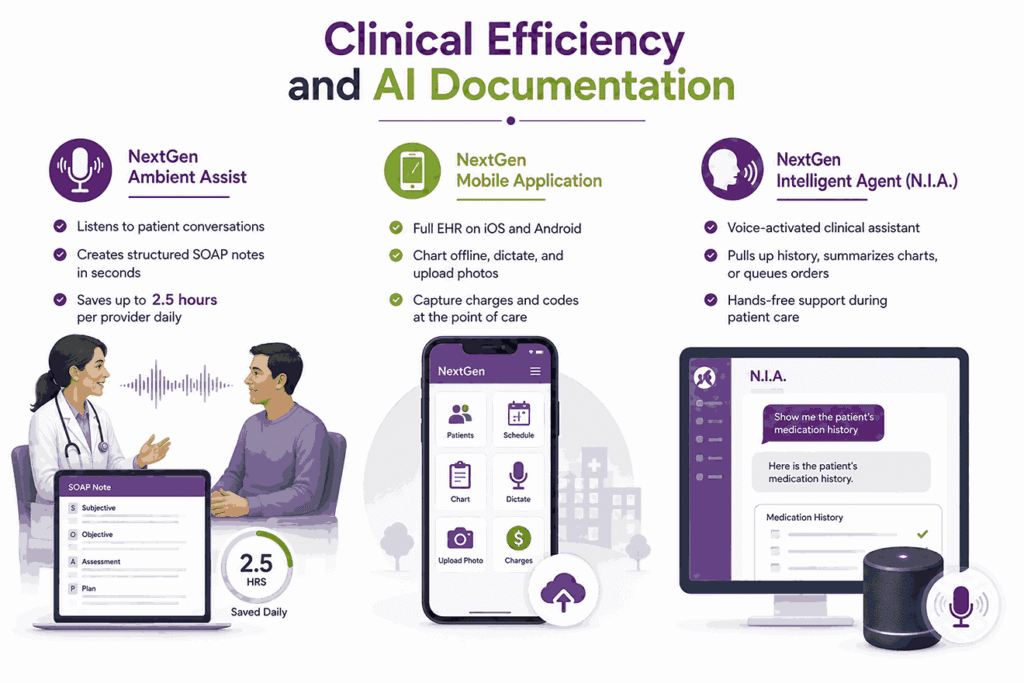
NextGen Ambient Assist listens to natural conversation between a provider and a patient during a visit. It converts that dialogue into a structured SOAP note within seconds. Independent reviews report documentation time savings of up to 2.5 hours per provider each day.
The tool reduces manual typing and lets providers keep eye contact with patients. Generated notes are placed directly into the chart for review and editing before signing.
2. NextGen Mobile Application
The NextGen mobile app brings full EHR functionality to iOS and Android devices. Providers can chart offline, dictate notes with voice-to-text, and upload photos straight into a patient’s record.
The app also supports charge capture at the point of care, so diagnosis and billing codes get added immediately. This matters for specialists who round between multiple locations in a single day.
3. NextGen Intelligent Agent (N.I.A.)
N.I.A. is a voice-activated assistant built into the clinical workflow. Clinicians can ask it to pull up patient history, summarize a chart, or queue an order.
This hands-free design cuts down on clicking through multiple screens during an encounter. It works well for specialties where providers need to stay sterile or hands-free, such as procedural clinics.
Specialty-Specific Workflows
Generic templates rarely fit every specialty, so NextGen builds workflows around the documentation patterns each specialty actually follows in practice.
Adaptive Content Engine (ACE)
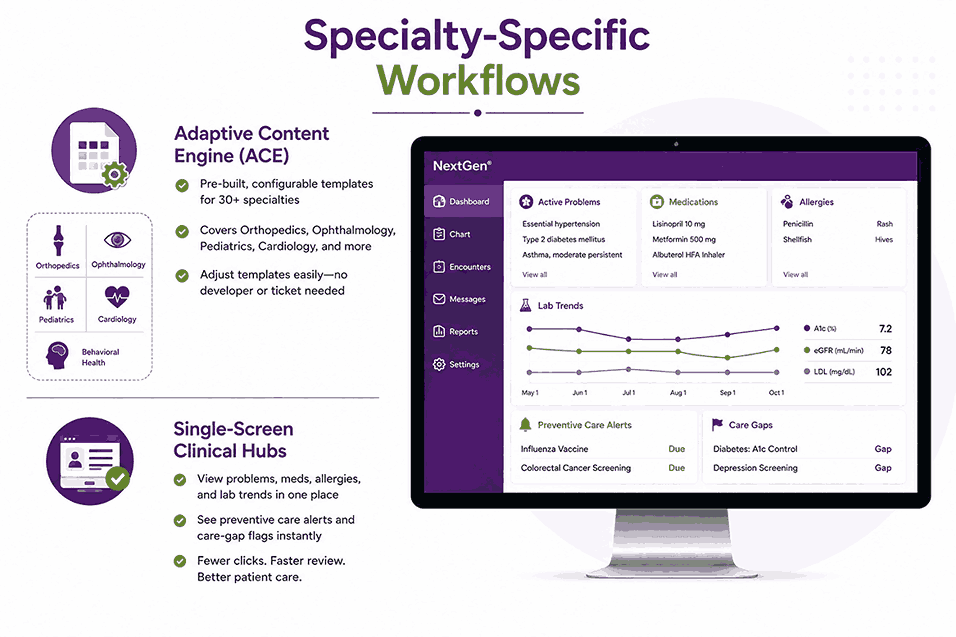
ACE provides practices with a library of prebuilt, configurable templates across more than 30 specialties. Templates cover documentation needs for orthopedics, ophthalmology, pediatrics, cardiology, and behavioral health.
Practice administrators can adjust these templates without needing a developer or a support ticket. This flexibility helps multi-specialty groups maintain consistent documentation across departments.
Single-Screen Clinical Hubs
This feature consolidates a patient’s active problems, medications, allergies, and lab trends onto one dashboard. Providers no longer need to click through separate tabs to see this information.
Preventive care alerts and care-gap flags also appear on the same screen. The result is fewer clicks per visit and a faster review before the provider walks in.
Ten Hidden Features Worth Activating
NextGen includes a set of smaller features that many practices never turn on. These do not appear prominently in the main workflow, but each one adds real efficiency. Below is a breakdown of ten features practices should review with their NextGen administrator.
- Copy User Preferences: Administrators can copy one user’s preference settings to another user or an entire group. This is accessed from the Admin Menu and saves setup time when onboarding new staff.
- Re-sort Columns: Users can drag and reorder column headers on several data grids, including Fax Status, the Inbox for appointments and clinical tasking, Patient Search, and the Appointment List. This lets each staff member prioritize the data that matters most to their role.
- Side-by-Side Templates: With two templates open, users can right-click a tab and choose a new horizontal or vertical tab group. This allows a provider to reference a prior note next to the current one without switching screens.
- APSO View Bar: This bar gives quick access to both the previous and current APSO document. It can be enabled permanently or toggled off when not needed, based on user preference.
- Adding Lab Results to Documents: Users can pull lab results directly into an EHR document while charting. There is an option to filter for abnormal results only, which speeds up review during follow-up visits.
- Moving Panels: Users can collapse all panels for a cleaner view, then drag individual panels to a preferred layout. This customization helps providers build a screen layout that matches their own workflow habits.
- Medication Module Grid Preferences: Users can choose which columns appear in the medication grid, including newer fields like ePA and RxFill status. Column order can also be adjusted to match a provider’s prescribing routine.
- Medication Favorites: Providers can build a favorites list of frequently prescribed medications inside the Medication Module. This removes the need to search for the same drug during every visit.
- Lab Categories: Set up through File Maintenance, this feature lets staff group labs by category and specialty. Once mapped, ordering labs by category becomes a much faster process during a visit.
- Orders Module Filters: Staff with permission can create, edit, or delete filters for orders and results. Filters can apply at the user level or the practice level, depending on how access is configured.
Turning on even three or four of these features can noticeably cut down daily administrative time. Most practices discover them only after a support call, not during initial training.
Financial and Revenue Cycle Management
Billing and collections often decide whether a practice stays profitable, regardless of clinical quality. NextGen addresses this by tying claim generation directly to the documentation a provider already creates. The subsections below cover how the platform handles coding, claims scrubbing, denial prevention, and eligibility checks.
1. Advanced Billing and RCM Engine
NextGen unifies clinical documentation with the billing workflow inside one database. Diagnoses entered during a visit are automatically translated into billing codes. This connection between the chart and the claim reduces the lag between service and submission.
For billing teams, this means fewer manual code entries and fewer transcription errors. Practices that lack in-house billing capacity often pair this engine with dedicated Nextgen Billing Services to manage claim submission and follow-up.
2. Automated Claims Scrubbing
Built-in rules engines check every claim against payer-specific policies before submission. This catches common errors, such as missing modifiers or mismatched diagnosis codes, before a claim reaches the payer.
Practices using this feature typically see a higher first-pass acceptance rate. Fewer claims returned means less rework for billing staff and faster reimbursement cycles.
3. AI Denial Prediction
This feature evaluates historical payer behavior alongside the current claim’s details. It flags claims with a high denial probability before they leave the practice.
Billing staff can then correct the issue proactively instead of appealing after a rejection. This shifts denial management from reactive to preventive, which shortens the overall revenue cycle.
4. Real-Time Eligibility (RTE)
RTE automatically verifies a patient’s insurance eligibility, copay, and deductible balance ahead of their appointment. Front desk staff no longer need to call payers or check separate portals. Patients also arrive with a clearer picture of what they owe, which reduces billing disputes after the visit.
Where Outsourced Billing Support Fits In
The built-in RCM engine handles the mechanics of coding and claim generation. It does not replace the ongoing work of claim tracking, denial appeals, and payer follow-up.
Many practices route this work through specialized NextGen Billing Services so that internal staff can stay focused on patient care rather than on aging claims. This pairing tends to work best for practices running high claim volumes across multiple specialties.
Patient Engagement Ecosystem
Patient expectations now extend beyond the visit itself, and NextGen supports this shift through tools that manage scheduling, intake, and communication end-to-end.
Closed-Loop Digital Front Door
This suite automates the patient journey from first contact through billing. It includes text-to-web self-scheduling, an interactive voice response system, and AI chatbots for common questions. An automated digital waitlist fills last-minute openings, and the system recalls patients who are due for follow-up care.
Digital Intake and Check-In
Patients complete intake forms, scan insurance cards, and sign consent forms electronically before arriving. NextGen supports intake forms in more than 30 languages, which helps practices serving diverse populations. Cost transparency tools run background eligibility checks so patients see estimated costs before their visit.
Integrated Telehealth
Providers can launch a video visit directly from the schedule or from the patient portal. Encounter data from the telehealth visit maps automatically back into the EHR chart. This keeps documentation consistent regardless of whether a visit happens in person or remotely.
Interoperability and Connectivity
Patient records rarely live in one system alone, so NextGen focuses on exchanging data cleanly across labs, hospitals, and outside networks.
Carequality and CommonWell Connections
NextGen connects to Carequality and CommonWell, two of the largest national health data networks. Providers can pull historical summaries, medication lists, and discharge records from outside hospital systems. This reduces the need for faxing records between organizations and speeds up care coordination for new patients.
HL7/FHIR API Framework via Mirth Connect
The platform runs on Mirth Connect, a widely used HL7 and FHIR integration engine. This allows NextGen to exchange data with third-party labs, imaging centers, and regional Health Information Exchanges. Mirth Connect also supports HL7v2, FHIR R4, and C-CDA formats, which gives practices flexibility when connecting outside vendors.
Case-Level Privacy Controls
Access to sensitive records can be restricted by diagnosis category, case type, employer, location, or specific payer. Restricted items are fully suppressed for users outside the permitted group. This matters for behavioral health, substance use treatment, and other sensitive specialty records that carry extra legal protection.
Analytics and Regulatory Compliance
Raw data holds little value until a practice can act on it, and NextGen turns clinical and financial records into measures that guide decisions and reporting.
NextGen Insights
This analytics engine converts raw clinical and financial data into dashboards practices can act on. Key metrics include net collection rates, provider utilization, and claim turnaround time.
Practice managers can use these dashboards to identify bottlenecks in scheduling or billing without pulling manual reports.
Population Health and Risk Stratification
NextGen aggregates patient data to flag high-risk patient cohorts and gaps in chronic care management. This supports practices moving toward value-based care contracts, where reimbursement depends partly on outcomes. Care teams can proactively schedule outreach for patients falling behind on chronic disease monitoring.
MIPS/MACRA Reporting Dashboards
Built-in dashboards track quality measures in real time rather than at the end of a reporting period. This gives practices time to correct course before a MIPS submission deadline.
Meeting these measures directly affects federal incentive reimbursements under MACRA, so early visibility carries real financial weight.
Security and HIPAA Compliance
NextGen encrypts patient data both at rest and in transit across the platform. Role-based access controls limit which staff can view specific chart sections or billing details. Audit logs track every user action inside a patient record, which supports HIPAA compliance reviews.
Practices undergoing a security audit can pull these logs directly instead of reconstructing access history manually. This level of tracking also helps during payer audits, where proof of appropriate access matters.
Implementation Timeline and Onboarding
Migrating to NextGen Enterprise typically takes longer than switching to NextGen Office, given the depth of specialty configuration involved. Practices should expect data migration, template configuration, and staff training as the three main phases.
Larger multi-specialty groups often extend this timeline to allow parallel testing before full go-live. Practices needing to launch in under 60 days should discuss this constraint with their NextGen representative early, since Enterprise implementations rarely move that fast.
NextGen Office vs. NextGen Enterprise
NextGen operates two product lines aimed at different practice sizes. NextGen Enterprise targets mid-size to large ambulatory and specialty groups needing deep customization. NextGen Office, formerly known as MediTouch, serves smaller practices that want a simpler, lower-cost setup.
Both lines share the same underlying AI documentation tools, including ambient listening and mobile charting. The choice between them usually comes down to practice size, specialty complexity, and implementation timeline.
Choosing the Right Features for Your Practice
Not every practice needs every module described above. A solo primary care clinic may only need core charting, e-prescribing, and basic billing tools. A multi-specialty group with 20 providers will likely need ACE templates, population health tools, and full RCM automation.
Practices switching from another EHR should map their current workflow against NextGen’s modules before migration. This avoids paying for features that will sit unused after go-live.
Billing teams specifically benefit from activating claims scrubbing, denial prediction, and real-time eligibility together. These three features work as a connected chain, catching errors at intake, before submission, and during payer review.
Practices that activate only one of the three tend to see smaller gains than practices running all three in sequence. Practices without the internal bandwidth to manage this chain often lean on outside NextGen medical billing services to keep denial rates low and cash flow steady.
Frequently Asked Questions
Does NextGen EHR Include Built-In Billing, or Is a Separate System Needed?
NextGen includes a native RCM engine that generates and scrubs claims. Many practices still use dedicated billing services for claim follow-up and denial appeals.
How Much Documentation Time Does NextGen Ambient Assist Actually Save?
Reported savings run up to 2.5 hours per provider per day, based on independent review data from 2026.
Can NextGen EHR Support a Multi-Specialty Practice?
Yes, the Adaptive Content Engine covers more than 30 specialties, and each specialty can run its own templates within one shared database.
What Is the Difference Between NextGen Enterprise and NextGen Office?
Enterprise targets larger, more complex practices, while Office targets smaller groups needing a simpler, faster setup.
Final Thoughts
NextGen EHR in 2026 offers a wide feature set that spans clinical documentation, billing, patient engagement, and interoperability. The larger features, like Ambient Assist and the Adaptive Content Engine, get most of the attention during a sales demo. The smaller features, like column re-sorting and medication favorites, often deliver daily time savings that add up over months.
Practices getting the most value from NextGen typically review both categories with their account team at least once a year, and pair the platform’s built-in tools with dedicated NextGen billing services where claim volume justifies it. New capabilities get added regularly, and workflows that fit a practice two years ago may no longer be the most efficient option today.