Most medical practices are sitting on uncollected revenue right now. Not because patients are not paying or payers are refusing claims at record rates. But because the very software designed to streamline clinical and financial operations is being used at only about 40 percent of its capacity.
Practices spend tens of thousands of dollars implementing NextGen EHR software, then proceed to use it like a fancy digital notepad.
Studies and industry reports consistently show that billing errors and inefficient EHR use are among the leading contributors to revenue leakage in medical practices. Missed charges, unchecked denials, and poorly built templates can cost a mid-sized practice hundreds of thousands of dollars every year.
This post is not a product brochure, but is a practical guide built around real NextGen EHR tips and tricks that actually move the revenue needle. Whether your practice is already using NextGen EHR software or exploring it, what follows will help you stop leaving money on the table.
A multispecialty group in Texas was collecting 83 cents on every dollar billed. Six months after Transcure optimized their NextGen configuration and billing workflows, that number was 96 cents, on the same volume, same payers, same team.

What Is NextGen EHR and Why Does It Matter for Your Revenue?
Before diving into the tips, let us get aligned on the basics.
What is NextGen EHR?
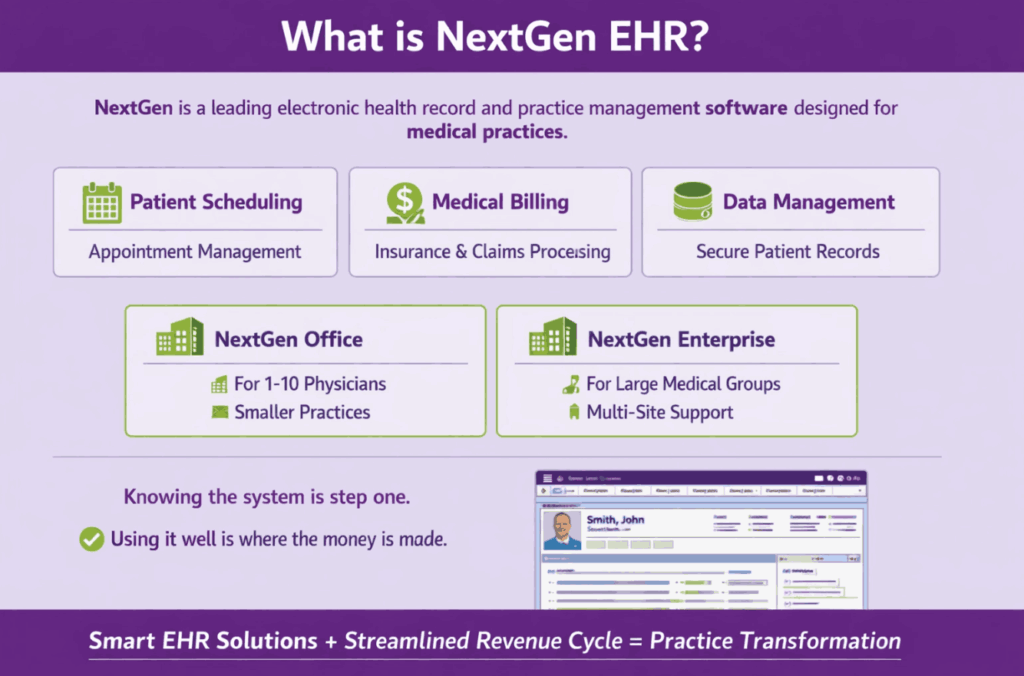
NextGen is a leading electronic health record and practice management software designed for medical practices. It streamlines clinical and administrative workflows, enabling healthcare providers to deliver efficient patient care. NextGen EMR features include patient scheduling, medical billing, and data management, which help improve practice efficiency and revenue cycle management.
NextGen Enterprise is designed for outpatient medical groups, specialty practices, and enterprise-level healthcare organizations, and it supports practices across multiple sites with a shared billing infrastructure, reducing redundancy and improving financial oversight. The smaller version, NextGen Office, is built for practices with one to ten physicians.
NextGen Healthcare is a leading healthcare software and services company that empowers the transformation of ambulatory care. The platform’s smart EHR solutions include NextGen Office for smaller practices and NextGen Enterprise for larger groups, both designed to alleviate documentation burden, advance clinical outcomes, and streamline the revenue cycle.
Knowing the system is step one. Using it well is where the money is made.
The Real Reason Most Practices Are Not Getting ROI from NextGen
Here is a scenario that happens more often than anyone in healthcare IT would like to admit.
A practice goes through a full NextGen implementation, six months of planning, a chunk of money, and a two-day training session. Then the staff goes back to old habits. Templates never get customized. Reports never get opened. Charge capture rules stay at their default settings.
Six months later, the practice manager wonders why revenue is flat.
EHR improvements are most effective when departments are working together, and the system is customized to each practice’s specific workflows. Without proper configuration, even robust platforms like NextGen underperform significantly.
NextGen EHR, What You Need to Know Before Buying
Shopping for an EHR is stressful. You are comparing features, sitting through demos, and trying to figure out if the price tag is worth it. NextGen comes up a lot in these conversations. And for good reason.
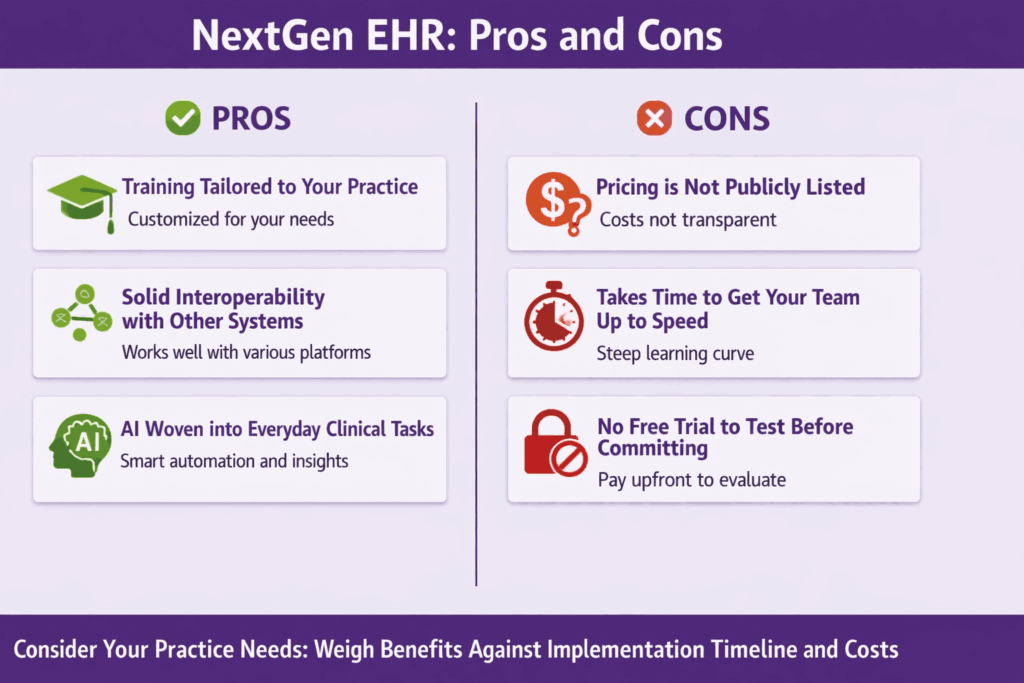
It is built for mid-to-large practices that need more than a basic scheduling tool. Think about robust next-gen workflows, clinical documentation, and AI that actually does something useful inside the platform. Not bolted on as an afterthought.
But there are real drawbacks worth knowing before you book that sales call.
Your NextGen EHR is sitting on revenue you have already earned.
NextGen is one of the most capable EHR platforms available. But capability is not the same as results. The gap between what NextGen can do and what most billing teams actually extract from it is where practices quietly lose tens of thousands of dollars a year.
Most practices using NextGen see 15 to 30% of claims denied, delayed, or paid at less-than-contracted rates. Not because the care was wrong, but because the billing was not optimized. Transcure changes that.
You have a powerful system. But if charge capture is inconsistent, if prior authorization workflows are manual, if denial management is reactive rather than automated, you are funding your payer’s bottom line, not your own.
This is not a technology problem. It is a depth-of-use problem. And it is exactly where Transcure operates.
NextGen EHR Tips and Tricks That Can Help Directly Boost Revenue
This is where the practical work begins. Each of the following tips targets a specific revenue leak and explains how to close it inside NextGen.
1. How to Master NextGen Templates?
RPR NextGen reports let you save any report configuration as a reusable template. One click and you are back in business. Here is how to do it properly.
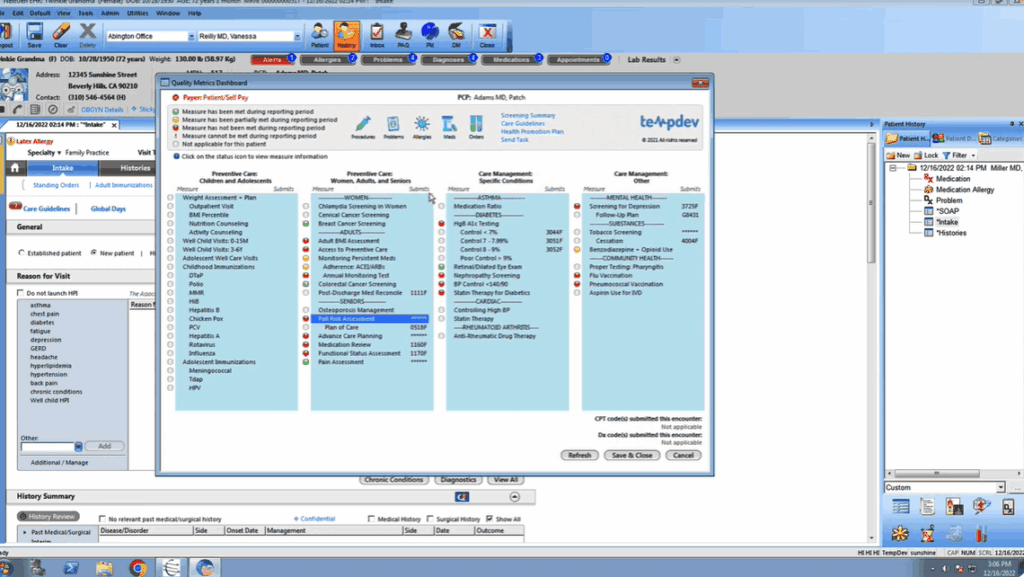
Step 1: Start With the Right Base
Do not start from a blank slate. RPR gives you preset templates to build from.
Go to the Reports dropdown and select one of the preset options. For seller-focused prospecting, the Seller Template is your best starting point. Enter a report location and title, then hit Continue.
The editor will load a live preview on the right side of your screen. Everything you change updates in real time.
Step 2: Set Up Your Cover Page
Click the Customize tab first. Head to the cover page.
You do not need to select a property photo right now. You are building a template, not a one-time report. Focus on what will carry across every report this template generates:
- Your contact information
- A generic message that fits multiple clients and situations
Keep that message broad. If you are prospecting, a hyper-specific note defeats the purpose
Step 3: Choose and Arrange Your Sections
This is where the real work happens. And honestly, where most people underuse the tool.
Each section has a dropdown arrow. Expand it, and you will see individual elements. Check what you want. Uncheck what you do not. Simple.
A few things worth knowing:
- Gray boxes with drag handles let you reorder elements within a section
- You can drag entire sections up or down in the report
- You cannot move an element from one section into a different section
- Some sections, like Property Summary, are fixed in place, but their elements can still be selected or deselected
Build around a clear purpose. For a “Time to Move” prospecting report aimed at off-market sellers, a focused configuration might look like this:
- Property Summary includes the map and AVM or RVM values only.
- Property Information shows sales history, moved to the top of the section for easy visibility.
- Market Trends follows next, with median estimated property value, active listings, pending listings, and sold listings. This gives sellers a clear picture of what is happening around them.
- Pricing Summary comes after that, with the price and seller’s net sheet included. Note: the net sheet only populates if you have entered that data in the property details beforehand.
- The Refined Value section shows the refined value summary. This connects directly to your CMA work in the property details page.
Any sections not needed? You can open, deselect, and move on with the work if you don’t need any sections.
Step 4: Add a Custom Page
This is a feature people often skip. Do not.
Under the Custom Pages tab, you can upload up to five PDF pages, each no larger than 10 megabytes. Think market timing charts, neighborhood snapshots, custom infographics, anything that adds context your client cares about.
Name each file clearly before uploading. You will thank yourself six months from now when you are managing multiple templates.
Once uploaded, go back to the Customize tab and drag the custom page to wherever it fits best in the report flow.
Step 5: Save It as a Template
You have built something useful. Now make it permanent.
Select Save, then Save as Template. Give it a name that describes its purpose, not just a generic label. “Time to Move Prospecting” beats “Template 3” every time.
Your saved templates live under the Templates section. You can create up to 20 of them. Click any template to open the report editor, or use the three-dot menu in the upper right corner to delete templates you no longer need.
2. How to Use Automated Charge Capture Correctly in NextGen
Now, let’s move on to how you can use the automated charge capture accurately in NextGen. Before we get into the automation side, let us be clear on what charge capture means.
Every time a patient visit happens, a procedure is performed, or a service is rendered, someone needs to document it. That documentation becomes the proof. It tells the billing team what to charge for, which codes to use, and ultimately what gets submitted to the payer.
For a primary care visit, you might be dealing with a handful of codes. For a surgical procedure? You could be looking at dozens of billable codes for a single encounter. Miss one and you are leaving real money behind.
The Problem With Doing It Manually
Here is what the old process looks like in most orthopedic and surgical practices.
A procedure happens. Clinical staff write their notes. Someone on the billing side reads through those notes and manually enters the charges into the billing software. Then that information gets cross-referenced with the EHR before anything goes out.
Every single step involves a human making a judgment call. And humans get tired. Humans get rushed. Humans miss things.
It is not a character flaw. It is just how volume and complexity work against accuracy.
One missed CPT code can mean anywhere from one dollar to one thousand dollars in uncollected revenue. Per encounter. Multiply that across weeks and months of patient volume, and the number gets uncomfortable fast.
How Charge Capture Automation Works
An orthopedic practice with an in-house surgical center built a full automation around this exact problem. Here is what the automated workflow looks like step by step.
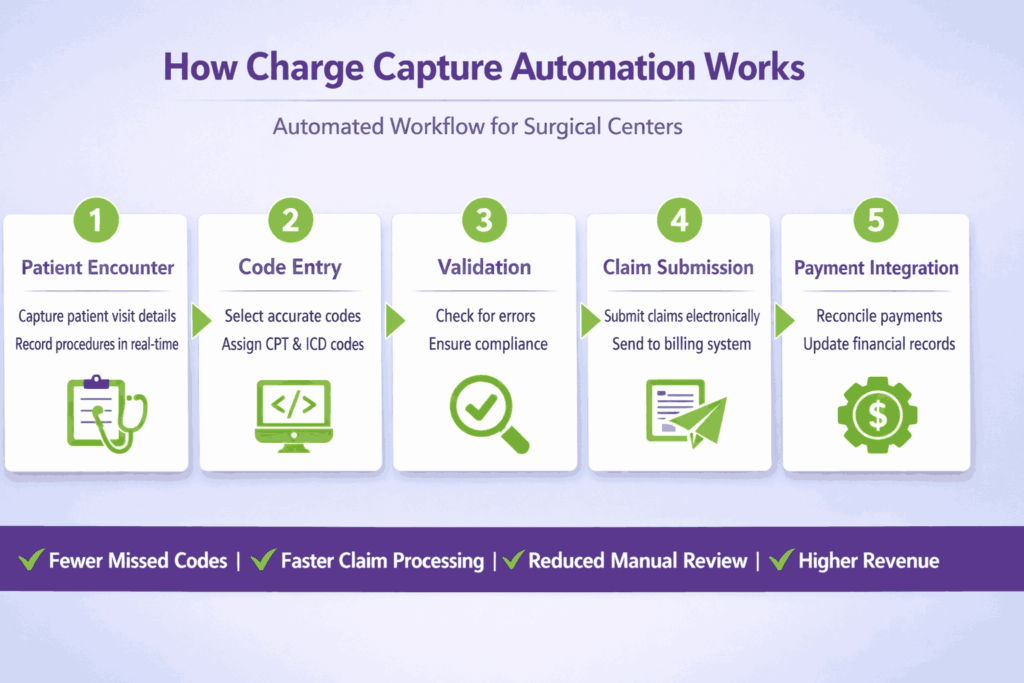
Step 1: Monitor Completed Encounters
The system watches for every completed encounter inside the EHR. No manual trigger needed. When an encounter is marked complete, the automation kicks off.
Step 2: Cross-Reference EHR and Billing Software
The bot pulls the encounter data from the EHR and compares it directly against what has been entered in the billing software. These two systems should match. When they do not, that is a flag.
This cross-referencing step alone catches a significant number of errors that would have sailed through under a manual review process.
Step 3: Read and Analyze the Clinical Notes
This is where the real work happens.
The system reads through the clinical notes for that encounter and checks whether the documented procedures, diagnoses, and observations line up with the codes that were captured. If a surgeon documents a specific action during a procedure and the corresponding CPT code is absent from the billing entry, the system catches it.
For surgical staff, especially, this matters. A single procedure can generate a long list of individually billable codes. The notes are the source of truth. Matching them against what was actually captured is where missed revenue gets recovered.
Step 4: Route Clean Claims Forward
If everything checks out, the encounter information gets packaged and sent directly to the claim submission queue. No human intervention needed. No delay. Clean data moves fast.
Step 5: Flag and Notify on Discrepancies
When something looks off, the automation does not just silently fix it. It flags the encounter and sends a notification to the billing team.
The message is direct. Something is wrong with this encounter. A human being then reviews the flagged item, makes the correction, and approves it for submission.
The billing team stops spending time hunting for errors across hundreds of charts and starts spending time resolving the specific ones the system already found.
3. NextGen Scheduling Workflows Tips
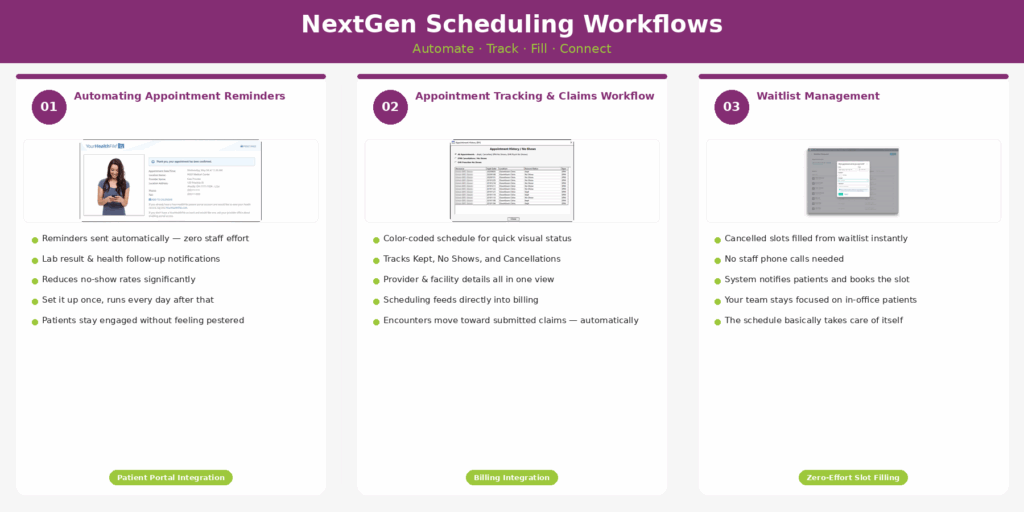
1. Automating Appointment Reminders
Automating appointment reminders, lab result notifications, and health follow-up messages through the NextGen patient portal does two things well. It reduces no-show rates. And it improves patient engagement in a way that feels almost invisible once the system is running. You set it up once. It works every day after that without anyone on your staff lifting a finger.
2. Appointment Tracking
Color-coded appointment tracking. Automated reminders are sent directly to patients. Waitlist management that fills canceled slots before they turn into dead weight on the schedule. Provider and facility details. A connected claims workflow that talks to every other part of the system.
That last point is the one most practices miss. It all connects. The scheduling side feeds the billing side. When the workflow is set up correctly, an encounter does not just sit in a calendar. It moves toward a submitted claim.
Most practices underuse this. Not because the tools are hard. Because someone set things up quickly years ago, and nobody has gone back to revisit it since.
3. The Waitlist Feature
When a cancellation comes in, that slot does not have to sit empty. NextGen pulls from your waitlist and fills it. No one on your staff needs to pick up the phone and start calling down a list of patients. The system handles it. Your team focuses on the patients in the building. The schedule takes care of itself.
4. Optimize Your Coding With Built-In NextGen Tools
NextGen’s revenue cycle management features automate billing processes, including coding suggestions based on provider notes, error detection, and claim submissions. Customizing rules for automatic claim scrubbing catches coding errors before submission, significantly reducing claim denials and improving revenue flow.
ICD-10 and CPT Code Suggestions
ICD-10 and CPT code suggestions inside NextGen are pulled directly from the clinical documentation in the encounter note. This is why Tip 1 matters so much. When templates are built correctly, the coding suggestions become dramatically more accurate. The system connects what the provider documented with what the billing team submits. It’s not magic, it’s just good architecture working the way it was designed to.
Practices that use NextGen’s rule libraries and add payer-specific CPT and ICD-10 edits effectively prevent underpayments and catch coding errors before they become denial patterns. Payer-specific edits are particularly worth the effort.
5. Run the Right Reports. Every Week.
Most practices ignore NextGen’s reporting dashboard until something goes wrong. By that point, a denial trend has already become a revenue leak. You’re not catching a problem anymore, you’re doing damage control. And those are very different situations to be in.
NextGen provides customizable dashboards for financial analytics and reporting, designed to give administrators real-time visibility into the practice’s financial health. Real-time is the operative word. You don’t have to wait until the end of the month to know that something’s off.
Here are the reports that matter most for revenue.
- A/R Aging Report: The A/R Aging Report shows how long outstanding claims have been sitting unpaid. If money is aging past 60 days, something in your follow-up process is broken. Full stop. That’s not a maybe, that’s a definite sign something needs attention.
- Denial Trend Report: The Denial Trend Report shows which payers are denying claims and why. Patterns here are genuinely valuable. A payer consistently denying a specific code combination is a fixable problem once you can see it. You can’t fix what you can’t see. This report makes the invisible visible.
- Payer Mix Report: The Payer Mix Report shows the breakdown of your revenue by insurance type. Understanding your payer mix helps with contract negotiation and financial forecasting. It also helps you have smarter conversations about where to grow and where to pull back.
- Financial Analytics: NextGen Financial Analytics dashboards can track denial trends and refine rule sets in real time, allowing practices to make proactive adjustments rather than reactive ones.
Note: Set aside time each week to review these reports with your billing team and turn the data into specific workflow changes. Even 30 minutes a week, consistently, will surface patterns you’d otherwise miss completely.
5. How to Fix Your Denial Management Workflow Inside NextGen?
Denial management is not a one-time cleanup project. It’s an ongoing process, and honestly, most practices resist setting it up properly because it feels like extra work on top of an already brutal workload.
Here’s how to actually fix that, step by step.
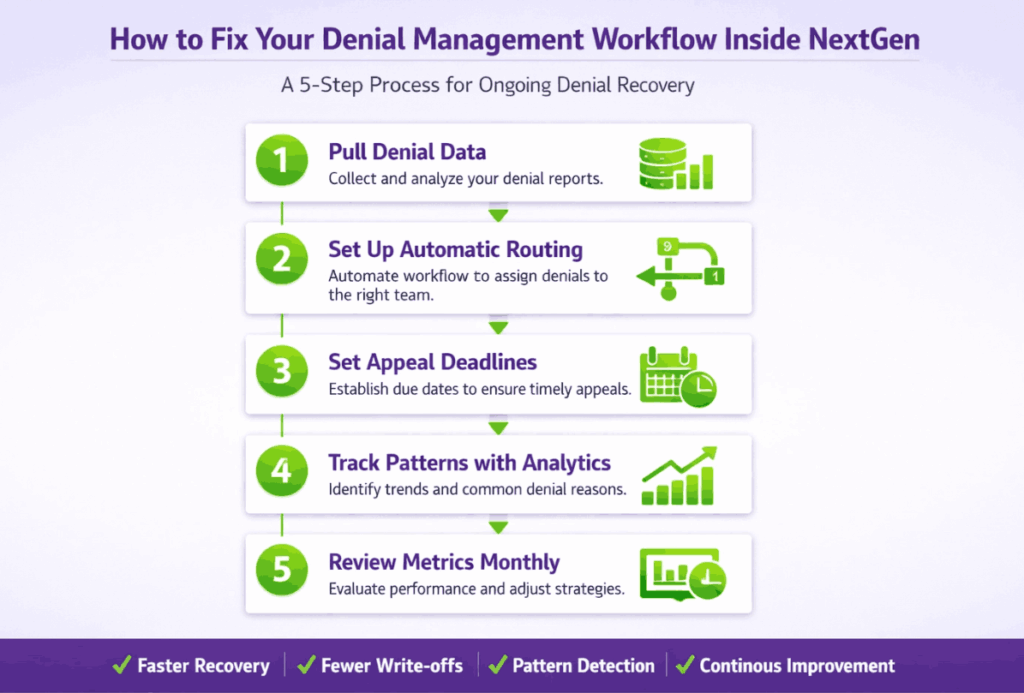
Step 1: Pull your denial data and figure out what you’re actually dealing with
Before you change anything, you need to see the full picture. Inside NextGen, run a report that shows denied transactions with reason codes. Export it to Excel if you need to; sometimes it’s easier to sort and filter there. Don’t try to fix everything at once.
Pick two or three reason codes that keep showing up and start there. Eligibility issues. Missing modifiers. Whatever’s showing up the most. Just start somewhere.
Step 2: Set up automatic routing for denied claims
This is the part most practices skip, and it’s costing them real money. Every denied claim should automatically land in the right billing staff member’s queue, with everything they need to act on it already attached.
The reason for the denial. The payer contact. The original claim data. No digging around, no guessing. Just open it and work it. NextGen’s workflow tools can do this, but someone has to actually configure it. That someone needs to be you, or someone you assign.
Step 3: Set appeal deadlines and treat them like hard stops
An unworked denial that’s past its appeal window is gone. There’s no recovering it, it’s just a write-off. So once a denied claim hits the queue, there needs to be a deadline attached to it. Not a soft suggestion. A real deadline with a follow-up task built in. NextGen’s tasking and workflow features can handle this, but again, it doesn’t set itself up.
Step 4: Use the analytics tools to track patterns, not just individual claims
Fixing one denied claim is fine. Figuring out why the same denial keeps happening across 40 claims, that’s where the real money is. NextGen’s analytics and reporting dashboards let you slice denial data by payer, provider, procedure code, whatever angle makes sense for your practice. Use that. Look for patterns. If one payer keeps denying a specific procedure, that’s a process problem, not a one-off mistake.
Step 5: Review your metrics monthly and actually adjust
Set a baseline. Track your denial rate, your recovery rate, and your resolution time. Then check it every month. Not to beat people up over numbers, but to see if what you changed is actually working and to catch new problems before they pile up.
Why NextGen EHR Training is Non-Negotiable
Let us be direct about this. A poorly trained staff on a well-built system is still a poorly performing practice.
While onboarding may require significant training investment, NextGen’s pricing and architecture deliver long-term operational value when staff are properly equipped to use the platform.
What does proper NextGen EHR training actually look like? It is not a one-day onboarding session where someone clicks through a demo. Real training is role-specific, hands-on, and repeated over time.
Front desk staff need to master scheduling workflows, insurance eligibility verification, and patient portal setup. Coders need to know how to read NextGen’s coding suggestions and configure payer-specific rules. Providers need to understand template customization and documentation standards that support accurate coding.
NextGen does publish official training resources, including a NextGen EHR training manual PDF available through their Success Community portal at successcommunity.nextgen.com. These resources cover system navigation, feature-specific guidance, and workflow best practices organized by role and specialty.
Providing extensive training and ongoing support to healthcare staff empowers them to use NextGen effectively and efficiently, which directly translates to cleaner claims and better financial performance.
The cost of skipping proper training is not a one-time hit. It compounds every single day through missed charges, coding errors, and denied claims that nobody knows how to fix.
NextGen EHR Integration: Connecting the Dots Across Your Practice
Siloed systems are expensive. When your EHR does not talk to your lab system, your billing platform, or your patient portal, staff spend time manually entering data that should move automatically. Manual entry introduces errors. Errors produce denials.
NextGen EHR supports interoperability standards, enabling seamless data exchange with other healthcare systems, labs, and pharmacies. This interoperability is fundamental for providing coordinated and comprehensive patient care while reducing duplicate data entry.
What does NextGen EHR integration look like in practice? Lab orders placed inside the EHR flow directly to connected lab systems. Results come back and populate the patient chart automatically. Telehealth sessions conducted through NextGen’s integrated platform document directly into the encounter note.
NextGen has incorporated telehealth capabilities into its EHR system, allowing providers to conduct virtual visits, share medical records, and maintain continuity of care remotely.
Consider a multi-specialty orthopedic group running four locations. Before proper NextGen integration, billing staff were manually reconciling encounter data from three separate systems.
After integration, charge capture became automatic, claim error rates dropped, and the billing team shifted from data entry to actual revenue cycle management. The result was a measurable improvement in collections without adding staff.
Organizations benefit from unified financial workflows when running operations across multiple sites, reducing redundancy and improving oversight. This setup is particularly effective for groups consolidating revenue cycle management under a central administrative team.
Should You Hire a NextGen EHR Consultant?
There is a point in every practice’s EHR journey where internal staff hit a ceiling. They know the system well enough to get through the day. They do not know it well enough to find the revenue gaps buried inside it.
That is when outside expertise earns its fee.
Signs your practice needs a NextGen EHR consultant:
- Denial rates above 10 percent with no clear explanation
- Reports that have never been reviewed or acted upon
- Templates that were never customized from the default
- Staff who describe the system as “frustrating” without being able to say why
- Revenue that has stayed flat despite patient volume growth
What does a NextGen EHR consulting engagement actually involve? A good consultant starts by auditing the current configuration, identifying where workflows break down, and tracing revenue losses to specific system failures. They then work alongside staff to rebuild templates, configure rules engines, set up reporting cadences, and train teams on the features they have been ignoring.
What to look for in a consulting partner:
- specialty-specific experience with NextGen.
- A track record of measurable revenue improvement.
- A training model that builds internal competency rather than permanent dependence on outside help.
What Companies Use NextGen and What Can You Learn From Them?
NextGen is not built for every healthcare setting. It is specifically designed for ambulatory care, and understanding who uses it well tells you a lot about what good actually looks like in practice.
Who is Using NextGen?
Providers in cardiology, orthopedics, and behavioral health tend to get the most out of NextGen Enterprise. The platform works especially well for organizations that want to consolidate revenue cycle management under one central administrative team. It is built for specialty workflows, not generic ones.
FAQs About NextGen EHR
What does NextGen Company do?
NextGen Healthcare develops an EHR and practice management platform designed to transform ambulatory care. The company builds intelligent workflows across EHR, practice management, patient experience, and revenue cycle tools for outpatient and specialty practices.
What is a NextGen?
NextGen is an EHR platform built specifically for ambulatory medical practices. It streamlines clinical and administrative workflows, enabling healthcare providers to deliver efficient patient care through features including patient scheduling, medical billing, and data management.
What companies use NextGen?
NextGen is designed for healthcare providers across specialties, including behavioral health, cardiology, and orthopedics. It serves small practices through NextGen Office and larger multispecialty groups through NextGen Enterprise.
Is NextGen a good company?
NextGen EHR continues to be a strong contender in the EHR market, offering a comprehensive suite of tools designed to improve clinical documentation, revenue cycle management, and patient engagement. Users generally appreciate its customization options and interoperability, though a learning curve exists for new users.
How much does NextGen cost per month?
NextGen does not publish fixed public pricing, as plans are customized based on practice size, specialty, and modules selected. The vendor offers custom pricing to users, and there is no free trial version available for the NextGen Enterprise subscription. Smaller practices using NextGen Office can contact NextGen directly for current pricing. The investment varies significantly depending on the scope of services.
Does Transcure provide NextGen EHR outsourcing services?
Yes, Transcure provides NextGen EHR outsourcing services, including system optimization, template customization, revenue cycle management, denial management, and staff training. Our team works with practices of all sizes and specialties to improve NextGen performance and increase collections.
What are the Top 3 EHR systems?
The EHR market is competitive, but three names consistently lead in ambulatory care: Epic, which dominates large health systems; Cerner (now Oracle Health), which serves both large and mid-sized organizations; and NextGen Healthcare, which is recognized as a top choice for specialty and mid-sized ambulatory practices.
NextGen Healthcare is a leading healthcare software and services company specifically empowering the transformation of ambulatory care, with specialty-specific content tailored to support clinical and financial objectives.