
Practice Fusion is a cloud-based electronic health record platform built for independent medical practices in the United States. Veradigm owns and operates the software today. More than 30,000 practices rely on it for daily charting, scheduling, and patient records.
The platform runs entirely through a web browser, so no server or local installation sits inside the office. Providers open Practice Fusion from any device with an internet connection. Updates apply automatically across every account without staff involvement.
Billing runs on this same account, and our Practice Fusion medical billing guide breaks that side down in more detail.

How Did Practice Fusion Start, and Who Owns It Today?
Ryan Howard launched Practice Fusion in 2005 in San Francisco, alongside co-founders Alan Wong, Jonathan Malek, and Matthew Douglass. The company built its early growth around a free EHR model, funded through in-platform advertising rather than subscription fees.
By 2014, industry reporting had placed Practice Fusion at the top of the cloud-based EHR market for independent physicians nationwide. Allscripts acquired Practice Fusion in January 2018 for $100 million and folded it into a broader ambulatory health IT portfolio.
A paid subscription model replaced the free version in early 2018 and ended over a decade of ad-funded access. Veradigm became the new name for Allscripts in 2022, and Practice Fusion has run under that brand since.
| Year | Milestone |
|---|---|
| 2005 | Founded in San Francisco by Ryan Howard and three co-founders |
| 2009 | EHR access made free, funded through in-platform advertising |
| 2014 | Recognized as a top cloud-based EHR platform for U.S. physicians |
| 2018 | Acquired by Allscripts for $100 million; moved to paid subscriptions |
| 2022 | Allscripts renamed itself Veradigm; Practice Fusion joined its network |
| Present | Operates as a Veradigm network solution for independent practices |
How Is the Practice Fusion Platform Organized?
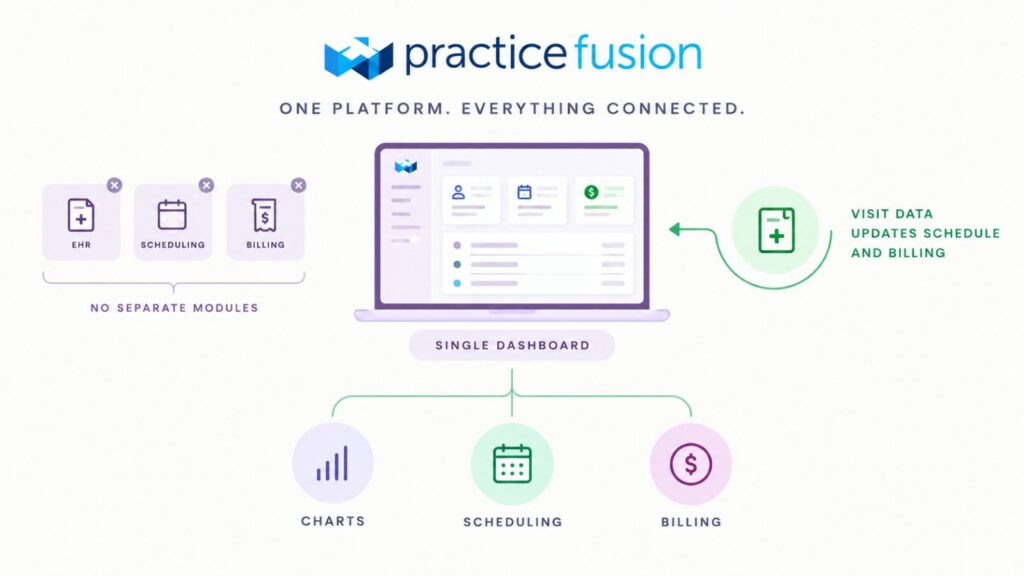
Unlike modular systems such as Epic, Practice Fusion runs as one connected application instead of separate licensed pieces. Every user works from a single dashboard covering charts, scheduling, and billing.
Data entered during a visit updates the schedule and billing queue within the same system. This shared structure removes the manual handoffs that appear in some large, module-based platforms.
What Are the Different Practice Fusion Features?
Every feature in Practice Fusion runs inside one connected platform, grouped by the job each one performs. The table below lists the main features by function, along with what each one does.
| Function | Feature | What It Does |
|---|---|---|
| Clinical | Charting & Templates | Specialty-specific SOAP templates, favorites, and Note Assist shortcuts for faster documentation |
| Clinical | Custom Flowsheets | Tracks vitals and lab trends over time, with abnormal values flagged automatically |
| Clinical | E-Prescribing | Sends prescriptions to any pharmacy nationwide, with EPCS certified in all 50 states |
| Clinical | PDMP Integration | Pulls controlled substance prescription history into the chart through Bamboo Health |
| Patient Access | Scheduling | Day and week calendar views with template slots and automated appointment reminders |
| Patient Access | Online Check-In | Lets patients complete intake forms from home before their visit |
| Patient Access | Eligibility Verification | Confirms insurance coverage from the scheduling screen ahead of a visit |
| Patient Engagement | Patient Fusion Portal | Lets patients view records, message providers, request refills, and pay bills online |
| Patient Engagement | FollowMyHealth | Newer Veradigm-owned portal gradually replacing Patient Fusion for some practices |
| Interoperability | Lab & Imaging Connections | Routes orders to national networks such as Quest Diagnostics and RadNet, with results returning to the chart |
| Interoperability | Referral Routing | Sends lab data and referral notes to outside providers electronically |
| Communication (Updox) | Electronic Fax | Routes inbound and outbound faxes into the chart without paper or a physical machine |
| Communication (Updox) | Secure Texting | Two-way HIPAA-compliant messaging and broadcast alerts to patients |
| Communication (Updox) | Telehealth | Video visits with a virtual waiting room, scheduled as a dedicated appointment type |
| Revenue Cycle | Native Billing Tools | Claim generation tied directly to chart documentation |
| Revenue Cycle | Billing Services (Add-on) | Optional vendor-managed billing package for full-cycle revenue support |
| Reporting & Compliance | MIPS Dashboard | Tracks Quality, Promoting Interoperability, Improvement Activities, and Cost categories |
| Reporting & Compliance | ONC Certification | 2015 Edition CEHRT status supports MIPS attestation and FHIR-based data exchange |
| Security | HIPAA Safeguards | Encryption, role-based access, and audit logging across every chart |
Who Is Practice Fusion Best Suited For?
Independent and solo practices make up most of the Practice Fusion user base today. Physicians, nurse practitioners, chiropractors, and podiatrists commonly choose it for its simple setup and modest learning curve.
Large hospital systems and multi-specialty groups usually look elsewhere, since Practice Fusion does not offer the deep specialty modules found in enterprise platforms. Practices needing dozens of providers across many departments often outgrow its feature depth.
What Clinical and Charting Features Does Practice Fusion Offer?
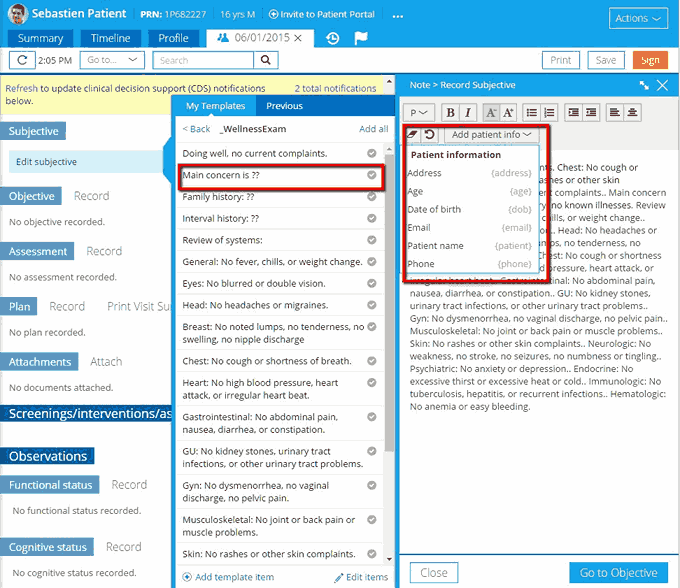
Charting inside Practice Fusion runs on specialty-specific templates, so a podiatry note and a psychiatry note follow different structures under the same login. Thousands of provider-built templates sit in a shared library, searchable by specialty or keyword.
Automatic favorite lists populate common exam findings, review-of-systems items, and diagnosis codes with a single click. Note Assist shortcuts pull patient details straight into the note, cutting repeated typing during a visit.
Copy Forward pulls relevant details from a prior visit into the current note, so providers avoid re-entering the same history. Custom flowsheets track vitals and lab trends over time, with abnormal values flagged automatically.
How Does Practice Fusion Handle E-Prescribing?
Prescribers send medication orders straight from the chart to any e-prescribing-enabled pharmacy nationwide. Every order runs through automatic drug-drug and drug-allergy interaction checks before it reaches the pharmacy.
Electronic prescribing for controlled substances (EPCS) is certified in all fifty states and the District of Columbia. This lets providers send scheduled medications without a paper prescription pad.
Refill requests move through a two-click approval workflow instead of a phone call to the pharmacy. Prescription Drug Monitoring Program (PDMP) data appears inside the chart through a Bamboo Health integration.
Real-time patient savings tools show medication cost estimates and budget-friendly alternatives during the visit. Prior authorization requests also route through the EHR instead of a separate portal.
What Practice Management and Scheduling Tools Does Practice Fusion Include?
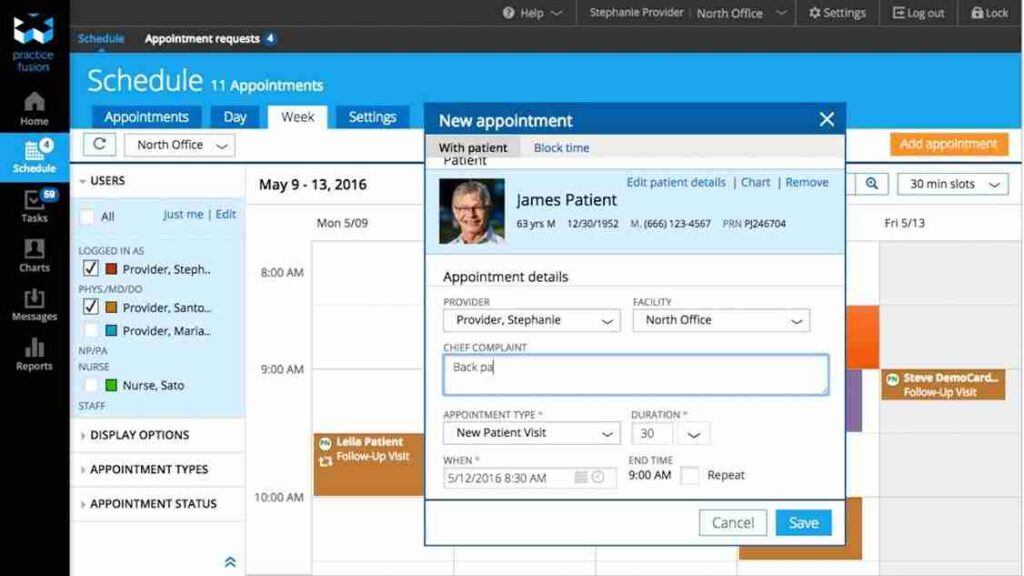
Scheduling runs from a day or week calendar view built directly into the EHR, so front-desk staff work from one screen. Template slots pre-fill appointment type and duration, cutting manual entry for common visit types.
Patients book directly through a public Patient Fusion profile, with the request landing in a queue for staff to approve or deny. Appointment reminders go out by text, voice, or email ahead of each visit.
Front-desk staff can check insurance eligibility from inside the same scheduling screen before a patient arrives. That check catches coverage problems ahead of the visit instead of after the claim gets filed.
How Does Online Check-In and Patient Intake Work?
Online Check-In lets patients complete intake forms from home before their appointment. Forms are fully customizable so that a practice can replicate its existing paperwork inside the platform.
Demographic details, insurance information, and clinical responses flow directly into the encounter note once a patient submits the form. Staff receive a task notification the moment a form comes in.
This workflow’s patient portal is shifting from Patient Fusion to FollowMyHealth, a Veradigm-owned personal health record. Some practices already run intake and scheduling through FollowMyHealth instead of the original interface.
What Reporting and MIPS Tools Does Practice Fusion Provide?
Quality reporting inside Practice Fusion runs through a dedicated MIPS Dashboard, split into four performance categories tracked by the federal Quality Payment Program.
| MIPS Category | What It Tracks |
|---|---|
| Quality | Clinical outcome and process measures selected by the practice |
| Promoting Interoperability | Electronic health information exchange and patient portal use |
| Improvement Activities | Care coordination and patient engagement initiatives |
| Cost | Medicare spending per patient, calculated directly by CMS |
Clinicians select their own measures for the Quality and Improvement Activities categories, then track progress throughout the year. Results can take up to 48 hours to appear once a reporting period is set.
An eCQM Dashboard gives practices a hub for tracking quality measures pulled straight from signed chart notes. Only signed encounters count toward Quality category calculations, so unsigned notes can quietly reduce a score.
What Can Patients Do Through the Patient Fusion Portal?
Registered users can view lab results, request prescription refills, and message their care team directly through Patient Fusion. Abnormal values are posted the moment a provider signs off on the report. Portal access also covers billing, letting patients review statements and submit payments online.
A downloadable health summary gives patients a portable copy of their record for other providers. Mobile browsers support the full portal experience, so no separate app download is required.
How Does Practice Fusion Handle Lab and Imaging Integration?
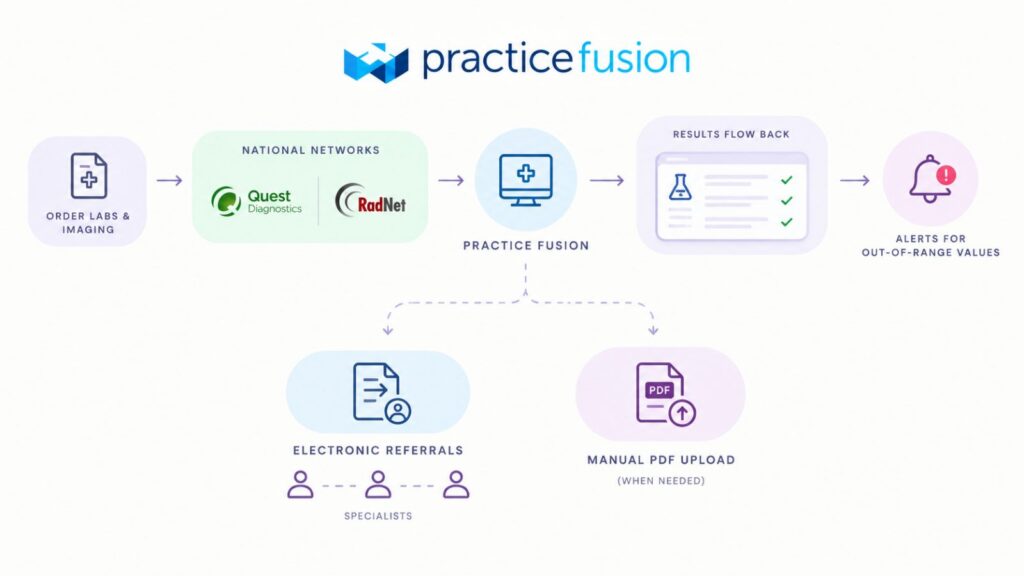
Orders for labs and imaging move straight from the chart to connected national networks, including Quest Diagnostics and RadNet. Providers avoid re-keying test requests into a separate portal.
Structured results return directly into the patient’s flowsheet once a lab confirms them, without manual transcription. Values outside a normal range trigger an alert inside the chart.
Referral notes and lab findings route to outside specialists electronically, cutting reliance on faxed paperwork for routine care coordination. Manual PDF upload remains available for labs without a direct interface.
What Is Updox, and How Does It Connect With Practice Fusion?
Updox is a separate, cloud-based communication and document platform, not a built-in Practice Fusion feature. Veradigm and Updox maintain an official partnership that links the two systems together.
Basic appointment reminders by text, voice, and email come standard with a Practice Fusion subscription. A deeper connection, sold separately, adds the full Updox communication suite.
| Tier | Included In |
|---|---|
| Standard reminders | Base Practice Fusion subscription |
| Premium Updox integration through Practice Fusion | Separate add-on, billed per enabled provider |
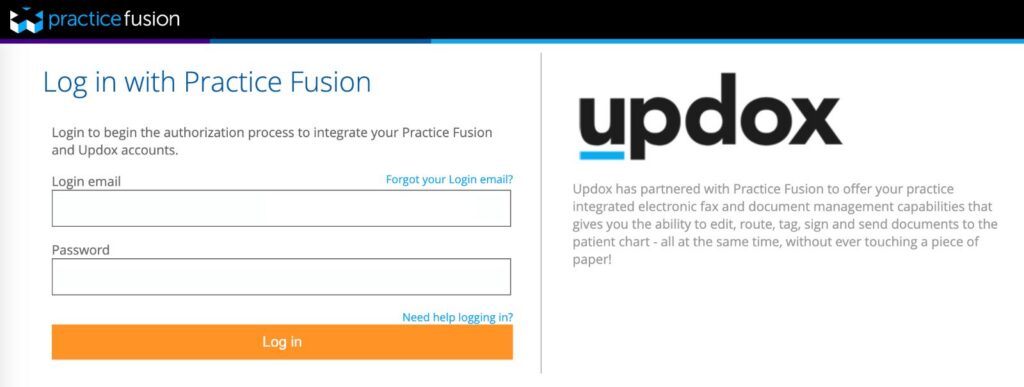
Connecting the two accounts uses a single sign-on link, so staff manages one login instead of two separate systems.
What Features Does the Updox Integration Add to Practice Fusion?
Inbound and outbound faxes route through one shared inbox instead of a physical machine, and staff tag, sign, and file each document straight into the chart.
Two-way HIPAA-compliant texting lets staff message patients without exposing personal phone numbers on either side. Group messages can reach an entire patient list at once, useful for clinic closures or health alerts.
Secure Direct messaging carries referrals and specialist notes to outside providers on the same network, without a fax at all. A fax option still covers recipients who have not adopted Direct messaging yet.
Core additions include:
- Unlimited electronic faxing with chart-based routing
- Two-way secure texting and broadcast messaging
- Digital forms with built-in e-signature capture
- Direct secure messaging for referrals and specialist notes
How Do Practices Set Up Updox With Practice Fusion?
Setup starts with a call to an Updox representative or a scheduled demo to open a new Updox account. Existing Updox customers reach support directly to request the Practice Fusion connection.
Staff then follow an emailed link and select “Sign in with Practice Fusion” to begin the authorization process. Entering Practice Fusion credentials and approving the access request completes the connection.
Administrators enable individual providers from the Updox admin panel, since each added provider changes the monthly bill. Documents sent from Updox land inside the matching patient chart automatically.
Does Practice Fusion Offer Telehealth Through Updox?
Video visits are scheduled inside Practice Fusion through a dedicated appointment type, just like an in-person booking. Patients join from a browser link, with no app download required on either end. A virtual waiting room holds patients until the provider is ready, mirroring the front-office check-in experience.
The connection runs through Updox’s video layer once the practice activates that add-on. Registration for the video and chat feature happens through a dedicated help center article once the Updox account connects. Clinics without the add-on still keep basic appointment reminders through the standard subscription.
Does Practice Fusion Include Native AI Tools?
No built-in ambient scribe or AI billing assistant ships with the core Practice Fusion subscription. Providers wanting that layer connect third-party AI scribes and virtual front-desk assistants instead.
Coding suggestions and automated claim scrubbing appear only through the optional Billing Services package, not the base EHR. Solo and small practices comfortable with outside tools can still assemble a similar AI stack piece by piece.
Is Practice Fusion HIPAA Compliant and ONC Certified?
Certification under the 2015 Edition Certified EHR Technology (CEHRT) standard qualifies Practice Fusion for MIPS Promoting Interoperability reporting. FHIR-based APIs also meet the Cures Act requirement for certified health IT vendors.
Encryption, role-based access, and audit logging run across every chart to support HIPAA safeguards. Two-step verification and security codes add another layer for new device logins.
Day-to-day compliance still depends on staff training and internal access policies, since certification alone does not guarantee proper daily use. Clinics carry that responsibility even on a certified platform.
How Much Does Practice Fusion Cost?
Practice Fusion pricing for 2026 lists a base rate of $199 per provider each month, tied to a mandatory annual commitment. That figure covers the core EHR, e-prescribing, scheduling, and standard reporting tools.
| Cost Item | Typical Range |
|---|---|
| Base subscription | $199 per provider, per month |
| Implementation and onboarding | Varies by practice size and complexity |
| Premium or priority support | $3,000 to $20,000 per year |
Total Practice Fusion cost climbs once Updox, priority support, or custom integrations enter the picture. None of those add-ons show up in the advertised base rate.
What Additional Costs Should Practices Expect?
Implementation and onboarding fees vary by practice size, since a solo provider setup differs from a multi-location rollout. Migrating records from a previous EHR adds another line item to that estimate.
Priority or premium support tiers run from roughly $3,000 to $20,000 a year, on top of the standard subscription. Clinics weighing that expense should compare it against the cost of unresolved support tickets during a billing disruption.
What Do Users Say About Practice Fusion Customer Service?
Capterra reviewers rate Practice Fusion customer service at 3.3 out of 5, trailing the platform’s overall 3.7 rating. G2 reviewers score its support quality at 7.3 out of 10.
Support runs through phone, live chat, and email tickets, available roughly 9 a.m. to 7:45 p.m. Eastern on weekdays. Internally, the company brands this team as its Phenomenal Support group.
Reviewers describe mixed outcomes: some praise quick, patient help, while many report long hold times and chat agents listed as unavailable. Critical tickets reportedly get a response within an hour, though several users dispute that timeline in practice.
What Are the Limitations of Practice Fusion?
Browser-only access replaces a dedicated mobile app, so providers rely on phone or tablet browsers for on-the-go work.
Reporting stays fairly rigid, with reviewers noting limited options to customize layouts, dashboards, or report formats beyond the built-in templates.
Account security controls draw mixed feedback too, since some reviewers describe device verification and login steps as unexpectedly complex, occasionally locking staff out mid-shift.
In short, the recurring gaps are:
- Browser-only access instead of a dedicated native mobile app
- Limited customization for reports, dashboards, and chart layouts
- Device verification steps some reviewers call unexpectedly complex, with occasional lockouts
- Compound medication refills require a brand-new prescription instead of a simple renewal
Who Can Manage Practice Fusion Billing Services for Your Practice?
Options for running billing include an in-house team, the vendor’s own Billing Services package, or an outside billing partner. Transcure, a medical billing company, builds its support specifically around the Practice Fusion workflow.
Certified billers and coders work directly inside an existing Practice Fusion account, so no data migration or platform switch is required. Clinical notes, scheduling, and claims data all stay inside one connected system.
What Does Transcure Handle Inside Practice Fusion?
Full-cycle billing support covers every stage from a patient’s first visit through the final collected balance. Certified specialists manage the following inside the existing Practice Fusion account:
- Verifying eligibility and benefits before scheduled visits
- Reviewing superbills for coding accuracy and modifier use
- Scrubbing claims and submitting them electronically the same day
- Tracking clearinghouse rejections through to correction
- Posting payments and reconciling ERAs within one business day
- Following up on aging accounts by payer and balance
- Supporting patient statements and self-pay balance collection
How Does Transcure Compare With Practice Fusion’s Native Billing Tools?
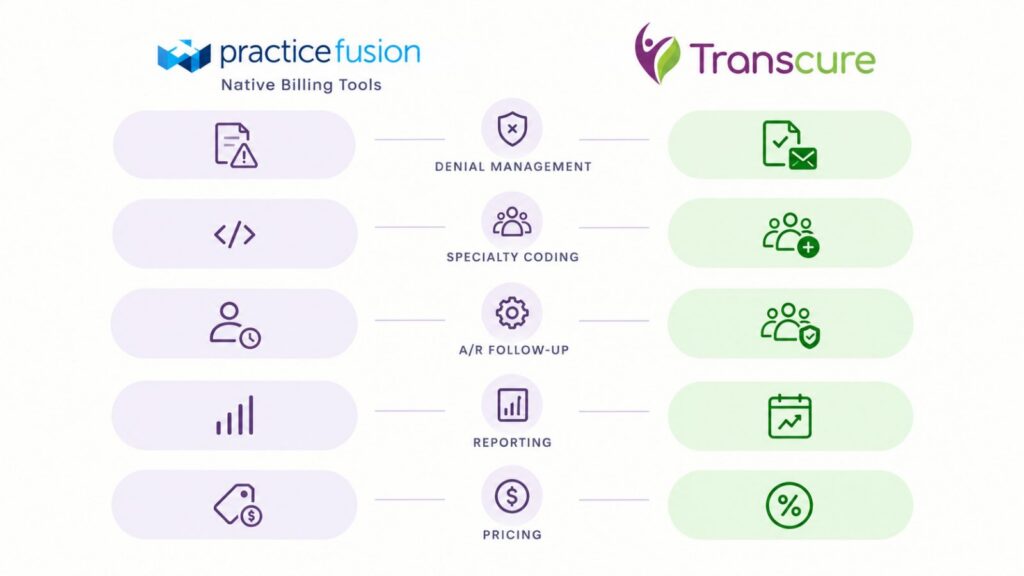
Native billing tools inside Practice Fusion handle claim generation and basic tracking, but denial follow-up and coding depth stay limited without added support. The table below lines up both options.
| Factor | Practice Fusion Native Billing | Transcure |
|---|---|---|
| Denial management | Basic flagging, no active appeal workflow | Root-cause tracking with written appeals |
| Specialty coding | Generic templates | Coders trained across 40+ specialties |
| A/R follow-up | Manual, practice-managed | Dedicated team by payer bucket and age |
| Reporting | Standard dashboard | Weekly reports with denial trend data |
| Pricing | Separate quote-based fee | 5% of monthly collections, no setup cost |
What Results Can Practices Expect From Transcure’s Practice Fusion Billing Services?
Clients on Practice Fusion typically see first-pass clean claim rates near 98%, based on Transcure’s own reported client data across 40-plus specialties. Accounts receivable recovery averages around 24 days under that same reporting.
Free billing audits, valued around $2,000, identify denial patterns and coding gaps before a practice commits to switching providers. That step gives a clinic a clear baseline before any changes take effect.
Frequently Asked Questions
Does Practice Fusion offer a free trial before signing a contract?
Yes, a 14-day free trial runs with no credit card required, giving new users hands-on time before any annual commitment starts.
What happens to patient data if a practice leaves Practice Fusion?
A CCDA export covers most records, though it may not capture everything. A full data dump takes 4 to 6 weeks and arrives in a compressed file format.
Can multiple providers share a single Practice Fusion account?
Pricing runs per provider, not per practice, so each provider needs a separate license. Some reviewers note friction when scaling workflows across a larger provider group.
Does Practice Fusion work for multi-specialty groups, or only solo practices?
Vendor data lists support for specialties from family medicine to orthopedic surgery and OB/GYN, though pricing and template depth still favor small and independent practices over large multi-specialty organizations.
Does adding Updox require new hardware or equipment?
No, you don’t need a new fax machine, phone line, or scanner. Updox runs through the browser and replaces that hardware with a digital inbox.