
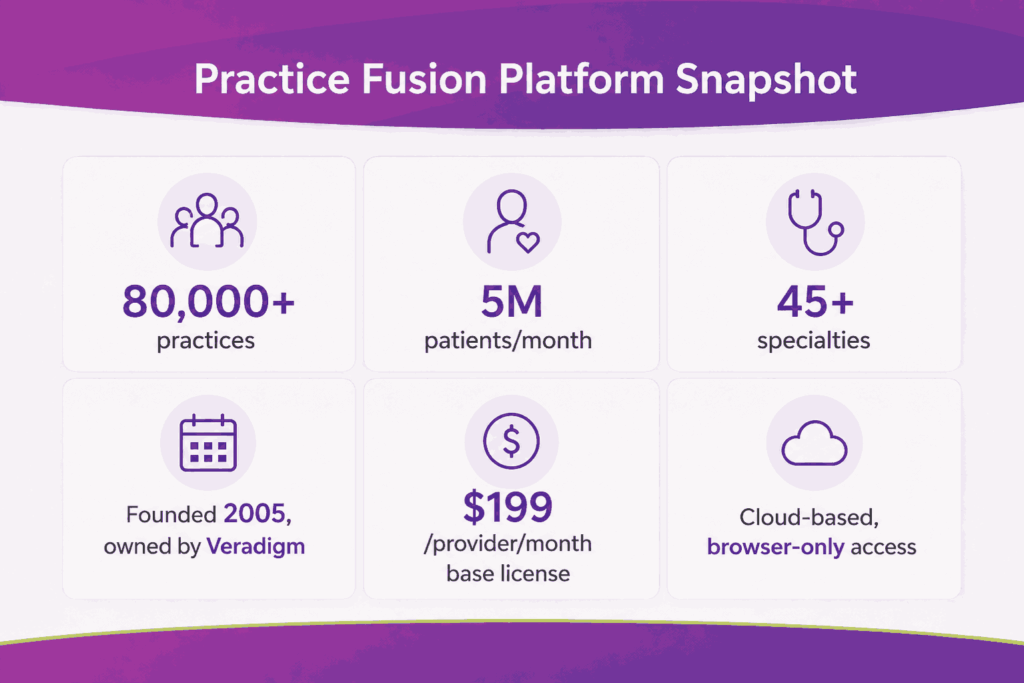
Practice Fusion is a cloud-based EHR owned by Veradigm. It serves over 80,000 healthcare practices and treats more than 5 million patients each month. The platform handles clinical charting and billing within a single system. Independent practices use it across more than 45 specialties.
Billing inside Practice Fusion runs along three operational paths. A practice can bill in-house, subscribe to the billing services of PF, or connect to a third-party billing partner. Each path uses the same superbill engine but follows a different workflow downstream. The path you pick changes the daily routine. This guide covers everything from setup and eligibility verification to the 270/271 transaction and claim submission.
What Is Practice Fusion and How Does Its Billing Work?
Practice Fusion launched in 2005 as a free EHR for independent practices. Allscripts acquired the company in 2018. Veradigm now owns and operates Practice Fusion as a paid product with pricing starting at $199 per provider per month for the base license, securing its place among the top EMR software for medical billing in the ambulatory space.
The platform combines charting, scheduling, e-prescribing, lab orders, and billing in a single interface. Each patient visit creates an encounter, and the signed encounter feeds a superbill. The superbill carries CPT codes, ICD-10 diagnoses, and modifiers needed for the claim.
Practice Fusion’s footprint includes:
- More than 80,000 healthcare practices
- 5 million patients treated per month
- 45+ medical specialties
- Cloud-based access from any browser
- Native or partner billing options
What Does Practice Fusion’s Billing Module Actually Include?
The billing module covers front-end and back-end revenue cycle work. It pulls demographics and insurance from the patient chart and captures charges from the encounter. It supports claim creation through native or partner workflows. Each piece connects to the EHR without duplicate entry.
You can pair the module with in-house billing staff, the Practice Fusion billing team, or a third-party billing partner. The handoff happens at the superbill stage. The biller takes over from there and pushes the claim to the clearinghouse.
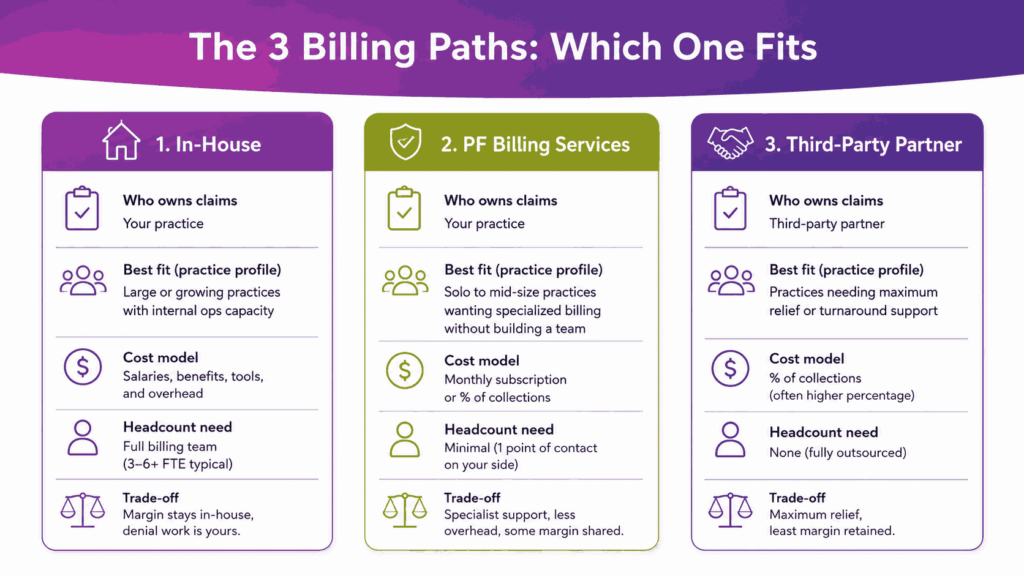
What Are the Three Ways to Bill with Practice Fusion?
Every Practice Fusion site picks one of three operational paths. The choice shapes daily workflows, headcount needs, software cost, and overall cash flow timing. Most practices stay on one path for years, with the option to switch when they cross specific size, denial, or A/R thresholds.
The handoff point is always the superbill. Once the encounter is signed and the superbill is marked Ready for Biller, the path you picked decides who acts on it next. That single status field connects the EHR side with the claim side across all three options.
| Path | Who Owns Claims | Best Fit | Cost Model |
|---|---|---|---|
| In-house billing | Your billing staff | Practices with established RCM team | Salary + clearinghouse fees |
| Practice Fusion Billing Services | PF’s billing team | Solo or small practices that want one vendor | Per-claim or % of collections |
| Third-party billing partner | External RCM vendor | Multi-specialty, complex payer mix | % of collections, typically 5–8% |
How Does In-House Billing Work In Practice Fusion?
In-house billing means your staff handles the full claim cycle inside Practice Fusion or a connected billing software. You contract a clearinghouse such as Change Healthcare or Availity. Your team posts ERAs, works on denials, and runs reports. Practice Fusion supplies the superbill, but the claim work sits with you.
This path keeps the margin inside the practice but also forces you to staff for it. A typical in-house team needs at least one certified coder and one A/R specialist for every 8 to 10 providers. For any team with fewer than these, denial work falls behind.
When Should You Choose In-House Billing
In-house billing fits well when:
- You have RCM staff already
- Payer mix is stable and concentrated
- Specialty is low-complexity (primary care, urgent care)
- Monthly claim volume sits below 1,500 per provider
How Does Practice Fusion Billing Work?
Practice Fusion Billing is an add-on subscription. The PF team handles payer enrollment, eligibility, claim scrubbing, submission, ERA posting, A/R follow-up, denials, and patient statements. They communicate through Tasks inside the EHR. You mark superbills Ready for Biller, and the team takes over.
Pricing for these dedicated PF billing is not public. Most reviews place it between a per-claim flat fee and a percentage of collections. You also get access to a payer enrollment dashboard, real-time financial reports, and a patient call center for billing questions.
How Does A Third-Party Billing Partner Work?
A third-party partner like Transcure sits outside Practice Fusion but connects to it through an approved link. Tebra (formerly Kareo), AdvancedMD, CollaborateMD, EZClaim, NueMD, and PracticeSuite are common picks. Superbills sync from Practice Fusion into the partner’s claim engine. The partner runs the rest of the cycle in their own system.
This path suits multi-specialty practices, surgical centers, and groups with complex payer rules. Partners often bring specialty-specific edit libraries that Practice Fusion’s native rules engine does not match. They also bring dashboards beyond what the PF reports show by default.
How Do You Set Up Practice Fusion for Billing?
Set-up decisions made before the first claim affect denial rates for years. Practice Fusion’s billing setup happens inside the practice settings page. The work sits with the practice admin or a designated billing manager. Most sites finish core configuration in a few days.
The core setup items are facility records, provider sequences, NPI numbers, place of service codes, payer lists, fee schedules, and a charge list. Each affects how the claim is built. A wrong setting at this stage produces silent rejections that show up weeks later.
Core setup items include:
- Facility records and addresses
- Provider NPIs and taxonomy codes
- Place of service codes
- Payer list and plan names
- Fee schedule and charge list
- ICD-9 and ICD-10 indicator setting
- User roles and billing permissions
What Is A Charge List And Why Does It Matter?
The charge list is the practice’s master library of CPT and HCPCS codes with prices. Practice Fusion uses it to populate superbills. If the charge list is empty or missing the fee, the claim still creates, but carries a $0.00 line, making it a common revenue leak.
You can also build billing templates. A template is a saved bundle of charges for a recurring visit type, such as a follow-up office visit or a new patient consult. Templates cut clicks per encounter and reduce errors during high-volume days.
How Do You Set The ICD Indicator Correctly?
Practice Fusion supports both ICD-9 and ICD-10. The Initial ICD Indicator setting decides which version flows to the claim. Since October 2015, ICD-10 has been the active set for all HIPAA-covered claims. Sites with the indicator set to ICD-9 still see rejections from this single misconfiguration.
Check the indicator before the first live claim. If your partner’s billing system also has an ICD indicator, both must match. A mismatch between Practice Fusion and the partner often shows up as a clearinghouse rejection with code 277CA.
What Are The User Role Types In Practice Fusion?
Practice Fusion has three license types. A Provider license lets one clinician chart, sign, e-prescribe, and submit claims. A Clinical Support license lets up to three users sign chart notes. A Non-Clinical Support license lets unlimited users schedule, upload documents, and handle billing tasks.
Pick roles based on your practice workflow. A biller does not need a Provider license. Similarly, a medical assistant who signs chart notes does need a Clinical Support seat. Wrong role assignment either blocks daily work or wastes spend on unused seats.
How Do You Run Eligibility Verification in Practice Fusion?
Eligibility verification is the highest-impact step in the front-end revenue cycle. Practice Fusion runs verification through the Eligibility tab inside each patient chart. The check uses the patient’s insurance record, plan ID, and date of service to query the payer.
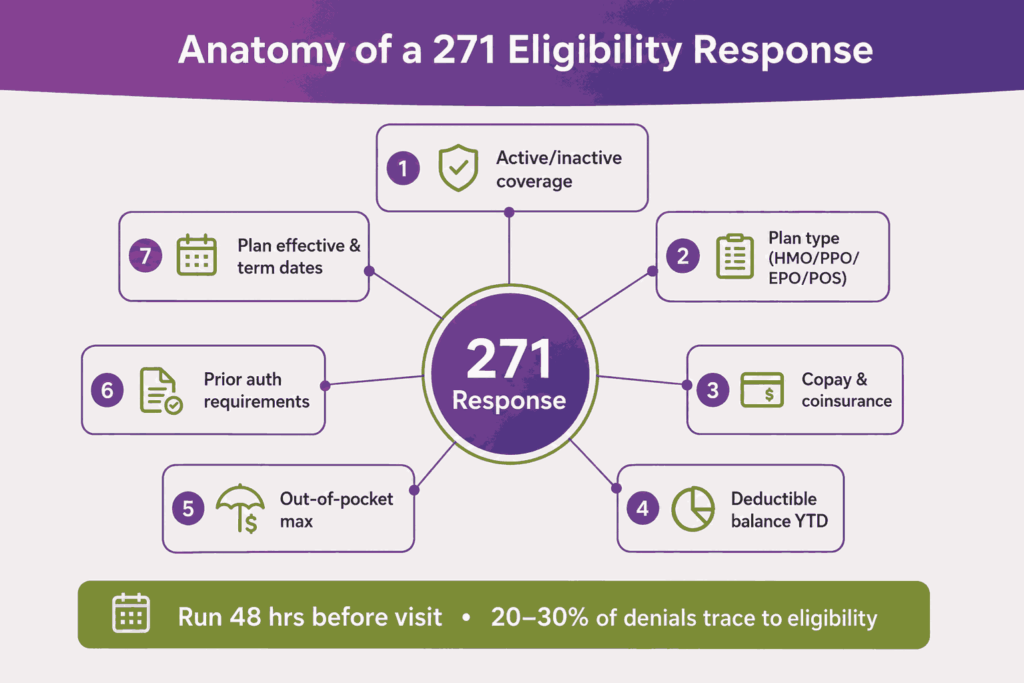
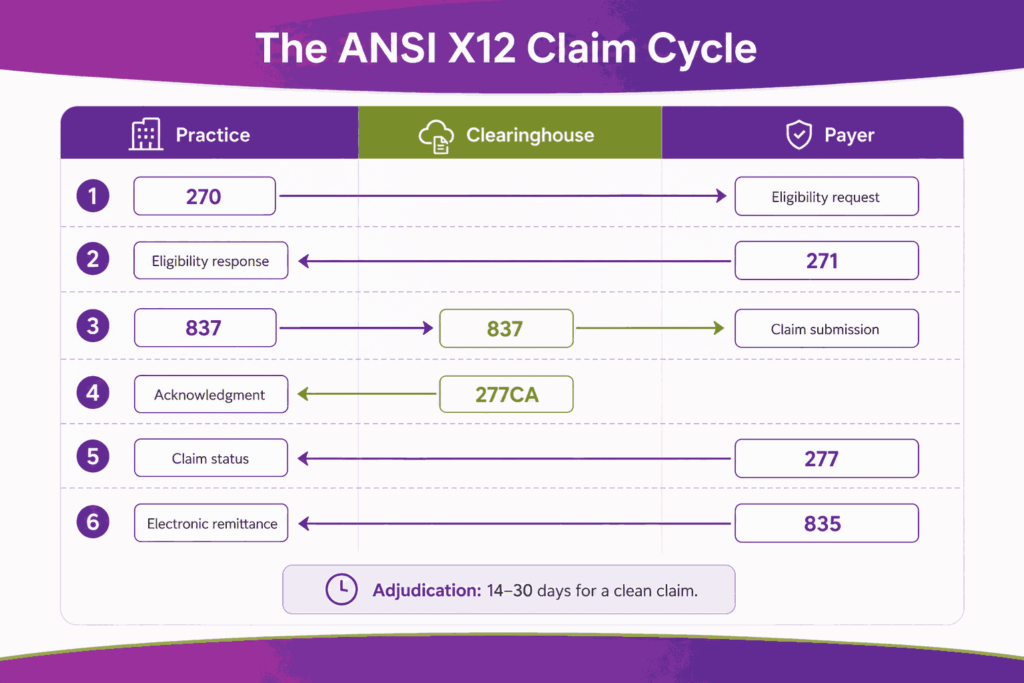
The check uses the ANSI X12 270 request and 271 response transactions. The response returns coverage status, copay, deductible balance, plan effective dates, and prior authorization rules. Practice Fusion stores the response inside the patient record for future reference.
A typical eligibility response shows:
- Active or inactive coverage
- Plan type (HMO, PPO, EPO, POS)
- Copay and coinsurance amounts
- Deductible balance year-to-date
- Out-of-pocket maximum
- Prior authorization requirements
- Plan effective and term dates
When Should You Run Eligibility Verification?
Run verification at least 48 hours before the visit. This gives staff time to handle a failed check, update the patient, and resolve coverage gaps. Same-day checks catch lapsed plans but leave no room to fix them. Industry benchmarks place 20 to 30 percent of denials as eligibility-related, which is why optimizing this step is critical for modern medical billing services.
Some practices run a second check the morning of the visit. This catches mid-month plan changes that the 48-hour check missed. The cost is one extra API call per visit. The benefit is fewer same-day discoveries at the front desk.
What Happens When An Eligibility Check Fails?
A failed check returns a 271 response with a coverage problem. Common reasons include lapsed plans, wrong member ID, or missing payer in the patient record. The Practice Fusion task workflow lets staff flag the case, call the patient, and update insurance before the visit.
How Do You Create and Submit a Superbill in Practice Fusion?
The superbill is the link between clinical work and the claim. Inside Practice Fusion, a superbill is created automatically when the patient is checked in as Arrived. The biller or coder then adds diagnoses, procedures, and modifiers before sending it to the billing team.
A finished superbill carries CPT or HCPCS procedure codes, ICD-10 diagnosis codes, modifiers, units, and place of service. It also pulls the rendering and billing provider records from the encounter. The biller marks it Ready for Biller once all fields are complete.
Here are the steps to create a superbill in Practice Fusion:
- Check in the patient as Arrived on the schedule.
- Open the encounter and complete the chart note.
- Sign the chart note so the encounter locks.
- Open the linked superbill from the encounter.
- Add or verify CPT/HCPCS procedure codes.
- Add ICD-10 diagnosis codes from the encounter.
- Apply modifiers where the procedure rules require them.
- Confirm units, charges, and place of service.
- Mark the superbill Ready for Biller.
What Do The Superbill Statuses Mean?
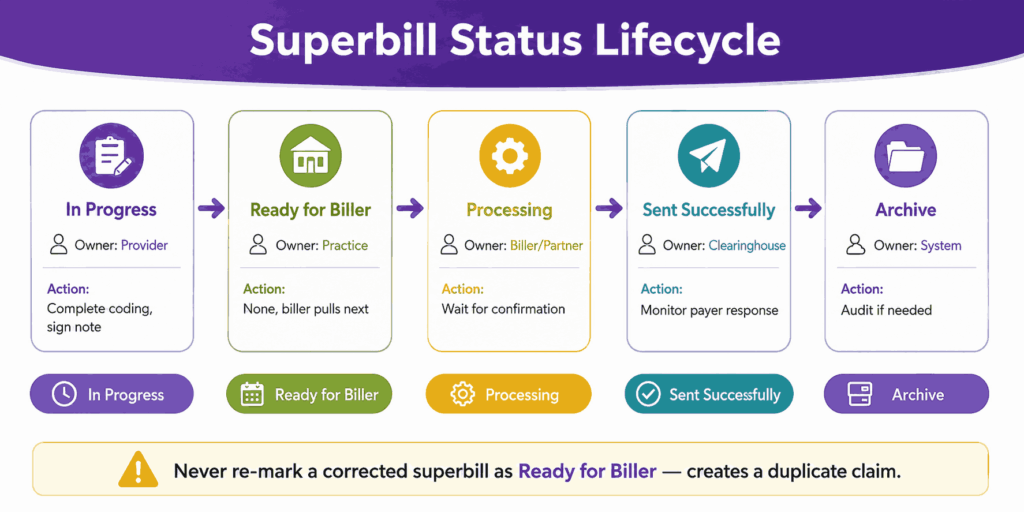
Practice Fusion tracks the superbill through a fixed status field. The status tells the biller and the practice where the claim sits. The status updates as the partner system or PF Billing Services receives, processes, and finalizes the work. Reading the status correctly avoids duplicate submissions.
The five core statuses are In Progress, Ready for Biller, Processing, Sent successfully, and Archive. Each maps to a different stage in the workflow. Sites that rely on Tasks without checking the Billing Report often miss superbills stuck at Processing for too long.
| Status | What It Means | Action Required |
|---|---|---|
| In Progress | Encounter open, superbill not finalized | Complete coding, sign chart note |
| Ready for Biller | Marked for the billing team to pick up | None, biller pulls it next |
| Processing | Partner system has received it | Wait for confirmation |
| Sent successfully | Claim built and accepted by clearinghouse | Monitor for payer response |
| Archive | Claim cycle closed | Review for audit if needed |
How Do You Correct A Superbill After It Has Been Sent?
Such corrections are common in medical billing. A missed modifier, a wrong CPT, or a typo in units all need a fix before the payer receives the claim. Practice Fusion allows superbill correction through the encounter view. The key rule is to never re-mark a corrected superbill as Ready for Biller.
Re-marking a corrected superbill as Ready for Biller creates a duplicate at the partner side. This forces manual cleanup and can trigger duplicate claim flags from payers. The right move is to update the data, save it, and notify the billing team through a task.
Why Do Some Practice Fusion Superbills Import At $0.00?
This is the most common silent revenue leak in Practice Fusion. When CPT or HCPCS charges are not stored in the charge list, the superbill still imports into the partner system. But the procedure line carries $0.00. The claim goes out with zero billed.
The fix is to populate either the Practice Fusion charge list or the partner Procedure Code Library with current fees. EZClaim’s own documentation flags this exact issue. Run a monthly audit of zero-charge claims to catch sites where the fee schedule drifted.
How Does Claim Submission Work in Practice Fusion?
Claim submission happens after the superbill leaves the practice side. The PF team builds the 837 file and sends it through the built-in clearinghouse. With a third-party partner, the partner builds the 837 in their system and submits it through their own clearinghouse.
In both cases, the claim flows from the clearinghouse to the payer. The payer returns a 277CA acknowledgment file first. This file confirms whether the claim passed clearinghouse-level checks. A clean claim then moves to payer adjudication, which can take 14 to 30 days.
Standard ANSI X12 transactions used in the Practice Fusion claim cycle:
- 270 / 271, eligibility request and response
- 837, professional claim submission
- 277CA, clearinghouse acknowledgment
- 277, claim status response
- 835, electronic remittance advice
Which Clearinghouses Does Practice Fusion Work With?
Practice Fusion billing uses a built-in clearinghouse, as compared to third-party partners bringing their own. Tebra connects through Tebra’s clearinghouse, EZClaim uses ClaimMD, and CollaborateMD uses its own Claim Control Center. Each clearinghouse has slightly different edit rules, so the same claim can pass one and fail another.
Pick a partner whose clearinghouse has strong edits for your payer mix. Medicare-heavy practices need solid CMS edit rules. Commercial-heavy practices need payer-specific scrubbers. The wrong fit shows up as a high clearinghouse rejection rate inside the first 90 days.
How Long Does It Take A Clean Claim To Reach The Payer?
A clean claim leaves Practice Fusion the same day it is marked Ready for Biller in most cases. The clearinghouse forwards it within minutes to hours. The payer receives and time-stamps it on the same business day. Adjudication then takes 14 to 30 days on average.
How Do You Post Payments, ERAs, and EOBs in Practice Fusion?
Posting closes the loop on each claim. Practice Fusion handles two payment streams. Insurance payments arrive as an ERA from the payer or as a paper EOB. Patient payments arrive at the front desk, through the patient portal, or by mail.
An ERA is an electronic 835 file. A paper EOB is the printed version. Both contain the same data: paid amount, adjustment reason, denial codes, and patient responsibility. The difference is whether the data can auto-post or has to be entered manually.
| Feature | ERA | Paper EOB |
|---|---|---|
| Format | 835 electronic file | Printed document |
| Speed | Posts in minutes | Posts in hours or days |
| Source | Clearinghouse pull | Mailroom or scanned upload |
| Data accuracy | Structured, machine-readable | Manual entry, error-prone |
How Are Insurance Payments Posted In Practice Fusion?
With Practice Fusion, ERAs auto-post overnight. The team also handles paper EOB entry by working from scanned documents uploaded through the Documents module. The Deposit batch type is used for payment uploads. The Correspondence batch type is used for other items.
With a third-party partner, posting happens in the partner system. The partner pulls the 835 file from the clearinghouse and posts it. Patient balances then sync back to Practice Fusion if the partner has bi-directional sync. Sites without bi-directional sync see balance drift.
How Are Patient Payments Tracked?
Patient payments show up in three places inside Practice Fusion: the Schedule view, the Patient Profile, and the Superbill copay field. These three views do not always match. A copay collected at the front desk but logged only in the Schedule may not flow to the claim record.
Fix this by setting one source of truth. Most practices use the Superbill copay field as the master record. Front desk staff logs every payment there. The Schedule and Patient Profile then mirror it without conflict.
How Do You Handle Denials and Rejections in Practice Fusion?
Denials and rejections look similar, but they occur at different stages. A rejection comes from the clearinghouse before the payer sees the claim. A denial is issued by the payer after adjudication. The fix path differs between the two.
Clearinghouse rejections appear quickly, often within hours. They point to data problems: a missing modifier, a wrong NPI, and a mismatched plan name. Payer denials show up days later. They point to coverage, medical necessity, coding, or eligibility problems.
What Are The Top Denial Reasons For Practice Fusion?
Top denial reasons for Practice Fusion practices include:
- Eligibility errors caught late (CO-22, CO-27)
- Missing or wrong modifier (CO-4)
- Medical necessity not supported (CO-50)
- Wrong payer plan-name routing
- ICD-9 / ICD-10 indicator mismatch
- $0.00 charge import from empty charge list
How Do You Appeal A Denial Inside Practice Fusion?
The team works on denials daily and files appeals on your behalf. You get a task in Practice Fusion when the team needs documentation, a corrected note, or a signed letter. Reply through the task. The team submits the appeal.
With a third-party partner, the partner builds the appeal in their system. They pull supporting notes from Practice Fusion. The appeal letter goes through the clearinghouse or by mail, depending on the payer. Track appeal turnaround time as a KPI. 30 to 60 days is typical.
What Clean-Claim Rate Should A Practice Fusion Site Target?
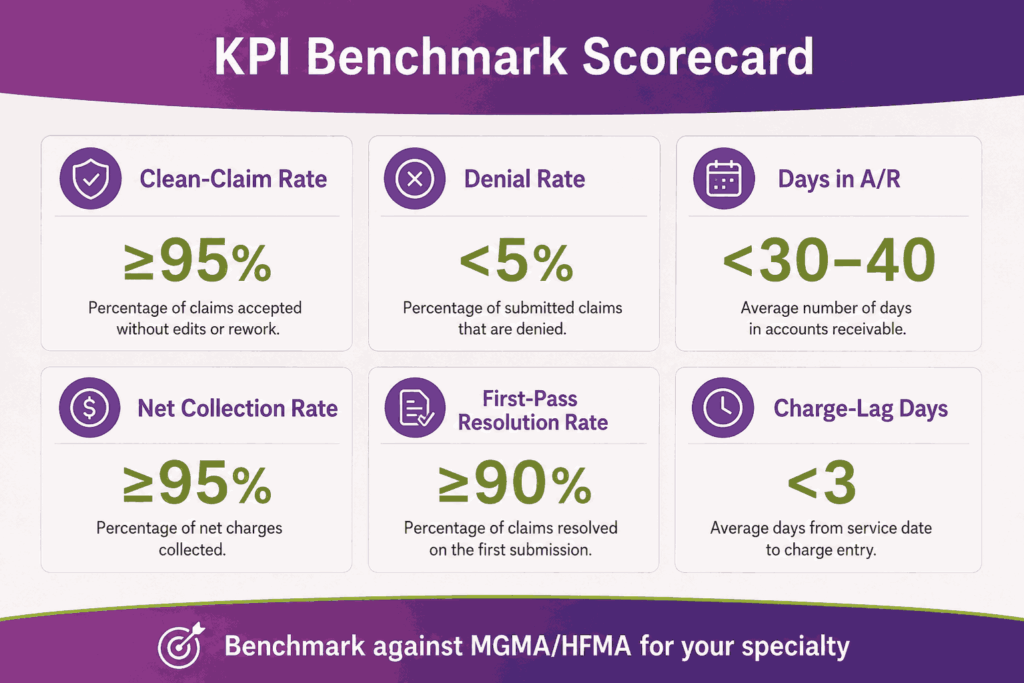
A healthy clean-claim rate sits at 95 percent or higher. This means at least 95 of every 100 claims pass the clearinghouse without rejection. The denial rate should sit below 5 percent. Days in A/R should stay under 30 to 40 days, depending on the specialty.
Sites running PF Billing Services should see these numbers from month two. Sites with a third-party partner should see them within 90 days of go-live. In-house teams should benchmark monthly. If the clean-claim rate sits 90 percent below, root-cause it before adding claim volume.
What Reports Should You Run Daily, Weekly, and Monthly in Practice Fusion?
Reports turn raw claim data into an operational signal for improved management. Practice Fusion offers a built-in Billing Report, a Daily Patient Balance Report, and patient-level views. The depth varies by path. PF Billing Services adds dashboards on top. Third-party partners bring their own report suite.
Set a report cadence to prevent issues from piling up. Daily checks catch front-end problems, and weekly checks catch claim-cycle drift. Monthly checks catch financial trends. Quarterly reviews catch payer mix changes and KPI patterns over time.
| Cadence | Report | What to Watch |
|---|---|---|
| Daily | Billing Report by status | Stuck superbills, failed eligibility |
| Daily | Patient Balance Report | Same-day collections, copays missed |
| Weekly | A/R Aging | Buckets 30, 60, 90, 120+ days |
| Weekly | Denial Log | Top 5 reason codes by volume |
| Monthly | Net Collection Rate | Cash vs adjusted charges |
| Monthly | First-Pass Resolution Rate | Claims paid without rework |
Which KPIs matter most for a Practice Fusion practice?
Six KPIs answer most operational billing questions for healthcare practices. Clean-claim rate measures front-end claim accuracy, while denial rate tracks payer-side reimbursement issues. Days in A/R reflect how quickly revenue is collected, and the net collection rate shows how much collectible revenue the practice actually captures. First-pass resolution rate measures overall revenue cycle efficiency, while charge-lag days track how quickly patient encounters are converted into submitted claims.
Track each KPI against a target. Compare against MGMA or HFMA benchmarks for your specialty. Primary care, mental health, and surgical specialties all have different baselines. A 30-day A/R is healthy for primary care. The same number is high for an ambulatory surgery center.
How Do You Read The Practice Fusion Billing Report?
The Billing Report lists every superbill with its current status, encounter date, provider, patient, and dollar amount. Filter by status to find stuck claims. Sort by date to find aged work. Export monthly to compare period-over-period. Skipping this report hides a slow drift in your A/R.
How Does Practice Fusion Stay HIPAA-Compliant in the Billing Workflow?
Practice Fusion is a HIPAA-covered cloud platform. Veradigm runs the parent compliance program. The platform encrypts data at rest and in transit. Access is role-based with audit logging on all PHI views covering the EHR side and the Billing Services side.
Compliance is a shared duty. Practice Fusion handles the platform. Your practice handles its own user accounts, password policy, and downstream workflows. A Business Associate Agreement (BAA) sits between you, Veradigm, and any third-party billing partner that touches PHI.
These HIPAA controls are relevant to the Practice Fusion billing workflow:
- TLS encryption for all data in transit
- Encryption at rest for stored PHI
- Role-based access by user license type
- Audit logs on every chart access
- BAAs with PF Billing Services and partners
- Multi-factor authentication on user sign-in
What are the Practical HIPAA Risks During Billing?
The biggest compliance risks usually come from the workflow surrounding the platform itself. Sending an unencrypted EOB through email to a coder creates a HIPAA exposure, just like storing claim spreadsheets on a personal device. Even sharing a Practice Fusion login between multiple billers can create serious compliance and audit risks.
What Are the Most Common Practice Fusion Billing Mistakes?
Most Practice Fusion billing problems trace back to a small set of recurring mistakes. Each one shows up in either the rejection report or the denial log. Catching them at setup saves months of cleanup later.
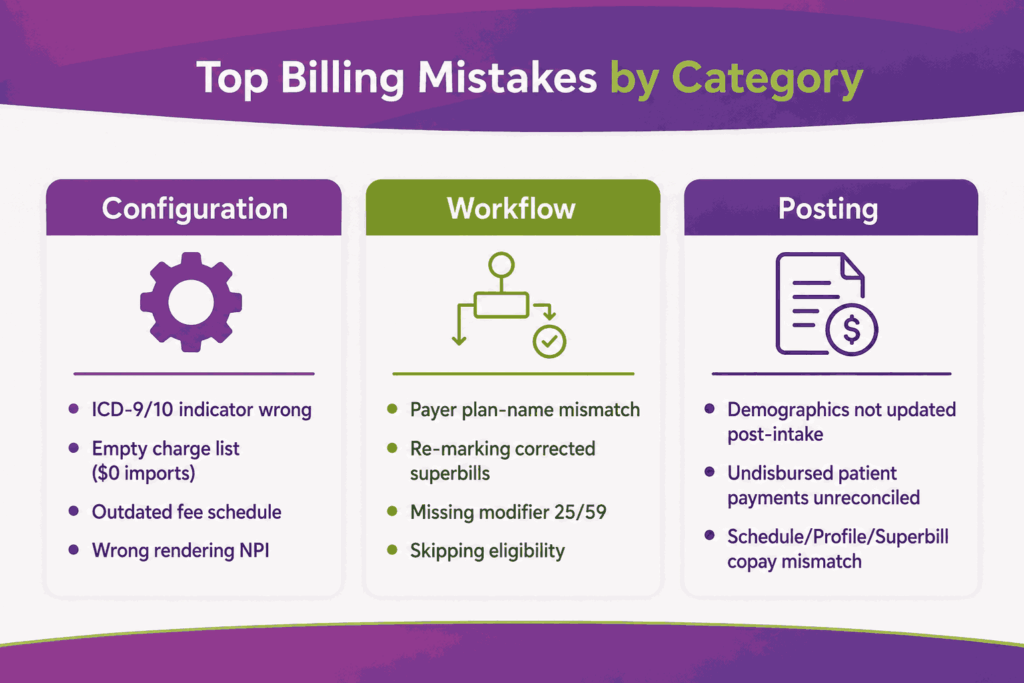
The mistakes usually fall into three categories. Configuration mistakes happen during system setup, workflow mistakes occur at the encounter or superbill stage, and posting mistakes happen during payment reconciliation and posting. Each group has different signs and different fixes.
The most common Practice Fusion billing mistakes are:
- ICD-9 / ICD-10 indicator set wrong, producing universal claim rejections.
- Empty charge list, producing $0.00 line items on the claim.
- Payer plan-name mismatch, sending BCBS-TX claims to BCBS-NC by routing error.
- Re-marking a corrected superbill as Ready for Biller, creating duplicate claims.
- Missing modifier 25 or 59 on an E&M plus procedure encounter.
- Skipping eligibility verification before the visit.
- Failing to update patient demographics after intake forms come in.
- Not reconciling undisbursed patient payments inside Practice Fusion.
- Wrong NPI on the rendering provider line.
- Outdated fee schedule producing underbilled claims.
How Do You Catch These Mistakes Early?
Practices should run a setup audit before submitting the first live claim, followed by weekly reviews of the top rejection reasons during the first 90 days. Monthly denial analysis against payer remit advice helps identify recurring billing gaps and workflow issues early. Practices that maintain this review cycle often reduce billing error rates by 60 to 70 percent within a single quarter.
When Should You Outsource Practice Fusion Billing Instead of Doing It In-House?
Outsourcing is not the default answer. Some practices do better in-house with two trained billers and a clear playbook. But specific signals point to a partner being the right call. Spotting them early prevents months of revenue loss before a switch.
The signs to watch include rising A/R, denial rate creep, billing FTE churn, and growth across new specialties. Each one is a leading indicator that internal capacity has hit a ceiling. The right partner brings the bench you cannot easily hire for.
You should switch to a Practice Fusion billing partner when:
- A/R aging crosses 40 days for two months in a row
- Denial rate sits above 8 percent
- Your billing manager has turned over twice in 18 months
- The practice is adding a new specialty with unfamiliar payers
- Charge lag exceeds 5 business days
- Underpayments are not being audited
- Patient statement volume is hurting front-desk capacity
A specialized Practice Fusion billing partner brings certified coders, payer-specific edits, and analytics that the native PF reports do not show. See how Transcure’s Practice Fusion billing services run the full revenue cycle for independent practices and surgical groups across more than 32 specialties.
Frequently Asked Questions
Is Practice Fusion free?
No, Practice Fusion was free until 2018. Veradigm now charges from $199 per provider per month for the base license. Add-ons such as billing services and partner connections carry separate fees.
Does Practice Fusion Include Billing Software?
Yes, the EHR includes a built-in billing module with electronic superbills, charge lists, billing templates, and a billing report. Billing services are the optional add-on that runs the full revenue cycle work for you.
What Clearinghouse Does Practice Fusion Use?
Practice Fusion uses an in-built clearinghouse. Third-party partners bring their own. Common pairings include ClaimMD with EZClaim, Tebra’s clearinghouse with Tebra, and CollaborateMD’s Claim Control Center with CollaborateMD.
Can You Connect Practice Fusion with Kareo?
Kareo is now Tebra. Practice Fusion and Tebra share an active connection. Superbills flow from Practice Fusion into Tebra’s claim engine through the Ready for Biller status. Tebra then submits the claim through its own clearinghouse.
Can you Bill Medicare and Medicaid through Practice Fusion?
Yes, Practice Fusion supports Medicare, Medicaid, and all commercial payers. Eligibility, claim routing, and ERA posting work the same way across payer types. Payer enrollment is part of the billing services setup or your partner’s setup.
What happens to your Practice Fusion data if you switch billing partners?
Your clinical and superbill data stay inside Practice Fusion. The partner system retains its own claim and payment data. A clean switch requires an A/R handoff plan, a BAA termination, and a mapped transition of open claims.