
The GA modifier is one of the most consequential codes in Medicare Part B billing. It tells the payer that an Advance Beneficiary Notice (ABN) is on file for a service the provider expects to be denied. Without it, the provider cannot bill the patient after a claim denial.
This matters now more than ever. Medical necessity denials rose 5% in 2024, according to a Crowe revenue cycle analytics report covered by Becker’s Hospital Review. Many of those denied claims could have been financially protected with correct GA modifier usage. Missing this two-character code means the practice absorbs the full loss. This is why many providers rely on expert medical billing services to safeguard their revenue through precise modifier application.
This guide breaks down the GA modifier from every angle. It covers the definition, ABN process, step-by-step billing instructions, real-world claim examples, and common mistakes. It also explains the differences between GA, GZ, GY, and GX modifiers, along with UnitedHealthcare’s commercial plan requirement for GA usage.
What Does the GA Modifier Mean?
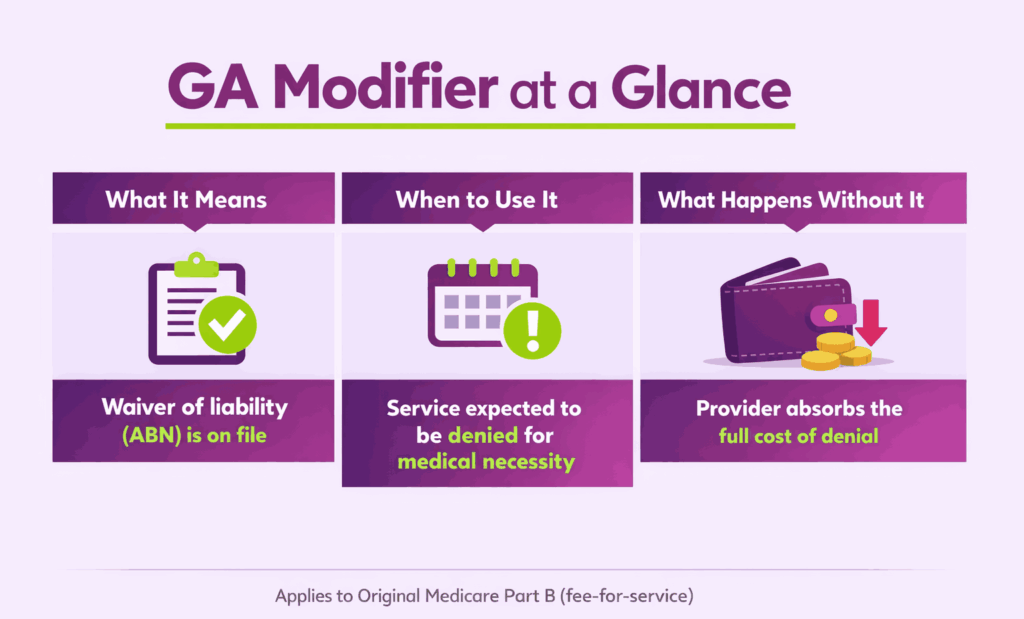
The GA modifier is a two-character HCPCS Level II modifier used in medical billing. It communicates one specific fact to the payer: a Waiver of Liability Statement is on file. That waiver is formally known as the Advance Beneficiary Notice of Noncoverage (ABN).
Providers append this modifier to a CPT or HCPCS code when they expect Medicare to deny the service. The denial is typically based on a lack of medical necessity. By adding GA, the provider documents that the patient was informed before the service was rendered.
What is the Official Description of the GA Modifier?
The Centers for Medicare & Medicaid Services (CMS) defines the GA modifier as follows:
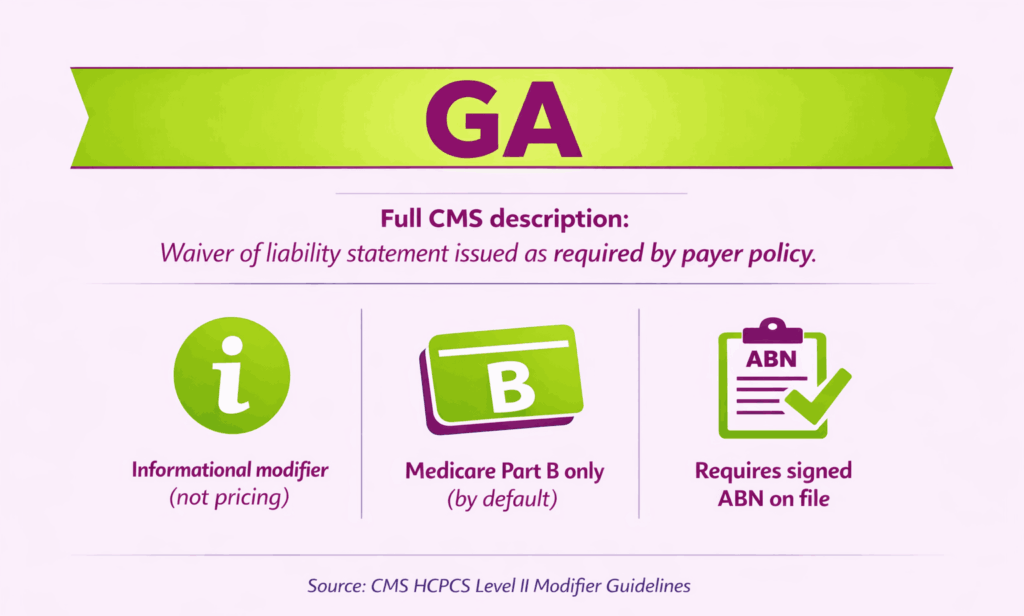
GA: Waiver of liability statement issued as required by payer policy.
This means the provider has given the patient a signed ABN before delivering the service. The ABN explains that Medicare may not pay for the item or service. It also confirms that the patient agreed to accept financial responsibility if the claim is denied.
Key facts about the GA modifier definition:
- It is an informational modifier, not a pricing modifier.
- It applies to Original Medicare (Part B) fee-for-service claims only.
- It does not apply to Medicare Advantage, Medicaid, or most commercial plans by default.
- It must always be backed by a valid, signed ABN on file.
Why Is the GA Modifier Important for Revenue Protection?
The GA modifier directly controls who pays when a claim is denied. If a provider submits a claim without GA and Medicare denies it, the provider cannot bill the patient. The practice absorbs the entire cost.
When the GA modifier is present, Medicare automatically assigns beneficiary liability upon denial. This means the patient becomes responsible for payment, as agreed in the ABN they signed.
| Scenario | GA Modifier Used? | Who Pays After Denial? |
|---|---|---|
| ABN signed, GA appended | Yes | Patient (beneficiary liable) |
| ABN signed, GA not appended | No | Provider absorbs cost |
| No ABN issued | No | Provider absorbs cost |
The financial impact is clear. A single missing modifier can turn a collectible charge into a write-off. Across a full year of claims, that adds up fast.

Who Uses the GA Modifier and When?
Any provider billing Original Medicare Part B can use the GA modifier. This includes physicians, nurse practitioners, therapists, labs, and DME suppliers.
The modifier applies when a provider reasonably believes Medicare will deny a service. Common reasons for expected denial include:
- The service exceeds Medicare’s frequency limits for that benefit period.
- The diagnosis does not support medical necessity under the applicable LCD or NCD.
- The treatment is experimental or outside standard coverage guidelines.
- The item or supply fails to meet DMEPOS coverage criteria.
The provider must issue the ABN before the service is rendered. Issuing it after the fact does not meet CMS requirements and invalidates the liability transfer.
How Does the GA Modifier Work With the ABN Process?
The GA modifier and the ABN are inseparable. One cannot function without the other. The modifier is the claim-level signal. The ABN is the legal document that backs it up.
If you append GA without a signed ABN, it is a billing error. If you have a signed ABN but forget GA, the claim is denied as provider-liable. Both must be in place for the liability transfer to work.
What is an Advance Beneficiary Notice (ABN)?
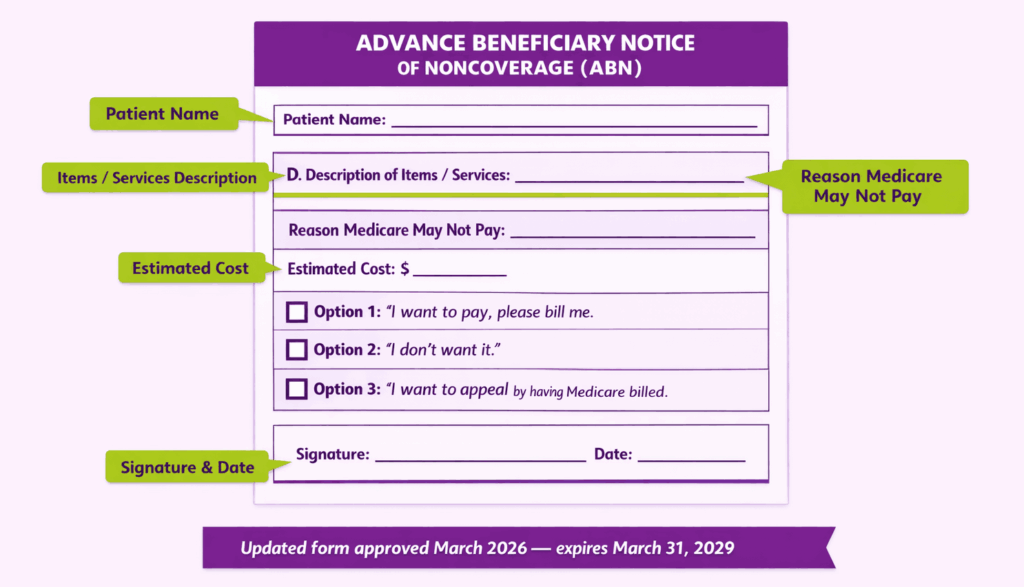
An ABN (Form CMS-R-131) is a written notice given to Original Medicare beneficiaries. It informs the patient that a specific service may not be covered. The patient then decides whether to proceed and accept financial responsibility.
A valid ABN must include:
- The patient’s name.
- The specific item or service that may not be covered.
- The reason the provider believes Medicare may deny it.
- An estimated cost for the service.
- Three option boxes for the patient to choose from.
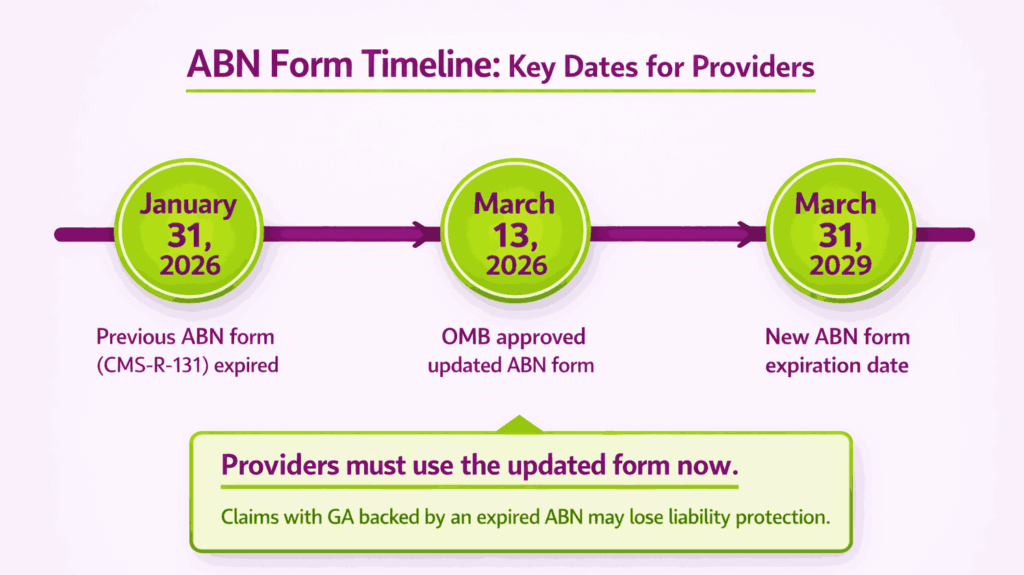
CMS approved an updated ABN form in March 2026. The new version expires March 31, 2029. Providers should confirm they are using the current form to avoid invalid notices.
What Steps Should Providers Follow Before Appending the GA Modifier?
Before applying the GA modifier, providers must take several essential steps to ensure proper documentation, patient understanding, and compliance with billing requirements:
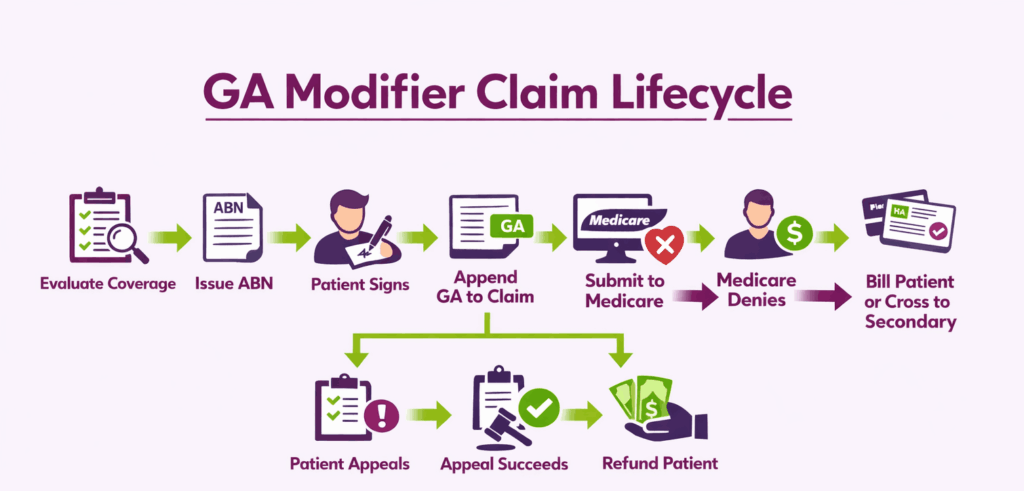
Step 1: Evaluate Coverage and Medical Necessity
Review the applicable Local Coverage Determination (LCD) or National Coverage Determination (NCD). Check frequency limits, diagnosis requirements, and benefit exclusions. If denial is likely, proceed to Step 2.
Step 2: Issue the ABN to the Patient
Present the ABN before delivering the service. The patient must have time to read and understand it. Never issue an ABN during a medical emergency or under duress.
Step 3: Obtain the Patient’s Signature
The patient selects one of three options and signs the form. If the patient refuses to sign, document the refusal on the ABN with a witness signature. The provider may still append GA in this situation.
Step 4: Append the GA Modifier and Submit the Claim
Add GA to the relevant CPT or HCPCS code in Box 24D of the CMS-1500 form. Report the full charge amount. Do not reduce the charge because a denial is expected. Submit with the correct diagnosis codes.
What Happens After a GA Modifier Claim Is Denied?
Medicare denies the claim and assigns beneficiary liability. The provider can then bill the patient per the signed ABN agreement. If the patient has secondary insurance, the denial allows that claim to cross over.
Can a Patient Appeal a GA Modifier Denial?
Yes, as even with a signed ABN, the patient retains full Medicare appeal rights. If the appeal succeeds and Medicare overturns the denial, the provider must refund any amount already collected from the patient.
When Should You Use the GA Modifier?
The GA modifier is not used on every Medicare claim. It applies only when a provider has a reasonable basis to expect denial for medical necessity. Below are the most common clinical and billing situations where GA is required.
What Are Common Clinical Scenarios That Require the GA Modifier?
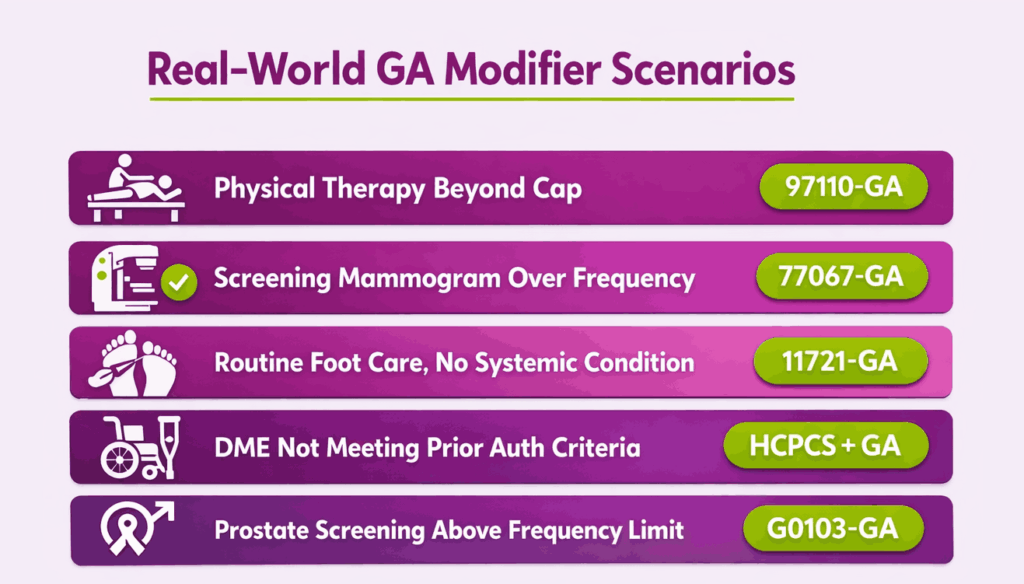
Several recurring situations in daily practice call for the GA modifier. Each involves a service Medicare typically covers but may deny under specific circumstances.
| Scenario | Why Medicare May Deny | Example Code |
|---|---|---|
| Therapy beyond coverage limits | Exceeds annual benefit cap | 97110-GA |
| Screening outside frequency limits | Done more often than allowed | 77067-GA |
| Non-covered diagnosis for a covered service | Diagnosis does not support necessity | 93306-GA |
| Routine foot care without a qualifying condition | No systemic condition documented | 11721-GA |
In each case, the provider issues an ABN before the service. The patient signs it, and the GA modifier is appended to the claim line.
Can the GA Modifier Be Used for DMEPOS Claims?
Yes. DMEPOS suppliers frequently use the GA modifier. Medicare may deny equipment or supplies when coverage criteria are not met. Common triggers include failure to obtain prior authorization and missing advance determination of coverage.
The GA modifier also applies to DMEPOS technical denials, such as:
- Invalid or missing supplier number.
- Prohibited unsolicited telephone contact with the beneficiary.
- Items furnished in a Competitive Bidding area by a non-contract supplier.
What About the GA Modifier and Surprise Billing?
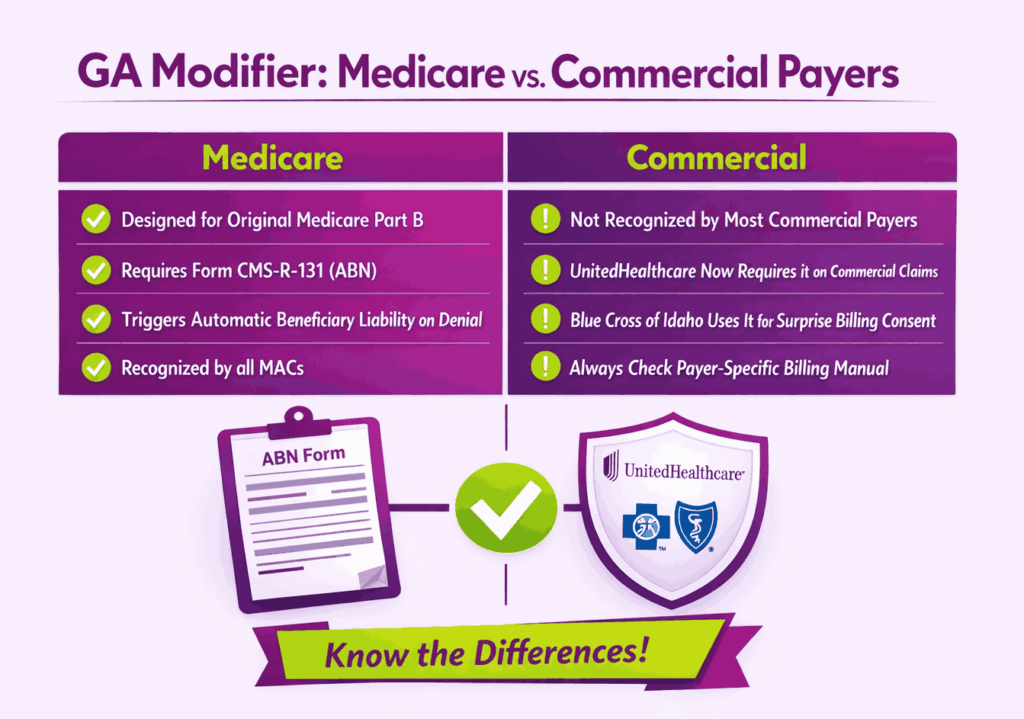
Some commercial payers have adopted the GA modifier outside of Medicare. Blue Cross of Idaho, for example, requires GA when an out-of-network provider performs non-emergent services at an in-network facility. In that context, GA signals that the provider issued a Surprise Billing Protection Form and obtained the patient’s signed consent to balance bill. This usage falls under the Consolidated Appropriations Act protections.
Do You Put the GA Modifier on Commercial Insurance?
This is one of the most searched questions around the GA modifier. The short answer is no, with one major exception. The GA modifier was designed for Original Medicare Part B claims. Most commercial payers do not recognize it. But payer-specific policies are changing that rule.
Is the GA Modifier Only for Medicare?
By default, yes. CMS created the GA modifier specifically for Medicare fee-for-service billing. ABN forms are also designed exclusively for Medicare beneficiaries. The American Academy of Ophthalmology has confirmed that using GA on non-Medicare claims can trigger denials. Blue Care Network Advantage plans, for example, have rejected claims carrying the GA modifier and asked providers to remove it.
Commercial and Medicare Advantage plans have their own waiver of liability processes. These often require different forms or predetermination before services. Providers should never assume that GA works the same way across all payer types.
What Is UnitedHealthcare’s GA Modifier Requirement for Commercial Plans?
UnitedHealthcare introduced a requirement for providers to append the GA modifier on commercial plan claims. This applies specifically when a service may not meet coverage criteria, and the patient has signed a waiver of liability.
What Does the UHC Update Require From Providers?
The update aligns UnitedHealthcare’s commercial billing with Medicare-style GA modifier logic. Providers must notify the patient that the service may not be covered. A signed waiver must be on file before the service is delivered. The GA modifier must then be appended to the claim.
If the claim is denied and no GA modifier is present, the provider cannot bill the member for the non-covered service. That makes the financial risk identical to missing GA on a Medicare claim.
How Should Practices Prepare for This Requirement?
Practices billing UnitedHealthcare commercial plans should take three steps. First, train front-desk and billing staff on when to issue waivers for UHC members. Second, build a workflow to flag potentially non-covered services at eligibility verification. Third, confirm that your billing system supports appending GA to commercial claims, not just Medicare.
Are Other Commercial Payers Adopting the GA Modifier?
A small number of commercial payers now accept or require GA in specific scenarios. Blue Cross of Idaho uses GA for surprise billing consent under the Consolidated Appropriations Act. Molina Healthcare lists GA among the modifiers it recognizes for processing non-covered services. Each payer’s rules differ, so providers should always check the specific payer’s billing manual before appending GA to a commercial claim.
How Is the GA Modifier Different From GZ, GY, and GX?
These four modifiers are often grouped together, but each one serves a distinct purpose. Confusing them leads to denied claims, lost revenue, and compliance issues. The table below shows the core differences at a glance.
| Modifier | Meaning | ABN Required? | Who Pays After Denial? |
|---|---|---|---|
| GA | Waiver of liability on file | Yes, signed ABN required | Patient (beneficiary liable) |
| GZ | Expected denial, no ABN issued | No, ABN was not given | Provider absorbs cost |
| GY | Service statutorily excluded from Medicare | No, ABN not applicable | Patient or secondary payer |
| GX | Voluntary ABN issued for non-covered service | Yes, voluntary ABN | Patient (beneficiary liable) |
What Is the Difference Between GA and GZ Modifiers?
GA and GZ both involve services expected to be denied for medical necessity. The difference is documentation. GA means a signed ABN exists. GZ means no ABN was issued, or the ABN on file is invalid.
Medicare automatically denies GZ claims using Claim Adjustment Reason Code CO-50. The provider cannot collect from the patient. GZ is essentially an admission of non-compliance. It should only be used when an ABN was required but not obtained.
What Is the Difference Between GA and GY Modifiers?
GY applies to services that are statutorily excluded from Medicare. These are items Medicare never covers under any circumstances, such as routine dental care or cosmetic surgery. No ABN is needed because the service falls outside Medicare’s benefit definition entirely.
GA applies to services Medicare normally covers but may deny in a specific case. The distinction matters because the ABN process only applies to GA situations, not GY.
What Is the Difference Between GA and GX Modifiers?
GX indicates a voluntary ABN was issued for a service that is not covered by Medicare. Unlike GA, which is mandatory when denial is expected for medical necessity, GX is optional. Providers use it to document that the patient was informed about a non-covered service as a courtesy.
Can You Use GA With Other Modifiers on the Same Claim Line?
GA has strict stacking rules. CMS does not allow GA on the same claim line as GY, GZ, or KX. Pairing these modifiers will result in a rejection.
Modifiers that cannot appear with GA on the same line include:
- GZ: Item or service expected to be denied, no ABN.
- GY: Statutorily excluded service.
- KX: Service meets therapy threshold requirements.
- EY: No physician or provider signature on file.
GA can be combined with therapy discipline modifiers like GP, GO, or GN. It can also appear alongside standard CPT modifiers such as 25 or 59 when clinically appropriate.
What Are Common GA Modifier Billing Mistakes to Avoid?
Even experienced billing teams make errors with the GA modifier. Some mistakes lead to write-offs. Others create audit exposure. Knowing the most common pitfalls helps prevent both.
What Happens if You Don’t Use the GA Modifier When Required?
If a provider has a signed ABN but fails to append GA, Medicare denies the claim as provider-liable. The practice cannot bill the patient and cannot send the claim to secondary insurance. The revenue is lost with no path to recovery.
This is one of the most expensive single-character billing errors in Medicare. A missed modifier on a high-cost service like an echocardiogram or advanced imaging study can mean thousands of dollars in unrecoverable charges.
What Are the Compliance Risks of Misusing the GA Modifier?
The GA modifier is a high-risk area for Medicare audits, Recovery Audit Contractor (RAC) reviews, and OIG investigations. The following errors are frequently flagged:
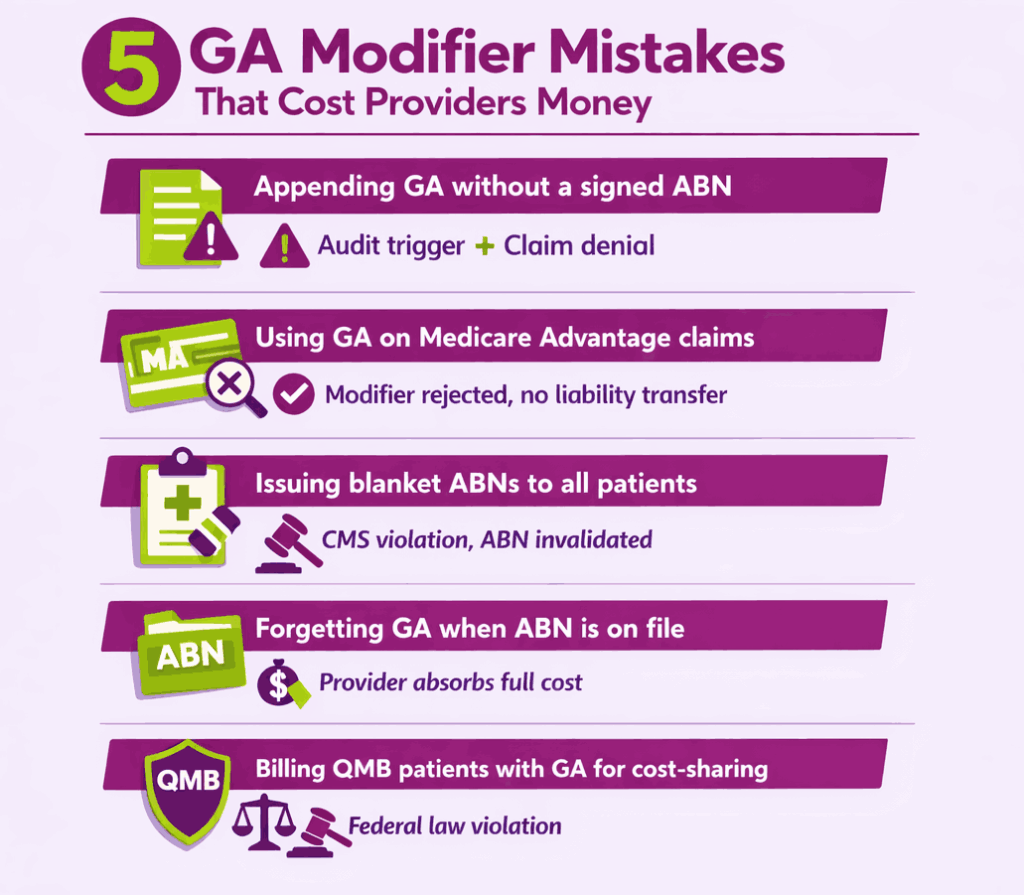
- Blanket ABNs: Pre-printing ABNs for all patients or covering all services in one form is prohibited by CMS.
- GA without a signed ABN: Appending the modifier without a valid ABN on file is a billing error and potential fraud trigger.
- Using GA on Medicare Advantage claims: MA plans are administered by private insurers with separate waiver processes. GA does not produce the same liability transfer on MA claims.
- Billing QMB patients incorrectly: Federal law prohibits billing Qualified Medicare Beneficiary (QMB) patients for Medicare cost-sharing amounts. Providers can only issue an ABN to a QMB patient for services fully excluded from Medicare coverage.
What Changed With the ABN Form in 2026?
The previous ABN form (CMS-R-131) expired on January 31, 2026. In March 2026, the Office of Management and Budget approved an updated version. The new form is effective immediately and expires March 31, 2029.
Providers must transition to the updated ABN form. Submitting claims with GA while using an expired ABN form may invalidate the liability transfer. Always confirm the form version before issuing a new notice.
Key Takeaways for GA Modifier Compliance
The GA modifier is a small code with an outsized financial impact. Getting it right protects revenue. Getting it wrong creates write-offs that cannot be reversed. Here are the core rules to follow:
- Always issue a valid, current ABN before delivering the service.
- Append GA only when a signed ABN is on file and a denial is expected.
- Never use GA on Medicare Advantage claims unless the plan specifically requires it.
- Do not combine GA with GZ, GY, or KX on the same claim line.
- Confirm you are using the 2026-approved ABN form (expires March 31, 2029).
- Check payer-specific policies before appending GA to commercial claims.
- Train billing staff to flag expected denials at the point of eligibility verification.
For practices with high Medicare Part B volume, a quarterly audit of GA modifier usage and ABN documentation is a practical safeguard against compliance risk.
Frequently Asked Questions About the GA Modifier
Is the GA Modifier a Pricing Modifier?
No, as the GA modifier is an informational modifier. It does not change the reimbursement amount or fee schedule for a service. It only communicates that an ABN is on file, and the patient may be billed upon denial.
Can You Use the GA Modifier on Medicare Advantage Claims?
No, Medicare Advantage plans are administered by private insurers with their own coverage and waiver rules. GA does not trigger beneficiary liability on MA claims. Always check the specific MA plan’s provider manual for the correct modifier or waiver process.
What if the Patient Refuses to Sign the ABN?
The provider should document the refusal directly on the ABN form. A witness signature is recommended. The provider may still append GA and submit the claim. CMS requires only that the patient was properly notified, not that they agreed to pay.
Does the GA Modifier Guarantee Patient Payment?
No, the GA modifier shifts liability from the provider to the patient upon denial. It does not guarantee the patient will pay. Collecting still depends on the practice’s billing and collections process. If the patient appeals and Medicare overturns the denial, the provider must refund any amount already collected.
Where Can Providers Find the Current ABN Form?
The official ABN (Form CMS-R-131) is available on the CMS Beneficiary Notices Initiative webpage. The updated version was approved in March 2026 and expires March 31, 2029. Providers can also contact their Medicare Administrative Contractor (MAC) for guidance on proper ABN completion.