Medical billing does not start when you submit a claim. It starts inside the EHR, where documentation accuracy determines whether you get paid. About 95% of U.S. office-based physicians had adopted EHR systems by 2024, but adoption alone does not drive revenue. How well you use the system directly affects your revenue, prompting many groups to look closely at how their technology interfaces with professional medical billing services to ensure no revenue is left on the table.
PrognoCIS EMR is a cloud-based platform built for ambulatory and specialty practices. It connects clinical documentation directly with billing. A well-configured PrognoCIS setup can reduce denials, speed up reimbursements, and give billing teams better visibility into their revenue cycle.
This guide covers what PrognoCIS is, who uses it, how billing works inside it, and the most common challenges practices face. We will explain how Transcure helps PrognoCIS users achieve better results with the platform.

What Is PrognoCIS EMR?
PrognoCIS EMR is a cloud-based electronic medical records platform developed by Bizmatics Inc. in 2001. It is now part of Harris Healthcare and is used by ambulatory practices, specialty clinics, and multi-provider groups across the United States.
The platform is ONC-certified, HIPAA-compliant, ICD-10 compliant, and MACRA-certified. It supports MIPS reporting and meets the requirements for most value-based care programs.
What sets PrognoCIS apart from many EHRs is the single-click transition between the EMR module and the billing module. Providers close an encounter, and the charge feeds directly into billing without manual re-entry. This connection reduces charge capture errors and speeds up the billing cycle significantly.
PrognoCIS includes its own clearinghouse called Secure Connect. It also supports external clearinghouses, including Waystar, Trizetto, and Jopari, for practices that require those connections.
Which Practices Can Use PrognoCIS EMR?
PrognoCIS is built for outpatient and ambulatory settings. It works across a wide range of practice sizes and specialties.
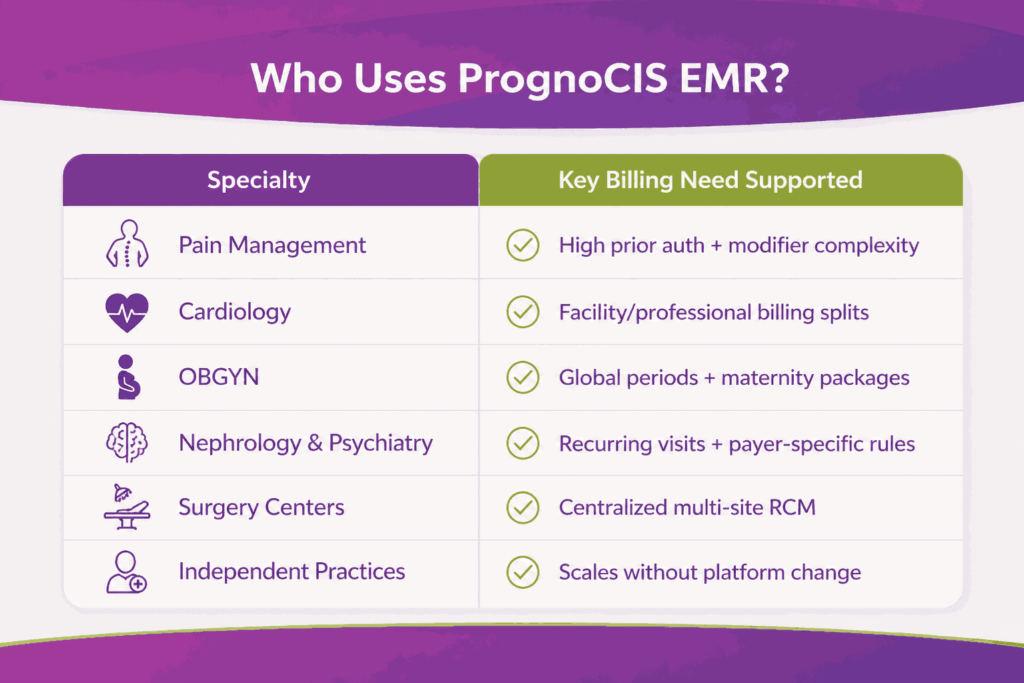
Practices that commonly use PrognoCIS include:
- Small to mid-sized independent practices
- Multi-specialty group practices and ambulatory clinics
- Pain Management, Cardiology, OBGYN, Nephrology, Psychiatry, Orthopedics, and Primary Care
- Surgery centers and multi-location practices need centralized billing
- In-house billing teams and outsourced RCM companies operating inside the platform
The platform’s specialty-specific templates and customizable workflows make it a practical choice for practices that bill across different payer types and procedure categories. It scales from solo providers to large multi-specialty groups without requiring a platform change as the practice grows.
How Does PrognoCIS EMR Fit Into Daily Practice Operations?
PrognoCIS sits at the center of a practice’s daily workflow. Every role in the practice interacts with a different part of the platform, and each interaction has a downstream effect on billing accuracy and revenue cycle performance.
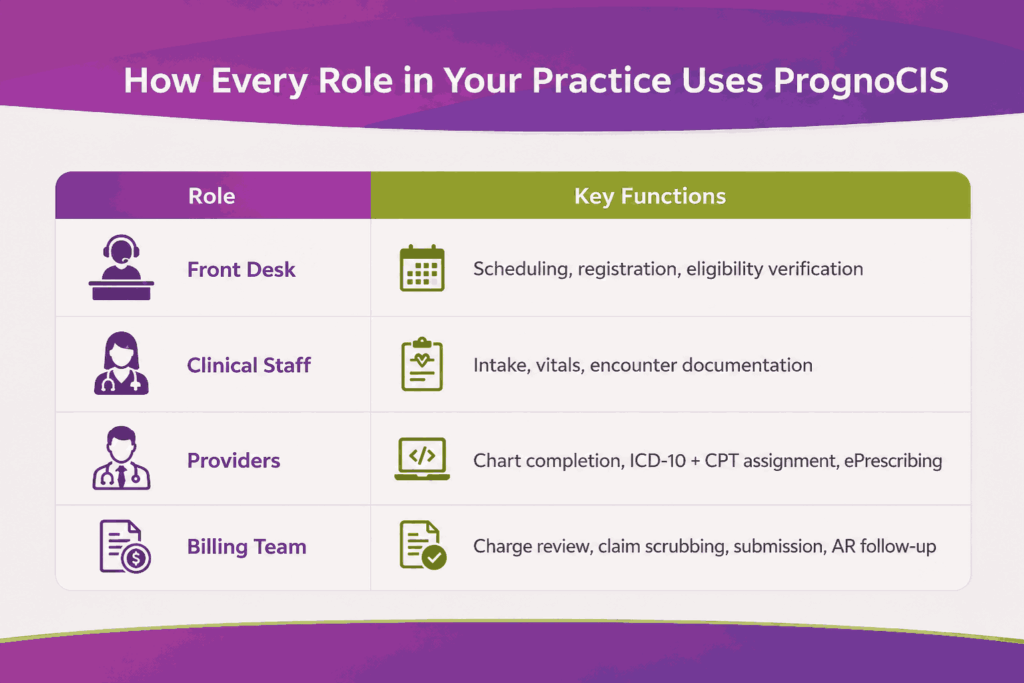
Here is how each role uses PrognoCIS day to day:
| Role | Primary Functions in PrognoCIS |
|---|---|
| Front Desk Staff | Appointment scheduling, patient registration, insurance eligibility verification |
| Clinical Staff | Intake documentation, vitals entry, encounter notes using specialty templates |
| Providers | Chart completion, ICD-10 and CPT code assignment, ePrescribing |
| Billing Staff | Charge review, claim scrubbing, submission, payment posting, AR follow-up |
Prior authorization tracking is built directly into the workflow. Staff can confirm and document authorizations before the patient visit, which reduces authorization-related denials at submission.
When the system is configured correctly, charges move from a closed clinical encounter into the billing queue automatically. This removes a common manual step that causes delays or errors in practices using disconnected systems.
What Are the Key Features of PrognoCIS EMR That Improve Medical Billing?
PrognoCIS includes a full suite of billing tools built into the platform. Understanding what each feature does helps billing teams use them correctly and get consistent results.
Real-Time Eligibility and Benefits Verification
PrognoCIS verifies patient insurance coverage in real time before the appointment. It also supports batch eligibility checks, which let staff run verification for an entire day’s schedule at once. Eligibility failures account for about 24% of all claim denials, making this one of the highest-impact features for denial prevention.
The verification response returns the patient’s active coverage status, plan type, copay amounts, deductible balances, and service-specific limitations. Front desk staff should review this before the visit and flag any coverage gaps that would affect billing. Running batch checks the night before gives your team time to resolve issues before the patient arrives.
Integrated Charge Capture and Superbill Generation
When a provider closes a clinical encounter, the charge data flows automatically into the billing module. Billers can review the superbill, confirm CPT codes, ICD-10 diagnosis codes, and modifiers before the claim is built. This direct feed reduces the lag between patient visits and claim submission.
During superbill review, billers should check that each diagnosis code is linked to the correct procedure, that modifiers are present where payer rules require them, and that no billable service has been left off. A missed service at this stage means lost revenue that rarely gets recovered after the claim is submitted.
Claims Scrubbing and Electronic Submission
PrognoCIS uses a rules engine to validate claims before they are sent to the payer. The scrubber checks for code accuracy, modifier compliance, and payer-specific requirements. PrognoCIS reports a 96% clean claim rate when scrubbing rules are properly configured. Claims are submitted electronically through Secure Connect or a connected external clearinghouse.
When the scrubber flags a claim, billing staff receive a specific error code explaining the issue. Common flags include missing modifiers, mismatched diagnosis-to-procedure pairings, and exceeded payer frequency limits. Each flagged claim needs to be corrected and revalidated before submission. Leaving flagged claims in the queue is one of the fastest ways to push a claim past a timely filing deadline.
Denial Tracking and AR Management
The platform flags denied claims and provides Denial Trends by Provider reports. Billing teams can identify recurring denials and trace them back to a root cause. The AR aging dashboard breaks outstanding claims into day-range buckets, giving teams a clear view of where follow-up is needed most.
The Denial Trends by Provider report is particularly useful for spotting systemic problems. If a specific provider’s claims are denied at a higher rate than others, the report can point to documentation patterns, template misconfigurations, or payer-specific rule gaps. Reviewing this report monthly gives billing managers the data they need to address problems before they affect collection rates.
EOB and ERA Payment Posting
PrognoCIS handles both electronic remittance advice (ERA) auto-posting and manual EOB entry. The system matches payments to submitted claims and flags underpayments against contracted rates, which helps prevent revenue from being written off incorrectly.
ERA files post automatically when PrognoCIS matches the remittance to an open claim through Secure Connect. Manual EOB entry covers paper remittances from payers that do not send electronic files. During posting, billers should verify that the paid amount matches the contracted rate and flag any underpayment for follow-up before closing the account.
Reporting Dashboard
PrognoCIS offers up to 10 configurable dashboards and over 90 report types. Billing teams can track key performance indicators, including clean claim rate, denial rate, days in AR, and collection rate. Reports can be filtered by provider, location, and date range for detailed performance analysis.
The most useful reports to run regularly are the Denial Trends by Provider report, the Reimbursement Turnaround Time report, and the AR aging summary. Reviewing these weekly gives billing teams the data they need to catch performance problems before they affect collection rates.
How To Set Up PrognoCIS For Medical Billing For Your Practice?
A proper setup is what separates a PrognoCIS account that performs from one that creates billing problems. Most issues practices face with PrognoCIS billing trace back to gaps in the original configuration, not the platform itself.
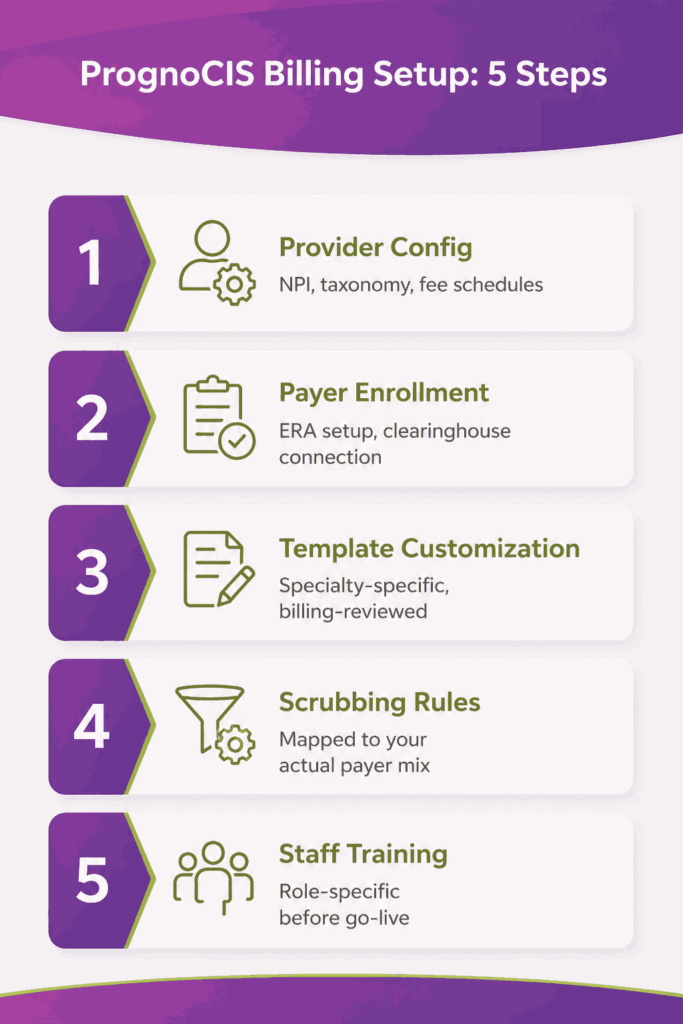
Step 1: Account Configuration and Provider Setup
Start by entering NPI numbers, taxonomy codes, provider credentials, and service locations for every provider. Define fee schedules and set payer-specific billing rules at this stage. Missing or incorrect fields here cause claim rejections weeks after go-live, often with no obvious root cause to trace.
Step 2: Payer Enrollment and Insurance Configuration
Set up carrier files, payer IDs, and ERA enrollment for every insurance plan the practice accepts. Connect the account to Secure Connect or configure the external clearinghouse if the practice uses Waystar or Trizetto. Incomplete payer enrollment is one of the most common causes of front-end submission failures after go-live.
ERA enrollment means registering with each payer to receive electronic payment files directly into PrognoCIS. Without it, remittances arrive as paper EOBs that require manual entry. Most payers take five to fifteen business days to approve enrollment, so submit the requests well before your go-live date.
Step 3: Clinical Template and Workflow Customization
Build specialty-specific documentation templates that prompt providers to capture the information needed for accurate coding. Set up role-based dashboards so billing staff see claim queues and clinical staff see patient schedules. Custom templates reduce coding errors significantly compared to free-text documentation.
A common mistake at this stage is importing generic templates and assuming they will work for your specialty. Pain Management, Cardiology, and OBGYN each have documentation requirements that generic templates do not capture. Billing staff should be involved in template review before go-live to confirm that provider-completed fields will support the codes being billed.
Step 4: Clearinghouse and Claims Scrubbing Configuration
Configure claims scrubbing rules against your actual payer mix. Generic rule sets miss payer-specific edits and allow denials that a properly mapped scrubber would have caught. Set timely filing alerts using the Open Chart reporting feature so billing staff are notified before payer deadlines pass.
Step 5: Staff Training
PrognoCIS provides live training sessions, training videos, and billing user guides during implementation. Practices that invest in role-specific training before go-live report fewer billing errors and faster adoption. Most post-go-live billing problems come from staff who were not adequately trained on the features specific to their role.
How Does The Everyday Billing Workflow Look in PrognoCIS EMR?
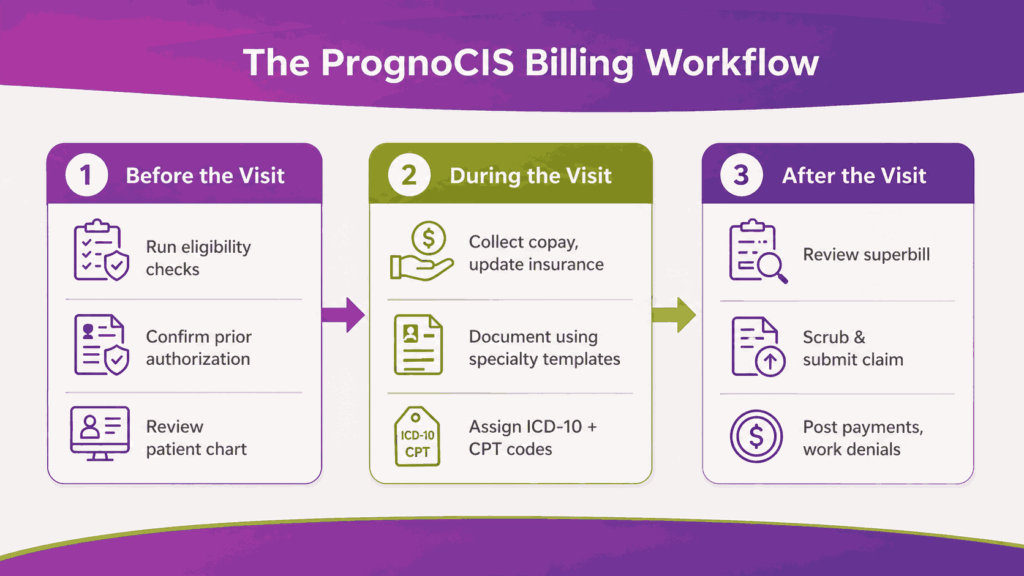
The PrognoCIS billing workflow runs across three phases of every patient visit. Each phase produces data that feeds the next, which means errors at the front end compound by the time a claim reaches the payer.
Before the Patient Visit
Front-office staff confirm appointments, run insurance eligibility checks, and update patient demographics in the system. Prior authorization status is confirmed and documented before the appointment date. Clinical staff reviews the patient’s chart for outstanding balances, pending authorizations, or care gaps that need to be addressed during the visit.
The pre-visit chart review should also flag any procedures scheduled for today that require specific documentation to support billing. If that documentation is missing or incomplete, it is far easier to address before the visit than after a denial has been issued.
Skipping eligibility verification at this stage is the single most preventable cause of front-end claim denials.
During the Patient Visit
At check-in, staff confirm the patient’s identity, collect copays, and update insurance information. Medical assistants record vitals and document the reason for the visit in the chart. The provider then works through the clinical encounter using specialty-specific templates.
Key actions the provider takes during the visit:
- Documents the clinical examination and patient assessment
- Assigns ICD-10 diagnosis codes based on clinical findings
- Attaches CPT procedure codes to the encounter record
- Sends prescriptions electronically to the pharmacy from within the chart
After the Patient Visit
Once the provider closes the encounter, the charge moves into the billing queue automatically. The billing team takes over from this point and manages the rest of the revenue cycle.
The post-visit billing sequence runs in this order:
- Review the superbill and confirm CPT, ICD-10, and modifier accuracy
- Run the claim through the PrognoCIS scrubber to catch errors before submission
- Submit the clean claim electronically through Secure Connect
- Post ERA payments automatically or enter EOB payments manually
- Flag denied claims and identify the root cause for each one
- Submit corrected claims or appeals with supporting documentation
- Follow up on aging AR buckets and generate patient statements for outstanding balances
When a claim does not pass the scrubber, it needs to be corrected before the timely filing window closes. Most commercial payers require submission within 90 to 180 days of the service date. Missing these windows means the charge is written off regardless of whether the service was performed and documented correctly.
Following this sequence consistently is what drives clean claim rates up and keeps AR days from growing uncontrolled.
What Are the Common Billing Challenges With PrognoCIS EMR?
PrognoCIS is a highly functional platform, but results depend on how it is used. The most common billing problems are not software issues. They are operational gaps that build up when teams skip steps, underuse features, or leave configuration incomplete.
Most of these gaps are invisible at first. A practice might go live on PrognoCIS and see acceptable results early, then watch clean claim rates drop and AR aging grow without a clear cause. Even well-run practices leave revenue on the table, not because of clinical issues, but because of gaps in billing workflow execution.
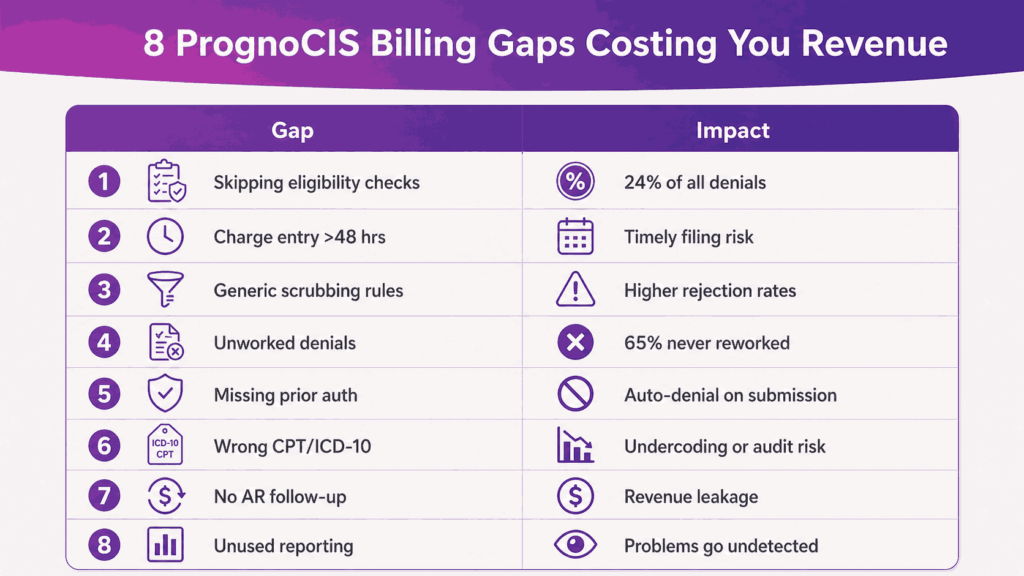
The following challenges are the most common points where PrognoCIS users face:
- Eligibility Denials: When real-time verification is skipped before a visit, the claim goes out on bad data. Eligibility-related issues account for approximately 24% of all claim denials, making front-end verification one of the highest-leverage steps in RCM.
- Charge Capture Lag: Encounters that sit more than 48 hours before charges are entered create downstream risk. Delayed charge entry pushes claim submission timelines, increases timely filing exposure, and gives billing staff less runway to catch errors before they become denials.
- Claim Scrubber Underuse: A scrubber configured on generic rules rather than your actual payer mix will pass claims that should be flagged. The result is higher first-pass rejection rates because it was never set up to match the payers you actually bill.
- Unworked Denials: Without a structured root-cause workflow, denials accumulate in the queue and age out. Across the industry, 65% of denied claims are never reworked. That figure reflects what happens when denial management is reactive rather than systematic.
- Prior Auth Misses: An authorization that isn’t confirmed before the date of service produces an automatic denial on submission. There is no scrubber catch for this, and it requires a workflow that flags auth requirements during scheduling, not after the encounter is closed.
- Coding Errors: Incorrect templates or wrong CPT and ICD-10 selections create two distinct problems. Undercoding leaves reimbursement on the table, while overcoding creates audit exposure. Both outcomes are avoidable with provider-specific template configuration and QA.
- AR Aging: Claims sitting in the 60-to-90-plus-day buckets without systematic follow-up show the revenue leakage. AR aging is rarely a payer problem; instead, it’s a follow-up problem. Without structured outreach tied to aging thresholds, cash flow slows, and write-offs accumulate.
- Reporting Underuse: A dashboard that isn’t configured for KPI tracking gives billing managers no early warning system. Denial patterns, AR trends, and clean claim rate shifts go undetected until they’ve already affected collection rates.
Addressing these challenges doesn’t require a platform change. Practices require tighter workflow configuration and consistent execution within PrognoCIS.
The table below maps the most common gaps to their causes and their revenue impact.
| Challenge | Cause | Revenue Impact |
|---|---|---|
| Eligibility denials | Skipping real-time verification before visits | Accounts for 24% of all claim denials |
| Charge capture lag | More than 48 hours between encounter close and charge entry | Delayed claims and timely filing risk |
| Claim scrubber underuse | Generic rules not mapped to actual payer mix | Higher first-pass rejection rates |
| Unworked denials | No structured root-cause workflow, denials aging in the queue | 65% of denied claims are never reworked across the industry |
| Prior auth misses | Authorization not confirmed before the date of service | Automatic denial on submission |
| Coding errors | Incorrect templates or wrong CPT and ICD-10 selection | Undercoding or audit exposure |
| AR aging | No systematic follow-up on 60 to 90+ day buckets | Revenue leakage and slower cash flow |
| Reporting underuse | Dashboard not configured for KPI tracking | Denial patterns go undetected until they become a larger problem |
These challenges are common across practices of all sizes. Left unaddressed, they build into consistent revenue loss that is difficult to recover from without outside help.
How Transcure Helps Practices With PrognoCIS EMR Billing?
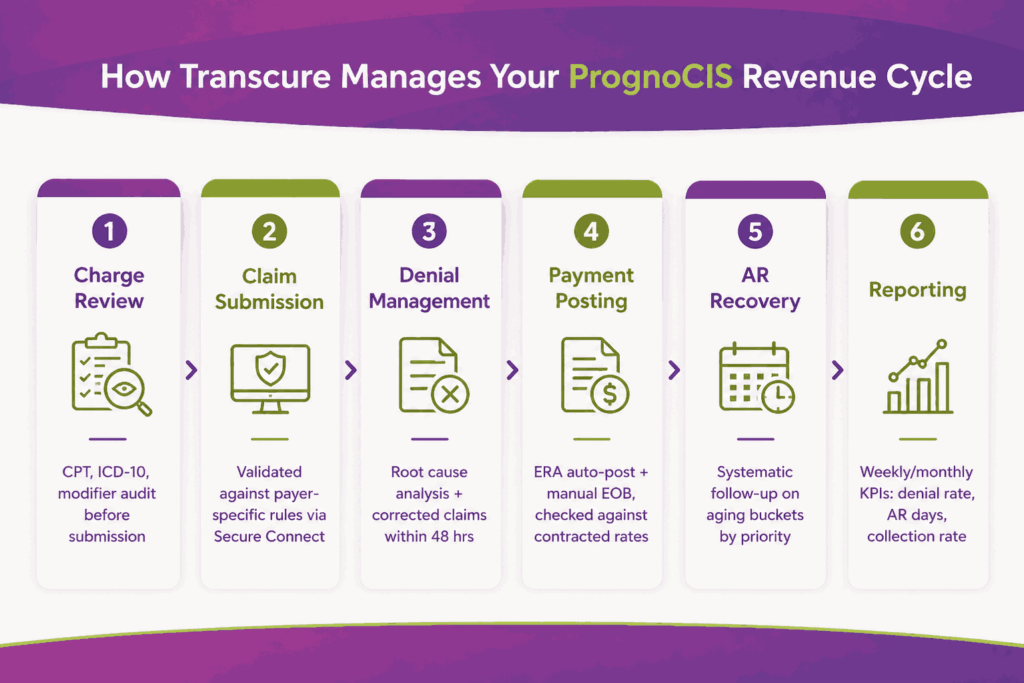
Transcure is a full-service medical billing company that works directly inside PrognoCIS on behalf of its clients. Practices do not need to switch platforms or change their clinical workflows. Our AAPC-certified billing team operates within the PrognoCIS environment and manages the full revenue cycle from charge review through payment posting and denial resolution. Tailoring our PrognoCIS billing services to the platform’s native features allows us to use the scrubbing rules engine, the Denial Trends by Provider report, and the prior authorization tracking module effectively to prevent denials before submission rather than chasing them after they happen.
Charge Review and Coding Accuracy
Our billing team reviews every encounter before a claim is submitted. We confirm that CPT codes, ICD-10 codes, and modifiers accurately reflect the documented services. We catch documentation gaps at the charge review stage, before they reach the payer and trigger a denial. This process delivers 99.99% clean claim accuracy across our PrognoCIS client base.
Claim Submission and Follow-Up
Transcure manages end-to-end claim submission through PrognoCIS and Secure Connect. We validate charges against payer-specific requirements before submission and track every claim through the payer’s adjudication process. Any claim that is pending, delayed, or returned without payment receives proactive follow-up from our team within defined SLA windows.
Denial Management
Every denied claim goes through a root cause analysis. Our team identifies whether the denial stems from eligibility, coding, authorization, timely filing, or a payer-specific edit. Corrected claims are submitted within 48 hours of identification. We recover 80% of initially denied claims and consistently bring denial rates below 1% for practices we work with.
Payment Posting and Reconciliation
Transcure posts all payer and patient payments inside PrognoCIS. ERA auto-posting handles most remittances, and manual EOB entry covers paper payments. Every payment is checked against contracted reimbursement rates before it is finalized. Underpayments are flagged and investigated rather than written off without review.
AR Recovery
Our team runs systematic follow-up on aging AR buckets, prioritizing high-balance claims and those approaching payer follow-up deadlines. Across our PrognoCIS client base, AR days drop below 24 days within the first two quarters of engagement.
Reporting and Performance Tracking
We provide monthly and weekly performance reports built from billing activity inside PrognoCIS. Reports cover collection rate, denial rate, days in AR, clean claim rate, and payer-level performance data. These reports give practice administrators a clear picture of their revenue cycle without requiring them to pull data from the platform themselves.
Which Practices Does Transcure Work With on PrognoCIS?
Transcure works with PrognoCIS users across a range of practice types and situations. Three profiles fit our engagement model best:
- Practices already live on PrognoCIS that want better clean claim rates and collections without switching platforms
- New practices setting up PrognoCIS for the first time, who want billing handled correctly from day one
- Practices moving from in-house to outsourced billing without disrupting their existing PrognoCIS setup
When a practice engages Transcure, we start with a billing audit of the existing PrognoCIS configuration. We identify gaps in payer setup, scrubbing rules, and template configuration before we submit a single claim.
We also work with specialty-specific practices that face complex billing demands, including:
- Pain Management practices with high prior authorization volume and modifier complexity
- Cardiology practices managing facility and professional billing splits
- OBGYN practices handling global billing periods and maternity billing packages
- Nephrology and Psychiatry practices with recurring visit billing and payer-specific rules
- Multi-location surgery centers needing centralized RCM visibility across sites
Conclusion
PrognoCIS is a capable EMR and billing platform. The practices that get the best results from it are the ones that configure it correctly, follow a consistent billing workflow, and act on denial data before it compounds into a larger problem.
The gap between having the right tools and getting paid consistently is almost always operational. It comes down to whether scrubbing rules are mapped to your payer mix and whether denials are being worked within the appeal window.
If your practice is seeing recurring denials, slow AR recovery, or a clean claim rate below 95%, the issue is likely operational, not the platform itself.
Transcure works inside PrognoCIS to fix exactly these problems. We manage the billing so your clinical team can stay focused on patients.
Frequently Asked Questions About PrognoCIS EMR and Medical Billing
How Much Does PrognoCIS EMR Cost Per Provider?
PrognoCIS pricing starts at approximately $280 per provider per month for the EMR subscription. Clearinghouse fees through Secure Connect are billed separately.
Can I use PrognoCIS EMR without PrognoCIS’s Own Billing Service?
Yes, PrognoCIS EMR and the RCM service are separate products. Many practices use PrognoCIS for clinical documentation while outsourcing billing to a third-party RCM company that operates directly inside the platform.
Does PrognoCIS Integrate with Waystar or Trizetto?
Yes, while PrognoCIS includes its own clearinghouse (Secure Connect), it also supports integration with external clearinghouses, including Waystar, Trizetto, and Jopari, for practices that require those connections based on their payer mix.
Is PrognoCIS Good for Pain Management Billing?
PrognoCIS is one of the more commonly used EMRs in Pain Management practices. It includes specialty-specific templates and supports the high prior authorization volume and modifier complexity typical in pain management billing.
How does PrognoCIS Billing Compare to eClinicalWorks or athenahealth?
PrognoCIS is generally positioned as a more configurable option for specialty and ambulatory practices, with tighter EMR-to-billing integration through a single platform. When looking at the top EMR companies in the ambulatory space, athenahealth handles more of the billing workflow as a managed service, while eClinicalWorks is a closer comparison to PrognoCIS. Both are specialty-capable, but billing outcomes depend on configuration quality and workflow discipline more than platform choice.
Does PrognoCIS Support MIPS Reporting and Value-Based Care Billing?
Yes, PrognoCIS is MACRA-certified and supports MIPS reporting. The platform includes dashboards for tracking quality measures and can be configured for value-based care program requirements, making it suitable for practices participating in ACO or Medicare Advantage contracts.
Is PrognoCIS Good for Medical Billing?
Yes, PrognoCIS is one of the stronger billing-integrated EHRs in the ambulatory market. It covers the full billing cycle from charge capture through AR follow-up inside one platform. Results depend on how well the system is configured and how consistently billing workflows are followed.
What Specialties does PrognoCIS Billing Support?
PrognoCIS supports billing across a wide range of specialties. It is commonly used by Pain Management, Cardiology, OBGYN, Nephrology, Psychiatry, Orthopedics, Primary Care, and Gastroenterology practices.
How long does PrognoCIS Billing Setup take?
Setup timelines vary by practice size and complexity. Most practices complete initial configuration within a few weeks. Full billing optimization, including claims scrubbing rule tuning and reporting setup, typically takes four to six weeks.