Medical billing is already complicated, and adding a software system your team does not fully understand, and revenue starts slipping, which is hard to spot and even harder to fix. Claims sit. Denials pile up, and nobody can quite explain where the money went.
This is a problem that more practices deal with than they admit. eClinicalWorks is one of the most capable platforms in healthcare today. But capability means nothing if the workflow behind it is broken or the team running it is undertrained.
This guide covers how eClinicalWorks EHR actually works from the inside, how each step connects to the next, and how practices that invest in the right eCW medical Billing services collect more without working harder. If you bill through eCW, read this carefully before your next billing cycle.
I. What is eClinicalWorks (eCW)?
eClinicalWorks, commonly abbreviated as eCW, is one of the most widely used electronic health record and practice management platforms in the United States. Founded in 1999 and headquartered in Westborough, Massachusetts, the company serves over 150,000 physicians and more than 850,000 medical professionals across various practice settings.
What makes eCW stand out in a crowded market is its combination of clinical and billing tools inside a single platform. Practices do not need to stitch together multiple systems to manage patient care and revenue. Everything from scheduling to claim submission lives under one roof.
Understanding how eCW billing works matters because even the best software cannot fix broken workflows. Practices that master the system collect more, deny less, and spend less time chasing money.

Overview of eClinicalWorks EMR
eClinicalWorks functions as a full ECW EHR system. It supports data exchange, patient portals, interoperability with outside labs and specialists. eClinicalWorks is not just a charting tool that replaced paper files. It is a fully connected system where clinical care and financial operations live together in one place. When a provider documents a visit, that documentation feeds directly into the billing workflow.
When a biller posts a payment, it reflects immediately in the practice’s financial reports. Nothing operates in isolation. That integration is what makes eCW different from older systems, where clinical and billing staff worked in completely separate platforms and spent half their time reconciling information that should have matched automatically from the beginning. population health tracking. It is not just a digital chart. It is a connected clinical and financial ecosystem.
eCW Product Versions
eClinicalWorks has evolved over the years. The current major releases include:
1. eClinicalWorks 12
eClinicalWorks 12 is the on-premise and hosted desktop version that many established practices have relied on for years. It runs on local servers or through a hosted environment managed by eCW. The interface is familiar to long-time users, which matters more than people admit. Retraining an entire team is expensive and disruptive.
If your practice has been on eCW 12 for a decade, your staff knows where everything lives. For practices that are not ready to move to the cloud, this version remains a dependable, full-featured option.
2. eClinicalWorks Cloud
eClinicalWorks Cloud is the browser-based version that removes the need for local servers entirely. You log in through a browser, from any device, anywhere with an internet connection. That kind of flexibility changes how a practice operates. Providers can finish notes from home.
Billers can work remotely without a VPN. IT costs drop because there is no server to maintain or update. For practices that are growing, hiring remote staff, or simply tired of managing infrastructure, the Cloud version is worth a serious look.
3. eClinicalWorks 12c
eClinicalWorks 12c sits between the two. It gives practices the familiar look and feel of eCW 12 but moves the hosting to the cloud.
Think of it as a middle path for practices that want the reliability of the interface they already know, without the burden of managing physical servers. The transition is smoother than jumping straight to the full Cloud version. For practices that are ready to reduce IT overhead but not ready to adopt an entirely new workflow, 12c is often the most practical starting point.
Who Uses eCW?
- Primary care and family medicine
- Internal medicine
- Pediatrics
- Behavioral health
- Federally Qualified Health Centers (FQHCs)
- Urgent care and multi-specialty groups
It scales from solo practitioners to large health systems with hundreds of providers. At the enterprise end of that range, eCW usually ends up on a shortlist next to Epic. Our eClinicalWorks vs Epic comparison covers how the two platforms differ on billing architecture, implementation timeline, and total cost of ownership.
Core Features of eClinicalWorks EHR
Before diving into billing, it helps to know what the ECW EHR software does on the clinical side. Billing does not happen in a vacuum. What clinicians document directly affects what gets billed and collected.
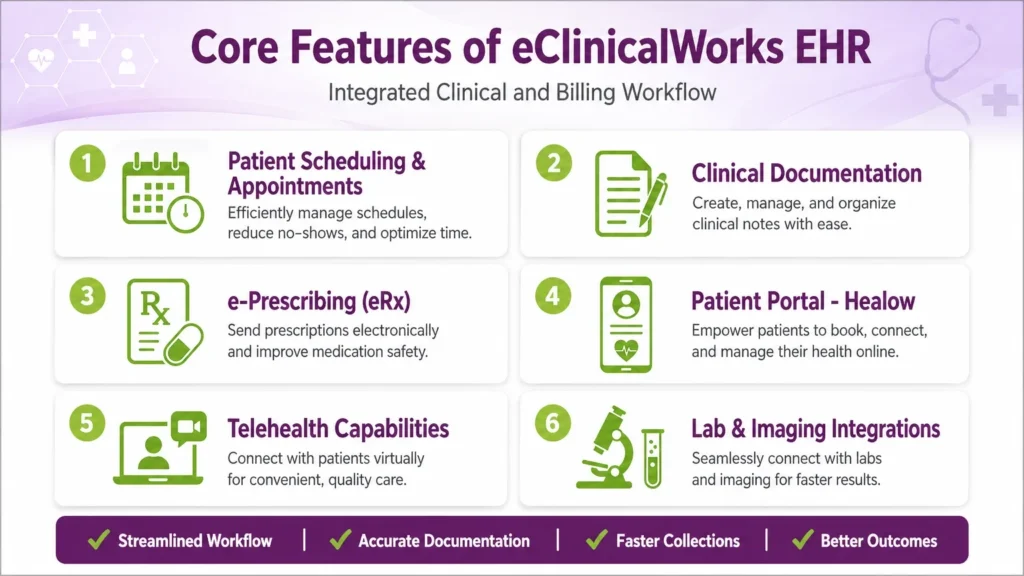
1. Patient Scheduling and Appointment Management
eCW includes a full scheduling module where front desk staff can book, reschedule, and track appointments. The schedule connects directly to the billing workflow. When an appointment is created, it triggers the patient registration process and insurance verification.
2. Clinical Documentation
Providers document patient encounters using customizable SOAP note templates, flowsheets, and structured data fields. Good documentation is the foundation of accurate billing. When a provider does not document completely, coding suffers, and claims get denied.
3. e-Prescribing (eRx)
eCW is certified for electronic prescribing, including controlled substances. This feature is built directly into the encounter workflow, so providers do not need to leave the chart to send a prescription.
4. Patient Portal – healow
eClinicalWorks offers a patient-facing portal called Healow. Patients can schedule appointments, view lab results, send messages to their care team, and make payments through the portal. The payment feature connects to the billing module and helps practices collect patient balances faster.
5. Telehealth Capabilities
eCW includes built-in telehealth tools, allowing providers to conduct video visits directly through the platform. Telehealth encounters flow into the same billing workflow as in-person visits, which keeps reporting clean and consistent.
6. Lab and Imaging Integrations
eCW integrates with major lab vendors and imaging centers. Results flow back into the patient’s chart automatically, and orders can be placed without leaving the system.
7. Population Health Tools
The population health module helps practices identify patients who are overdue for preventive care, track chronic disease management, and run outreach campaigns. From a billing standpoint, this supports risk adjustment coding and quality-based reimbursement programs.
Understanding the eCW Billing Workflow
This is where most practices either succeed or struggle. The billing workflow in eCW follows the standard revenue cycle, but the system has specific steps and tools at each stage. Here is a clear breakdown.
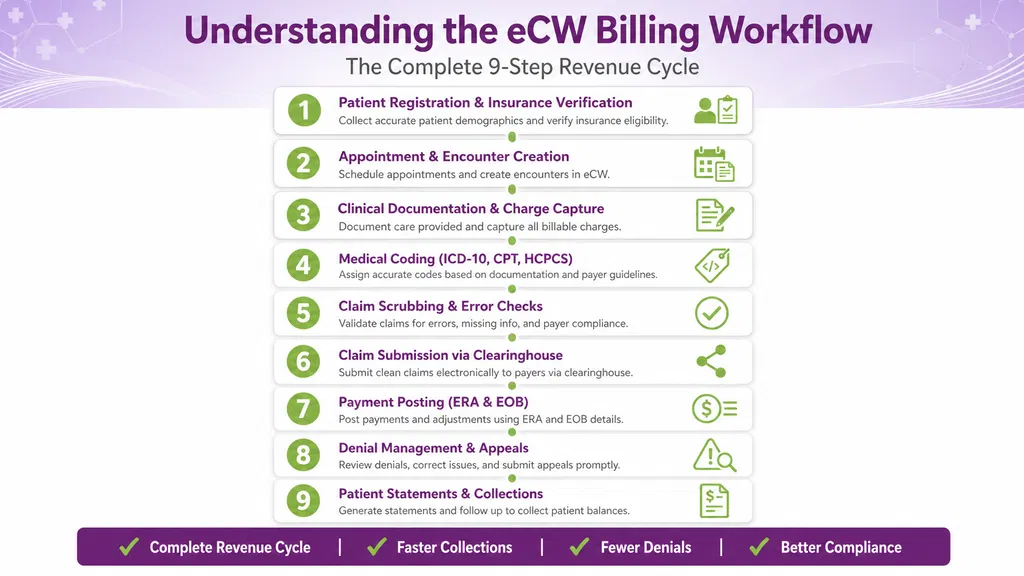
Step 1: Patient Registration and Insurance Verification
Everything starts with registration. When a patient calls to book an appointment, the front desk enters their demographic and insurance information into eCW. Accurate data at this stage prevents problems downstream.
eCW includes tools to verify insurance eligibility in real time through its clearinghouse connections. A quick eligibility check before the appointment confirms that the patient is covered, identifies copay amounts, and flags any authorization requirements.
Registration errors such as incorrect policy numbers, dates of birth, or missing secondary insurance are among the leading causes of claim denials. Getting this step right is not optional.
Step 2: Appointment and Encounter Creation
Once the patient is registered and the appointment is scheduled, eCW creates an encounter record. This is the central document that links the patient visit to a billing event.
The encounter holds information about the provider, the date of service, the location, and the visit type. All of this feeds into the claim that gets submitted to the payer.
Step 3: Clinical Documentation and Charge Capture
The provider documents the visit inside the encounter. eCW uses structured templates that prompt the provider to capture all relevant clinical details. When documentation is complete, the system is ready to capture charges.
Charge capture in eCW can happen in several ways:
- The provider selects services from a superbill at the end of the encounter
- A coder reviews the documentation and assigns codes separately
- Automated charge suggestions can be triggered based on what was documented
The goal is to capture every service that was rendered and that qualifies for reimbursement.
Step 4: Medical Coding (ICD-10, CPT, HCPCS)
Medical coding translates clinical documentation into standardized codes:
- ICD-10 codes describe the diagnosis or reason for the visit
- CPT codes describe the procedures and services performed
- HCPCS codes cover supplies, equipment, and services not captured by CPT
eCW allows coders to search and assign these codes directly within the encounter. The system also provides code lookup tools and, in some configurations, coding suggestions based on documented conditions and procedures.
Accurate coding is where revenue is earned or lost. Under-coding means leaving money on the table. Over-coding creates audit and compliance risk.
Step 5: Claim Scrubbing and Error Checks
Before a claim goes out the door, eCW runs it through a scrubbing process. The system checks for common errors, including:
- Missing or invalid diagnosis codes
- Mismatched procedure and diagnosis code combinations
- Missing modifiers
- Duplicate claim submissions
- Authorization requirements that have not been met
Claims that fail scrubbing are flagged for correction before submission. This step is important because unclean claims sent to a payer result in denials, delayed payment, and extra work for the billing team.
Step 6: Claim Submission Through Clearinghouse Integration
Once a claim passes scrubbing, it is submitted electronically through a clearinghouse. eCW integrates with major clearinghouses, including Change Healthcare and Availity. The clearinghouse acts as a middleman between the practice and the payer, running additional validation checks and routing the claim to the correct insurance company.
Electronic claim submission is faster and more accurate than paper. Most payers require electronic submission for timely processing.
Step 7: Payment Posting (ERA and EOB)
When a payer processes a claim and sends payment, eCW handles payment posting through:
- ERA (Electronic Remittance Advice): An electronic file that details exactly what was paid, what was adjusted, and what was denied
- EOB (Explanation of Benefits): A paper or electronic document sent to the practice and patient explaining the payer’s decision
eCW can auto-post ERA payments, which saves significant time compared to manual posting. The system matches the remittance to the original claim and posts the payment, adjustment, and any patient balance automatically.
Step 8: Denial Management and Appeals
Not every claim pays on the first submission. eCW tracks denied claims and routes them to the denial worklist. The billing team reviews each denial, identifies the root cause, corrects the claim or adds supporting documentation, and resubmits.
Common denial reasons include:
- Eligibility issues at the time of service
- Missing or incorrect authorization
- Coding errors
- Timely filing violations
- Duplicate claims
Fast, systematic denial management is one of the highest-impact activities a billing team can do. A claim sitting in the denial queue is revenue the practice has already earned but has not collected yet.
Step 9: Patient Statements and Collections
After insurance pays its portion, any remaining balance becomes the patient’s responsibility. eCW generates patient statements automatically and can send them by mail or electronically through the Healow portal.
For practices with high patient balance volume, eCW also supports integration with payment plans and third-party collection services. Collecting patient balances has become more important as high-deductible health plans have shifted more costs to patients.
eCW Billing Module Deep Dive
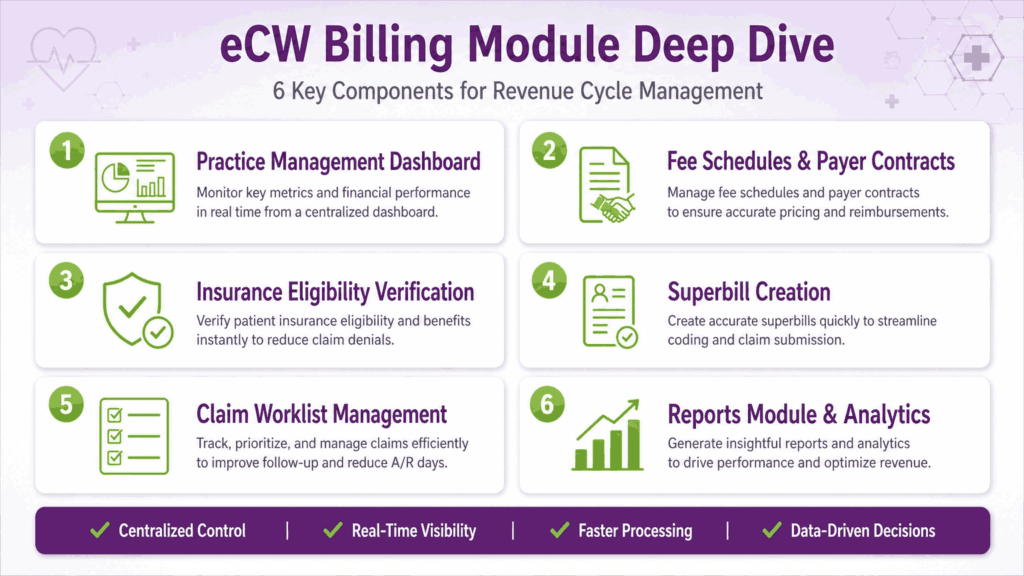
The Practice Management (PM) Dashboard
The PM dashboard is command central for billing staff. From here, billers can see claim status, pending tasks, denial queues, and financial summaries at a glance. The dashboard is configurable, so each user can set it up to show the information most relevant to their role.
Fee Schedules and Payer Contracts
eCW allows practices to set up fee schedules for each payer. The fee schedule defines what the practice charges for each service and what each payer has contractually agreed to pay. Keeping fee schedules accurate is important for tracking whether payers are reimbursing correctly.
Payer contract management in eCW also supports expected payment calculations, which flag underpayments automatically during payment posting.
Insurance Eligibility Verification
eCW offers real-time eligibility checks directly from the scheduling or patient registration screen. Staff can verify coverage with a single click instead of calling the insurance company. Batch eligibility verification is also available, allowing the front desk to verify all upcoming appointments at once, typically the night before or the morning of service.
Superbill Creation in eCW
A superbill is a document that summarizes the services rendered during a patient visit. In eCW, the superbill is generated from the encounter and includes the diagnosis codes, procedure codes, and any applicable modifiers. The provider or coder reviews and approves the superbill before the claim is generated.
Working the Claim Worklist
The claim worklist shows all claims that need attention. This includes rejected claims, denied claims, claims pending additional information, and claims that are approaching timely filing deadlines. The billing team works through the list systematically to move revenue forward.
eCW Reports Module for Billing Insights
eCW includes a robust reporting module. Billing managers can run reports on accounts receivable aging, collections by payer, denial rates, and provider productivity. These reports help identify where the revenue cycle is breaking down and where performance improvements are needed.
Medical Coding in eCW
ICD-10 Diagnosis Code Assignment
Providers and coders assign ICD-10 diagnosis codes within the encounter. eCW includes a code search function that allows users to search by keyword or code number. The system displays the code description and any relevant coding guidelines.
For practices that see complex patients with multiple chronic conditions, eCW supports adding multiple diagnosis codes per encounter and linking each procedure to the appropriate diagnosis.
CPT Procedure Code Entry and Charge Capture
CPT codes are entered on the superbill or charge capture screen. eCW displays commonly used codes based on the provider’s specialty, which speeds up the charge entry process. Custom favorites lists can also be created for each provider.
Modifier Usage in eCW
Modifiers are two-digit codes appended to CPT codes to provide additional information about how a service was performed. Common modifiers include:
1. Modifier 25
Modifier 25 applies when a provider performs a significant and separately identifiable evaluation and management service on the same day as a procedure. Without this modifier, the payer assumes the office visit is included in the procedure payment and will not reimburse it separately.
2. Modifier 59
Modifier 59 tells the payer that two procedures performed on the same day are genuinely distinct from each other and should not be bundled into a single payment. Payers bundle codes by default when they believe one service already includes another. Modifier 59 overrides that assumption, but it requires solid documentation to back it up.
3. Modifier GT
Modifier GT is used for telehealth services delivered through live, interactive audio and video communication. When a provider conducts a video visit, modifier GT signals to the payer that the service was rendered remotely and qualifies for telehealth reimbursement under the applicable coverage policy. Not every payer reimburses telehealth at the same rate as in-person visits, and coverage rules vary significantly.
Common Coding Errors in eCW and How to Avoid Them
- Assigning unspecified ICD-10 codes when a more specific code is available
- Failing to link procedures to the correct diagnosis
- Missing modifiers for bilateral procedures or multiple procedures performed on the same day
- Using outdated code sets after annual code updates
Practices that invest in regular coder training and conduct internal audits catch these errors before they become denial patterns.
Claim Submission and Clearinghouse Integration
How eCW Connects to Clearinghouses
eCW has established integrations with major clearinghouses, most notably Change Healthcare (now Optum) and Availity. These connections allow claims to move electronically from eCW to the clearinghouse and then to the payer.
The clearinghouse performs its own set of validation checks before passing the claim to the payer. Claims that fail clearinghouse edits are returned to the practice for correction, usually within 24 to 48 hours.
Electronic vs. Paper Claim Submission
Electronic submission is the standard. It is faster, generates a trackable confirmation, and most payers process electronic claims in 14 to 30 days. Paper claims take longer and are harder to track.
eCW supports paper claim generation for the small number of payers that still require it. However, practices should work toward eliminating paper claims where possible.
Claim Status Tracking Inside eCW
Billers can check claim status directly within eCW without logging into the payer’s portal. Real-time claim status inquiries through the clearinghouse integration show whether a claim has been received, is processing, has been paid, or has been denied.
Real-Time Eligibility Checks
Beyond pre-visit verification, eCW can run eligibility checks at any point in the workflow. This is useful for catching coverage changes that happened between scheduling and the date of service.
Denial Management in eCW
How Denials Are Flagged in the System
When a claim is denied, the ERA or electronic denial notification flows back into eCW and flags the claim with a denial reason code. The claim moves to the denial worklist automatically, where it waits for a biller to review and act.
Common Denial Reasons and Root Causes
The most common denials in ECW medical billing fall into a few categories:
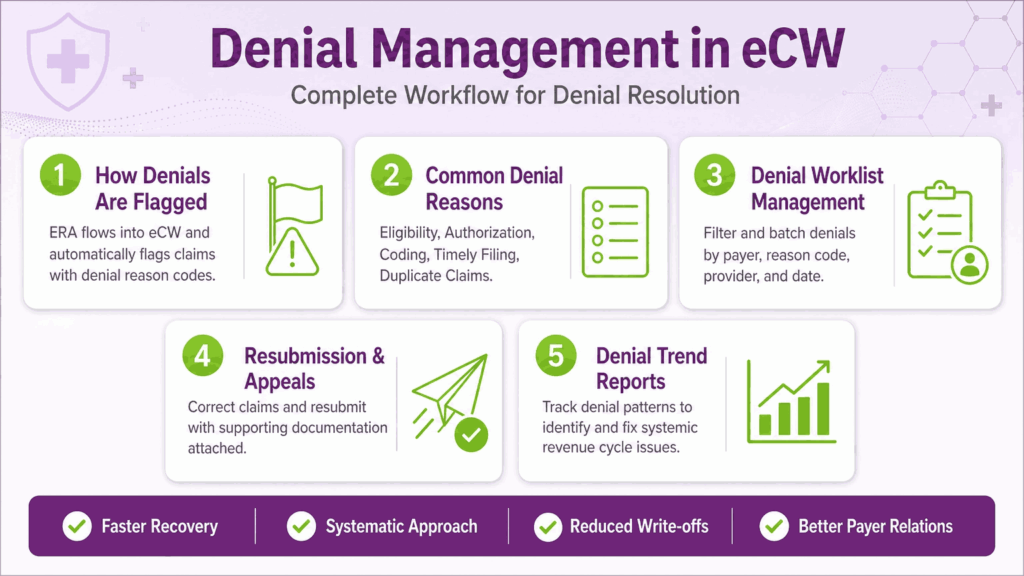
- Eligibility denials – The patient was not covered on the date of service, often due to a registration error at check-in
- Authorization denials – A required prior authorization was missing or expired.
- Coding denials – The diagnosis and procedure code combination was not medically appropriate according to the payer’s guidelines
- Timely filing denials – The claim was submitted after the payer’s filing deadline
- Duplicate claim denials – The same claim was submitted more than once
Each denial type has a different resolution path. Eligibility denials often require a corrected claim with updated insurance information. Authorization denials may require a retroactive authorization request. Coding denials require a review of the documentation and often a corrected claim.
Using eCW’s Denial Worklist
The denial worklist in eCW is a queue of all outstanding denied claims. Billers can filter by payer, denial reason, provider, and date of service. Working denials in batches by reason code is more efficient than handling them one at a time, because similar denials often share the same root cause and the same fix.
Resubmission and Appeals Workflow
eCW allows billers to correct and resubmit claims directly from the denial worklist. When an appeal is needed, supporting documentation can be attached to the resubmitted claim within the system. eCW tracks the status of resubmitted claims and appeals separately, so nothing falls through the cracks.
Tracking Denial Trends with Reports
eCW’s reporting module can generate denial trend reports that show which payers deny most often, which codes are denied most frequently, and which providers have the highest denial rates. This data helps practices address systemic problems rather than just fixing individual claims.
Reporting and Analytics for Billing
Key Billing Reports in eCW
The reports that matter most for revenue cycle management include:
- A/R Aging Report: Shows how much money is outstanding and how long it has been sitting in each aging bucket (0 to 30 days, 31 to 60 days, 61 to 90 days, and over 90 days)
- Collections Report: Shows what has been collected by provider, payer, and service type
- Payer Performance Report: Compares expected reimbursement to actual payment by payer to identify underpayments
- Denial Report: Tracks denials by reason code, payer, and provider
- Provider Productivity Report: Shows encounters, charges, collections, and adjustments by provider
Running these reports regularly gives the billing team and practice manager a clear picture of financial performance.
Using Dashboards to Monitor Practice Financial Health
eCW dashboards give a real-time snapshot of the key financial metrics without needing to run a full report. Managers can see total charges, collections, outstanding A/R, and denial rates at a glance. Dashboards are configurable and can be set up differently for billers, managers, and physicians.
Benchmarking KPIs
Key performance indicators for medical billing include:
- Days in A/R – The average number of days it takes to collect payment after a service is rendered. A healthy benchmark is under 40 days for most practices.
- Clean Claim Rate – The percentage of claims that pass all edits and are accepted by the payer on the first submission. A rate above 95 percent is the goal
- Denial Rate – The percentage of claims that are denied. A rate below 5 percent is considered strong
- Net Collection Rate – The percentage of collectible revenue that is actually collected. A rate above 95 percent is the target
eCW’s reporting tools make it possible to track all of these metrics over time and measure the impact of workflow changes.
eCW Billing: In-House vs. Outsourced RCM
Managing Billing In-House with eCW
Many practices choose to handle billing internally using eCW. This gives the practice direct control over the revenue cycle, faster access to billing data, and the ability to address issues immediately. In-house billing works best when the team is adequately trained, properly staffed, and consistently following up on denials and outstanding claims.
The risk with in-house billing is that it is highly dependent on staff expertise and turnover. When a key billing person leaves, revenue can drop quickly.
When to Consider Outsourcing
Outsourcing revenue cycle management to an eCW-compatible RCM company can make sense when:
- The practice is growing faster than the billing team can keep up
- Denial rates are rising, and the team does not have time to work appeals systematically
- Key billing staff have left, and the practice is short-handed
- The practice wants to reduce administrative overhead and focus on clinical care
Outsourced RCM companies that specialize in ECW medical billing software know the system well and can often improve collection rates and reduce denial rates compared to an understaffed in-house team.
What to Look for in an eCW Billing Partner
- Proven experience with eClinicalWorks EMR software, specifically
- Transparency in reporting, including access to all billing data and reports
- A clear denial management process with defined turnaround times
- References from practices of similar size and specialty
- No long-term contracts with unreasonable exit terms
- A fee structure tied to collections, not just charges
Comparison Considerations
In-house billing costs add up faster than most practice managers expect. You are paying staff salaries, benefits, paid time off, and training. Add clearinghouse fees, billing software upgrades, and the hours the practice manager spends on oversight and follow-up. For a mid-sized practice, that can easily exceed $80,000 to $120,000 per year when you count everything honestly.
Outsourced RCM typically runs between 4 and 8 percent of collections, depending on your practice size and specialty mix. On paper, that sounds straightforward. In practice, it depends entirely on who you outsource to.
Here is where the decision gets interesting. eClinicalWorks does offer its own RCM service. It is built into the platform, which sounds convenient. But convenience is not the same as performance. eCW RCM is a generalist service. It handles billing for all kinds of practices across all specialties. That means your account is one of thousands. You are not getting a team that lives and breathes your specialty. You are getting a process.
On the flip side, Transcure has a different story. Transcure specializes in eClinicalWorks billing specifically. Our team works inside eCW and knows the denial patterns, the payer quirks, the workflow shortcuts, and the reporting tools that most billing teams never touch. That depth of platform knowledge matters because eCW is not a simple system. A lot is going on under the hood, and a team that knows it cold will always outperform a team that knows it generally.
A Real-World Example
A multi-provider internal medicine practice in Texas was running a denial rate above 11 percent and sitting on 58 days in A/R. They were using eCW RCM and getting monthly reports that showed activity but not improvement. They switched to Transcure. Within 90 days, their denial rate dropped to under 5 percent. Days in A/R came down to 34. The difference was not magic. It was a billing team that understood exactly where eCW workflows break down and fixed them at the source.
The right choice depends on your numbers. Some practices do collect more in-house when the team is experienced, fully staffed, and well-trained. Others bleed revenue slowly because no one is watching the denial worklist closely enough.
Common eCW Billing Challenges and Solutions
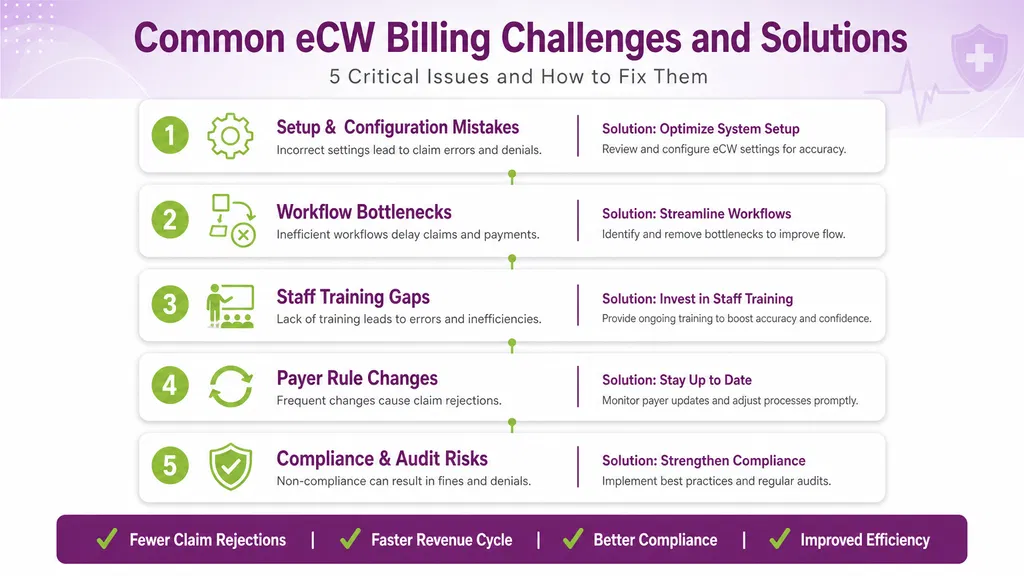
1. Setup and Configuration Mistakes
Many billing problems in eCW trace back to initial setup errors. Payer IDs entered incorrectly, fee schedules that do not reflect current contracts, and missing provider enrollment information can all cause claims to fail. A thorough setup review when onboarding and after any major system update prevents these issues.
2. Workflow Bottlenecks
Common bottlenecks include:
- Superbills sitting unsigned for days after the encounter
- Denials piling up in the worklist without regular review
- Eligibility checks being skipped because the front desk is busy
Building structured workflows with clear accountability at each step keeps the revenue cycle moving. Assign specific team members to specific worklist queues and set daily expectations for what gets worked.
3. Staff Training Gaps
eCW is a feature-rich platform. Staff who are not fully trained miss tools that could save them hours each week. Regular training on new features, coding updates, and payer rule changes keeps the team sharp.
4. Keeping Up with Payer Rule Changes
Payers update their coverage policies, coding requirements, and fee schedules regularly. eCW users need to stay current with these changes and update the system accordingly. Subscribing to payer bulletins and attending regular billing team meetings helps the group stay aligned.
5. Compliance and Audit Risks
The combination of clinical documentation and billing data in eCW creates both opportunity and risk. Overly templated documentation that does not reflect the actual complexity of the visit, upcoding, and billing for services that were not rendered are all audit risks.
Practices should conduct internal audits of documentation and coding regularly to discover all the challenges with eCW they can find and address any patterns before they become compliance problems.
Tips to Maximize Revenue with eCW
Best Practices for Clean Claim Submission
- Verify eligibility before every visit, not just new patients
- Require providers to complete and sign encounters within 24 hours of the visit
- Use eCW’s claim scrubbing tools before submission and fix all flagged errors
- Keep payer ID and enrollment information current in the system
Reducing Days in Accounts Receivable
- Work the A/R aging report weekly, prioritizing claims over 60 days old
- Set timely filing alerts so no claim approaches the filing deadline without action
- Resubmit denied claims within 48 hours of receiving the denial
- Close out small balance write-offs according to a defined policy to keep A/R clean
Leveraging eCW Automation Features
eCW includes automation tools that many practices underuse, including:
- Automated ERA posting, which eliminates manual payment entry
- Automated eligibility verification for upcoming appointments
- Automated patient statement generation after insurance processing
- Automated appointment reminders through Healow, which reduces no-shows and the revenue loss that comes with them
Regular System Audits and Billing Hygiene
Periodically review your eCW configuration for accuracy. Confirm that fee schedules are current, that all active providers are properly enrolled with payers, and that clearinghouse connections are functioning correctly.
Billing hygiene is not glamorous work, but it prevents the kind of silent revenue leaks that are hard to trace once they start.
eClinicalWorks Pricing and Billing Service Options
eCW Software Pricing Model Overview
eClinicalWorks uses a subscription-based pricing model. As of recent reporting, the software costs approximately $449 per month per provider for the full EHR and practice management suite. Pricing varies based on the number of providers, the version selected, and any additional modules or services.
eCW does not charge per-patient fees for the base software, which makes it cost-predictable for growing practices.
eCW RCM Services
eClinicalWorks also offers its own revenue cycle management services, branded as eCW RCM. This is a fully outsourced billing service that operates within the eClinicalWorks platform. The service includes claim submission, payment posting, denial management, and reporting.
The fee for eCW RCM services is typically a percentage of collections. This model aligns the vendor’s incentives with the practice’s financial performance, since the vendor only earns more when the practice collects more.
Choosing the Right Plan for Your Practice
Solo and small practices may find the standard EHR and PM subscription sufficient, especially if they have experienced billing staff. Larger practices or those with complex payer mixes may benefit from the full RCM service or a hybrid model where in-house staff handles front-end billing tasks and an RCM company handles denials and appeals.
The best way to evaluate options is to track your current collection rate, denial rate, and days in A/R, then compare those numbers against what a different approach might realistically deliver.
Outsourcing is worth serious consideration for practices that want predictable billing performance without the overhead of managing a full billing department. A good RCM partner brings trained staff, proven workflows, and accountability built into the contract. For many practices, that combination delivers better results at a lower total cost than keeping everything in-house.
The Bottom Line
Mastering eCW billing is an ongoing discipline that requires consistent attention at every step of the revenue cycle.
Practices that collect the most do not necessarily have better software than everyone else. They have better habits. Clean patient registration from the start. Complete clinical documentation before the encounter closes. Fast, systematic denial response before claims age out. Consistent reporting reviews so problems get caught early instead of compounding quietly for months.
If your numbers are not where they should be, the fix is usually more straightforward than you expect. Start with your denial report and look at the top five reason codes. Then pull your A/R aging and see where claims are sitting the longest. That data will tell you exactly where the money is stuck and what needs to change.
If fixing it in-house feels like too much to take on right now, that is not a failure. That is a business decision. A billing partner who knows eCW inside and out can often move your numbers faster than a stretched internal team working without enough support.