
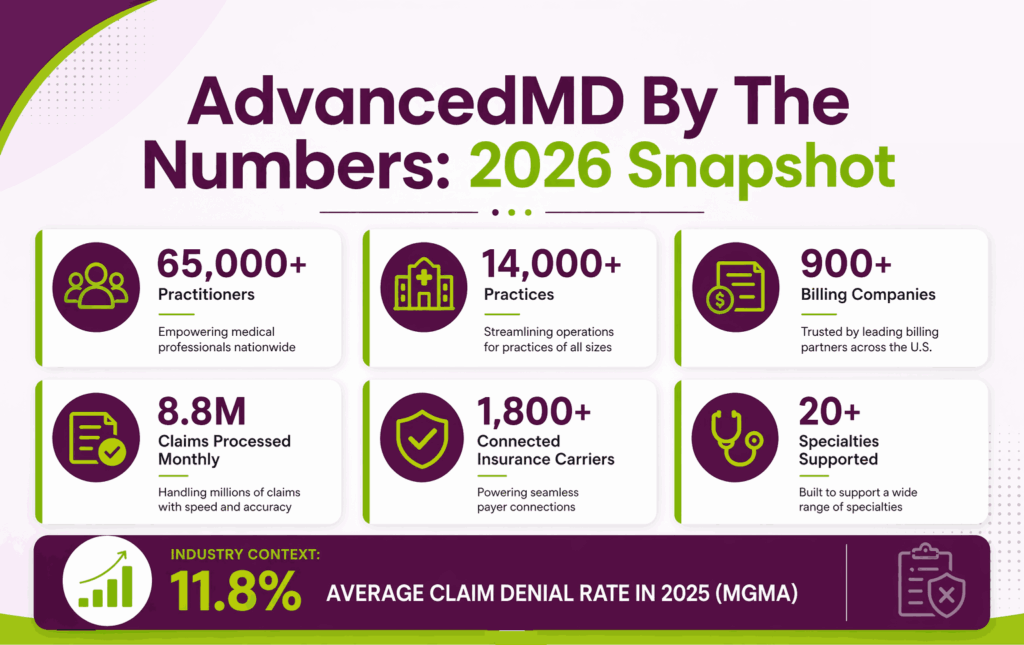
AdvancedMD is a cloud-based EHR and practice management platform built for independent medical practices. According to AdvancedMD, the company serves over 65,000 practitioners across 14,000 practices and 900 independent medical billing companies, with 8.8 million insurance claims processed every month on the AdvancedMD medical billing platform. That footprint puts it among the largest cloud-based EHRs serving outpatient settings in the US.
For billing teams, AdvancedMD covers charge capture, claim scrubbing, electronic submission, ERA posting, and denial management. It also ships with a built-in clearinghouse and reporting suite. Most independent practices use it to run clinical and financial operations from one login.

This guide covers what AdvancedMD does, how billing works inside it, what setup looks like, and where it falls short. It also covers AdvancedMD pricing, the most common challenges teams face, and how a medical billing company like Transcure handles AdvancedMD billing.
What is AdvancedMD, and why do Independent Practices Rely on it?
AdvancedMD has carved out a strong position in the independent practice market. Two things matter here: the platform’s underlying infrastructure, and what makes it different from other EHRs in the same category.
A Cloud-Based Platform Built for the Business Side of Healthcare
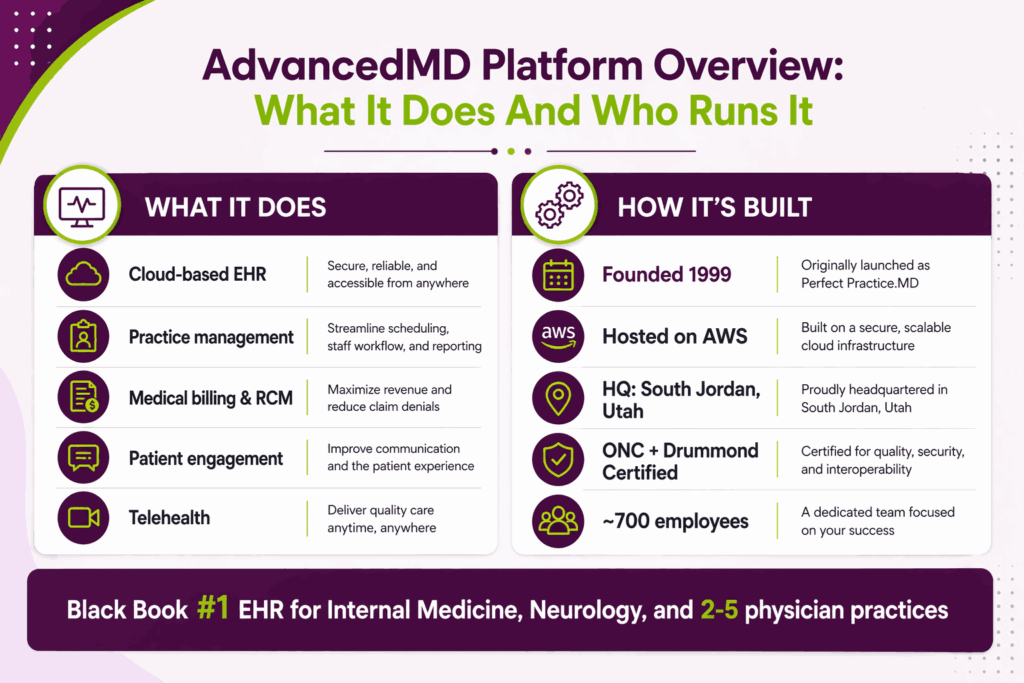
AdvancedMD started as Perfect Practice.MD in 1999 and rebranded in 2000. The platform now runs entirely on AWS, with no on-premise hardware required. It has grown into one of the largest cloud-based EHR systems for independent practices in the US.
Key facts about AdvancedMD’s footprint:
- Founded in 1999 as Perfect Practice.MD, relaunched as AdvancedMD in 2000
- Hosted on AWS, accessible from any device or modern browser
- Used by 65,000+ practitioners across 14,000 medical practices
- Supports 900+ independent medical billing companies through its CBO option
- Processes 8.8 million insurance claims each month
- Headquartered in South Jordan, Utah, with around 700 employees as of 2025
- Owned by Francisco Partners since October 2024, purchased from Global Payments for $1.125 billion Led by chief executive officer Amanda Sharp
AdvancedMD has changed hands five times since 2008. Francisco Partners held the company from 2008 to 2011, followed by ADP, then Marlin Equity Partners, then Global Payments. Francisco Partners repurchased AdvancedMD in 2024. Published AdvancedMD reviews still name Global Payments or Marlin as the current owner.
What Makes AdvancedMD Distinctive
A few things separate AdvancedMD from other EHR platforms in the same market. The biggest is its modular pricing model. Practices buy only what they need instead of paying for a fixed bundle. How AdvancedMD’s pricing differs from Tebra goes beyond modules, because Tebra also varies rates by provider type and claim volume.
What sets AdvancedMD apart:
- A-la-carte bundle pricing, so practices pick only the modules they need
- Donut Dashboard, the color-coded workload view AdvancedMD built for task triage
- Ranked #1 EHR by Black Book for Internal Medicine, Neurology, and 2-5 physician practices
- ONC Certified and Drummond Certified for clinical and billing standards
- AI Clinical Assistant with ambient listening, released for desktop in early 2026 and mobile in June 2026
What Changed In AdvancedMD During 2026?
AdvancedMD released more than 15 new features across June 2026 on a tiered schedule. Four changes affect billing directly.
- Secondary and tertiary insurance verification now runs inside batch eligibility checks, routed through Change Healthcare
- Fee schedules by locality set charge and allowable amounts by locality, facility, and carrier combination
- Group-level coding assigns CPT and ICD-10 codes once per group session, then applies them across every patient after approval
- Automated charge slip generation for group sessions became available July 9, 2026
Coordination of benefits errors drive a persistent share of preventable denials. Secondary and tertiary verification carries the largest denial impact of the four.
Who Is AdvancedMD Designed For, and Which Specialties Does It Serve?
AdvancedMD is not a one-size-fits-all platform. It works best for specific practice types and supports a defined set of medical specialties out of the box.
Practice Types And Organizational Structures Supported
AdvancedMD is built for independent outpatient settings rather than hospital systems. Its sweet spot is the small to mid-sized private practice that wants clinical and billing under one roof.
The platform supports:
- Solo practitioners and single-physician clinics
- Small to mid-sized group practices, typically 2 to 50 providers
- Management Services Organizations (MSOs) and Independent Physician Associations (IPAs)
- Accountable Care Organizations (ACOs)
- Medical billing companies using the Central Billing Office (CBO) model
- Practices moving from in-house to outsourced billing without switching EHRs
Specialty Coverage Across AdvancedMD
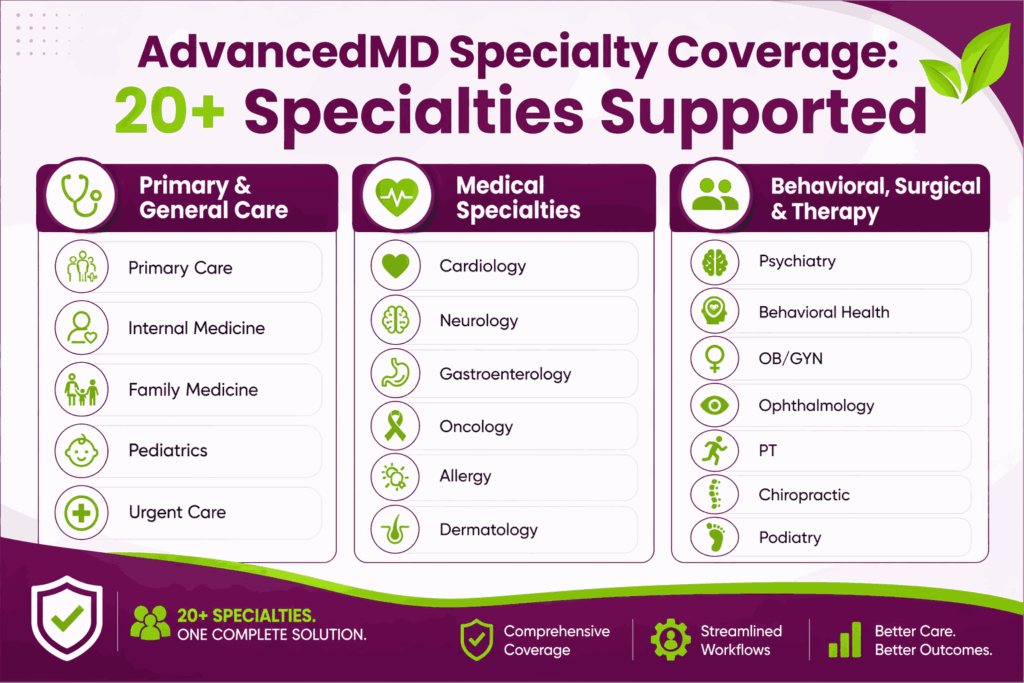
The platform ships with templates for more than 20 medical specialties. Each specialty has its own SOAP templates, code sets, and workflow defaults.
Specialties supported with dedicated templates include:
- Primary Care, Internal Medicine, Family Medicine, Pediatrics
- Cardiology, Neurology, Gastroenterology, Oncology
- Behavioral Health, Psychiatry, and Substance Use Treatment
- OB/GYN, Dermatology, Ophthalmology, Allergy
- Physical Therapy, Chiropractic, Podiatry
- Urgent Care and small outpatient surgical practices
This makes AdvancedMD specialty billing workable across most independent care settings, though the depth of template content varies by specialty.
Who Operates AdvancedMD Day-To-Day
Different roles inside a practice use different parts of the platform.
Day-to-day users include:
- Physicians, nurse practitioners, and PAs for clinical documentation and e-prescribing
- Practice managers and front desk admins for scheduling and patient flow
- In-house billing staff for charge entry, claim submission, and payment posting
- Outsourced billing companies and CBO teams managing several practices from one login
- Compliance and audit staff pulling reports for MIPS, MACRA, and payer audits
How Do You Set Up AdvancedMD For A Medical Practice?
AdvancedMD setup is more straightforward than legacy EHRs but more demanding than many new buyers expect. The work happens in four configuration stages, and the quality of each one shows up in your billing results within months.
What The Implementation Process Actually Looks Like
AdvancedMD implementation is web-based, so there is no hardware procurement or IT infrastructure to plan. Each new practice is assigned an implementation team and given access to an onboarding training library from day one.
Most practices reach stable billing workflows within a few weeks. Full AdvancedMD onboarding, including claim rule tuning and reporting setup, takes longer. The quality of your initial setup determines how clean your claims will be once you go live.
Step-By-Step Configuration For Billing-Ready Setup
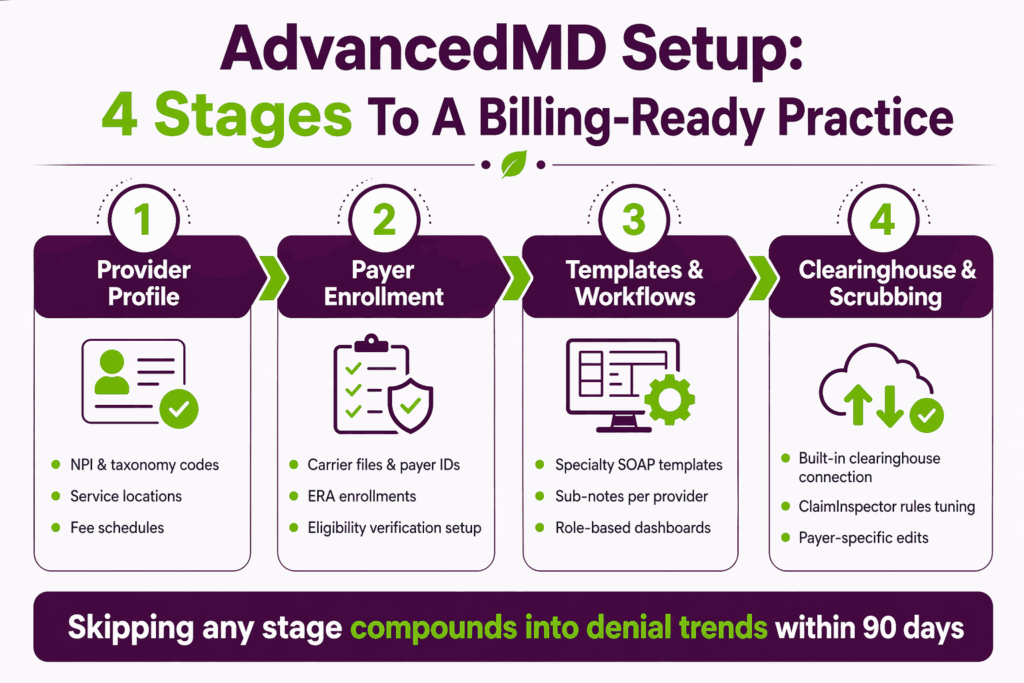
The setup process breaks into four configuration stages. Each one has a direct downstream impact on billing outcomes.
Provider And Practice Profile Configuration
Enter NPI numbers, taxonomy codes, service locations, and billing entities for each provider. Define fee schedules and referring provider relationships. Missing fields here cause claim rejections weeks later, often without an obvious root cause.
Payer Enrollment And Insurance Setup
Configure carrier files, payer IDs, and ERA enrollments for every insurance plan the practice accepts. Enable AdvancedMD insurance eligibility verification so the next-day patient list runs checks overnight. This step alone prevents most front-end denials.
Clinical Template And Workflow Customization
Build or import specialty-specific SOAP templates and sub-notes for each provider. Configure role-based dashboards so billers see claim queues and clinicians see schedules. Standard templates work, but custom ones reduce coding errors significantly.
Clearinghouse And Claims Scrubbing Configuration
Connect to AdvancedMD’s built-in clearinghouse, acquired from NueMD in 2018. Configure ClaimInspector rules and scrubbing logic against your actual payer mix and coding patterns. Generic rule sets miss payer-specific edits and let denials through.
Common Setup Mistakes That Hurt Billing Down The Line
Most AdvancedMD billing problems start at setup, not in daily operations. A few patterns cause the bulk of denied or delayed claims for new accounts.
The most damaging AdvancedMD setup mistakes:
- Incomplete carrier file setup, which causes claim submission failures after platform updates
- Skipping role-based training for billers, leading to chronic underuse of billing features
- Not auditing which features are base-included versus paid add-ons before go-live
- Rushing ClaimInspector configuration instead of mapping rules to your real payer mix
- Leaving the AdvancedMD payer enrollment incomplete for secondary and tertiary payers
These mistakes are hard to reverse once they compound into denial trends. Transcure runs a setup audit on AdvancedMD instances within the first 30 days of engagement to catch and fix these issues before they hit collections.
What Are The Core Features Of AdvancedMD That Matter For Billing?
AdvancedMD delivers features across four application groups sharing one database and one login. Billing teams work almost entirely inside the practice management group.
Six modules carry the revenue cycle inside AdvancedMD:
- Claims Management with ClaimInspector pre-submission scrubbing
- eEligibility for automated pre-visit verification
- Electronic Remittance Advice for payment auto-posting
- A/R Control Center for aging by payer, provider, and location
- Central Billing Office for multi-client access from one login
- Period Close Automation for month-end reconciliation
The EHR group feeds charge capture through specialty templates. The patient engagement group handles portal payments and kiosk check-in. Module licensing stays separate, so several capabilities practices assume are standard carry their own line items.
Practices auditing their configuration should review which AdvancedMD features are add-ons rather than standard before the next renewal.
How Does The Billing Workflow Run Inside AdvancedMD?
The AdvancedMD billing workflow runs from patient check-in to final payment posting inside one system. The design connects clinical documentation to charge capture to claim submission without manual re-entry between stages.
How Charges Move From Clinical Encounter To Claim Automatically
AdvancedMD charge capture happens during clinical documentation, not after it. When a provider finalizes a SOAP note with ICD-10 and CPT codes attached, the charge pushes to the billing queue at the same moment.
iPad charge capture and kiosk check-in reduce front-end data entry errors before billing begins. This is the single biggest AdvancedMD billing workflow advantage for practices coming off paper-based or disconnected systems.
The Full Billing Workflow Inside AdvancedMD
The end-to-end workflow breaks into six stages, each with its own configuration and reporting inside the platform.
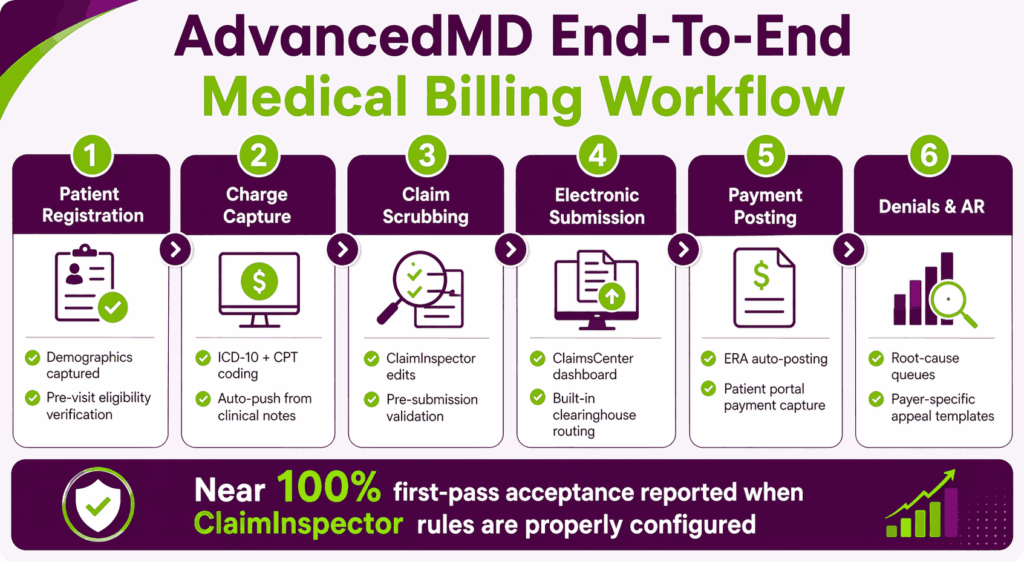
Patient Registration And Pre-Visit Insurance Verification
Demographics get captured at check-in, and eligibility auto-verifies for the next-day patient list. This step prevents most front-end denials before the visit happens.
Charge Capture And Coding
Charges trigger from finalized clinical notes with ICD-10 and CPT codes attached. Specialty templates enforce coding consistency and reduce under-coding and over-coding.
Claim Scrubbing And Electronic Submission
ClaimInspector runs pre-submission edits. ClaimsCenter tracks submissions and payer responses. AdvancedMD reports first-pass claim acceptance rates close to 100% when rules are properly configured.
Payment Posting And ERA Processing
ERA auto-posting reconciles payer payments against submitted claims. Manual EOB entry and patient payment capture work within the same module.
Denial Management And Appeals
AdvancedMD denial management uses intelligent queues with root cause categorization. Workflow triggers split missing-information denials from medical necessity denials. Payer-specific appeal templates auto-populate patient and claim data.
AR Follow-Up And Collections
AdvancedMD accounts receivable worklists surface patient notes and balance history during follow-up calls. AR aging buckets by payer, provider, and location let teams target high-value accounts first.
AdvancedMD Billing Pricing: What Does It Actually Cost?
AdvancedMD runs on a modular, per-provider, per-month subscription model. Pricing varies widely based on which modules you pick, practice size, and whether you use the managed RCM service or just the software.
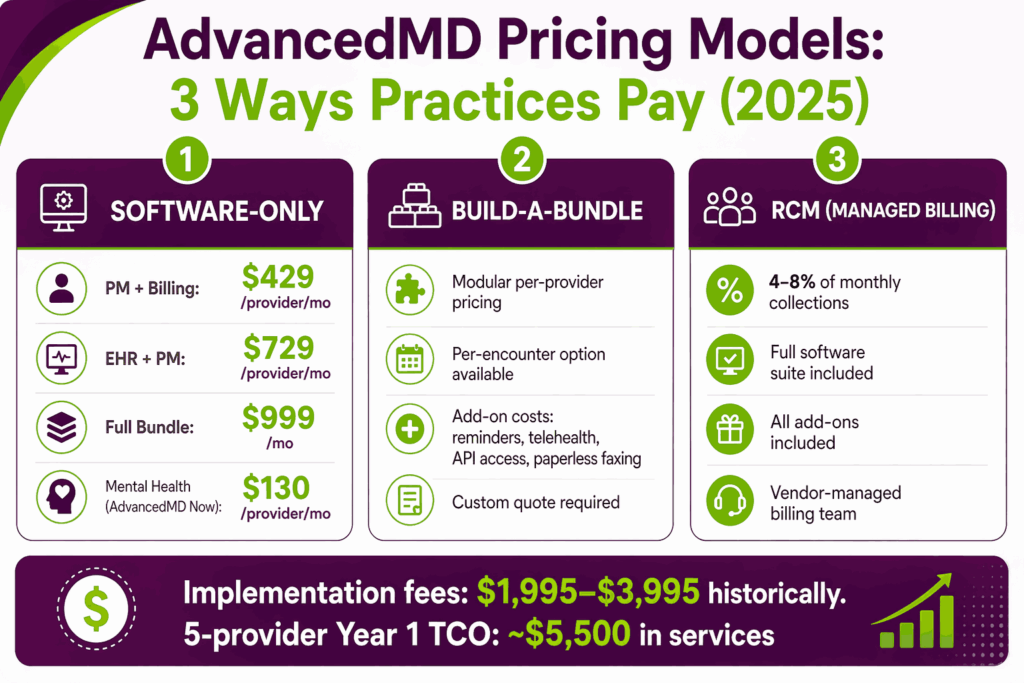
Software-Only Pricing Tier
- Practice management and medical billing software: starts at $429 per provider per month.
- EHR plus practice management: starts at $729 per provider per month
- Full bundle with patient engagement added on: starts at $999 per month
- A self-service option called AdvancedMD Now runs $130 per provider per month for mental health practices after the trial
Build-A-Bundle Pricing Model
Practices pick individual modules and stack pricing against them. Common add-ons that surprise buyers include appointment reminders, telemedicine, API access, paperless faxing, and advanced reporting. Per-encounter pricing is also an option for low-volume practices, as an alternative to the per-provider model.
RCM And Managed Billing Pricing
The AdvancedMD RCM service costs 4% to 8% of monthly collections. That includes access to the full software suite and all add-on features. AdvancedMD’s billing team handles claim scrubbing, denial management, and AR follow-up. Pricing sits at the lower end for large practices and higher for smaller ones. How AdvancedMD compares to athenahealth turns on this model, because athenahealth prices its whole platform as a share of collections.
Hidden And Variable Costs To Account For
- Implementation and training fees historically ranged from $1,995 to $3,995 per account
- A 5-provider team typically faces around $5,500 in Year 1 professional services
- A 3-physician practice with 4 support staff can see initial implementation costs between $20,000 and $65,000
- Data migration, annual renewal cap increases, and per-click paperless fax fees add up
- Telemedicine, advanced analytics, and certain billing modules sit behind add-on paywalls
What Are The Real Challenges Practices Face With AdvancedMD Billing?
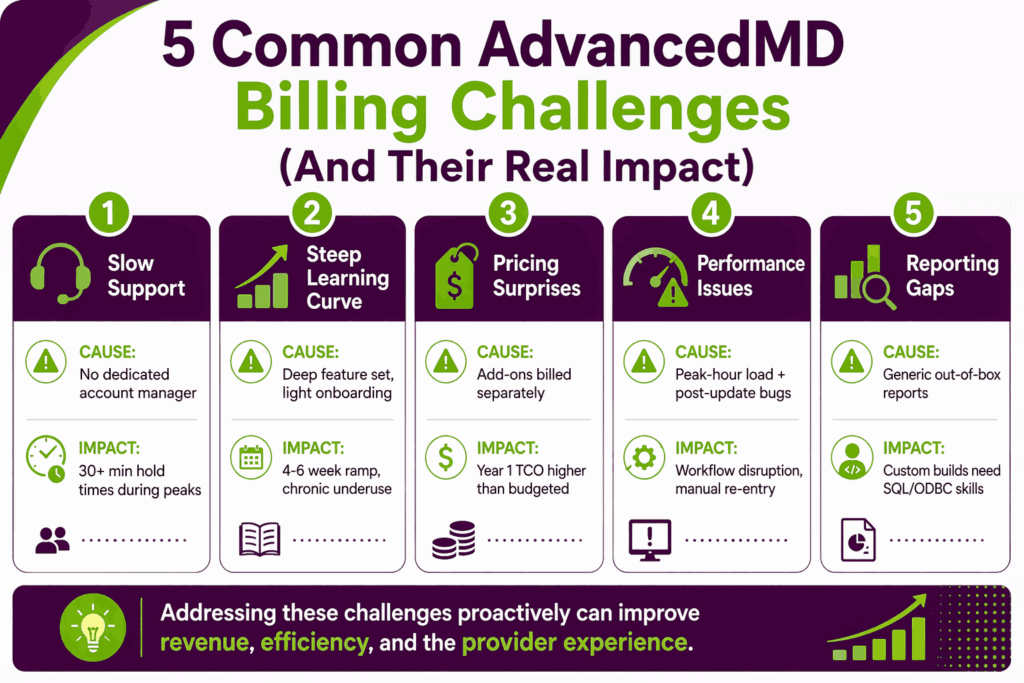
AdvancedMD is a strong platform, but it has real friction points that show up consistently in user reviews and support tickets. Most of these problems are operational rather than software flaws, but they hit billing teams hard either way.
Support Responsiveness And Account Management Gaps
Customer support is the most common complaint across AdvancedMD review platforms. Standard accounts do not get a dedicated account manager.
- Hold times of 30+ minutes are reported during peak hours
- No dedicated account manager assigned to most standard accounts
- Weekend system degradation is reported as a recurring, unresolved issue
- Email and ticket responses are described as slow and inconsistent across user reviews
Learning Curve And Staff Adoption Problems
The platform’s depth is also its barrier. Billers who get only surface-level training never use the features that matter most for collections.
- Deep feature set requires structured, role-based onboarding to use correctly.
- Implementation typically takes 4 to 6 weeks for full configuration
- Insufficient initial training leads to chronic underuse of billing tools
- Staff turnover resets training progress, with no quick-ramp option built in
Pricing Structure And Contract Surprises
The modular pricing model creates flexibility on paper and unexpected bills in practice. Buyers often discover features they assumed were standard sit behind add-on paywalls.
- Advanced reporting, certain billing tools, and patient reminders are paid add-ons.
- Contract liability caps have drawn criticism from larger billing companies after revenue losses.
- Cost is prohibitive for solo practices and startups with thin margins
- Annual renewal cap increases should be factored into multi-year budgeting
System Performance And Technical Issues
Performance issues show up most during peak billing hours and after platform updates.
- Slowness during peak usage hours disrupts billing workflows
- Post-update carrier file data dropouts require manual re-entry into master files
- Browser compatibility problems have affected paper claim printing on Chrome and Mac
- Attaching medical records to electronic claims is not supported within the platform
Reporting And Analytics Limitations
AdvancedInsight is powerful, but the out-of-the-box reports rarely match what billing companies and larger practices need.
- Standard reports lack the granularity larger practices need for payer-level analysis
- Historical claim status reports are cumbersome to navigate
- Custom report building requires workarounds for certain payer-level and provider-level KPIs
- ODBC access helps, but requires SQL skills that most billing teams do not have in-house
These challenges are not software flaws but operational gaps that show up consistently across in-house teams running AdvancedMD without specialty-specific configuration and dedicated denial workflows. The next section covers how Transcure addresses them.
How Does Transcure Help Practices Get Better Billing Results On AdvancedMD?
AdvancedMD provides infrastructure. Revenue performance depends on how that infrastructure is configured and used. Most in-house billing teams on AdvancedMD leave money uncollected because of misconfigured rules, undertrained staff, and unworked denials.
Where The Gap Between The Software And The Results Actually Lives
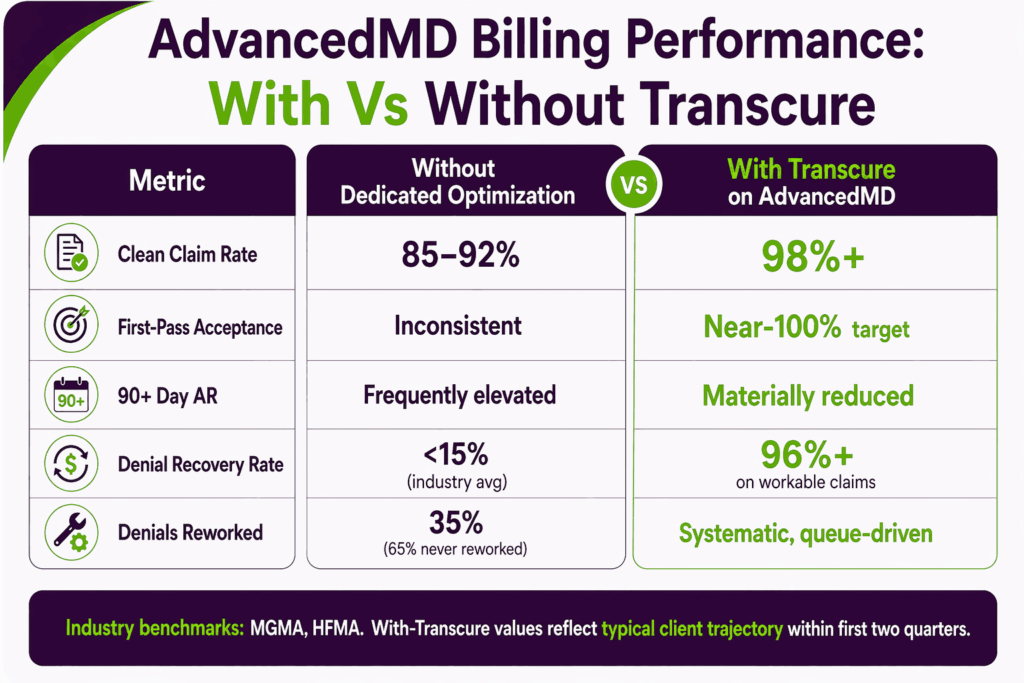
The software is rarely the problem. Industry data backs this up: as per HFMA, hospitals lose an average of 4.8% of net revenue to denials, and Change Healthcare research found 86% of those denials are potentially avoidable. Yet 65% of denied claims are never reworked, according to MGMA-cited industry research.
That gap shows up inside AdvancedMD the same way it shows up everywhere else. The platform has the tools. Most teams just do not have the bandwidth or specialty expertise to use them fully.
What Transcure Does Differently Inside AdvancedMD
Transcure operates inside the AdvancedMD platforms our clients already use. Across our AdvancedMD client base, the pattern holds: clean claim rates climb into the 99%, and AR aging days drop to less than 24 days within the first two quarters of engagement.
Specialty-Specific Billing Configuration From Day One
Transcure builds out AdvancedMD workflows mapped to your specialty’s actual coding patterns. Fee schedules, payer rules, and ClaimInspector edits get configured against your real payer mix instead of generic defaults.
Denial Prevention Before Claims Leave The System
Charge review happens at the point of capture, not after rejection. ClaimInspector rules are tuned to catch modifier, coding, and eligibility issues pre-submission. This is where the AdvancedMD claim denials trend reverses.
Structured Denial Management And Appeals
Denial root cause analysis runs inside AdvancedMD’s queue system. Appeal turnaround stays fast through payer-specific templates and pre-built workflows. Nothing sits unworked past its appeal window, reducing the denial rate to less than 1%.
Dedicated AR Recovery And Aging Cleanup
Focused follow-up targets high-balance and long-outstanding claims using AdvancedMD’s collections worklists and aging reports. AdvancedMD AR recovery becomes systematic instead of reactive, with payer escalation triggered for claims past standard follow-up thresholds.
Practice-Level Reporting That Drives Decisions
Custom AdvancedInsight dashboards get built around your practice’s actual KPIs. Monthly reports cover denial trends, first-pass rates, collection performance, and provider-level billing health. The reporting becomes a decision tool instead of a record.
Which Practices Transcure Works With On AdvancedMD
- Practices already live on AdvancedMD that want better clean claim rates and collections without switching platforms
- New practices setting up AdvancedMD for the first time, who want billing handled correctly from day one
- Practices moving from in-house to outsourced AdvancedMD billing without disrupting their existing EHR setup
Frequently Asked Questions About AdvancedMD And Medical Billing
Is AdvancedMD A Good Software For Medical Billing?
Yes, it is one of the strongest billing platforms in the independent practice market when properly configured. The gap most practices hit is setup and utilization, not the tool itself.
What Practice Sizes Is AdvancedMD Best For?
Solo practitioners through mid-sized groups, typically 2 to 50 providers. AdvancedMD also serves MSOs, IPAs, ACOs, and billing companies. Above 50 providers, reporting granularity and support responsiveness become the constraint rather than feature coverage.
What Are The Drawbacks Of Using AdvancedMD?
Major drawbacks of using AdvancedMD include support responsiveness, add-on pricing surprises, and limited out-of-the-box report customization. Carrier file data drops after platform updates. Attaching medical records to electronic claims is not supported inside the platform.
What Is The Difference Between AdvancedMD RCM And A Third-Party Billing Company?
AdvancedMD RCM is the vendor’s in-house managed billing service. A third-party company like Transcure operates independently on the same platform with specialty-specific expertise, tighter SLAs, and no conflict of interest between the software vendor and the billing service.
How Long Does It Take To Implement AdvancedMD?
Most practices reach stable billing workflows within a few weeks. Full optimization of claim rules and reporting typically runs 4 to 6 weeks and depends heavily on the quality of the initial configuration.
What’s a Realistic First-Pass Clean Claim Rate on AdvancedMD?
Industry benchmark for clean claim rate sits at 95%, according to MGMA-cited data. AdvancedMD reports near-100% first-pass acceptance when ClaimInspector rules are properly configured. Most practices land between 85% and 92% without dedicated configuration work.
Which Clearinghouses Does AdvancedMD Work With?
Claims route through the AdvancedMD clearinghouse, which connects to 1,800 carriers directly. Change Healthcare handles eligibility transaction routing, confirmed in the June 2026 release. Availity and Waystar routing requires payer-level confirmation during setup.
What’s the Contract Length and Cancellation Policy with AdvancedMD?
Standard AdvancedMD contracts run on annual terms with renewal caps that should be reviewed pre-signing. The AdvancedMD Now option for mental health practices runs month-to-month at $130 per provider with cancellation any time. Larger contracts include liability caps that have drawn criticism from billing companies in dispute scenarios.
Can I Migrate My Data Off AdvancedMD If I Switch Platforms?
Yes, AdvancedMD provides ODBC read-only access to practice data, and data export can be requested through the vendor. Migration mechanics depend on the destination platform. Plan for at least 60 to 90 days of overlap when switching.
What Are The Most Common Complaints About AdvancedMD?
Poor support responsiveness, weekend system degradation, add-on pricing surprises, browser compatibility problems, and limited out-of-the-box reporting customization. None of these are dealbreakers, but all show up consistently in user reviews.
Is AdvancedMD HIPAA And Compliance Certified?
Yes, AdvancedMD is HIPAA, MACRA, MIPS, ICD-10, and Meaningful Use compliant. It is ONC and Drummond certified. A cross-department compliance committee meets regularly to maintain standards.